
Medion KB313U
Medion KB313U Spanish QWERTY Keyboard User Manual
Model: KB313U | Brand: Medion
1. Introduction
This manual provides comprehensive instructions for the setup, operation, maintenance, and troubleshooting of your Medion KB313U Spanish QWERTY Keyboard. Please read this manual carefully before using the product to ensure proper functionality and longevity.

Figure 1: Top-down view of the Medion KB313U Spanish QWERTY Keyboard, showing the full layout and attached USB cable.
2. Product Features
The Medion KB313U keyboard is designed for daily use with its ergonomic and slim profile. Key features include:
- Model: Medion KB313U
- Keyboard Layout: Spanish QWERTY
- Connection: Wired USB-A
- Condition: New product
- Design: Height-adjustable and slim design for ergonomic comfort.
- Number of Keys: 104 keys
- Material: Plastic construction

Figure 2: Side view of the Medion KB313U keyboard, illustrating its slim and ergonomic design.
3. Setup Guide
Setting up your Medion KB313U keyboard is a simple plug-and-play process.
- Unpack the Keyboard: Carefully remove the keyboard from its packaging. Ensure all components are present and undamaged.
- Connect to Your Computer: Locate an available USB-A port on your computer (PC). Insert the USB connector of the keyboard firmly into the USB port.
- Driver Installation: The operating system (e.g., Windows, macOS, Linux) will automatically detect and install the necessary drivers. This process usually takes a few seconds. No manual driver installation is typically required.
- Verify Functionality: Once the drivers are installed, the keyboard is ready for use. Open a text editor or any application that accepts text input and test typing to ensure all keys are functioning correctly.

Figure 3: Close-up of the USB-A connector of the Medion KB313U keyboard, used for connecting to a computer.
4. Operating Instructions
The Medion KB313U keyboard operates as a standard Spanish QWERTY layout keyboard. Familiarize yourself with the key functions:
- Standard Typing Keys: All alphanumeric keys, punctuation marks, and symbols function as expected for the Spanish QWERTY layout.
- Function Keys (F1-F12): These keys perform various functions depending on the application or operating system. Common uses include help (F1), renaming files (F2), searching (F3), etc.
- Multimedia Keys: Located typically above the numeric keypad or as secondary functions on F-keys, these keys control media playback (play/pause, stop, next/previous track) and volume.
- Numeric Keypad: For efficient data entry, use the dedicated numeric keypad on the right side of the keyboard. Ensure "Num Lock" is active.
- Special Characters: To type special Spanish characters like 'ñ' or accented vowels, use the dedicated keys or combinations with the 'Alt Gr' key as per the Spanish keyboard standard.
5. Maintenance
Proper maintenance ensures the longevity and optimal performance of your keyboard.
- Cleaning:
- Disconnect the keyboard from your computer before cleaning.
- Use a soft, lint-free cloth slightly dampened with water or a mild cleaning solution to wipe the keycaps and surface.
- Avoid spraying liquids directly onto the keyboard.
- Use compressed air to remove dust and debris from between the keys.
- Storage: Store the keyboard in a cool, dry place away from direct sunlight and extreme temperatures when not in use for extended periods.
- Handling: Avoid dropping the keyboard or exposing it to excessive force, which can damage internal components.
6. Troubleshooting
If you encounter issues with your Medion KB313U keyboard, refer to the following common troubleshooting steps:
| Problem | Possible Cause | Solution |
|---|---|---|
| Keyboard not responding | Loose USB connection, faulty USB port, driver issue. |
|
| Keys are sticky or unresponsive | Dirt or debris under keycaps, liquid spill. |
|
| Incorrect character output (e.g., @ instead of ") | Incorrect keyboard layout selected in operating system. |
|
7. Specifications
Detailed technical specifications for the Medion KB313U keyboard:
| Model Number | KB313U |
| Brand | Medion (Generic) |
| Keyboard Layout | Spanish QWERTY |
| Connectivity Technology | Wired USB-A |
| Compatible Devices | PC |
| Special Features | Ergonomic, Height Adjustable |
| Color | Black (schwarz) |
| Number of Keys | 104 |
| Product Dimensions | 43.5L x 16W x 2H centimeters |
| Material | Plastic |
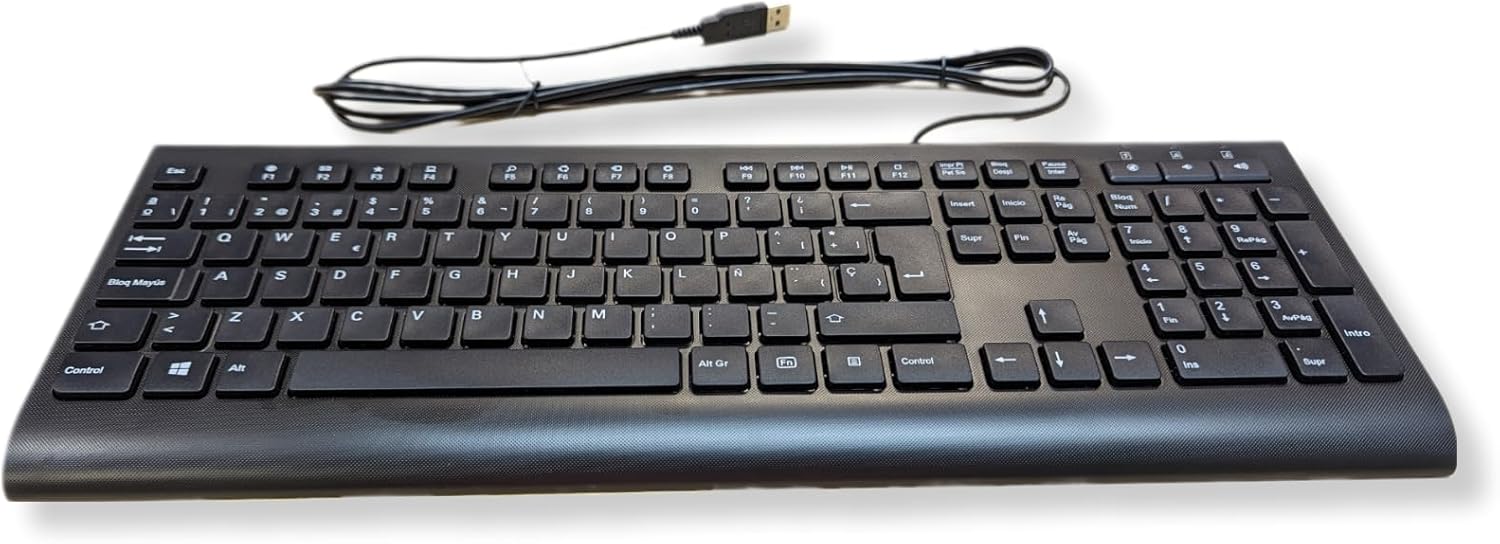
Figure 4: Full view of the Medion KB313U keyboard, showcasing the Spanish QWERTY layout.
8. Warranty and Support
Information regarding product warranty and customer support is typically provided by the seller or manufacturer at the time of purchase. Please refer to your purchase documentation or the official Medion website for the most accurate and up-to-date warranty terms and support contact information.
For technical assistance or further inquiries, please contact the retailer or the manufacturer's customer service department.
Figure 5: Example of product packaging or label, which may contain model and serial number information. (Note: This image is a placeholder for a packaging image, using the main product image as a substitute since no specific packaging image was provided in the input beyond the main product image itself.)
Related documentsKB313U


Ask a question about this manual
Ask about setup, troubleshooting, compatibility, parts, safety, or missing instructions. Manuals+ will review the question and use this page’s manual context to help answer it.