
Stiive 6975575933111
Stiive Fitness Tracker Smart Watch User Manual
Model: 6975575933111
Introduction
This manual provides essential instructions for the proper use and maintenance of your Stiive Fitness Tracker Smart Watch. Please read this manual thoroughly before using the device to ensure optimal performance and longevity.

Image: The Stiive Fitness Tracker Smart Watch, featuring a square display and a teal-colored silicone band. The screen shows the time "10:28" and the date "MON 01/23".
Setup
1. Charging the Device
Before initial use, fully charge your Stiive Fitness Tracker. Connect the charging cable to the designated port on the watch and to a USB power source. A full charge typically takes approximately 2.5 hours.

Image: An illustration detailing the watch's power features, including 30 days standby time, 7-9 days battery life depending on usage, and 2.5 hours charging time. A person is shown relaxing in a pool, wearing the watch, highlighting its waterproof capability.
2. App Installation
To access all features and synchronize data, download the "VeryFitPro" application on your smartphone. The app is compatible with iOS 8.0+ and Android 4.4+ devices. Scan the QR code below or search for "VeryFitPro" in your device's app store.

Image: A visual guide showing how to download the "VeryFitPro" app using a QR code. The image also displays a smartphone screen with sleep data from the app and a person stretching in bed, suggesting improved sleep habits.
You can also download the app directly from this link: http://www.youduoyun.net/qrcode.html
3. Device Pairing
After installing the "VeryFitPro" app, open it and follow the on-screen instructions to pair your Stiive Fitness Tracker with your smartphone via Bluetooth. Ensure Bluetooth is enabled on your phone.
Operating Instructions
Basic Navigation
The Stiive Fitness Tracker features a 1.3-inch TFT-LCD full-touch screen. Swipe left, right, up, or down to navigate through menus and access various functions. Tap to select options.
Activity Tracking
The device automatically tracks your daily activities, including steps taken, distance covered, and calories burned. Detailed data can be viewed on the watch and within the "VeryFitPro" app.

Image: A visual representation of the watch's all-day activity tracking capabilities, displaying steps, distance, and calories burned. A smartphone screen shows a map with route tracking, and a person is exercising with a medicine ball.
Heart Rate Monitoring
The fitness tracker continuously monitors your heart rate throughout the day. Access real-time heart rate data on the watch or review historical trends in the "VeryFitPro" app.

Image: A graphic illustrating real-time heart rate tracking, showing average, maximum, and minimum heart rates over a 24-hour period. A person is shown stretching outdoors, wearing the fitness tracker.
Sleep Monitoring
The watch tracks your sleep patterns, differentiating between deep sleep, light sleep, and awake time. This data provides insights into your sleep quality and can be viewed in the "VeryFitPro" app.
Sports Modes
Select from 8 available sports modes to accurately track specific workouts. The watch records activity duration, calories burned, and other relevant metrics for each mode.
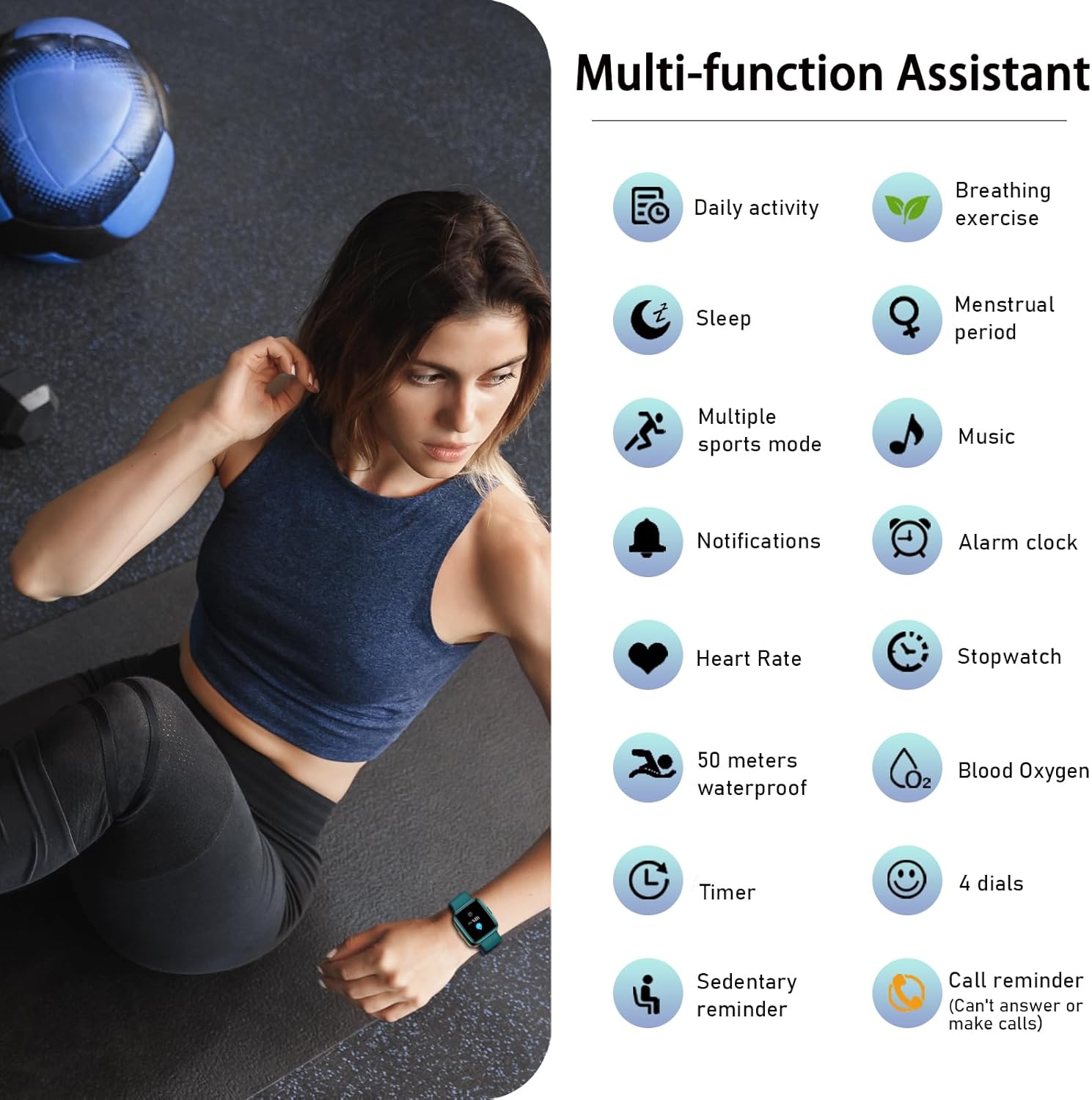
Image: A comprehensive display of the watch's multi-function assistant features, including daily activity tracking, breathing exercises, sleep monitoring, menstrual period tracking, multiple sports modes, music control, notifications, alarm clock, heart rate monitoring, stopwatch, 50 meters waterproof rating, blood oxygen monitoring, timer, 4 dial options, sedentary reminder, and call reminder. A person is performing a core exercise with a medicine ball in the background.
Notifications
Once paired with your smartphone, the watch can display timely alerts for incoming calls, SMS messages, and notifications from social media applications such as Facebook, Twitter, WhatsApp, Skype, and Snapchat.

Image: A visual demonstrating the intelligent notification feature, showing icons for various social media platforms (Facebook, Snapchat, Telegram, Instagram, Skype, Twitter, Email) and a watch displaying a message notification. A person is checking their watch while holding a smartphone.
Water Resistance
The Stiive Fitness Tracker has a 50-meter waterproof rating, making it suitable for daily activities such as washing hands, showering, and swimming. It is not recommended for diving or high-pressure water activities.
Additional Features
- Menstrual Health Tracking: Monitor and track menstrual cycles through the app.
- Relaxation Guidance: Utilize breathing exercises for stress reduction.
- Alarms & Timers: Set alarms and use timer functions directly from the watch.
- Sedentary Reminder: Receive alerts to encourage movement after periods of inactivity.
Maintenance
- Cleaning: Regularly clean the watch and strap with a soft, dry cloth. Avoid harsh chemicals.
- Battery Care: To prolong battery life, avoid extreme temperatures and fully charge the device when prompted. The battery typically lasts 7-9 days with normal use and up to 30 days on standby.
- Storage: Store the device in a cool, dry place when not in use for extended periods.
Troubleshooting
- Device not turning on: Ensure the device is fully charged.
- Cannot pair with phone:
- Ensure Bluetooth is enabled on your phone.
- Make sure the watch is within Bluetooth range of your phone.
- Restart both the watch and your phone.
- Check if the "VeryFitPro" app is updated to the latest version.
- Inaccurate data: Ensure the watch is worn snugly on your wrist, about one finger's width from your wrist bone.
- Notifications not appearing: Check app permissions on your phone to ensure "VeryFitPro" has access to notifications. Ensure the watch is connected via Bluetooth.
Specifications
| Model Number | 6975575933111 |
| Screen Size | 1.3 Inches TFT-LCD |
| Water Resistance | 50 Meters |
| Connectivity | Bluetooth |
| Battery Type | Lithium Ion (1 included) |
| Charging Time | Approx. 2.5 hours |
| Battery Life | 7-9 days (typical use), 30 days (standby) |
| Operating System | Proprietary/Customized OS |
| Compatibility | iOS 8.0+ / Android 4.4+ (Smartphone only) |
| Dimensions | 25.3 x 4.19 x 1.19 cm |
| Weight | 68 g |
Safety Information
- Do not attempt to disassemble or modify the device.
- Keep the device away from extreme heat or cold.
- Avoid exposing the device to strong impacts or drops.
- Consult a medical professional before starting any new exercise regimen, especially if you have pre-existing health conditions.
- This device is not a medical device and should not be used to diagnose or treat any medical condition.
Warranty and Support
For warranty information or technical support, please refer to the documentation included with your purchase or contact Stiive customer service. Keep your purchase receipt for warranty claims.
Related documents6975575933111


Ask a question about this manual
Ask about setup, troubleshooting, compatibility, parts, safety, or missing instructions. Manuals+ will review the question and use this page’s manual context to help answer it.