
Introduction
The XCell H280 Headlamp is designed for versatile illumination, offering reliable brightness for various activities. This manual provides essential information for the safe and efficient use of your headlamp, covering setup, operation, maintenance, and troubleshooting.
Key features include:
- Versatile Lighting: Four light modes, including white LED, white spotlight, red spotlight, and red flashing light for individual use.
- Powerful Illumination: Up to 280 lumens and a light range of 120 meters provide strong brightness and reach.
- Flexible Tilt Angle: The lamp head is adjustable up to 90° to ensure optimal illumination in any situation.
- Compact and Comfortable: Lightweight design with an elastic and adjustable headband ensures high wearing comfort.
- Practical Functions: Includes time and memory function, quick shut-off, and IPX4 splash-water protection.
Setup
1. Battery Installation
The XCell H280 Headlamp requires three (3) AAA batteries for operation. Ensure correct polarity when inserting batteries.
- Locate the battery compartment on the rear of the headlamp unit.
- Open the battery compartment cover.
- Insert three AAA batteries, matching the positive (+) and negative (-) terminals as indicated inside the compartment.
- Close the battery compartment cover securely to ensure water resistance.
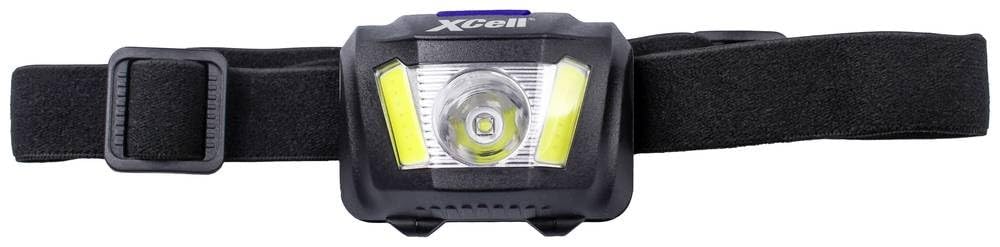
Image: XCell H280 Headlamp showing the main unit and adjustable strap. The battery compartment is located at the back of the main unit.
2. Adjusting the Headband
The elastic headband is adjustable to provide a comfortable and secure fit for various head sizes.
- Place the headlamp on your head.
- Use the adjustable buckles on the side of the headband to tighten or loosen it until it fits snugly without being too tight.
- Ensure the headlamp unit is centered on your forehead.
Operating Instructions
1. Power On/Off
- To turn the headlamp ON, press the power button located on the top of the unit.
- To turn the headlamp OFF, press and hold the power button for approximately 2 seconds. The quick shut-off function allows turning off from any mode by holding the button.
2. Changing Light Modes
The XCell H280 features four distinct light modes. Press the power button repeatedly to cycle through the modes:
- High (White LED): Maximum brightness (280 lumens) for extensive illumination.
- Medium (White LED): Reduced brightness (200 lumens) for general use and battery conservation.
- Low (White LED): Minimal brightness (80 lumens) for close-range tasks or extended battery life.
- Continuous Red: Red light for preserving night vision.
- Flashing Red: Red flashing light for signaling or emergency situations.
The headlamp includes a memory function, which means it will turn on in the last used mode.
3. Adjusting Tilt Angle
The lamp head can be tilted up to 90 degrees to direct the light precisely where needed.
- Gently hold the headlamp unit and tilt it up or down to your desired angle.
- The mechanism is designed to hold the chosen angle securely.
Maintenance
1. Cleaning
- Wipe the headlamp body with a soft, damp cloth. Do not use abrasive cleaners or solvents.
- Clean the lens gently with a microfiber cloth to avoid scratches.
- The headband can be hand-washed with mild soap and water, then air-dried.
2. Battery Replacement
- Replace all three AAA batteries simultaneously when the light output becomes dim or inconsistent.
- Always use new, high-quality alkaline AAA batteries for optimal performance.
- Dispose of used batteries according to local regulations.
3. Storage
- If storing the headlamp for an extended period (more than one month), remove the batteries to prevent leakage and damage.
- Store the headlamp in a cool, dry place, away from direct sunlight and extreme temperatures.
Troubleshooting
| Problem | Possible Cause | Solution |
|---|---|---|
| Headlamp does not turn on. | Dead or incorrectly inserted batteries. | Replace batteries with new ones, ensuring correct polarity (+/-). |
| Light is dim or flickers. | Low battery power. | Replace batteries with new ones. |
| Headlamp turns off unexpectedly. | Low battery power or loose battery connection. | Replace batteries. Check that batteries are securely seated in the compartment. |
| Water ingress (despite IPX4 rating). | Battery compartment not sealed properly or exposure to heavy water jets. | Ensure battery compartment cover is fully closed. IPX4 protects against splashes, not submersion or strong jets. Dry the unit thoroughly if exposed to water. |
Technical Specifications
| Feature | Detail |
|---|---|
| Model | 149276 |
| Dimensions (L x W x H) | 58 x 43 x 35 mm |
| Weight | 60 grams |
| Housing Material | Rubber/Plastic |
| Light Source Type | LED |
| Light Output (High) | 280 lumens |
| Light Output (Medium) | 200 lumens |
| Light Output (Low) | 80 lumens |
| Illumination Duration | 3 hours (at max output) |
| Light Range | 120 meters |
| Light Modes | High, Medium, Low, Continuous Red, Flashing Red |
| Water Resistance | IPX4 (Splash-water resistant) |
| Power Supply | 3 x AAA batteries |
| Battery Composition | Alkaline |
Warranty Information
XCell products are manufactured to high-quality standards. This product is covered by a standard manufacturer's warranty against defects in materials and workmanship. Please refer to the warranty card included with your purchase or visit the official XCell website for detailed warranty terms and conditions. Keep your proof of purchase for warranty claims.
Customer Support
If you encounter any issues or have questions regarding your XCell H280 Headlamp that are not addressed in this manual, please contact XCell customer support. You can typically find contact information on the product packaging or the official XCell website.
When contacting support, please have your product model number (149276) and a description of the issue ready.
