
Introduction
This manual provides instructions for the safe and efficient use of your Accent Pro Wireless Airbuds. Please read this manual thoroughly before using the product and retain it for future reference.
Package Contents
Verify that all items are present in the package:
- Accent Pro Wireless Airbuds (Left and Right)
- Wireless Charging Case
- USB Charging Cable
- User Manual (this document)
Product Overview
The Accent Pro Wireless Airbuds are designed for high-quality audio playback and hands-free communication. They feature Bluetooth 5.0+EDR for stable connectivity and come with a portable charging case.
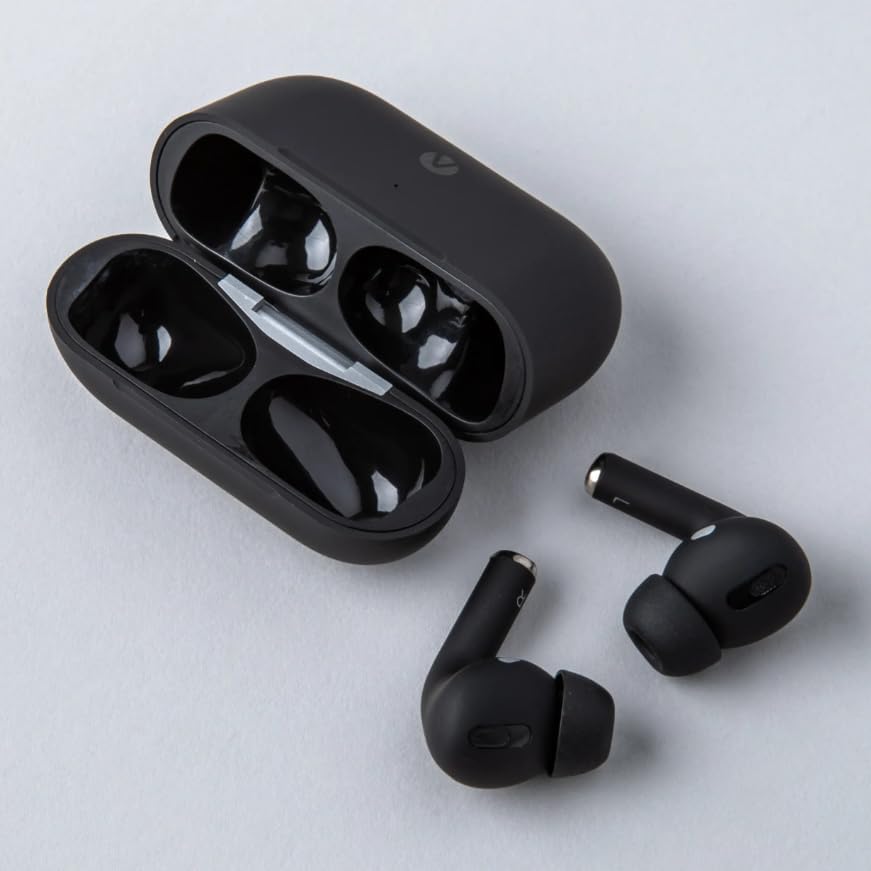
Figure 1: Accent Pro Wireless Airbuds removed from their open charging case. The case is black with two compartments for the earbuds. The earbuds are also black, with a stem design.

Figure 2: Accent Pro Wireless Airbuds placed inside their black charging case. A small green LED indicator light is visible on the front of the case, indicating charging status or battery level.
Setup
Charging the Airbuds and Case
Before first use, fully charge the Airbuds and the charging case.
- Place the Airbuds into the charging case, ensuring they are correctly seated.
- Connect the USB charging cable to the charging port on the case and the other end to a USB power source (e.g., computer, wall adapter).
- The indicator light on the case will show charging status. A full charge typically takes 1-2 hours.
- Once fully charged, disconnect the charging cable.
Pairing with a Bluetooth Device
The Airbuds will automatically enter pairing mode when removed from the charging case.
- Ensure the Airbuds are charged.
- Open the charging case and remove both Airbuds. They will automatically power on and attempt to pair with each other.
- On your smartphone or Bluetooth-enabled device, go to the Bluetooth settings.
- Search for available devices. You should see "Accent Pro Airbuds" or a similar name.
- Select the Airbuds from the list to connect. A voice prompt will confirm successful pairing.
- If pairing fails, place the Airbuds back into the case, close the lid, wait a few seconds, and then repeat the steps.
Operating Instructions
Power On/Off
- Power On: The Airbuds automatically power on when removed from the charging case.
- Power Off: Place the Airbuds back into the charging case and close the lid. They will automatically power off and begin charging.
Basic Controls
The Accent Pro Wireless Airbuds feature touch controls. Specific functions may vary slightly depending on your device and operating system.
| Action | Function |
|---|---|
| Single Tap (Left/Right) | Play/Pause Music, Answer/End Call |
| Double Tap (Right) | Next Track |
| Double Tap (Left) | Previous Track |
| Triple Tap (Left/Right) | Activate Voice Assistant (Siri, Google Assistant) |
| Long Press (2 seconds) | Reject Call |
Maintenance
Cleaning
Regularly clean your Airbuds and charging case to ensure optimal performance and hygiene.
- Use a soft, dry, lint-free cloth to wipe the exterior of the Airbuds and case.
- For stubborn dirt, slightly dampen the cloth with water or a mild, non-abrasive cleaner.
- Do not use harsh chemicals, aerosols, or abrasive cleaners.
- Gently clean the charging contacts on both the Airbuds and the case with a dry cotton swab.
Storage
When not in use, store the Airbuds in their charging case to protect them and keep them charged.
- Store in a cool, dry place, away from direct sunlight and extreme temperatures.
- Avoid storing in dusty or humid environments.
Troubleshooting
If you encounter issues with your Accent Pro Wireless Airbuds, refer to the following common problems and solutions:
No Sound or Disconnection
- Check Battery: Ensure both Airbuds and the charging case are sufficiently charged.
- Re-pair: Disconnect the Airbuds from your device's Bluetooth settings, place them back in the case, close the lid, then remove them and try pairing again.
- Device Proximity: Ensure your Bluetooth device is within the 10-15 meter range.
- Interference: Move away from other strong wireless signals (Wi-Fi routers, other Bluetooth devices).
Only One Airbud Playing Sound
- Re-sync: Place both Airbuds back into the charging case, close the lid, and then remove them simultaneously. They should re-sync with each other.
- Clean Contacts: Ensure the charging contacts on both Airbuds and the case are clean and free of debris.
Airbuds Not Charging
- Check Cable/Power Source: Ensure the charging cable is functional and the power source is active.
- Clean Contacts: Clean the charging contacts on the Airbuds and inside the case.
- Proper Seating: Ensure the Airbuds are correctly seated in the charging case.
Specifications
| Feature | Detail |
|---|---|
| Model Name | Accent Airbuds Pro |
| Model Number | SM6614BK |
| Connectivity Technology | Wireless (Bluetooth) |
| Bluetooth Version | v5.0+EDR |
| Bluetooth Frequency | 2.4GHZ |
| Bluetooth Range | 10-15 meters |
| Earbud Battery Capacity | 300mAh |
| Charging Dock Battery Capacity | 300mAh |
| Talk/Play Time | 3-5 hours |
| Talk Time | 4 hours |
| Standby Time | 96 hours |
| Material | Plastic |
| Color | Black |
Safety Information
Please read and follow these safety guidelines to prevent injury or damage to your device:
- Do not expose the Airbuds or charging case to extreme temperatures, direct sunlight, or high humidity.
- Do not disassemble, repair, or modify the device. This may void the warranty and cause damage.
- Keep out of reach of children and pets.
- Avoid listening at high volume levels for extended periods to prevent hearing damage.
- Do not use the Airbuds while driving or in situations where you need to be aware of your surroundings.
- Dispose of the product responsibly according to local regulations. Do not dispose of with household waste.
Warranty and Support
For warranty information and customer support, please refer to the documentation provided with your purchase or visit the Wireless Warehouse official website.
Manufacturer: Select Future Technology Ltd.
Model: SM6614BK
Date First Available: Jan. 10 2024