
Anderic FAN30R
Anderic FAN30R Ceiling Fan Receiver User Manual
Model: FAN30R
Introduction
This manual provides detailed instructions for the installation, operation, and maintenance of the Anderic FAN30R Ceiling Fan Receiver. The FAN30R is designed to enhance the functionality of compatible Harbor Breeze Ceiling Fans, specifically those requiring the U-shaped FAN-30R receiver, and integrates seamlessly with the Harbor Breeze FAN35T Remote Control (not included).
Important Note: The Anderic FAN30R Receiver is not a replacement for Dawnsun FD30-H02R (FD30H02R), FD40-H02R (FD40H02R), or FD40-H03R receiver models. Please verify your existing receiver model before installation.
Safety Information
Always observe the following safety precautions to prevent injury or damage to the product:
- Power Disconnection: Always disconnect power to the ceiling fan circuit breaker before installing, servicing, or cleaning the receiver. Failure to do so may result in electric shock or serious injury.
- Qualified Electrician: Installation should be performed by a qualified electrician or a person with experience in electrical wiring to ensure proper and safe installation.
- Voltage Compatibility: Ensure the receiver's voltage rating (120V/60Hz) matches your electrical supply.
- Load Limits: Do not exceed the maximum load limits for the receiver: Max. downlight tungsten 240 watts or max. ballast 240 VA non-dimmer. Max motor 1A for ceiling fan only.
- Proper Wiring: Ensure all wire connections are secure and properly insulated.
- Environmental Conditions: Do not expose the receiver to moisture or extreme temperatures. Intended for indoor use only.
Package Contents
The Anderic FAN30R Ceiling Fan Receiver package typically includes:
- Anderic FAN30R Ceiling Fan Receiver (1 unit)
- Instruction Manual (this document)
Note: The FAN35T Remote Control is not included and must be purchased separately.
Setup and Installation
Follow these steps to install the Anderic FAN30R receiver into your compatible Harbor Breeze ceiling fan:
- Disconnect Power: Before beginning, turn off the power to the ceiling fan at the circuit breaker. Verify that the power is off by attempting to operate the fan or light.
- Access Fan Canopy: Carefully lower the ceiling fan canopy to expose the wiring compartment.
- Remove Old Receiver (if applicable): If replacing an existing receiver, carefully disconnect all wires from the old receiver and remove it. Note the wiring configuration for reference.
- Install New Receiver: Insert the Anderic FAN30R receiver into the fan's mounting bracket or canopy. The U-shaped design is specifically made to fit certain Harbor Breeze models.
- Wire Connections: Connect the wires from the ceiling fan and house wiring to the FAN30R receiver according to the fan's wiring diagram and the receiver's labels. Ensure all connections are secure and insulated with wire nuts.

Image: Top view of the Anderic FAN30R receiver, showing the U-shaped body and the multi-colored wiring harness extending from one end. This view highlights the overall form factor and the connection points.

Image: Angled side view of the Anderic FAN30R receiver, providing a clearer look at the wire connections and the ventilation slots on the side of the unit. The brown antenna wire is also visible.

Image: Close-up side view of the Anderic FAN30R receiver, emphasizing the compact thickness and the arrangement of the connected wires. This perspective helps in understanding how the unit fits into tight spaces.
- Secure Canopy: Once wiring is complete and secure, carefully push the wires back into the canopy and reattach the canopy to the ceiling fan mounting bracket.
- Restore Power: Turn the power back on at the circuit breaker.
Operating Instructions
Pairing with Remote Control (FAN35T)
To ensure proper functionality, the Anderic FAN30R receiver must be paired with your Harbor Breeze FAN35T remote control. Follow these steps:
- Power On: Ensure the receiver is installed and power is supplied to the ceiling fan circuit.
- Access Pairing Button: Locate the pairing button inside the battery compartment of your FAN35T remote control. You may need to remove the battery cover.
- Initiate Pairing: Press and hold the pairing button on the remote control for approximately 5 seconds.
- Confirmation: The lights on your ceiling fan will blink twice to confirm that the pairing process was successful.
Once paired, you can use the FAN35T remote control to operate your ceiling fan's speed (3-speed functionality) and light functions.
Maintenance
The Anderic FAN30R receiver requires minimal maintenance. To ensure optimal performance and longevity:
- Cleaning: If necessary, gently wipe the exterior of the receiver with a dry, soft cloth. Do not use liquid cleaners or solvents.
- Power Cycles: If the fan or receiver is unresponsive, try turning off the power at the circuit breaker for a few minutes, then restore power. This can sometimes reset the unit.
- Avoid Moisture: Keep the receiver dry and away from any sources of moisture.
Troubleshooting
| Problem | Possible Cause | Solution |
|---|---|---|
| Fan/Light does not respond to remote. |
|
|
| Fan operates but light does not, or vice versa. |
|
|
| Fan operates erratically. |
|
|
Specifications
| Model: | FAN30R (replaces 190WA version) |
| Compatibility: | Harbor Breeze Ceiling Fans requiring U-shaped FAN-30R receiver; pairs with FAN35T Remote Control. |
| Power Input: | 120V / 60Hz |
| Max Motor Load: | 1A (ceiling fan only) |
| Max Downlight Tungsten: | 240 Watts |
| Max Ballast (non-dimmer): | 240 VA |
| Frequency: | 303.9 MHz |
| Dimensions (L x W x T): | 5 3/16" x 3 1/8" x 1" (approx. 6"D x 1"W x 4"H as per product specs) |
| Weight: | 5.3 ounces |
| Indoor/Outdoor Usage: | Indoor |

Image: An alternative angled view of the Anderic FAN30R receiver, showing the overall shape and the wire connections from a different perspective, useful for understanding its physical integration.
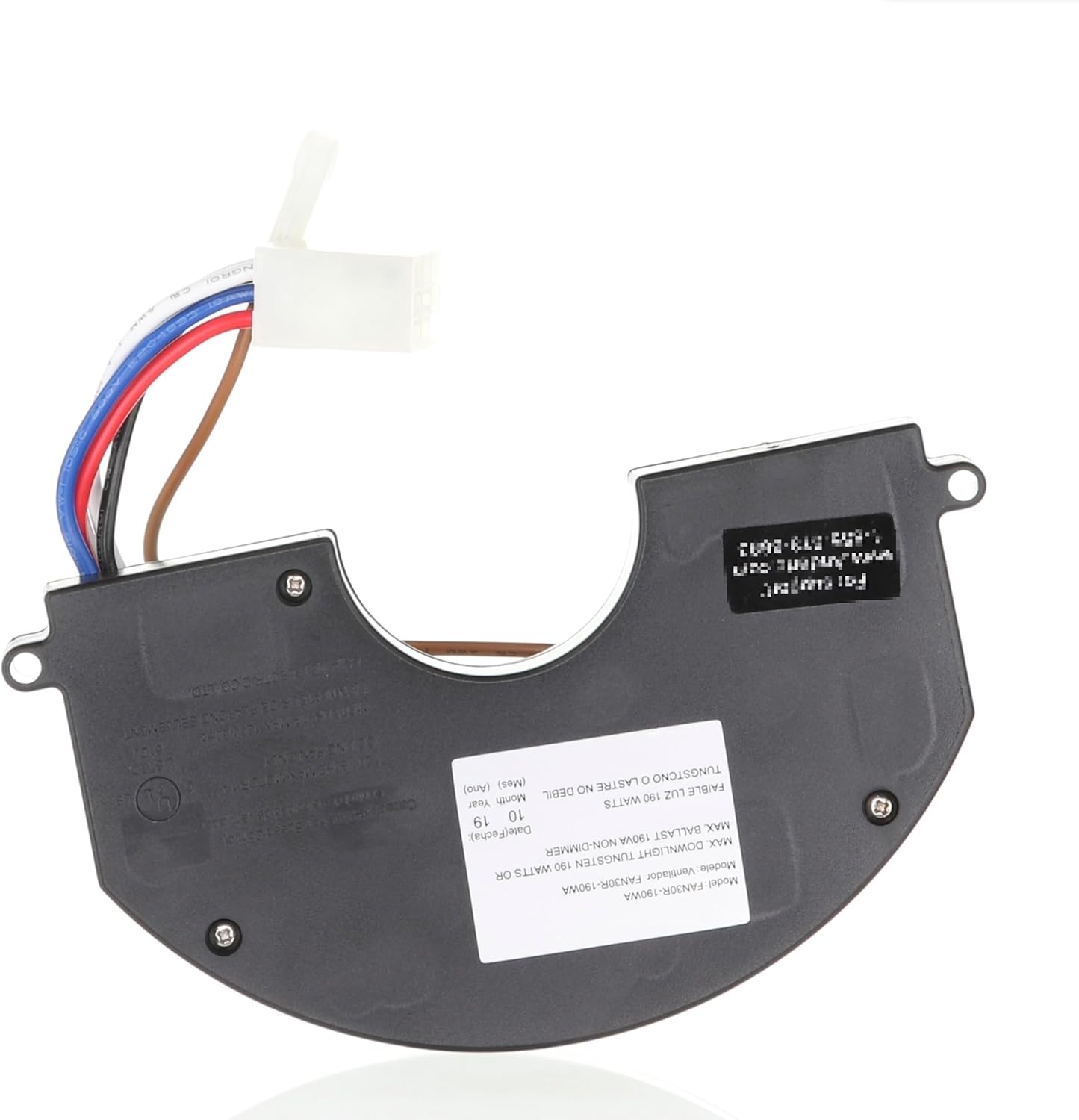
Image: Bottom view of the Anderic FAN30R receiver, featuring a label with detailed specifications such as model number, wattage limits, and electrical ratings. This provides critical technical information directly from the unit.
Warranty and Support
For warranty information or technical support regarding your Anderic FAN30R Ceiling Fan Receiver, please contact Anderic customer service directly. Refer to the product packaging or the official Anderic website for the most current contact details.
Manufacturer: Dan's Electronics Etc., Inc.
Global Trade Identification Number (GTIN): 00191713242310
Related documentsFAN30R


Ask a question about this manual
Ask about setup, troubleshooting, compatibility, parts, safety, or missing instructions. Manuals+ will review the question and use this page’s manual context to help answer it.