

1. Product Overview
The Morpilot 21.6V 8000mAh Battery Replacement is designed to provide extended power and reliable performance for your Dyson V7 series vacuum cleaner. This high-capacity battery is engineered for durability and features a smart protection system for safe operation.
Key Features:
- High Capacity: 8000mAh for extended runtime.
- Voltage: 21.6V.
- Durability: Engineered for 600+ charge cycles.
- Safety: Smart protection board with short-circuit and voltage regulation protection.
- Design: Features an LED breathing light and precise charging port.
Package Contents:
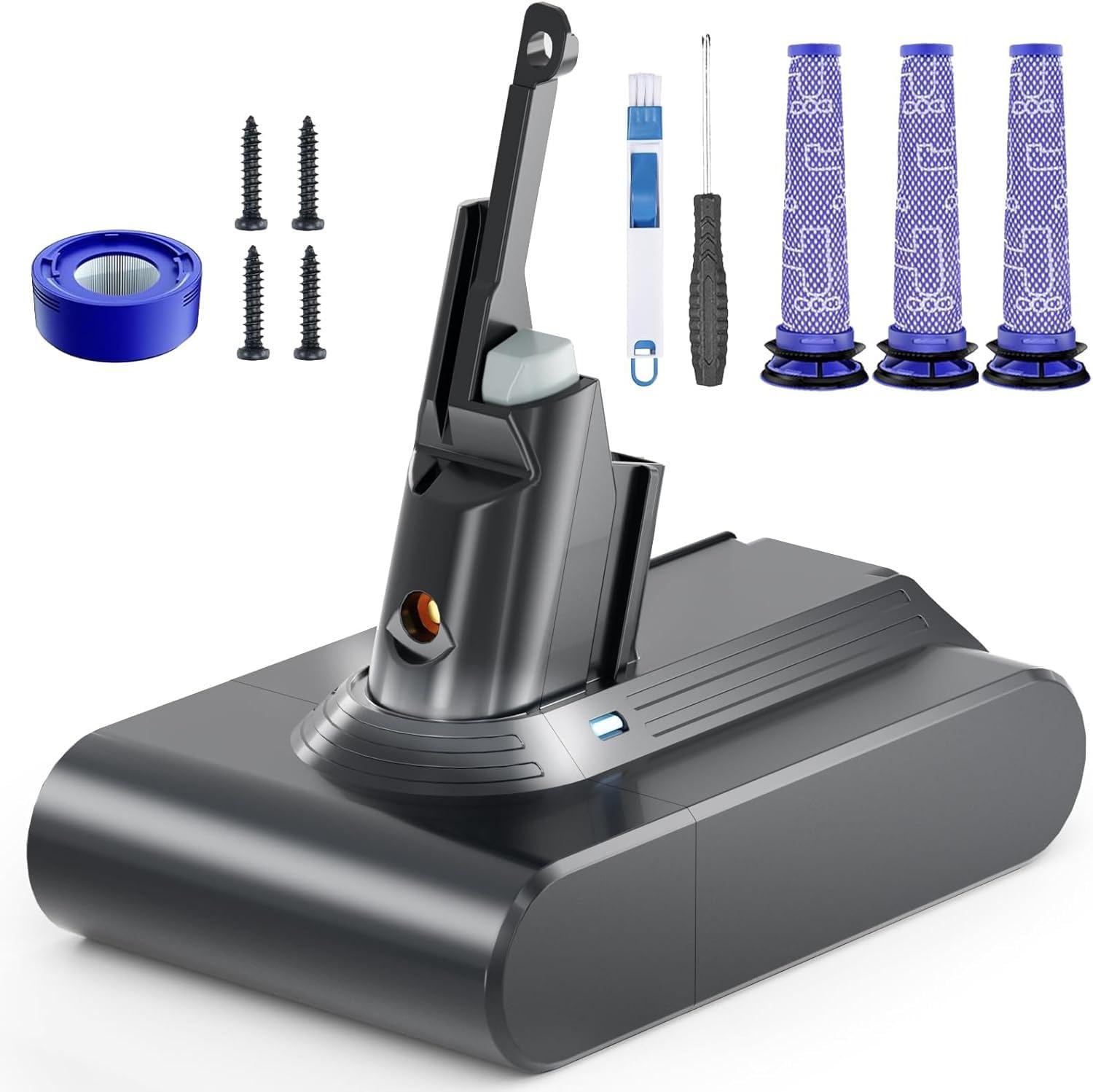
- 1 x Morpilot 21.6V 8000mAh Battery Replacement for V7
- 2 x Pre-filters
- 1 x Post-Filter
- 1 x Screwdriver
- 1 x Cleaning Brush
- 4 x Screws
- 1 x User Manual (this document)
2. Compatibility
This Morpilot replacement battery is fully compatible with the following Dyson V7 series vacuum cleaner models:
- Dyson V7 Animal
- Dyson V7 Motorhead
- Dyson V7 Trigger
- Dyson V7 Car+Boat
- Dyson V7 Absolute
- Dyson V7 SV11
- Dyson V7 Extra
- Dyson V7 Mattress
- Dyson V7 Allergy
- Dyson V7 Total Clean
- Dyson V7 Fluffy


3. Safety Information
Please read and understand all safety instructions before using this product. Failure to follow these instructions may result in electric shock, fire, or serious injury.
- Do not disassemble, open, or shred the battery pack.
- Do not expose the battery to heat or fire. Avoid storage in direct sunlight.
- Do not short-circuit a battery pack. Do not store battery packs haphazardly in a box or drawer where they may short-circuit each other or be short-circuited by conductive materials.
- Do not subject battery packs to mechanical shock.
- In the event of battery leakage, do not allow the liquid to come into contact with the skin or eyes. If contact has been made, wash the affected area with copious amounts of water and seek medical advice.
- Keep battery packs out of the reach of children.
- Seek medical advice immediately if a cell or battery has been swallowed.
- Do not use any charger other than that specifically provided for use with the equipment.
- Always charge the battery in a well-ventilated area.
- If the battery is fully drained and warm from use in MAX mode, allow it to cool for 10–20 minutes before charging.
4. Setup and Installation
Replacing the battery in your Dyson V7 vacuum cleaner is a straightforward process. The necessary tools (screwdriver and screws) are included in your package.
Required Tools:
- Screwdriver (included)
- Replacement Screws (included, if needed)
Installation Steps:
- Remove the Dust Cover: Locate and hold the red buckle to detach the dust cover from your Dyson V7 handheld unit.
- Unscrew the Handle Screw: Identify the screw located at the handle of the vacuum. Use the provided screwdriver to unscrew and remove it.
- Unscrew the Dust Cover Back Screw: Locate the screw at the back of the dust cover. Unscrew and remove it.
- Remove the Old Battery: Carefully remove the old battery from its compartment.
- Install the New Morpilot Battery: Insert the new Morpilot replacement battery into the compartment, ensuring it is properly seated.
- Tighten Retaining Screws: Re-insert and tighten the screws at the handle and the back of the dust cover to secure the new battery.
- Install the Dust Cover: Reattach the dust cover, ensuring it clicks securely into place.

5. Operating Instructions
Once the Morpilot replacement battery is installed, your Dyson V7 vacuum cleaner is ready for use. Follow these guidelines for optimal performance.
Charging the Battery:
- Connect your Dyson V7 vacuum to its original charger.
- The battery features a precise charging port for easy connection.
- If the battery is fully drained or has become warm from extended use (especially in MAX mode), allow it to cool for 10–20 minutes before initiating charging. This helps prolong battery life.
Understanding Battery Status Indicators:
The battery includes an LED breathing light that indicates its status:
- Blue Light: Indicates the battery is charging or fully charged.
- Yellow Light: Indicates high temperature or a battery fault.
- No Light: Indicates the battery is in use or needs recharging.
Usage Modes and Runtime:
The Dyson V7 vacuum typically operates in two modes:
- Standard Mode: Recommended for everyday cleaning tasks. Provides approximately 34–35 minutes of runtime on a full charge.
- MAX Mode: Provides maximum suction power for tougher cleaning. Runtime is reduced to approximately 6–7 minutes on a full charge.
For optimal battery longevity, it is recommended to primarily use the standard mode for general cleaning and reserve MAX mode for specific, heavy-duty tasks.


6. Maintenance
Regular maintenance of your vacuum's filters is crucial for maintaining optimal suction power and extending the life of your appliance. Your Morpilot battery replacement package includes additional filters for convenience.
Filter Cleaning and Replacement:
- The included pre-filters and post-filter are cleanable and reusable.
- Refer to your Dyson V7 vacuum's original manual for specific instructions on how to remove, clean, and re-install the filters.
- Ensure filters are completely dry before re-installing them to prevent damage to the vacuum.
- Replace filters periodically, or when you notice a decrease in suction power, even after cleaning.

7. Troubleshooting
If you encounter issues with your Morpilot replacement battery or Dyson V7 vacuum, refer to the following common solutions:
| Problem | Possible Cause | Solution |
|---|---|---|
| Battery drains quickly. | Frequent use of MAX mode; battery not fully charged; battery warm from use. | Use standard mode for general cleaning. Ensure battery is fully charged before use. If battery is warm, allow it to cool for 10-20 minutes before recharging. |
| Vacuum not turning on or stopping unexpectedly. | Battery not properly installed; battery completely discharged; internal fault. | Check battery installation (refer to Setup section). Ensure battery is charged. If issues persist, contact customer support. |
| LED indicator shows yellow light. | High temperature; battery fault. | Allow battery to cool down. If the yellow light persists, there might be a battery fault. Contact customer support. |
| Reduced suction power. | Clogged filters; full dustbin. | Clean or replace filters (refer to Maintenance section). Empty the dustbin. |
8. Specifications
| Feature | Detail |
|---|---|
| Product Dimensions | 3.7 x 5.3 x 6.4 inches |
| Item Weight | 1.1 pounds |
| Battery Cell Composition | Lithium Ion |
| Battery Capacity | 8000 Milliamp Hours |
| Voltage | 21.6V |
| Cycle Life | 600+ cycles |
| Manufacturer | Morpilot |
| Compatible Models | Dyson V7 series (Animal, Motorhead, Trigger, Car+Boat, Absolute, SV11, Extra, Mattress, Allergy, Total Clean, Fluffy) |
9. Warranty and Support
Your Morpilot 21.6V 8000mAh Battery Replacement for Dyson V7 is backed by a One-Year Warranty.
If you have any questions, require assistance with installation, or experience any issues with your product, please do not hesitate to reach out to Morpilot customer support. We are here to help.
For support, please visit the official Morpilot store on Amazon or contact their customer service directly.