
1. Introduction
Thank you for purchasing the Maxcio Air Purifier. This device is designed to improve air quality in your home by filtering out various airborne particles. Please read this manual thoroughly before operating the appliance and retain it for future reference.
Important Safety Instructions
- Always unplug the air purifier before moving it, opening the grille, changing filters, or whenever it is not in use.
- Do not operate the appliance with a damaged cord or plug.
- Keep the cord away from heated surfaces.
- Do not use the air purifier in wet or damp environments.
- Do not insert objects into any openings.
- This appliance is for indoor use only.
- Supervise children to ensure they do not play with the appliance.
2. Product Overview
The Maxcio Air Purifier features a compact design with a 360-degree air intake system and a multi-layer filtration process to effectively clean the air.
Components
- Main Unit
- 3-in-1 Filter (Pre-filter, HEPA filter, Activated Carbon filter)
- Remote Control
- Power Adapter
- Aromatherapy Pad (integrated)
Filtration System
The air purifier utilizes a 3-stage filtration system to capture various airborne particles:
- Pre-filter: Captures large particles such as dust, lint, fibers, pet fur, and hair.
- HEPA Filter: Traps 99.98% of airborne particles as small as 0.3 micrometers, including pollen, dust mites, mold spores, and pet dander.
- Granulated Activated Carbon Filter: Absorbs odors, smoke, and harmful gases.

Image: Advanced 3-stage filtration system diagram. Air passes through a pre-filter, then a HEPA filter, and finally a granulated activated carbon filter.
Control Panel and Remote Control
The air purifier can be controlled via its intuitive touch-sensitive top panel or the included magnetic remote control.
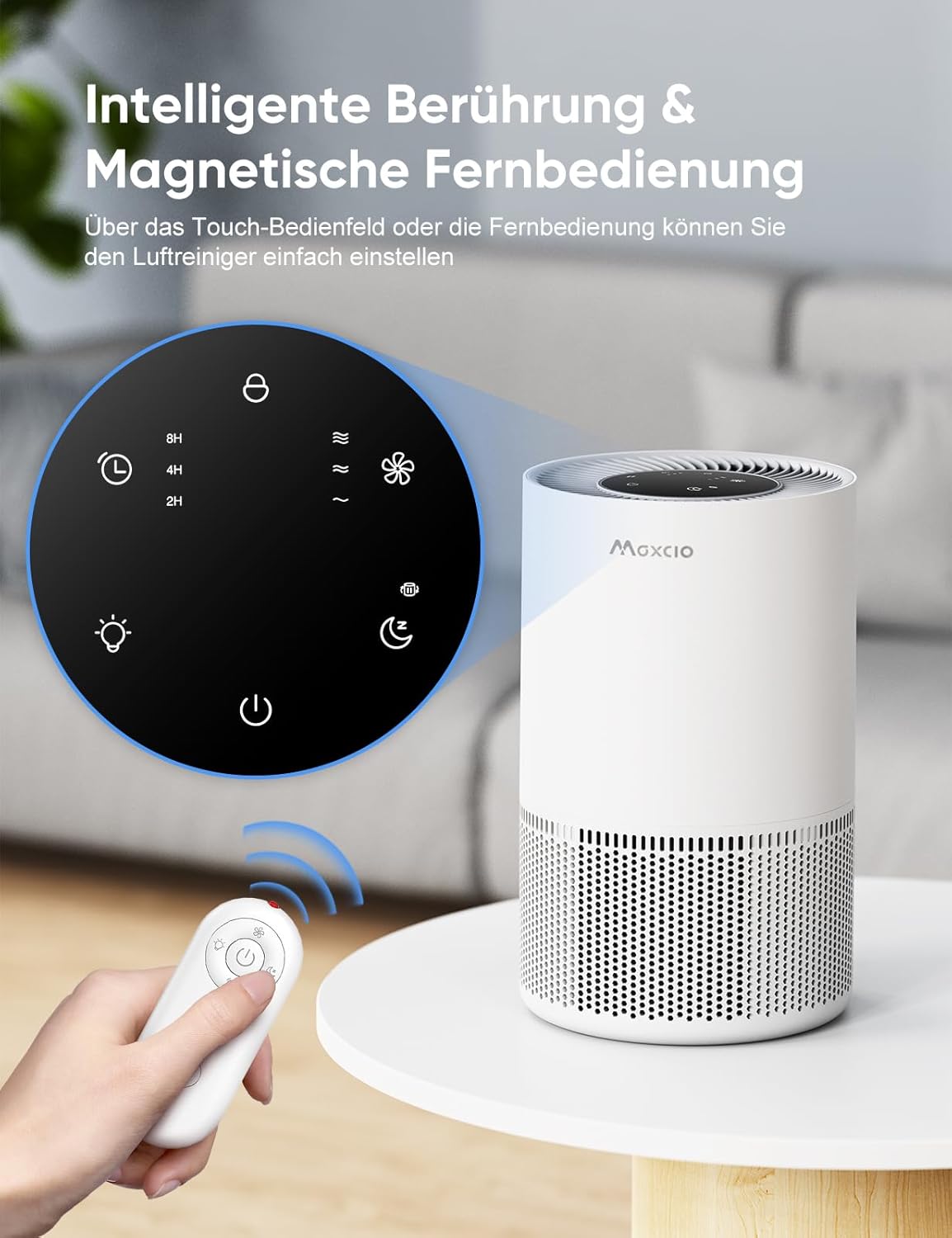
Image: Maxcio Air Purifier showing the touch control panel on top and the magnetic remote control. The remote allows for convenient operation from a distance.
3. Setup
Unpacking
- Carefully remove the air purifier and all accessories from the packaging.
- Remove any plastic bags or protective materials.
Filter Installation
The filter comes pre-installed but may be wrapped in plastic for protection. Remove the plastic before first use.
- Turn the air purifier upside down.
- Twist the base cover counter-clockwise to unlock and remove it.
- Take out the 3-in-1 filter. If it's wrapped in plastic, remove the plastic packaging.
- Place the filter back into the unit with the pull tabs facing upwards.
- Replace the base cover and twist clockwise to lock it securely.
Placement
- Place the air purifier on a firm, level surface.
- Ensure there is at least 15 cm (6 inches) of space around all sides of the unit for optimal air circulation.
- Avoid placing it near heat sources, direct sunlight, or areas with excessive moisture.
Power Connection
- Plug the power adapter into the power port on the back of the air purifier.
- Plug the other end of the power adapter into a standard electrical outlet.
4. Operating Instructions
Power On/Off
- Press the Power Button (symbol: circle with vertical line) on the control panel or remote control to turn the unit on or off.
Fan Speed Adjustment
- Press the Fan Speed Button (symbol: fan blades) to cycle through 3 fan speed settings: Low, Medium, and High.
- Select the appropriate speed based on air quality and personal preference.
Timer Function
- Press the Timer Button (symbol: clock) to set the operating time for 2, 4, or 8 hours. The unit will automatically turn off after the selected duration.
Sleep Mode
- Press the Sleep Mode Button (symbol: crescent moon with Zzz) to activate sleep mode. In this mode, the fan operates at its lowest speed (23 dB) and all indicator lights turn off to ensure a quiet environment.

Image: Maxcio Air Purifier on a bedside table in a bedroom, demonstrating its quiet operation in sleep mode (23dB) and the soft night light feature.
Night Light Function
- Press the Light Button (symbol: light bulb) to turn the night light on or off.
Child Lock
- Press and hold the Child Lock Button (symbol: padlock) for 3 seconds to activate or deactivate the child lock. When activated, all other buttons on the control panel will be unresponsive.
Aromatherapy Function
The air purifier includes an aromatherapy function to diffuse essential oils.
- Locate the aromatherapy pad compartment on the side of the unit.
- Add a few drops of your preferred essential oil onto the pad.
- Close the compartment. The fan will circulate the aroma throughout the room.

Image: A hand adding essential oil into the designated aromatherapy compartment of the Maxcio Air Purifier, demonstrating the high-efficiency purification and scent diffusion feature.
5. Maintenance
Filter Replacement
The filter should be replaced every 3-6 months, depending on usage and air quality. A filter replacement indicator light will illuminate when it's time to change the filter.
- Unplug the air purifier from the power outlet.
- Turn the unit upside down and twist the base cover counter-clockwise to remove it.
- Remove the old 3-in-1 filter.
- Insert a new Maxcio replacement filter, ensuring the pull tabs face upwards.
- Replace the base cover and twist clockwise to lock it.
- Plug in the air purifier. Press and hold the Filter Reset Button (often combined with the Power button or a dedicated icon) for 3-5 seconds until the indicator light turns off.
Note: Used filters cannot be washed and reused. Dispose of them properly.
Cleaning the Unit
- Always unplug the air purifier before cleaning.
- Wipe the exterior of the unit with a soft, dry cloth.
- Do not use abrasive cleaners or solvents.
- The pre-filter layer of the 3-in-1 filter can be gently vacuumed to extend its life, but the HEPA and activated carbon layers should not be cleaned.
6. Troubleshooting
| Problem | Possible Cause | Solution |
|---|---|---|
| Unit does not turn on. | Not plugged in; power outage; filter not installed correctly. | Check power cord connection; check power outlet; ensure filter is installed and base cover is locked. |
| Airflow is weak or noisy. | Filter is clogged; air intake/outlet blocked. | Replace the filter; ensure no obstructions around the unit. |
| Unpleasant odor from the unit. | Filter needs replacement; new filter odor. | Replace the activated carbon filter; run the unit in a well-ventilated area for a few hours if new. |
| Remote control not working. | Batteries are dead; remote is too far or obstructed. | Replace remote control batteries; ensure clear line of sight to the unit. |
| Filter replacement indicator remains on after changing filter. | Filter reset not performed. | Press and hold the Filter Reset Button for 3-5 seconds. |
7. Specifications
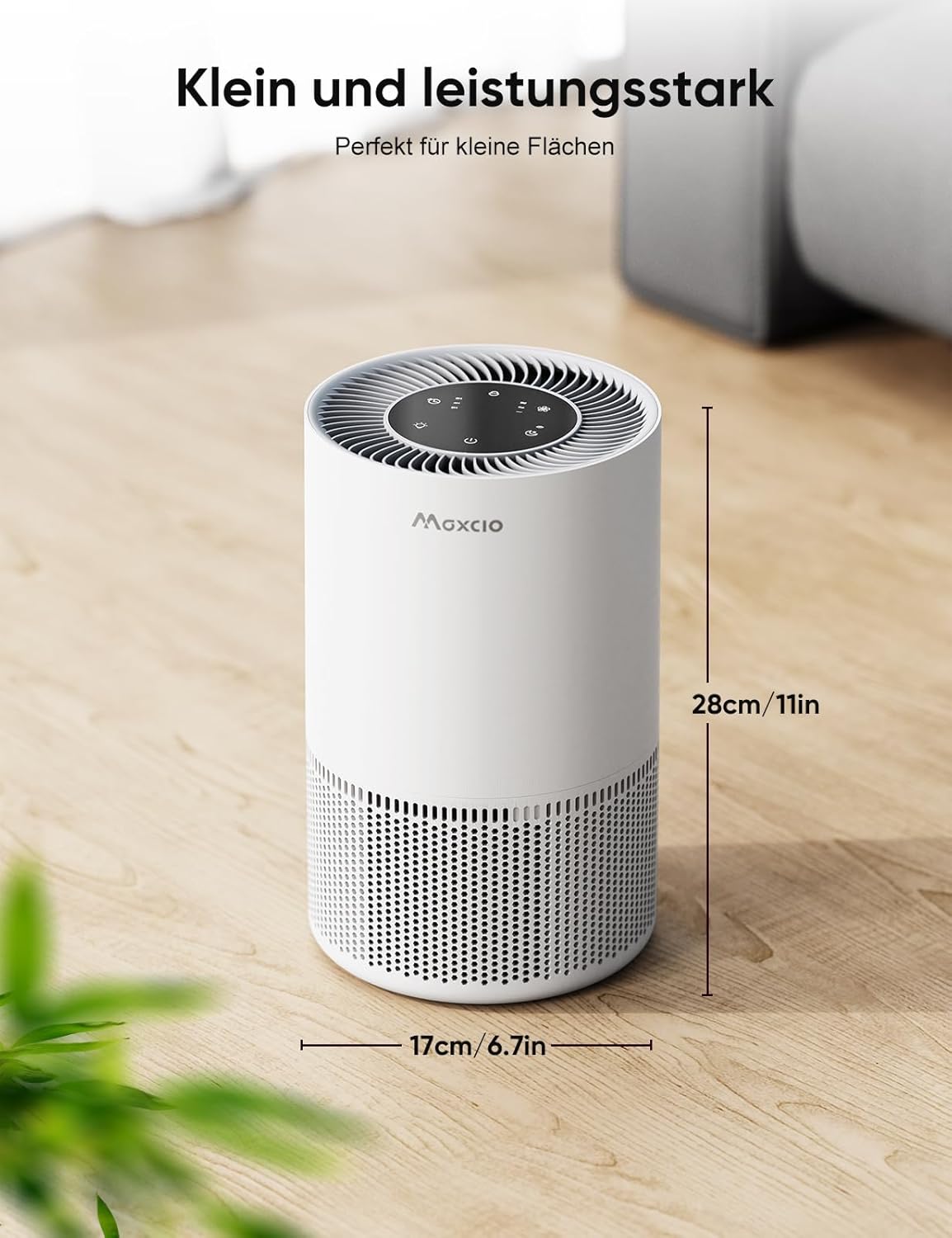
Image: Maxcio Air Purifier with its dimensions indicated: 17.3 cm (6.7 inches) in width and 28 cm (11 inches) in height.
| Feature | Detail |
|---|---|
| Brand | Maxcio |
| Model Number | MAXCIO-AP01 |
| Color | White |
| Dimensions (L x W x H) | 17.3 x 17.3 x 28 cm (6.7 x 6.7 x 11 inches) |
| Item Weight | 1.3 Kilograms |
| Power | 7 Watts |
| Noise Level | 23 Decibels (in Sleep Mode) |
| Control Method | Touch, Remote Control |
| Filter Type | HEPA, Activated Carbon, Pre-filter |
| Special Features | 360-degree air intake, Aromatherapy, Timer, Child Lock, Night Light |
8. Warranty and Support
Warranty Information
Maxcio products are manufactured to high-quality standards. For specific warranty details, please refer to the warranty card included with your purchase or visit the official Maxcio website. Keep your purchase receipt as proof of purchase for warranty claims.
Customer Support
If you encounter any issues or have questions regarding your Maxcio Air Purifier, please contact Maxcio customer support. Contact details can typically be found on the official Maxcio website or on the product packaging.