
Introduction
Thank you for choosing the 7KEYS G61 60% Wired Mini Gaming Keyboard. This manual provides essential information for setting up, operating, maintaining, and troubleshooting your new keyboard. Please read it carefully to ensure optimal performance and longevity of your device.
Package Contents
- 7KEYS G61 60% Wired Mini Gaming Keyboard
- USB Cable (USB-C to USB-A)
- User Manual (this document)
Setup
Connecting the Keyboard
To set up your 7KEYS G61 keyboard, follow these simple steps:
- Connect the USB-C end of the provided cable to the port on the keyboard.
- Connect the USB-A end of the cable to an available USB port on your computer (PC or Laptop).
- The keyboard is plug-and-play. No additional drivers or software installation is required for basic functionality.

Image: The keyboard features a USB-C interface for easy plug-and-play connection to various computer systems.
Compatibility
The 7KEYS G61 keyboard is compatible with a wide range of operating systems, including:
- Windows XP
- Windows 7
- Windows 8
- Windows 10
- MAC OS
- Other compatible systems

Image: The keyboard is widely compatible with most operating systems, including Windows and Mac OS.
Operating Instructions
Keyboard Layout
The 7KEYS G61 features a 61-key minimalist layout, designed to save desktop space while retaining essential functionality. Many standard 104-key functions are accessible via the Function (FN) key combinations.

Image: The 61-key minimalist layout of the 7KEYS G61 keyboard.
RGB Backlight Control
The keyboard features a true RGB backlight with multiple lighting effects. Use the following FN key combinations to control the backlight:
- FN + I: Turn off the backlight.
- FN + O / L: Adjust backlight brightness.
- FN + K: Switch between different backlight modes.
- FN + U / J: Adjust the speed of dynamic lighting effects.
- FN + M: Switch to backlight mode 8.
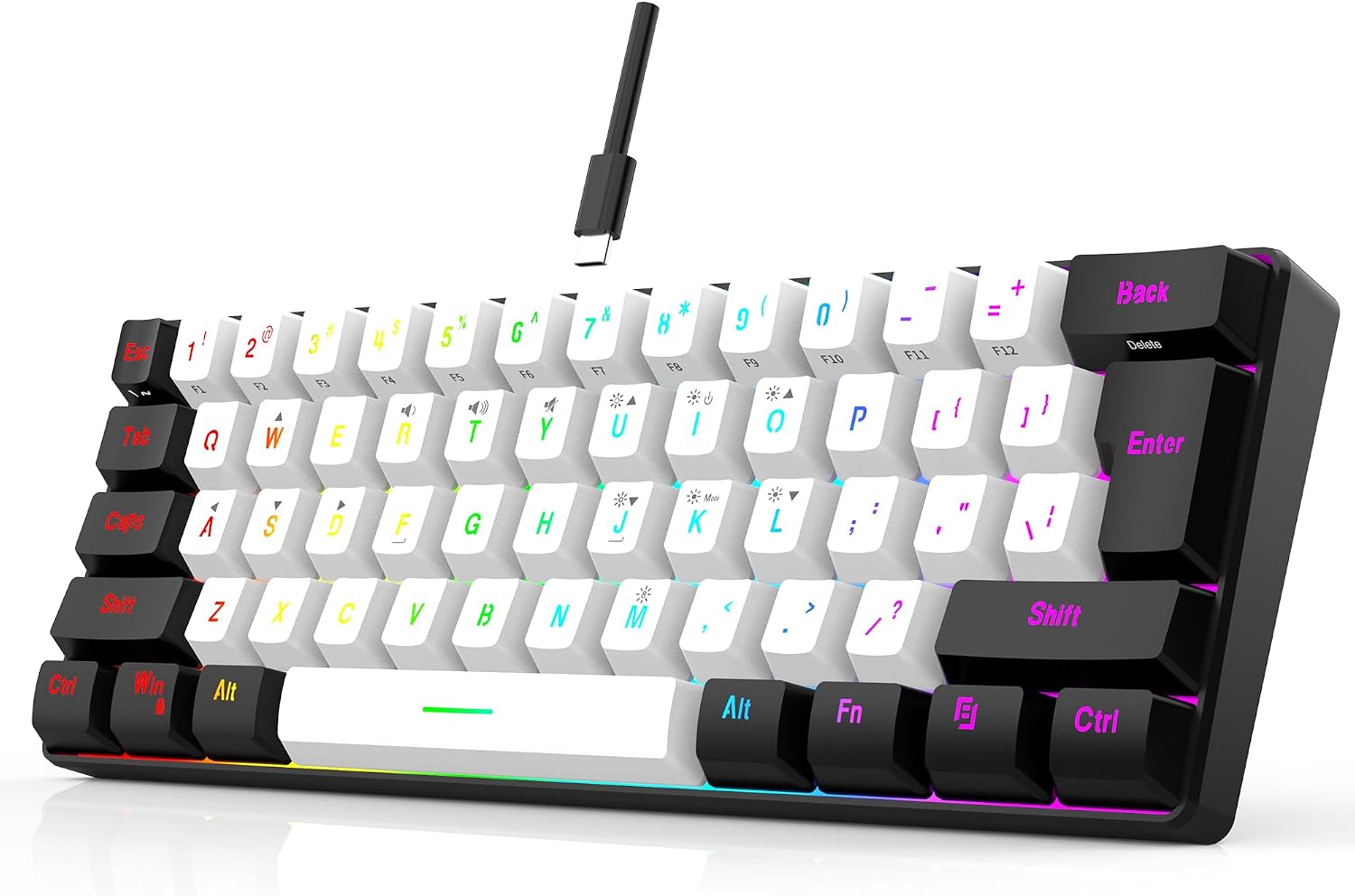
Image: RGB backlight controls using FN key combinations.
25-Key Anti-Ghosting
The 7KEYS G61 keyboard is equipped with 25-key anti-ghosting technology. This feature ensures that up to 25 simultaneous key presses are registered accurately, preventing missed commands during intense gaming sessions or fast typing.

Image: Illustration of the 25-key anti-ghosting capability.
Ergonomic Design
The keyboard features an ergonomic design with a 34mm height and progressive keycap layers. This design aims to provide a comfortable typing experience, reducing strain during extended use.

Image: The ergonomic streamline design of the 7KEYS G61 keyboard.
Maintenance
Proper maintenance ensures the longevity and performance of your keyboard.
- Cleaning: Regularly wipe the keyboard surface with a soft, dry, lint-free cloth. For deeper cleaning, use compressed air to remove dust and debris from between the keycaps.
- Avoid Liquids: Do not spill liquids on the keyboard. While it has some water resistance, excessive liquid exposure can cause damage.
- Storage: Store the keyboard in a cool, dry place away from direct sunlight and extreme temperatures.
- Cable Care: Handle the USB cable gently. Avoid bending or twisting it excessively to prevent internal damage.
Troubleshooting
If you encounter issues with your 7KEYS G61 keyboard, refer to the following common problems and solutions:
- Keyboard Not Responding
- Ensure the USB-C cable is securely connected to both the keyboard and your computer.
- Try connecting the keyboard to a different USB port on your computer.
- Test the keyboard on another computer to determine if the issue is with the keyboard or the computer.
- Backlight Not Working or Behaving Unexpectedly
- Press FN + I to ensure the backlight is not turned off.
- Adjust the brightness using FN + O / L.
- Cycle through different backlight modes using FN + K.
- Keys Not Registering or Input Lag
- Ensure the keyboard is clean and free of debris that might obstruct key switches.
- While the keyboard supports 25-key anti-ghosting, ensure you are not exceeding this limit with an extremely high number of simultaneous key presses.
- Compatibility Issues
- Verify that your operating system is listed as compatible (Windows XP/7/8/10, MAC OS).
- Since the keyboard is plug-and-play, driver conflicts are unlikely. Ensure your system's USB drivers are up to date.
Specifications
| Model Number | G61 |
| Brand | 7KEYS |
| Product Dimensions | 11.35 x 3.97 x 1.33 inches |
| Item Weight | 14.9 ounces |
| Connectivity Technology | USB-C Wired |
| Keyboard Description | Gaming, 60% Mini |
| Compatible Devices | Laptop, PC |
| Special Features | Backlit, Ergonomic, Lightweight, Waterproof |
| Backlighting Color Support | RGB |
Warranty and Support
7KEYS is committed to providing high-quality products and customer satisfaction. If you encounter any problems or have questions regarding your 7KEYS G61 keyboard, please do not hesitate to contact our customer service team.
We offer 7*24 hours service for all our customers. For support, please reach out to the seller directly through the platform where you purchased the product.