
Introduction
This manual provides detailed instructions for the installation, operation, and maintenance of your XTRONS 12.3 Inch Android 14 Car Stereo. Please read this manual thoroughly before using the product to ensure proper functionality and to prevent damage.
Applicable Models & Years
This unit is designed for Mercedes-Benz B-Class W246 vehicles manufactured between 2016 and 2018, specifically those equipped with the NTG 5.0, NTG 5.1, or NTG 5.2 system.
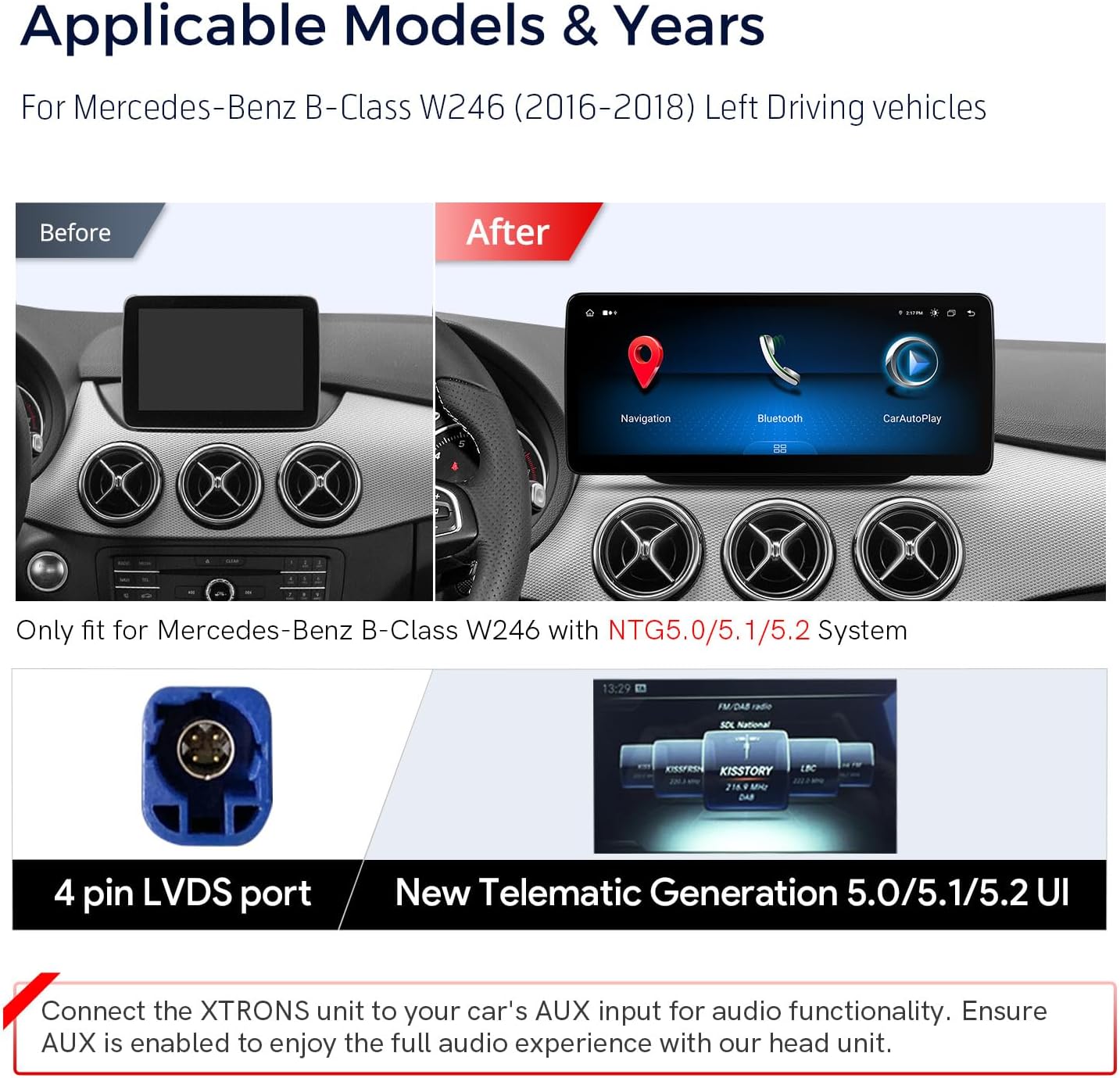
Image: Comparison of the original Mercedes-Benz B-Class W246 dashboard display (before) and the XTRONS 12.3-inch display (after). It also shows the 4-pin LVDS port and the New Telematics Generation 5.0/5.1/5.2 user interface.
Important: This unit is only compatible with Mercedes-Benz B-Class W246 models that have the NTG5.0/5.1/5.2 system.
Key Features
- 12.3-inch IPS Screen: High-fidelity 1920x720 HD IPS display with a 24:9 aspect ratio for wide viewing angles.
- Global 4G LTE Connectivity: Supports Nano-SIM cards for mobile broadband connection (up to 300Mbps download speed), compatible with 99% of worldwide carriers.
- Wireless Car Play & Android Auto: Seamless integration with iPhone (wireless Bluetooth) and Android phones (wireless Bluetooth or wired USB) for GPS, calls, messages, and voice assistants (Siri/Google Assistant).
- Android 14 Operating System: Octa-core processor with 4GB RAM and 64GB ROM for responsive performance and app storage.
- Retained Factory Features: Maintains functionality of the factory command knob, touch mouse, original radio, CD player, car information display, Bluetooth, steering wheel controls, and parking camera.
- Compatibility: Supports Optic Fiber Amplifier system and original navigation.
- Dual Wi-Fi Band: Connects to 2.4GHz or 5GHz Wi-Fi networks.
- Multi-task Display & Picture-in-Picture (PIP): Allows simultaneous use of two applications or viewing videos while using other apps.
What's in the Box
Verify that all components are present before proceeding with installation:
- 1 x ISO Wiring Harness
- 1 x USB Adapter
- 1 x GPS Antenna
- 1 x 4G Antenna
- 1 x USB/LVDS Cable
- 1 x SIM Card Ejector
- 1 x Speaker
- 3 x Screws
- 1 x Installation Instruction (separate document)
- 1 x User Manual (this document)

Image: The XTRONS 12.3-inch unit with its dimensions (312mm x 135mm) and a visual representation of all included accessories.
Setup and Installation
Professional installation is recommended. Refer to the separate "Installation Instruction" document for detailed wiring diagrams and mounting procedures specific to your vehicle model.
Wiring Connections Overview
The following diagram provides an overview of the main wiring harness connections. Ensure all connections are secure and correctly matched to your vehicle's system.
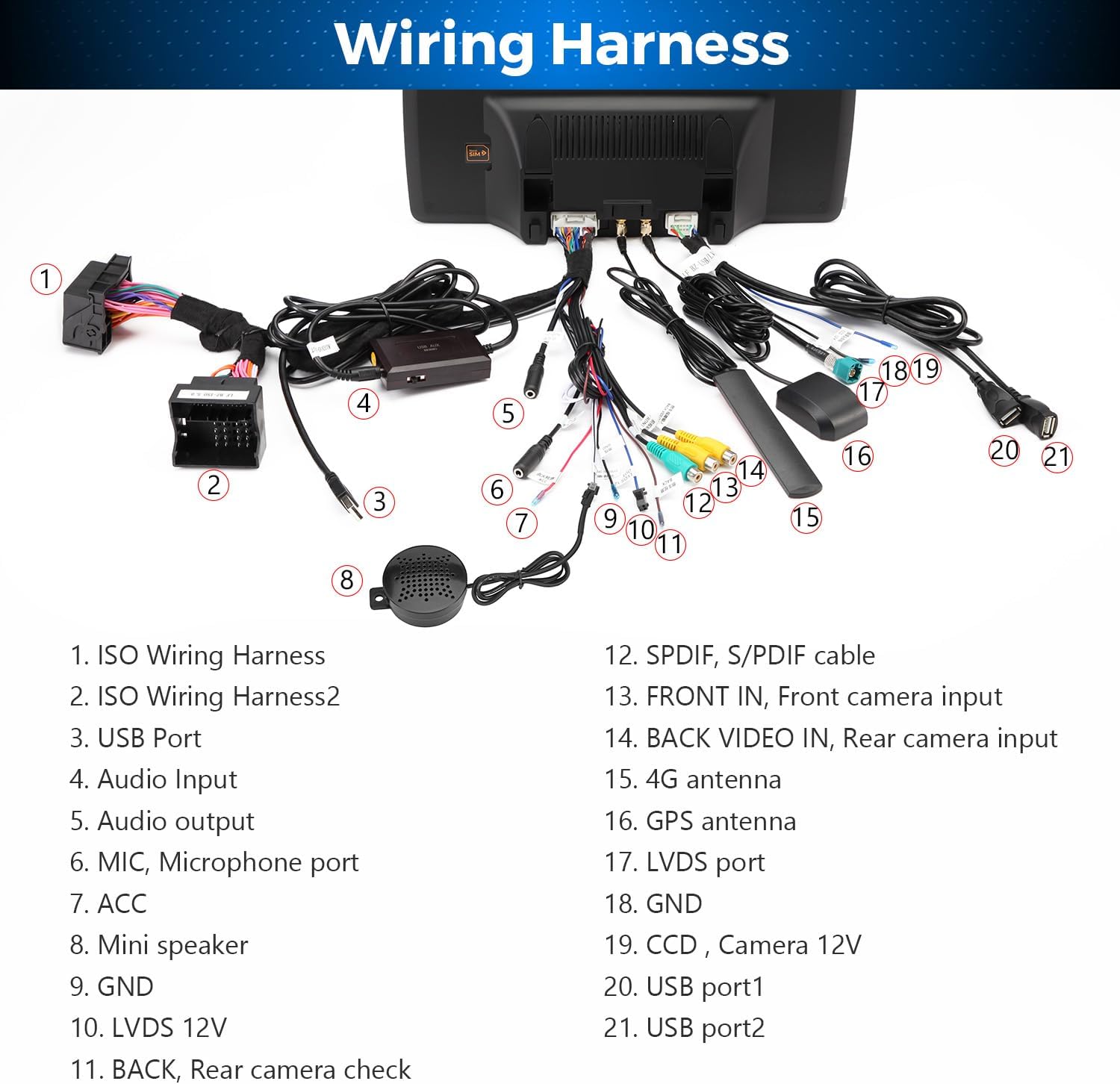
Image: Detailed diagram of the wiring harness, identifying components like ISO Wiring Harness, USB Ports, Audio Input, GPS Antenna, 4G Antenna, LVDS port, and camera inputs.
- ISO Wiring Harness
- ISO Wiring Harness 2
- USB Port
- Audio Input
- MIC, Microphone port
- ACC (Accessory Power)
- Mini speaker
- GND (Ground)
- LVDS 12V
- BACK, Rear camera check
- SPDIF, S/PDIF cable
- FRONT IN, Front camera input
- BACK VIDEO IN, Rear camera input
- 4G antenna
- GPS antenna
- LVDS port
- GND (Ground)
- CCD, Camera 12V
- USB port 1
- USB port 2
Audio Functionality: Connect the XTRONS unit to your car's AUX input for audio. Ensure AUX is enabled in your vehicle's settings for full audio experience.
Operating Instructions
Power On/Off
The unit powers on automatically with the vehicle's ignition. To manually power off or restart, refer to the on-screen controls or your vehicle's specific power management system.
Touch Screen Interface
The unit features a 12.3-inch IPS capacitive touch screen. Navigate by tapping, swiping, and pinching gestures similar to a smartphone.

Image: The 12.3-inch IPS touch screen in operation, demonstrating multi-task display and picture-in-picture capabilities.
Smartphone Integration (Car Play & Android Auto)
The unit supports both Wireless Car Play (for iPhone) and Wireless/Wired Android Auto (for Android phones).

Image: Visual representation of Wireless Car Play, Wireless/Wired Android Auto, and Screen Mirroring features, showing how smartphone content is displayed and controlled on the unit.
- Wireless Car Play (iPhone): Connect your iPhone via Bluetooth. Once paired, Car Play will launch automatically, allowing access to navigation, calls, messages, and music through the unit's interface or Siri voice commands.
- Wireless Android Auto (Android): Connect your Android phone via Bluetooth. Android Auto will activate, providing access to Google Maps, calls, messages, and media, controllable via the unit or Google Assistant.
- Wired Android Auto (Android): Connect your Android phone using a USB cable to one of the unit's USB ports.
Internet Access
The unit offers multiple options for internet connectivity:

Image: Diagram illustrating the three internet access options: Global 4G LTE (via Nano-SIM), 5GHz Wi-Fi, and 2.4GHz Wi-Fi, along with instructions for USB tethering.
- Global 4G LTE: Insert a Nano-SIM card (not included) into the designated slot. The unit will connect to 4G mobile broadband. Note: This supports internet data only, not phone calls.
- Wi-Fi: Connect to available Wi-Fi networks (2.4GHz or 5GHz) through the unit's settings.
- USB Tethering: Connect your smartphone to the unit via a USB cable and enable USB tethering in your phone's settings to share its internet connection.
Multi-task Display and Picture-in-Picture (PIP)
The 12.3-inch screen allows for enhanced multitasking:
- Multi-task Display: Run two applications simultaneously side-by-side, such as navigation and music playback.
- Picture-in-Picture (PIP): Keep a video playing in a small window while navigating other applications.
Retained Vehicle Features
The XTRONS unit is designed to integrate with and retain the functionality of several original vehicle features:

Image: Visual representation of retained factory features including COMAND control, steering wheel controls, factory camera support, factory CD player support, and optic fiber amplifier compatibility.
- Factory COMAND knob and touch mouse
- Original radio and CD player
- Vehicle information display
- Bluetooth functionality
- Steering wheel controls (SWC)
- Parking camera system
- Optic fiber amplifier system
- Original navigation system
Maintenance
Screen Care
Clean the screen with a soft, lint-free cloth. For stubborn marks, use a screen cleaner specifically designed for electronic displays. Avoid abrasive materials or harsh chemicals.
General Cleaning
Wipe the unit's exterior with a soft, damp cloth. Do not use excessive moisture or spray cleaners directly onto the unit.
Software Updates
Periodically check the XTRONS official website for available software updates to ensure optimal performance and access to new features. Follow the provided instructions carefully for any update procedures.
Troubleshooting
If you encounter issues with your XTRONS car stereo, refer to the following common problems and solutions:
- No Power:
- Check all power connections, including the ISO wiring harness and ACC wire.
- Verify the vehicle's fuse for the stereo system.
- No Audio:
- Ensure the unit is correctly connected to the vehicle's AUX input.
- Confirm that the AUX input is selected and enabled in your vehicle's original system settings.
- Check speaker connections.
- Touch Screen Unresponsive:
- Restart the unit by turning off and on the vehicle's ignition.
- Ensure the screen is clean and free from debris.
- GPS Signal Issues:
- Ensure the GPS antenna is properly connected and placed in a location with a clear view of the sky (e.g., on the dashboard).
- Check GPS settings within the unit.
- 4G/Wi-Fi Connectivity Problems:
- For 4G, ensure the Nano-SIM card is correctly inserted and active. Check signal strength.
- For Wi-Fi, verify the network password and ensure the unit is within range of the access point.
- For USB tethering, confirm it's enabled on your smartphone.
- Car Play/Android Auto Not Connecting:
- Ensure Bluetooth is enabled on both the unit and your smartphone.
- For wired Android Auto, try a different USB cable.
- Restart both the unit and your smartphone.
For further assistance, contact XTRONS customer support.
Specifications
| Feature | Detail |
|---|---|
| Brand | XTRONS |
| Model Number | B0CRT2V2ML |
| Vehicle Service Type | Car |
| Screen Size | 12.3 Inches |
| Resolution | 1920 x 720 |
| Operating System | Android 14 |
| Processor | Octa-Core (2 x Cortex-A75, 6 x Cortex-A55) |
| RAM | 4GB LPDDR4 |
| ROM | 64GB EMMC 5.1 |
| Connectivity Technology | Bluetooth 5.0, USB, Wi-Fi (2.4GHz/5GHz), Global 4G LTE |
| Special Features | Wireless Car Play, Wireless/Wired Android Auto, Touchscreen, Global 4G, Multi-task Display, Picture-in-Picture, Built-in DSP |
| Map Type | North America (pre-installed, other maps via app) |
| Human-Interface Input | Touchscreen |
| Compatible Devices | Smartphone, iPhone |
| Audio Output Mode | Stereo |
| Batteries Included | No |

Image: Overview of the unit's core specifications, including processor, memory, storage, connectivity, and display features.
Warranty Information
This XTRONS product comes with a 1-Year Manufacturer Warranty from the date of purchase. This warranty covers defects in materials and workmanship under normal use.
The warranty does not cover:
- Damage caused by improper installation, accident, misuse, abuse, or unauthorized modification.
- Damage occurring during shipment or storage.
- Damage from external causes such as power surges or natural disasters.
- Normal wear and tear.
Please retain your proof of purchase for warranty claims. For detailed warranty terms and conditions, refer to the official XTRONS website or contact customer support.
Customer Support
For technical support, troubleshooting assistance, or warranty inquiries, please contact XTRONS customer service.
XTRONS Official Website: www.xtrons.com
You may also find additional resources, FAQs, and software updates on the official website.


