
1. Introduction
This manual provides detailed instructions for the setup, operation, maintenance, and troubleshooting of your Andonstar AD246SM-Plus Digital Microscope. Please read this manual thoroughly before using the device to ensure proper functionality and to prevent damage.
2. Package Contents
Verify that all items listed below are included in your package:
- Microscope x1
- Metal stand x1
- Extension Base x1
- Tool holder x1
- Soldering Clamp x1
- Soldering mat x1
- Lens A x1 (18X-720X)
- Lens D x1 (1800X-2040X)
- Lens L x1 (60X-240X)
- USB cable x1
- Switch cable x1
- HDMI cable x1
- Remote control x1
- Slide holder x1
- Slides kit x5
- Observation box x1
- Tweezers x1
- 32G Micro SD card x1
- Instruction x1
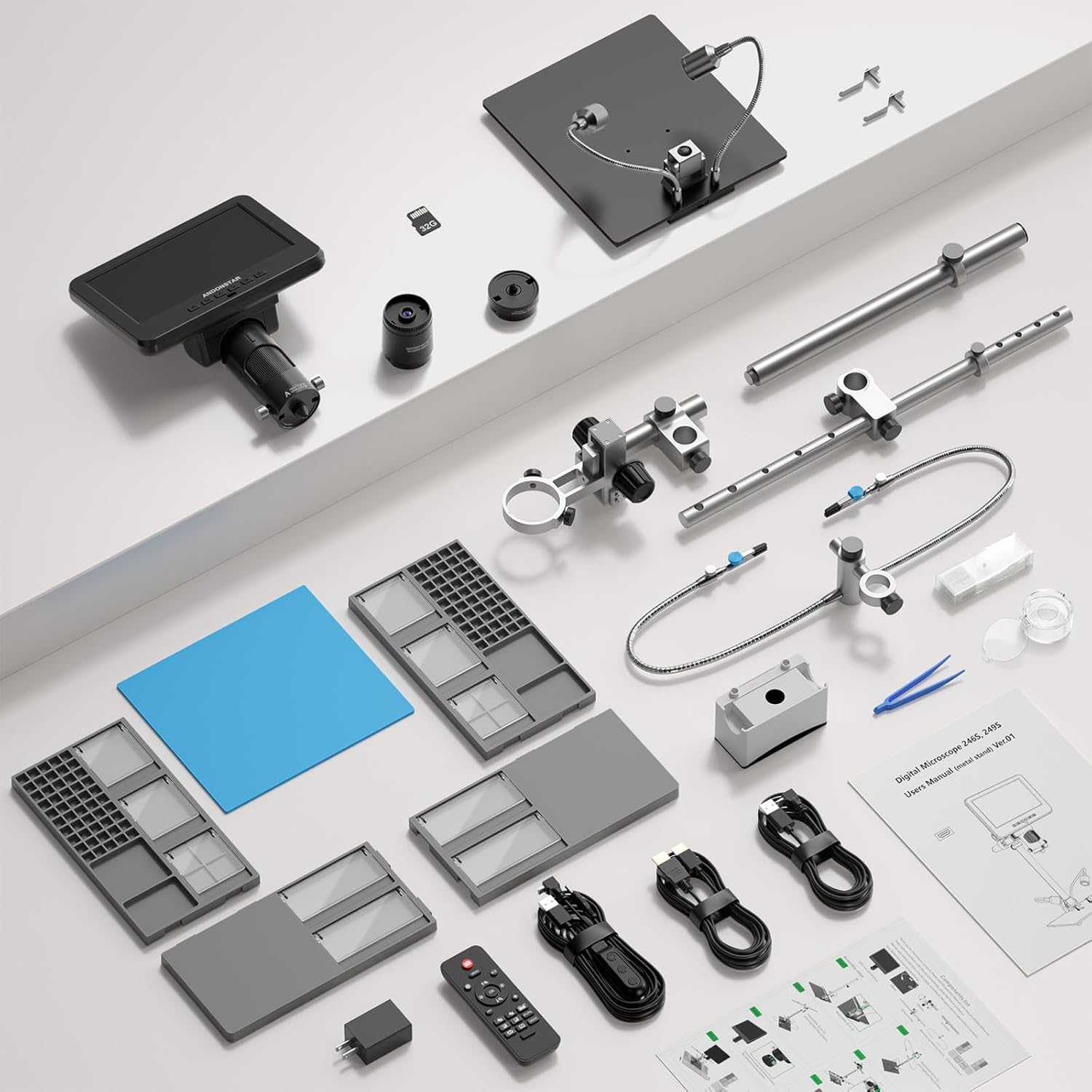
Image: All components included in the Andonstar AD246SM-Plus Digital Microscope package, laid out for inspection.
3. Setup Instructions
3.1 Assembling the Stand and Workstation
- Place the main metal stand base on a stable surface.
- Attach the extension base components to the main stand base to create a larger workspace. Ensure they are securely interlocked.
- Mount the flexible helping hands with clamps onto the designated slots on the extension base. Adjust their position as needed.
- Install the tool holder bar onto the main stand's vertical pole.
- Place the soldering mat in the center of the extended base.

Image: The fully assembled workstation of the Andonstar AD246SM-Plus microscope, showing the extended base, helping hands, and tool holder.

Image: A visual guide illustrating the step-by-step assembly process for the microscope stand and its extended base components.
3.2 Attaching the Microscope Unit
- Carefully attach the microscope unit to the adjustable holder on the vertical pole of the stand.
- Tighten the securing screws to ensure the microscope is firmly in place.
- Connect the flexible LED lights to the stand and position them to illuminate the working area.

Image: The microscope unit mounted on its stand, with the flexible LED lights positioned for optimal illumination of the observation area.
3.3 Powering On and Initial Connection
- Connect the power adapter to the microscope and a power outlet.
- Press the power button to turn on the microscope.
- For larger viewing, connect the microscope to an external display (monitor or TV) using the provided HDMI cable or to a PC via USB.

Image: The Andonstar AD246SM-Plus microscope displaying its view on a large external monitor via HDMI connection, illustrating the dual-screen capability.
Video: This video demonstrates the assembly process of the Andonstar AD246SM-Plus digital microscope, including attaching the base, helping hands, and the microscope unit itself. It also shows the microscope in operation with different lenses.
4. Operating Instructions
4.1 Lens Selection and Usage
The AD246SM-Plus comes with three interchangeable lenses, each designed for specific observation distances and magnification ranges:
- Lens A (18X-720X): Ideal for observing larger objects such as coins, stamps, circuit boards, and stones. Observation distance: 12mm-320mm.
- Lens L (60X-240X): Suitable for PCB/SMD soldering and general circuit board observation. Observation distance: 90mm-300mm.
- Lens D (1800X-2040X): Designed for microscopic slides and very fine details. Observation distance: 4mm-5mm.
To change a lens, gently twist the current lens counter-clockwise to remove it, then align the new lens and twist clockwise until secure.

Image: Microscope with Lens A, demonstrating its use for magnifying a coin, suitable for larger objects.

Image: Microscope with Lens L, showing a magnified view of a circuit board, ideal for soldering tasks.

Image: Microscope with Lens D, displaying a highly magnified view of a microscopic slide, for very fine details.
4.2 Focusing and Magnification Adjustment
Use the focus knob on the microscope body to achieve a clear image. Adjust the distance between the lens and the object by moving the microscope unit up or down on the stand for optimal magnification and clarity.
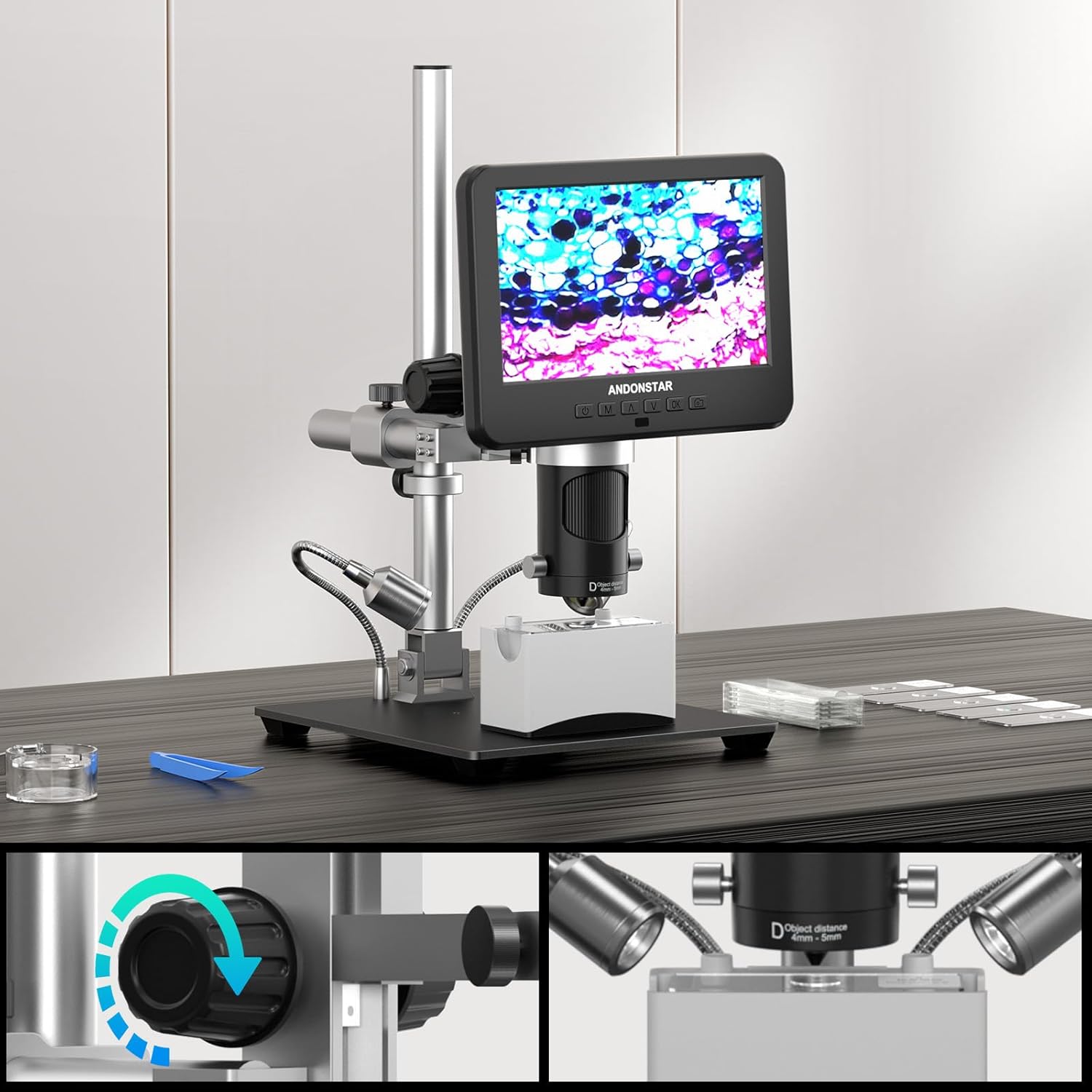
Image: Close-up view of the microscope's focus knob and the mechanism for adjusting the object distance, crucial for clear magnification.
4.3 LED Lighting and Remote Control
The built-in 8 LED lights provide adjustable brightness and lighting angles. Use the remote control to capture images and record videos without disturbing the microscope, ensuring stable and clear results.
5. Maintenance
- Cleaning Lenses: Use a soft, lint-free cloth and lens cleaning solution to clean the lenses. Avoid abrasive materials.
- General Cleaning: Wipe the microscope body and stand with a dry or slightly damp cloth. Do not use harsh chemicals.
- Storage: Store the microscope in a dry, dust-free environment when not in use.
- Soldering Mat: The silicone soldering mat is resistant to heat, dirt, and oil. Clean it regularly to maintain its protective properties.
6. Troubleshooting
| Problem | Possible Cause | Solution |
|---|---|---|
| No image on screen | Power not connected; Microscope not turned on; HDMI/USB cable loose or faulty. | Check power connection; Press power button; Reconnect or replace cables. |
| Blurry image | Incorrect focus; Wrong lens for object distance; Object too far/close. | Adjust focus knob; Select appropriate lens (A, L, or D); Adjust microscope height. |
| Screen flickering or unstable image | Loose cable connection; Power supply issue; Interference. | Ensure all cables are securely connected; Try a different power outlet; Minimize electronic interference. |
| Remote control not working | Batteries depleted; Obstruction between remote and microscope. | Replace remote control batteries; Ensure clear line of sight to the microscope's IR receiver. |
7. Specifications
- Model: AD246SM-Plus (SXWL-246S-M-Plus)
- Video Resolution: Ultra HD 2880x2160 24fps; Full HD 1920x1080 60fps/30fps; HD 1280x720 120fps
- Magnification: Up to 2000X (with Lens D)
- Lenses Included:
- Lens A: 18X-720X (Object distance: 12mm-320mm)
- Lens L: 60X-240X (Object distance: 90mm-300mm)
- Lens D: 1800X-2040X (Object distance: 4mm-5mm)
- Display: Integrated screen, supports HDMI output for larger field of view, USB output for PC connection.
- Lighting: 8 Adjustable LED lights
- Stand: Upgraded Plus Stand with Extension Base (30cm x 40cm x 33cm)
- Additional Features: Soldering helping hands, tool holder, 100 grids compartment screw box, silicone soldering mat, IR remote control, 32G Micro SD card.
- Item Weight: 7.39 pounds
- Package Dimensions: 17.5 x 10.8 x 6 inches
- Manufacturer: Andonstar
- Color: Black
- Material: Metal
8. Warranty and Support
For warranty information and technical support, please refer to the official Andonstar website or contact their customer service directly. Keep your purchase receipt for warranty claims.
You can visit the Andonstar Store on Amazon for more product information and support resources.


