
Hisense AP-12CWBRNPS01
Contents
Hisense Portable Air Conditioner User Manual
Model: AP-12CWBRNPS01
12,000 BTUs, Wi-Fi Enabled, 127V
1. Important Safety Information
Please read this manual carefully before operating your Hisense Portable Air Conditioner. Keep it for future reference. This appliance is designed for cooling, ventilation, and dehumidification of indoor spaces.
General Safety Precautions:
- Ensure the power supply matches the voltage specified on the rating label (127V).
- Do not operate the unit with a damaged cord or plug.
- Keep the air inlet and outlet clear of obstructions.
- Do not insert fingers or objects into the air outlets.
- Always unplug the unit before cleaning or servicing.
- This appliance is not intended for use by persons (including children) with reduced physical, sensory or mental capabilities, or lack of experience and knowledge, unless they have been given supervision or instruction concerning use of the appliance by a person responsible for their safety.
2. Product Overview
The Hisense AP-12CWBRNPS01 is a versatile portable air conditioner offering cooling, fan, and dehumidifier functions. It features integrated Wi-Fi for remote control via the ConnectLife app and an automatic evaporation system for convenience.

Figure 2.1: Front view of the Hisense Portable Air Conditioner, showing its sleek white design.

Figure 2.2: Angled front view, highlighting the compact form factor.

Figure 2.3: Close-up of the top control panel with LED display and function buttons.
3. Package Contents
Before beginning installation, ensure all components listed below are present and undamaged:
- A. Foam Seal (1 pc)
- B. Connector (1 pc)
- C. Flexible Exhaust Hose (1 pc)
- D. Window Exhaust Adapter (1 pc)
- E. Rivets (4 pcs)
- F. Screws (4 pcs)
- G. Window Lock Bracket (2 pcs)
- H. Outer Sliding Section with Vent (1 pc)
- I. Inner Sliding Section - Short (1 pc)
- J. Inner Sliding Section (1 pc)
- K. Outer Sliding Section (1 pc)
- L. Long Foam Seal (2 pcs)
- M. Short Foam Seal (2 pcs)
- N. Drain Hose (for Heat Pump Models) (1 pc)
- O. Drain Hose Clip (for Heat Pump Models) (1 pc)
- P. Remote Control (1 pc)
- Q. Standard AAA Batteries (1.5 volt) (2 pcs)
4. Setup and Installation
Choosing a Location:
- Place the unit on a flat, stable surface.
- Ensure there is at least 20 cm (8 inches) of space around the unit for proper airflow.
- Position the unit near a window for exhaust hose installation.
Window Kit Installation:
- Assemble the window sliding kit using the provided sections (H, I, J, K) to fit your window opening.
- Secure the assembled window kit in the window frame.
- Attach the flexible exhaust hose (C) to the unit's exhaust port and the window exhaust adapter (D).
- Insert the window exhaust adapter into the opening of the window sliding kit.
- Use the foam seals (A, L, M) to seal any gaps around the window kit for optimal efficiency.
- Install the window lock brackets (G) for security.

Figure 4.1: Product dimensions and key components for installation. Dimensions are approximately 320mm (D) x 430mm (W) x 694mm (H).
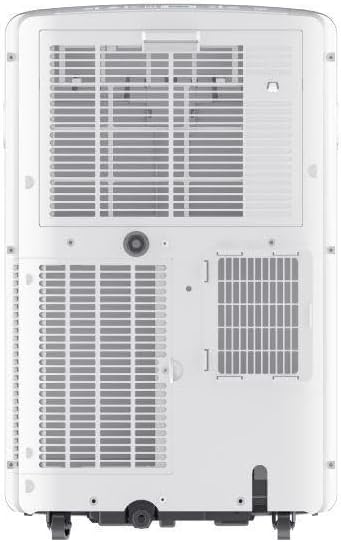
Figure 4.2: Rear view, indicating the exhaust port for hose connection.
5. Operating Instructions
Control Panel and Remote Control:
The unit can be controlled via the intuitive top-mounted control panel or the included remote control. Insert the two AAA batteries into the remote control before use.
Operating Modes:
- Cool Mode: Provides powerful cooling. Adjust temperature using the '+' and '-' buttons.
- Fan Mode: Circulates air without cooling. Select fan speed (Low, Medium, High).
- Dehumidify Mode: Reduces humidity in the room, helping to prevent mold and mildew. The automatic evaporation system minimizes the need for manual draining.
Wi-Fi Connectivity (ConnectLife App):
- Download the "ConnectLife" app from your smartphone's app store.
- Follow the in-app instructions to connect your portable air conditioner to your home Wi-Fi network.
- Once connected, you can remotely power on/off, adjust temperature, change modes, and set timers from your smartphone.
6. Maintenance
Cleaning the Air Filter:
The air filter should be cleaned every two weeks or more frequently depending on usage and air quality. A dirty filter can reduce efficiency and airflow.
- Unplug the unit from the power outlet.
- Locate and remove the air filter from the back of the unit.
- Wash the filter with warm, soapy water. Rinse thoroughly.
- Allow the filter to air dry completely before reinserting it.
Draining Water (if necessary):
This unit features an automatic evaporation system, which typically eliminates the need for manual draining. However, in very humid conditions, the internal reservoir may fill. If the unit stops operating and displays a "Full Tank" indicator, follow these steps:
- Unplug the unit.
- Place a shallow pan or tray under the drain port at the bottom rear of the unit.
- Remove the drain plug to allow water to flow out.
- Once drained, replace the drain plug securely.
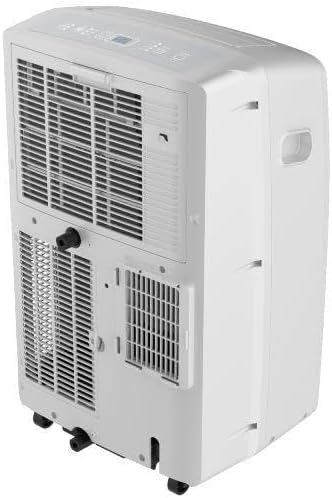
Figure 6.1: Angled rear view, indicating the location of the drain port and air filters.
7. Troubleshooting
| Problem | Possible Cause | Solution |
|---|---|---|
| Unit does not turn on. | No power, power cord unplugged, circuit breaker tripped. | Check power connection, reset circuit breaker. |
| Unit does not cool effectively. | Dirty air filter, exhaust hose not properly installed, room too large, windows/doors open. | Clean air filter, ensure exhaust hose is sealed, close windows/doors, consider room size. |
| Unit is noisy. | Normal operating noise, unit not on a level surface, fan speed too high. | Ensure unit is on a level surface, try a lower fan speed. (Note: Portable ACs are generally noisier than split units). |
| Water leakage. | Drain plug loose, unit tilted, excessive humidity. | Check drain plug, ensure unit is level, drain reservoir if full. |
| Wi-Fi connection issues. | Incorrect Wi-Fi password, router too far, app issues. | Verify password, move unit closer to router, restart app/unit. |
8. Specifications
| Feature | Detail |
|---|---|
| Brand | Hisense |
| Model | AP-12CWBRNPS01 |
| Cooling Capacity | 12,000 BTUs |
| Voltage | 127 Volts |
| Power Consumption | 1100 Watts |
| Noise Level | 54.1 dB |
| Dimensions (W x D x H) | 43 cm x 32 cm x 69.4 cm (16.9 in x 12.6 in x 27.3 in) |
| Weight | 30 kg (66.1 lbs) |
| Material | Plastic |
| Special Features | Wi-Fi Enabled, Automatic Evaporation, Dehumidification Function |
| Installation Type | Portable |
9. Warranty and Support
For warranty information and technical support, please refer to the warranty card included with your product or visit the official Hisense website. Keep your purchase receipt as proof of purchase.
You can also visit the Hisense store on Amazon for more information: Hisense Amazon Store
Documents and downloads
Ask a question about this manual
Ask about setup, troubleshooting, compatibility, parts, safety, or missing instructions. Manuals+ will review the question and use this page’s manual context to help answer it.