
GHUST MR23GA
Instruction Manual for GHUST MR23GA Replacement Magic Voice Remote Control
Model: MR23GA
1. Product Overview
This manual provides essential information for the operation and maintenance of your GHUST MR23GA Replacement Magic Voice Remote Control. This remote is designed as a replacement for various LG Smart TV models, offering convenient control without complex setup.

Image 1.1: The GHUST MR23GA Replacement Magic Voice Remote Control.
Key Features:
- Direct Replacement: Functions as a direct replacement for original LG Magic Remote models.
- No Programming Required: Ready to use out of the box after battery insertion.
- Durable Construction: Made of high-quality ABS material for enhanced durability.
- Compact Design: Small and ergonomic for comfortable grip.
- Voice Search Capability: Supports voice commands for easier navigation (functionality may vary based on TV model and original remote features).
- Dedicated Shortcut Buttons: Quick access to popular streaming services like Netflix and Prime Video.
2. Setup and Installation
The MR23GA remote control is designed for immediate use with compatible LG Smart TVs. No complex programming or pairing procedures are required.
2.1. Battery Installation
- Locate the battery compartment cover on the back of the remote control.
- Slide the cover downwards or press the latch to open the compartment.
- Insert two (2) AAA batteries (not included) into the compartment, ensuring the positive (+) and negative (-) terminals align correctly with the indicators inside.
- Close the battery compartment cover by sliding it back into place until it clicks securely.

Image 2.1: The remote control is designed for ease of use with no setup or programming required after battery installation.
Once batteries are installed, the remote is ready to operate your compatible LG Smart TV.
3. Operating Instructions
This section details the basic functions and operation of your MR23GA remote control.
3.1. Basic Functions
- Power Button (●): Press to turn the TV on or off.
- Number Buttons (0-9): Use to directly input channel numbers.
- Volume Up/Down (+/-): Adjust the TV's volume level.
- Channel Up/Down (▲/▼): Change TV channels.
- Mute Button (🔇): Mute or unmute the TV's audio.
- Navigation Pad (Up, Down, Left, Right, OK): Navigate through menus and select options.
- Back Button (↶): Return to the previous screen or menu.
- Home Button (🏠): Access the TV's Smart Home dashboard.

Image 3.1: The compact size and ergonomic design make the remote easy to hold and operate.
3.2. Voice Control
Press and hold the Microphone Button to activate voice control. Speak clearly into the remote to issue commands or search for content. Release the button when finished speaking. Note that voice control functionality may depend on your specific LG TV model and its original features.
3.3. Dedicated Shortcut Buttons
The remote features dedicated buttons for quick access to popular streaming applications:
- Netflix Button: Directly launch the Netflix application.
- Prime Video Button: Directly launch the Amazon Prime Video application.
- Disney+ Button: Directly launch the Disney+ application.
- LG Channels Button: Directly launch the LG Channels application.
- Sling Button: Directly launch the Sling TV application.
- Alexa Button: Activate Alexa voice assistant (functionality depends on TV model).

Image 3.2: Dedicated shortcut buttons provide quick access to your favorite applications.
3.4. Compatibility
This replacement remote control is compatible with a wide range of LG Smart TV models, including but not limited to:
- LG OLED Series: OLED42C3AUA, OLED42C3PUA, OLED48C3PUA, OLED55C3PUA, OLED65C3AUA, OLED77C3PUA, OLED83C3PUA, OLED55G3PUA, OLED65G3PUA, OLED77G3PUA, OLED83G3PUA, OLED55B3PUA, OLED65B3PUA, OLED77B3PUA
- LG QNED Series: 43QNED75URA, 50QNED75URA, 55QNED75URA, 65QNED75URA, 75QNED75URA, 50QNED80URA, 55QNED80URA, 65QNED80URA, 75QNED80URA, 86QNED80URA
- LG UR9000 Series: 43UR9000PUA, 50UR9000PUA, 55UR9000PUA, 65UR9000PUA, 75UR9000PUA
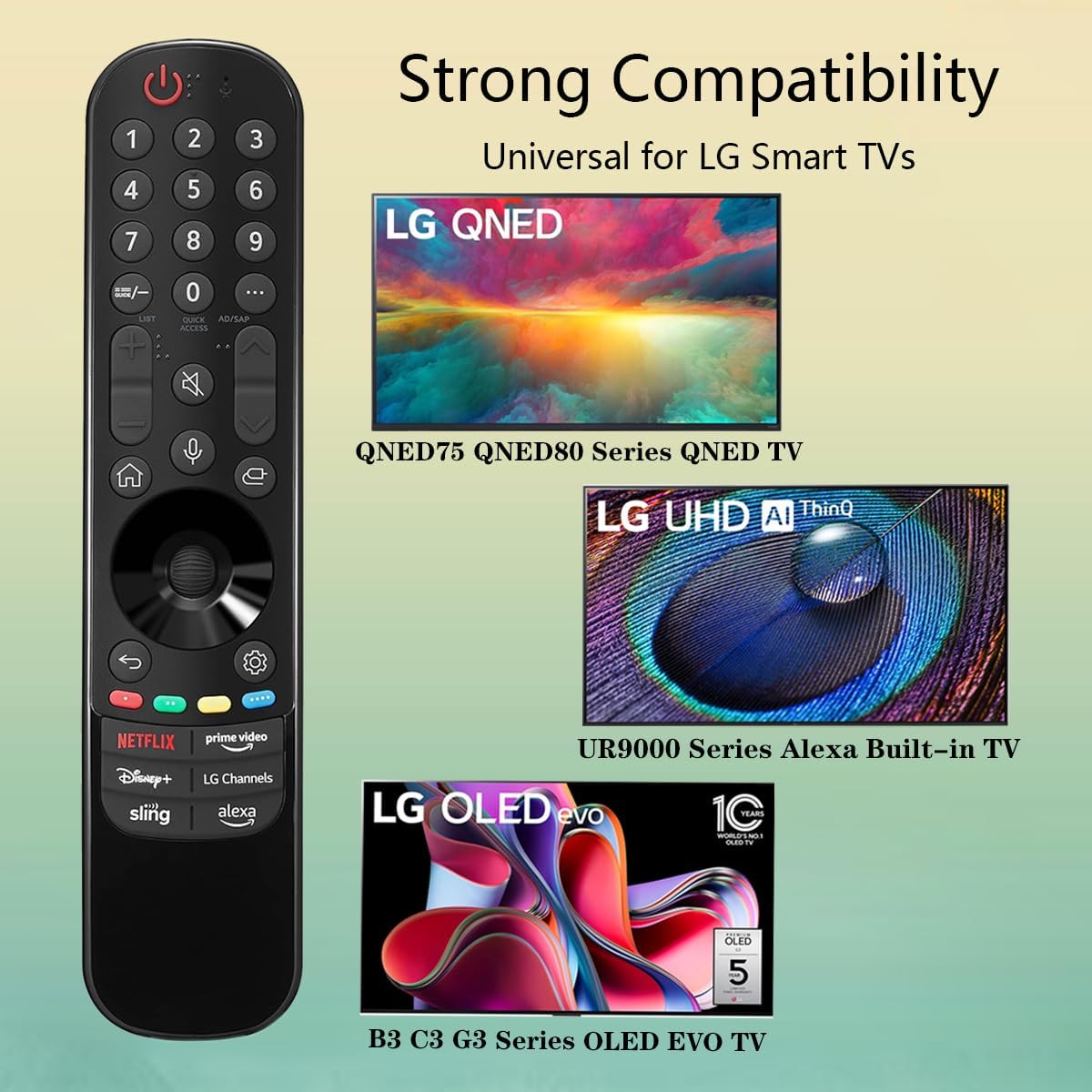
Image 3.3: The remote offers strong compatibility with various LG Smart TV series.
4. Maintenance
Proper care and maintenance will extend the lifespan of your remote control.
4.1. Cleaning
- Use a soft, dry cloth to wipe the surface of the remote control.
- For stubborn dirt, slightly dampen the cloth with water or a mild, non-abrasive cleaner. Do not spray cleaner directly onto the remote.
- Avoid using harsh chemicals, solvents, or abrasive cleaning materials, as these can damage the remote's finish or internal components.
4.2. Battery Care
- Replace batteries when the remote's responsiveness decreases or it stops functioning.
- Always replace both batteries at the same time with new ones of the same type (AAA).
- If the remote will not be used for an extended period (e.g., one month or more), remove the batteries to prevent leakage and potential damage to the remote.
- Dispose of used batteries according to local regulations.
5. Troubleshooting
If you encounter issues with your remote control, refer to the following common problems and solutions:
| Problem | Possible Cause | Solution |
|---|---|---|
| Remote not responding. | Dead or incorrectly inserted batteries. | Replace batteries with new AAA batteries, ensuring correct polarity (+/-). |
| Remote works intermittently. | Low battery power; obstruction between remote and TV; infrared sensor blocked on TV. | Replace batteries. Ensure a clear line of sight to the TV's infrared sensor. Remove any obstructions. |
| Voice control or pointer not working. | This replacement remote may not support all advanced features of the original LG Magic Remote, or your TV model does not fully support these features with a replacement remote. | Verify your TV model's compatibility with replacement remotes for advanced features. Basic functions should still operate. |
| Dedicated app buttons (e.g., Alexa, LG Channels) not working. | Functionality depends on TV model and specific app integration. | Some app buttons may not be universally compatible or require specific TV software versions. Verify if other buttons work. |
If the problem persists after trying these solutions, please contact customer support.
6. Specifications
- Model Number: MR23GA
- Brand: GHUST
- Product Dimensions: 7.3 x 1.6 x 1.2 inches
- Item Weight: 2.29 ounces
- Power Source: 2 x AAA batteries (not included)
- Color: Black
- Material: High-quality ABS
- Compatible Devices: LG Smart Televisions (specific models listed in Section 3.4)
- Special Feature: Voice Search (functionality may vary)
7. Warranty and Support
GHUST is committed to providing high-quality products and excellent customer service.
7.1. After-Sales Service
If you have any questions regarding the quality or functionality of your GHUST MR23GA remote control, please do not hesitate to contact our customer support team. We are dedicated to resolving any issues promptly and ensuring your satisfaction.
For support, please refer to the contact information provided with your purchase or on the official GHUST product page.
Ask a question about this manual
Ask about setup, troubleshooting, compatibility, parts, safety, or missing instructions. Manuals+ will review the question and use this page’s manual context to help answer it.