
Laser 8824
Laser 8824 Engine Timing Kit User Manual
Model: 8824 | Brand: Laser
1. Introduction
The Laser 8824 Engine Timing Kit is a specialized tool designed for precise alignment, setting, and checking of camshaft timing on Volkswagen Group EA 211, 4-cylinder TSI petrol engines. This kit eliminates the need for computer-based alignment tools by utilizing a battery-powered digital inclinometer alongside precision-engineered adaptors and tooling.
Adherence to the correct Laser Tools procedure ensures accurate camshaft setting without requiring interaction with the vehicle's On-Board Diagnostics (OBD) system.
2. Kit Contents
The Laser 8824 Engine Timing Kit includes the following components, designed for comprehensive camshaft timing operations:
- Digital Inclinometer (battery-powered)
- Camshaft Alignment Tooling
- Crankshaft Locking Pin
- Tensioner Pulley Locking Pin
- Various Adaptors and Fasteners
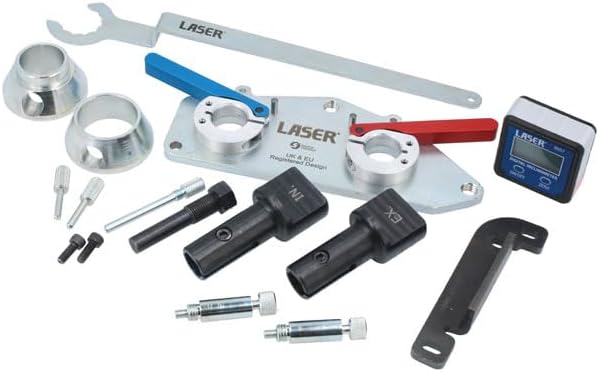
Figure 2.1: All components of the Laser 8824 Engine Timing Kit, including the digital inclinometer, camshaft alignment tools, and various pins and adaptors.

Figure 2.2: The Laser 8824 Engine Timing Kit neatly organized within its durable storage case, showcasing the custom-fit foam inserts for each component.
3. Vehicle and Engine Applications
This kit is specifically designed for the following vehicle brands and engine types:
- Vehicle Applications: Audi (from 2017), Seat (from 2017), Skoda (from 2017), Volkswagen (from 2017).
- Engine Applications: 1.5L TSi petrol engines, including engine codes DACA, DACB, DADA, DFYA, DPBA, DPCA, and DPBE.
- Engine Variants: EA211, EVO 4-cylinder TSi ACT.
Note: For earlier engines, refer to Laser Part No. 8866.
4. Setup and Preparation
Before commencing any timing procedure, ensure the engine is cool and the vehicle is securely supported. Always refer to the vehicle manufacturer's service manual for specific procedures and torque settings.
- Identify Engine Type: Confirm the engine is a compatible 1.5L TSi EA211 EVO 4-cylinder ACT engine.
- Access Timing Components: Remove any necessary covers or components to gain access to the camshafts, crankshaft, and timing belt/chain area.
- Position Engine: Rotate the crankshaft to the Top Dead Center (TDC) position for cylinder 1, as specified by the vehicle manufacturer.
- Prepare Digital Inclinometer: Ensure the digital inclinometer has fresh batteries. Power it on and calibrate it to zero on a known level surface before attaching it to the camshaft alignment tool.
5. Operating Instructions: Camshaft Timing Procedure
This section outlines the general steps for using the Laser 8824 kit for camshaft timing. Always follow the detailed instructions provided with the kit and the vehicle's service manual.
- Install Crankshaft Locking Pin: Insert the crankshaft locking pin into its designated position to secure the crankshaft at TDC.
- Position Camshaft Alignment Tool: Attach the camshaft alignment tool to the camshafts. Ensure it seats correctly and is secured as per the kit instructions.
- Attach Digital Inclinometer: Mount the digital inclinometer onto the designated area of the camshaft alignment tool.
- Adjust Camshafts: Carefully adjust the camshafts until the digital inclinometer displays the specified angle (typically 0.0 degrees or as per manufacturer's specification). The inclinometer provides precise feedback for fine adjustments.

Figure 5.1: The digital inclinometer mounted on the camshaft alignment tool, displaying an angle of 0.9 degrees, indicating the current camshaft position.

Figure 5.2: The digital inclinometer displaying 1.0 degrees, providing real-time feedback during camshaft adjustment.

Figure 5.3: The digital inclinometer displaying 1.1 degrees, illustrating the precision required for accurate camshaft timing.
- Tighten Camshaft Pulleys: Once the correct angle is achieved, use appropriate camshaft pulley holding tools (e.g., Laser Part Nos. 7279 & 8421 or similar) to prevent rotation while loosening or tightening the camshaft pulleys to the manufacturer's specified torque.
- Remove Tools: After tightening, carefully remove the digital inclinometer, camshaft alignment tool, and crankshaft locking pin.
- Verify Timing: Rotate the engine manually for two full revolutions and re-check the timing with the kit to ensure accuracy.
6. Maintenance and Storage
Proper maintenance and storage will extend the life of your Laser 8824 Engine Timing Kit.
- Cleaning: After each use, clean all components with a dry cloth to remove oil, grease, or debris. Do not use harsh chemicals that may damage the finish or calibration.
- Digital Inclinometer: Store the digital inclinometer in a dry environment. Remove batteries if storing for extended periods to prevent leakage.
- Storage: Always return all components to their designated slots in the original storage case. This protects the tools from damage and ensures all parts are accounted for.
- Inspection: Periodically inspect tools for any signs of wear, damage, or corrosion. Replace damaged components if necessary.
7. Troubleshooting
| Problem | Possible Cause | Solution |
|---|---|---|
| Inclinometer not powering on | Dead or incorrectly installed batteries | Replace batteries; ensure correct polarity. |
| Inaccurate inclinometer readings | Not calibrated to zero; tool not seated correctly | Recalibrate inclinometer on a level surface; ensure tool is firmly and correctly seated. |
| Camshaft alignment tool does not fit | Incorrect engine application; debris in mounting points | Verify engine code compatibility; clean mounting surfaces. |
| Difficulty in tightening/loosening camshaft pulleys | Improper holding tool used; insufficient leverage | Use specified camshaft pulley holding tools (e.g., Laser 7279 & 8421); ensure proper leverage. |
8. Specifications
| Feature | Detail |
|---|---|
| Model Number | 8824 |
| Brand | Laser |
| Weight | 5.29 Kilograms |
| Package Dimensions | 39.8 x 32.3 x 4.8 cm |
| Engine Compatibility | VW Group EA 211, 4-cylinder TSI Petrol (1.5L) |
| Key Feature | Digital Inclinometer for precise camshaft angle measurement |
9. Warranty Information
This product is manufactured by Laser Tools. For detailed warranty information, including terms, conditions, and duration, please refer to the official documentation provided with your purchase or visit the manufacturer's official website. Keep your proof of purchase for any warranty claims.
10. Customer Support
For technical assistance, product inquiries, or support regarding the Laser 8824 Engine Timing Kit, please contact Laser Tools customer service. You can typically find contact information on the product packaging or on the official Laser Tools website: www.lasertools.co.uk.
When contacting support, please have your product model number (8824) and any relevant purchase details ready.
Related documents8824


Ask a question about this manual
Ask about setup, troubleshooting, compatibility, parts, safety, or missing instructions. Manuals+ will review the question and use this page’s manual context to help answer it.