
BAFANG FM G020.500.D
BAFANG 48V 500W Front Hub Motor Electric Bike Conversion Kit User Manual
Model: FM G020.500.D
1. Introduction
This manual provides comprehensive instructions for the installation, operation, and maintenance of your BAFANG 48V 500W Front Hub Motor Electric Bike Conversion Kit. This kit is designed to transform a standard pedal bicycle into an electric bicycle, offering enhanced riding comfort and efficiency for various terrains including touring, commuting, and mountain biking.
Please read this manual thoroughly before attempting any installation or operation to ensure safe and correct usage of the product.

Figure 1.1: Overview of the BAFANG 48V 500W Front Hub Motor Electric Bike Conversion Kit components.
2. Product Specifications
The BAFANG 48V 500W Front Hub Motor Electric Bike Conversion Kit (Model: FM G020.500.D) features robust design and efficient performance. Key specifications are detailed below:
| Parameter | Value |
|---|---|
| Product Name | Front Hub Motor |
| Motor Option | 48V500W |
| Rated Voltage | 48V |
| Rated Power | 500W |
| No-load Current | ≤1.8A |
| Rated Current | ≤13.8A |
| Wheel Diameter (inch) | 20 / 26 / 700C |
| Max Torque | 65 N.M |
| Max Speed | 40 KM/H |
| Spoke Specification | 36H*12G |
| Weight | 7.100 KG |
| Efficiency | ≥75% |
| Noise Grade | <55 dB |
| Waterproof Grade | IPX5 |
| Installation Widths (OLD) | 100±1 mm |
| Maximum Current (Controller) | 18A |

Figure 2.1: BAFANG Front Hub Motor Specifications Diagram.

Figure 2.2: Wheel Size Compatibility and Selection Guide.
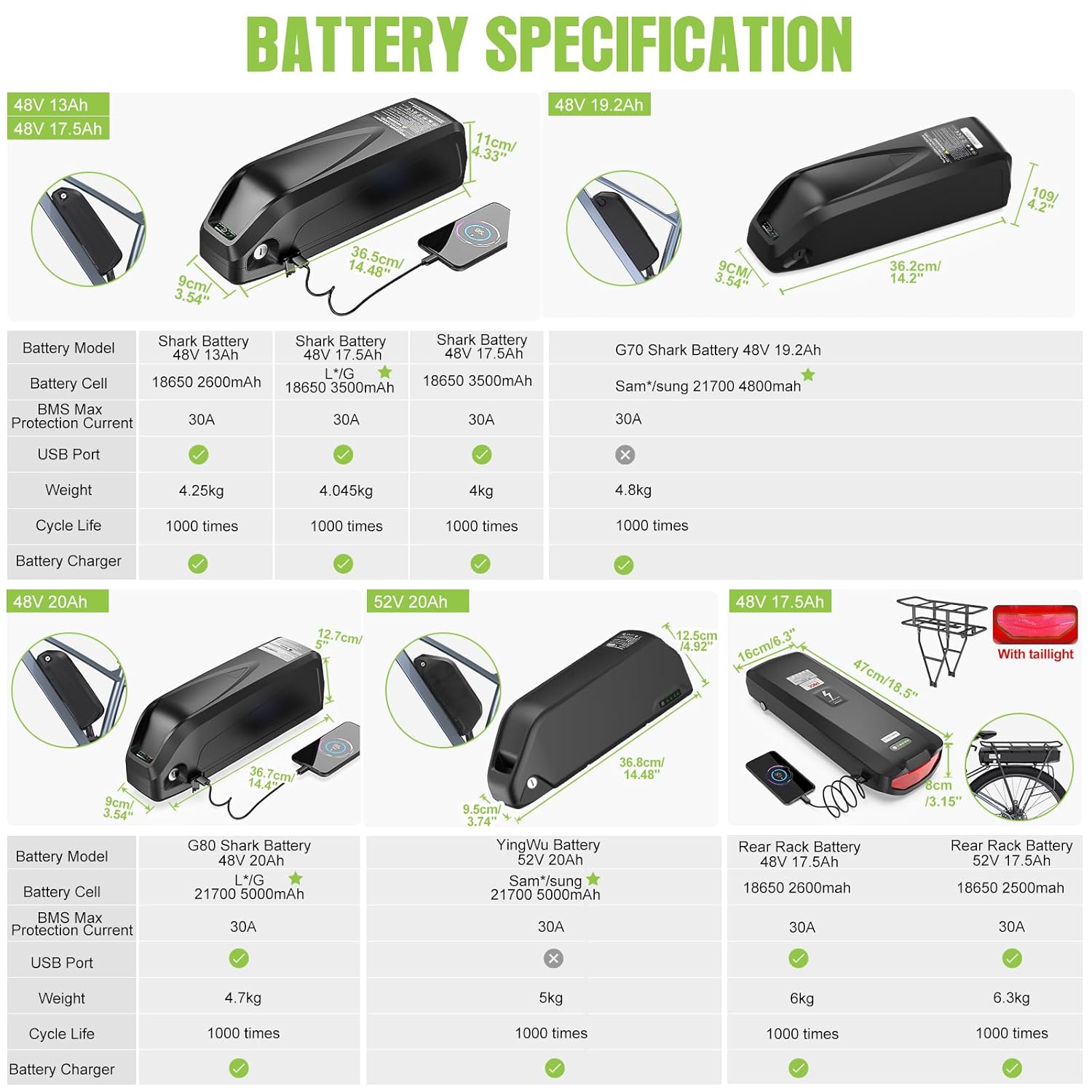
Figure 2.3: Optional LCD Display Specifications.

Figure 2.4: Optional Battery Specifications.
3. Packing List
Upon receiving your BAFANG conversion kit, please verify that all components listed below are present and undamaged. If any items are missing or damaged, contact customer support immediately.
- Front Hub Motor with Wheel (1 PC)
- Motor Controller (1 PC)
- Brake Lever (default) or Hydraulic Brake Sensor (1 Pair)
- Thumb Throttle (1 PC)
- PAS Sensor (1 PC)
- 1T4 Cable (1 PC)
- Headlight (1 PC)
- Controller Box (1 PC)
- Sticker (1 PC)
- Plastic Straps (Several)
- Optional: Ebike Display (1 PC)
- Optional: Battery with Charger (1 PC)

Figure 3.1: Visual Representation of Packing List Components.
4. Installation and Setup
This section outlines the general steps for installing the BAFANG front hub motor conversion kit. For detailed visual instructions, please refer to the official installation video provided by BAFANG or Greenergia. Ensure your bicycle is compatible with a 100mm front dropout and either V-brake or disc brake systems.
4.1 Safety Precautions
- Always disconnect the battery before performing any installation or maintenance.
- Wear appropriate safety gear, including gloves and eye protection.
- Ensure your workspace is clean, well-lit, and free of obstructions.
- If you are unsure about any step, seek professional assistance.
4.2 Installation Steps
- Prepare Your Bicycle: Remove the existing front wheel from your bicycle. Ensure the front fork dropout width is 100mm.
- Install the Front Hub Motor Wheel: Carefully insert the BAFANG front hub motor wheel into the front fork dropouts. Secure it firmly using the provided axle nuts. Ensure the motor cable is routed correctly and not pinched.
- Mount the Controller Box: Find a suitable location on your bike frame for the controller box, typically near the battery or motor. Secure it using the provided straps or mounting hardware.
- Install Brake Levers/Sensors: Replace your existing brake levers with the new ones provided, or install the brake sensors if using your original levers. Connect the brake cables/hoses and adjust for proper braking function. These components are designed to cut off motor power when brakes are applied.
- Install Thumb Throttle: Mount the thumb throttle on your handlebar in a comfortable position.
- Install PAS Sensor: Attach the Pedal Assist System (PAS) sensor to your bicycle's bottom bracket area. Ensure the magnet disc is properly aligned with the sensor.
- Install Display (Optional): Mount the LCD display on your handlebar.
- Install Headlight: Mount the headlight on your bicycle and connect it.
- Connect Wiring: Refer to the wiring diagram to connect all components: motor to controller, controller to battery, brake levers/sensors to controller, throttle to controller, PAS sensor to controller, display to controller, and headlight to controller. Ensure all connections are secure and waterproof.
- Install Battery (Optional): Mount the battery securely on your bike frame, typically on the downtube or rear rack, depending on the battery type. Connect the battery to the controller.

Figure 4.1: Kit Connection Diagram.
5. Operating Instructions
The BAFANG conversion kit offers multiple riding modes for versatile use.
5.1 Riding Modes
- E-bike Mode (Throttle Only): Use the thumb throttle to control the motor's power directly, without pedaling. This mode is ideal for effortless cruising or when you need an extra boost.
- Pedal-Assisted Bicycle Mode (PAS): The motor provides assistance as you pedal. The level of assistance can be adjusted via the LCD display (if equipped). This mode extends battery range and reduces rider fatigue.
- Push-Assisted Bicycle Mode: This mode provides low-speed assistance for walking the bike, useful when pushing the bike uphill or through crowded areas. Consult your display manual for activation.
- Normal Bicycle Mode: The motor is off, and the bike functions as a standard pedal bicycle.
5.2 Display Operation (If Applicable)
If your kit includes an LCD display, refer to its specific manual for detailed operation. Common functions include:
- Power On/Off
- Adjusting Pedal Assist Levels (PAS)
- Viewing Speed, Distance, Battery Level
- Controlling Headlight
- Accessing Settings (e.g., wheel size, speed limit)
5.3 First Ride Checklist
- Ensure all connections are secure.
- Check tire pressure.
- Verify brake functionality.
- Test throttle and PAS functions in a safe, open area.
- Familiarize yourself with the display controls.
6. Maintenance
Regular maintenance ensures the longevity and optimal performance of your BAFANG conversion kit. Always disconnect the battery before performing any maintenance.
6.1 General Care
- Cleaning: Use a damp cloth to wipe down the motor, controller, and battery. Avoid high-pressure washing directly on electrical components.
- Connections: Periodically check all electrical connections for tightness and corrosion. Ensure waterproof connectors are properly sealed.
- Cables: Inspect all cables for wear, fraying, or damage. Replace damaged cables immediately.
6.2 Battery Care
- Charging: Use only the charger provided with your battery. Do not overcharge or deep discharge the battery.
- Storage: Store the battery in a cool, dry place, away from direct sunlight and extreme temperatures. If storing for extended periods, charge the battery to 50-70% capacity every 2-3 months.
- Water Protection: While the kit has an IPX5 waterproof rating, avoid submerging the motor or exposing the battery to heavy rain or water jets.
6.3 Motor and Wheel
- Spokes: Check spoke tension periodically, especially after the first few rides.
- Bearings: The motor bearings are sealed and generally maintenance-free. If you notice unusual noises, consult a professional.
7. Troubleshooting
This section provides solutions to common issues you might encounter. For problems not listed here, please contact customer support.
| Problem | Possible Cause | Solution |
|---|---|---|
| Motor not working | Battery low or disconnected; Loose electrical connections; Brake levers engaged; Faulty throttle/PAS sensor. | Check battery charge and connection; Inspect all cables and connectors; Ensure brake levers are fully released; Test throttle and PAS sensor. |
| Display not turning on | Battery off or low; Loose display cable connection. | Turn on battery and check charge; Reconnect display cable securely. |
| Motor cuts out intermittently | Loose connections; Overheating; Battery issue. | Check all connections; Allow motor to cool down; Check battery health. |
| PAS not providing assistance | PAS sensor misaligned or damaged; PAS level set to zero. | Check PAS sensor alignment and connection; Increase PAS level on display. |
8. Warranty and Support
BAFANG products are manufactured to high quality standards. For warranty information and customer support, please refer to the warranty card included with your product or visit the official BAFANG website. As an officially authorized shop, Greenergia provides support and genuine products.
For technical assistance or inquiries, please contact your seller or the BAFANG customer service directly. Provide your model number (FM G020.500.D) and purchase details for faster service.
You can also visit the BAFANG Store on Amazon for more information and product offerings.
Related documentsFM G020.500.D


Ask a question about this manual
Ask about setup, troubleshooting, compatibility, parts, safety, or missing instructions. Manuals+ will review the question and use this page’s manual context to help answer it.