
1. Introduction
Thank you for choosing JOYLIT COB RGB LED Strip Lights. This product features advanced Chip-on-Board (COB) technology, providing a super bright, dotless, and continuous lighting effect. With 8400 LEDs over 32.8 feet, these strips offer high density illumination, 180-degree beam angle, and are fully dimmable with multi-color changing capabilities. This manual provides essential information for safe installation, operation, and maintenance of your LED strip lights.
2. Safety Information
- This product is designed for indoor use only (IP20 rated). Do not expose to moisture or outdoor elements.
- Ensure the power supply is disconnected before installation or maintenance.
- A DC 24V 120W power supply and an RGB LED controller are required and sold separately. Ensure all components are compatible and meet the specified voltage and wattage requirements.
- Do not connect the LED strip directly to AC power.
- Avoid bending the strip sharply or applying excessive force, which may damage the LEDs or circuit board.
- When cutting the strip, always cut at the designated cut marks.
- Do not touch the exposed PCB (Printed Circuit Board) at the end of the LED strip when connecting wires.
3. Package Contents
- 1 x JOYLIT 32.8FT COB RGB LED Strip Light (Model: COB-84010M-RGB)
Note: A 24V 120W power supply and an RGB LED controller are not included and must be purchased separately.
4. Specifications
| Feature | Specification |
|---|---|
| Model Number | COB-84010M-RGB |
| Length | 32.8 Feet (10 meters) |
| LED Type | COB (Chip on Board) RGB |
| LED Quantity | 8400 LEDs (840 LEDs/meter) |
| Voltage | DC 24V |
| Wattage | 100 Watts (14W/meter) |
| Color | RGB (Red, Green, Blue) |
| Dimmable | Yes (with compatible controller) |
| Beam Angle | 180 degrees |
| Waterproof Rating | IP20 (Non-waterproof, Indoor use only) |
| Cuttable Interval | Every 2 inches (5 cm) |
| PCB Width | 10mm |
| Lifespan | 65,000 hours |
| Material | Copper PCB |
5. Setup and Installation
5.1 Components Required (Not Included)
- DC 24V 120W Power Supply
- RGB LED Controller (PWM, WIFI, or DMX compatible)
5.2 Installation Steps
- Prepare the Surface: Ensure the installation surface is clean, dry, and smooth for optimal adhesion.
- Measure and Cut: Measure the desired length for your installation. The LED strip can be cut every 2 inches (5 cm) at the designated cut marks. Always cut at these specific points to avoid damaging the circuit.

Image: Close-up view of JOYLIT COB RGB LED strip showing cut marks every 5cm (2 inches) and the 3M adhesive backing. This image highlights the flexibility and cut points of the strip.
- Adhesion: Peel off the backing from the 3M adhesive tape on the back of the LED strip. Carefully press the strip onto the desired surface, ensuring firm contact along its entire length.

Image: Step-by-step guide demonstrating how to cut the LED strip at designated marks and reconnect using a 4-pin 10mm RGB LED strip connector. This shows the process for customizing strip length.
- Wiring (Single Strip): Connect the LED strip to your RGB LED controller and then to the 24V power supply. Ensure correct polarity (Red, Green, Blue, and Positive (+) wires).

Image: Diagram illustrating the connection of a single RGB LED strip to a 24V power supply and an RGB LED controller.
- Wiring (Multiple Strips): For installations requiring multiple strips, use an RGB amplifier and additional 24V power supplies as shown in the diagram below to maintain consistent brightness and color.

Image: Wiring diagram for connecting multiple JOYLIT COB RGB LED strips using an RGB LED controller, RGB amplifier, and 24V power supplies.
- Important Connection Note: When connecting wires to the LED strip, ensure that the wires are properly stripped and inserted into the connector without touching the exposed PCB.
Video: Important safety and installation video demonstrating how to handle the wires at the end of the LED strip, emphasizing not to touch the PCB directly.
6. Operating Instructions
6.1 Power On/Off
Once properly connected to a power supply and controller, use the controller to power the LED strip on or off.
6.2 Color Changing and Dimming
The JOYLIT COB RGB LED strip lights are fully dimmable and capable of producing a wide range of colors. Use your compatible RGB LED controller to:
- Adjust brightness levels.
- Select from various static colors (Red, Green, Blue, and mixed colors).
- Choose dynamic modes such as flash, strobe, or fading effects.
Video: A demonstration of the JOYLIT COB RGB LED strip lights changing colors in different indoor environments, highlighting their versatility.
6.3 Dotless Illumination
The COB technology ensures a continuous, uniform light output without visible individual LED dots, providing a smooth and aesthetic lighting experience.
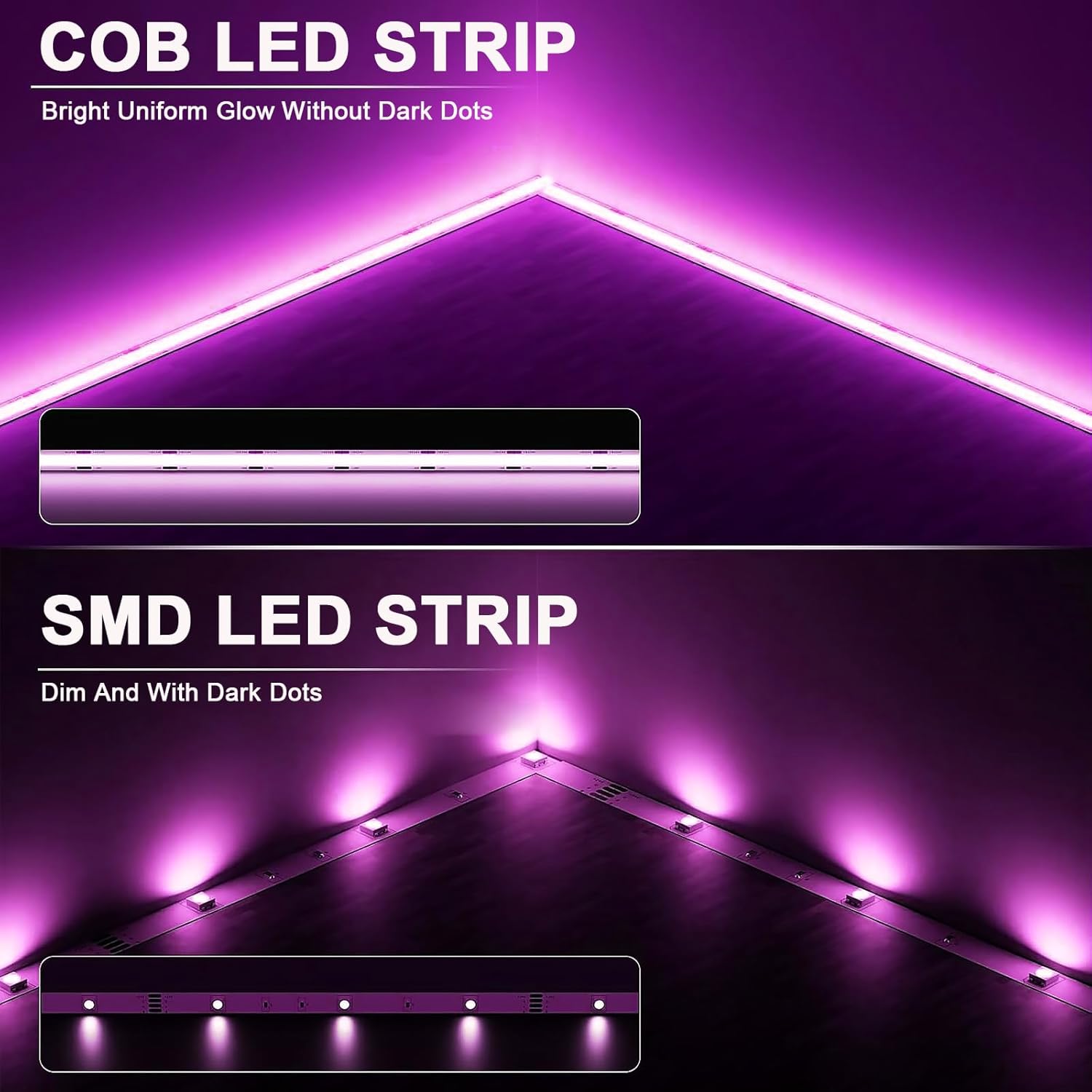
Image: Comparison image illustrating the seamless, dotless illumination of COB LED strips versus the visible individual LED dots of traditional SMD LED strips.
Video: This video demonstrates the smooth, dotless illumination of the JOYLIT COB RGB LED strip lights, showcasing their continuous light output.
7. Maintenance
- Cleaning: Gently wipe the LED strip with a dry, soft cloth. Do not use abrasive cleaners or solvents. Ensure the strip is powered off and cool before cleaning.
- Adhesive Check: Periodically check the adhesive to ensure the strip remains securely attached. Reapply or reinforce if necessary.
- Lifespan: The LED strip has an average lifespan of 65,000 hours under normal operating conditions.
8. Troubleshooting
- Lights not turning on:
- Check if the power supply is properly connected and receiving power.
- Verify that the LED controller is correctly wired to both the power supply and the LED strip, ensuring correct polarity.
- Ensure the controller is turned on and set to an active mode.
- Inconsistent brightness or color:
- Ensure the power supply wattage is sufficient for the total length of the LED strip(s) connected.
- If using multiple strips, confirm that RGB amplifiers and additional power supplies are correctly installed as per the multi-roll wiring diagram.
- Check for loose connections between the strip, controller, and power supply.
- Strip detaching from surface:
- Ensure the surface was clean and dry before initial installation.
- Reinforce with additional adhesive clips or stronger adhesive tape if needed.
9. Warranty and Support
For warranty information or technical support, please contact JOYLIT customer service or refer to the product packaging for specific details. You can also visit the official JOYLIT store on Amazon for more information: JOYLIT Store.