
1. Introduction
Thank you for choosing the JBL Charge 5 Portable Bluetooth Speaker. This manual provides essential information for setting up, operating, and maintaining your speaker to ensure optimal performance and longevity. The JBL Charge 5 is designed for powerful sound and features IP67 waterproofing and dustproofing, making it suitable for various environments. It also includes a convenient USB charge-out function for your devices.
2. What's in the Box
- JBL Charge 5 Portable Bluetooth Speaker
- Megen Hardshell Travel Case
- USB-C Charging Cable
- Quick Start Guide (separate document)
- Safety Sheet (separate document)

Image: JBL Charge 5 speaker, in Camo color, shown inside its protective Megen hardshell travel case.
3. Product Overview
3.1 Controls and Indicators
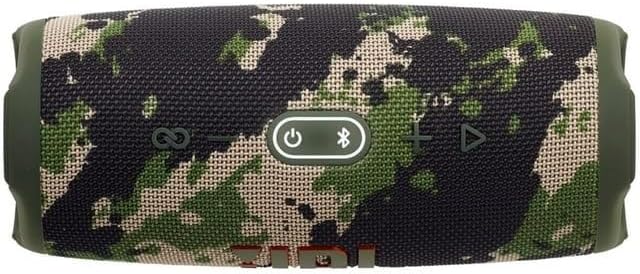
Image: Top view of the JBL Charge 5 speaker, displaying the control panel. From left to right, buttons include PartyBoost, Volume Down, Power, Bluetooth Pairing, Volume Up, and Play/Pause.
- PartyBoost Button: Connects to other JBL PartyBoost compatible speakers.
- Volume Down Button: Decreases audio volume.
- Power Button: Turns the speaker on or off.
- Bluetooth Button: Initiates Bluetooth pairing mode.
- Volume Up Button: Increases audio volume.
- Play/Pause Button: Controls audio playback.
- Battery Indicator: LED strip on the front shows battery charge level.
3.2 Ports

Image: Rear view of the JBL Charge 5 speaker with the protective flap open, revealing the USB-C charging port and the USB-A charge-out port.
- USB-C Charging Port: For charging the JBL Charge 5 speaker.
- USB-A Charge Out Port: For charging external devices from the speaker's battery.
4. Setup
4.1 Charging the Speaker
- Open the protective flap on the rear of the speaker.
- Connect the provided USB-C charging cable to the USB-C port on the speaker.
- Connect the other end of the USB-C cable to a compatible USB power adapter (not included).
- The battery indicator LED strip will illuminate to show charging status. A full charge takes approximately 4 hours.
4.2 Powering On/Off
- To power on, press the Power Button. The speaker will emit a startup sound, and the battery indicator will light up.
- To power off, press and hold the Power Button until the speaker emits a shutdown sound and the lights turn off.
4.3 Bluetooth Pairing
- Power on the JBL Charge 5 speaker.
- Press the Bluetooth Button on the top of the speaker. The Bluetooth indicator will flash, indicating pairing mode.
- On your smartphone or tablet, navigate to the Bluetooth settings.
- Select "JBL Charge 5" from the list of available devices.
- Once connected, the Bluetooth indicator will remain solid, and the speaker will emit a confirmation sound.
5. Operating Instructions
5.1 Audio Playback
- After successful Bluetooth pairing, start playing audio from your connected device.
- Use the Play/Pause Button on the speaker to control playback.
- Press the Volume Up or Volume Down buttons to adjust the speaker's volume.
5.2 PartyBoost Feature
PartyBoost allows you to connect multiple JBL PartyBoost compatible speakers together for a stereo sound experience or to amplify the sound across a larger area.
- Ensure both JBL PartyBoost compatible speakers are powered on.
- Connect one speaker to your device via Bluetooth.
- Press the PartyBoost Button on both speakers. They will automatically connect.
5.3 USB Charge Out
The JBL Charge 5 can charge external devices using its built-in battery.
- Open the protective flap on the rear of the speaker.
- Connect your device's charging cable (USB-A end) to the USB-A port on the JBL Charge 5.
- The speaker will begin charging your device.
5.4 Waterproof and Dustproof (IP67)
The JBL Charge 5 is rated IP67, meaning it is fully waterproof and dustproof. It can be submerged in up to 1 meter of water for up to 30 minutes. Ensure the protective flap covering the charging ports is securely closed before exposing the speaker to water or dust.
6. Maintenance
6.1 Cleaning
- Before cleaning, ensure the speaker is powered off and all cables are disconnected.
- Wipe the speaker with a soft, damp cloth. Do not use abrasive cleaners or solvents.
- If exposed to saltwater, rinse the speaker with fresh water and allow it to air dry completely before charging or using the ports.
6.2 Storage
- Store the speaker in a cool, dry place away from direct sunlight and extreme temperatures.
- For long-term storage, charge the battery to approximately 50% to prolong its lifespan.
- Utilize the provided Megen Hardshell Travel Case for protection during storage and transport.
6.3 Battery Care
- Avoid fully discharging the battery frequently.
- Do not expose the speaker to temperatures above 45°C (113°F) or below -20°C (-4°F).
- If the speaker will not be used for an extended period, charge it at least once every three months.
7. Troubleshooting
| Problem | Possible Cause | Solution |
|---|---|---|
| Speaker does not power on. | Battery is depleted. | Connect the speaker to a power source using the USB-C cable and charge it. |
| Cannot pair via Bluetooth. | Speaker is not in pairing mode or device is too far. | Press the Bluetooth button on the speaker. Ensure your device's Bluetooth is on and within 10 meters. Forget "JBL Charge 5" on your device and try pairing again. |
| No sound or low volume. | Volume is too low on speaker or device, or device is not connected. | Increase volume on both the speaker and your connected device. Verify Bluetooth connection. |
| PartyBoost not working. | Speakers are not PartyBoost compatible or not in pairing mode. | Ensure all speakers are JBL PartyBoost compatible. Press the PartyBoost button on all speakers to initiate connection. |
| External device not charging. | Speaker battery is low or cable is faulty. | Ensure the JBL Charge 5 has sufficient battery charge. Try a different USB-A cable. |
8. Specifications
| Feature | Detail |
|---|---|
| Model Name | Charge5 |
| Speaker Type | Outdoor |
| Waterproof Rating | IP67 |
| Connectivity | Bluetooth 5.1 |
| Bluetooth Range | Up to 10 meters (33 feet) |
| Output Power | 20 Watts RMS |
| Audio Driver Size | 52 mm Woofer, 20 mm Tweeter |
| Battery Type | Lithium-ion Polymer |
| Battery Capacity | 7.5 Ah |
| Charging Time | Approximately 4 hours (5V/3A) |
| Music Playtime | Up to 20 hours (varies by volume level and audio content) |
| Product Dimensions (W x H x D) | 10" x 5" x 5" (approx. 25.4 cm x 12.7 cm x 12.7 cm) |
| Item Weight | 1.78 kg (3.91 lbs) |
| USB Charge Out | Yes |
9. Warranty and Support
9.1 Warranty Information
JBL products are manufactured to the highest standards and are covered by a limited warranty against defects in materials and workmanship. The specific terms and duration of your warranty may vary by region. Please refer to the warranty card included with your product or visit the official JBL website for detailed warranty information.
9.2 Customer Support
For technical assistance, product inquiries, or warranty claims, please visit the official JBL support website or contact your local JBL customer service representative. You can find contact information and frequently asked questions at www.jbl.com/support.


