
Introduction
Thank you for choosing the JLab JBuds Lux ANC Wireless Headphones. This manual provides essential information for setting up, operating, maintaining, and troubleshooting your new headphones. Please read it carefully to ensure optimal performance and longevity of your device.

Figure 1: JLab JBuds Lux ANC Wireless Headphones, Sage color.
Setup
1. Included Components
- JLab JBuds Lux ANC Wireless Headphones
- USB-C Charging Cable
- User Manual (this document)
2. Charging Your Headphones
- Locate the USB-C charging port on your headphones.
- Connect the provided USB-C cable to the headphones and a compatible USB power source.
- Allow approximately 2.5 hours for a full charge. A full charge provides up to 70 hours of playtime (40+ hours with Active Noise Cancelling on).
3. Bluetooth Pairing
- Ensure your headphones are powered off.
- Press and hold the power button until the LED indicator flashes blue and red, indicating pairing mode.
- On your device (smartphone, tablet, laptop), go to Bluetooth settings and select "JBuds Lux ANC" from the list of available devices.
- Once connected, the LED indicator will turn solid blue.
- For Android devices, Google Fast Pair allows for effortless pairing.
4. JLab App Customization
Download the JLab App from your device's app store to customize your sound experience. The app allows you to adjust ANC/Be Aware settings, touch controls, sound preferences (JLab Signature, Balance, Bass Boost), and set safe hearing volume limits. You can also receive software updates through the app.

Figure 2: Customizing settings via the JLab App.
Operating Your Headphones
1. Controls
The headphones feature intuitive button and app controls. Refer to the included quick start guide for a detailed diagram of button functions for playback, volume, calls, and mode switching.
2. Smart Active Noise Cancelling (ANC) & Be Aware Mode
Activate Smart Active Noise Cancelling to eliminate external distractions up to 35 dB, providing an immersive audio experience. Switch to Be Aware mode to allow ambient sounds to pass through, keeping you connected to your surroundings for safety or convenience.

Figure 3: Utilizing Smart ANC and Be Aware Mode.
3. Spatial Audio Compatibility
Experience immersive sound with Spatial Audio, compatible with applications such as Dolby Atmos, Tempest 3D AudioTech, and Windows Sonic. This feature enhances audio depth and clarity, making you feel part of the action.
4. Bluetooth Multipoint & Wireless Share Mode
- Bluetooth Multipoint: Seamlessly connect to and toggle between two devices simultaneously, such as your phone and laptop, for added convenience.
- Wireless Share Mode: Share audio wirelessly between two JBuds Lux headphones, allowing two users to listen to the same content.
5. Crystal Clear Calls
Equipped with cutting-edge noise-canceling microphones, these headphones ensure clear and uninterrupted communication during calls. External disturbances are minimized for an impeccable conversation experience.

Figure 4: Clear communication with noise-canceling microphones.
Comfort & Design
1. Cloud Foam Comfort
The Form-Fit Earcups are ergonomically shaped to the natural outline of the ear. The 1-inch Cloud Foam cushions and adjustable hinges provide customized comfort for extended wear during travel, workouts, or commutes.

Figure 5: Detailed view of Cloud Foam earcups for ultimate comfort.
2. Foldable Design
The headphones feature a foldable design with rotating earcups, making them easy to store and carry, enhancing portability for on-the-go use.
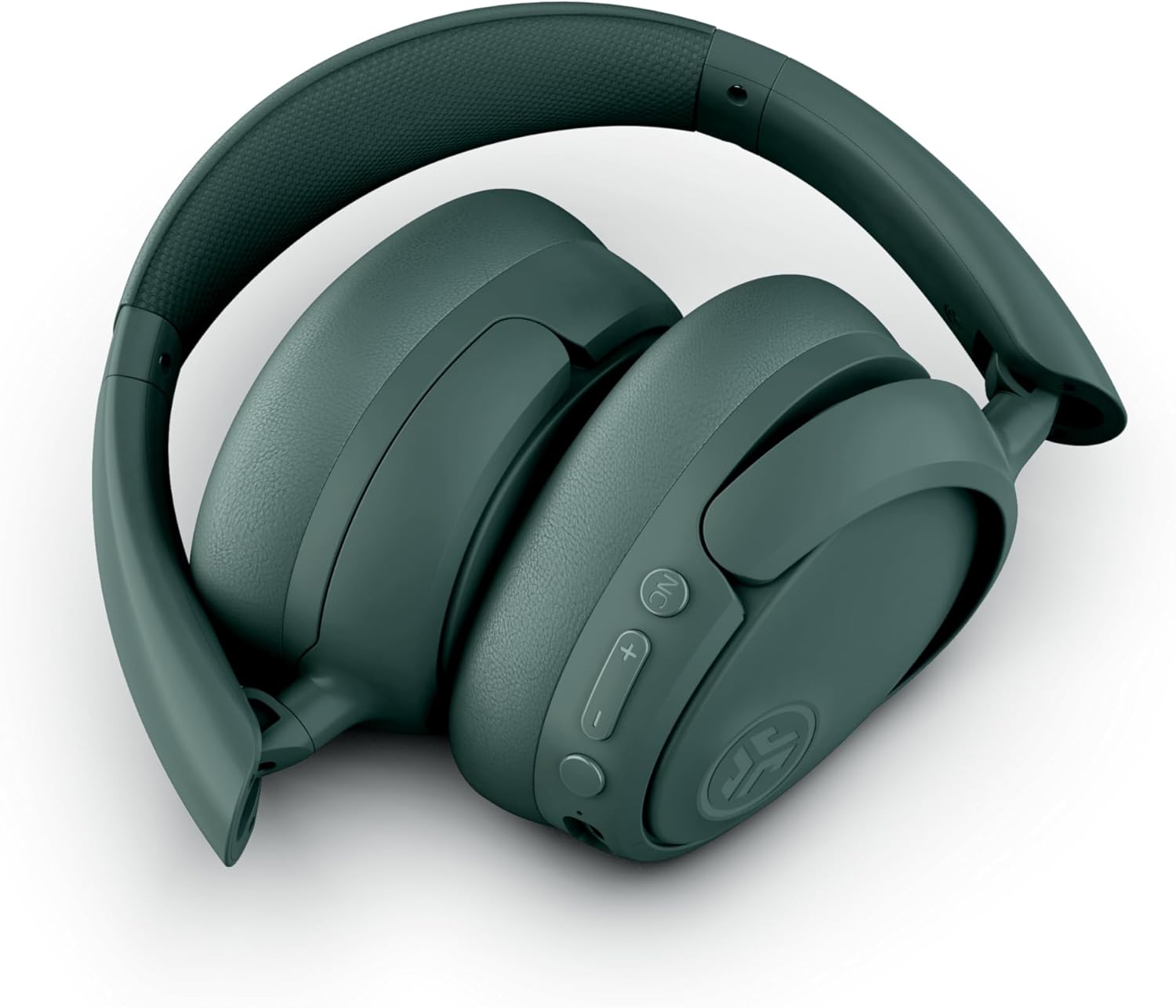
Figure 6: Foldable design for easy storage and portability.
Maintenance
- Cleaning: Use a soft, dry cloth to clean the headphones. Avoid using harsh chemicals or abrasive materials.
- Storage: When not in use, store the headphones in a cool, dry place, preferably in their folded position to protect them from damage.
- Water Resistance: The headphones are water resistant. Avoid submerging them in water or exposing them to excessive moisture.
Troubleshooting
- No Power: Ensure the headphones are fully charged.
- Cannot Pair: Make sure Bluetooth is enabled on your device and the headphones are in pairing mode. Try restarting both devices.
- No Sound: Check the volume levels on both the headphones and your connected device. Ensure the headphones are correctly paired.
- ANC Not Working: Verify that Active Noise Cancelling is enabled via the button on the headphones or through the JLab App.
- Poor Call Quality: Ensure the microphones are not obstructed and you are in an area with good signal strength.
Specifications
| Feature | Detail |
|---|---|
| Model Name | JBuds Lux ANC |
| Connectivity Technology | Wireless (Bluetooth 5.4) |
| Earpiece Shape | Over-Ear |
| Noise Control | Active Noise Cancellation, Be Aware mode |
| Battery Life | Up to 70 Hours (40+ Hours with ANC) |
| Charging Time | 2.5 Hours |
| Bluetooth Range | 10 Meters |
| Control Type | Button and App Control |
| Item Weight | 235 Grams (8.3 ounces) |
| Product Dimensions | 6.13 x 3.23 x 7.47 inches |
| Water Resistance Level | Water Resistant |
| Material | Faux Leather, Plastic |
Warranty and Support
For warranty information, product registration, and technical support, please visit the official JLab website or contact JLab customer service. Details can typically be found on the manufacturer's website or in the product packaging.


