Signia Signia Charge and Go

Signia Silk Charge & Go IX Portable Charger User Manual

Brand: Signia | Model: Signia Charge and Go

1. Introduction

This manual provides comprehensive instructions for the Signia Silk Charge & Go IX portable charger. This device is designed to offer convenient and wireless charging for compatible Signia Silk IX 5 and 7 hearing aids, ensuring they remain powered throughout the day and providing additional charges when away from a power outlet.

2. Safety Information

Please read all safety information carefully before using the Signia Silk Charge & Go IX portable charger. Failure to follow these instructions may result in injury or damage to the device.

  • Do not expose the charger to extreme temperatures, direct sunlight, or high humidity.
  • Do not immerse the charger in water or any other liquids.
  • Do not attempt to open, modify, or repair the charger yourself. Refer all servicing to qualified personnel.
  • Keep the charger out of reach of children and pets.
  • Use only the charging cable and power adapter recommended by Signia.
  • If the charger shows signs of damage, discontinue use immediately.

3. Product Overview

The Signia Silk Charge & Go IX portable charger is a compact and efficient charging solution. Familiarize yourself with its components:

3.1 Charger Components

Signia Silk Charge & Go IX portable charger with lid open, showing empty charging slots.

Image 1: The Signia Silk Charge & Go IX portable charger with its lid open, revealing the two empty charging slots designed for hearing aids. This view highlights the compact and ergonomic design of the charging case.

  • Charging Slots: Two dedicated slots for left (blue) and right (red) hearing aids.
  • LED Indicators: Small lights on the front of the charger that indicate charging status and battery level.
  • USB-C Charging Port: Located on the back or side for connecting the charger to a power source.
  • Lid: Protects the hearing aids and ensures proper contact during charging.

3.2 Closed View

Signia Silk Charge & Go IX portable charger in a closed position, showing its compact and sleek design.

Image 2: The Signia Silk Charge & Go IX portable charger in its closed state. This image emphasizes the device's portability and discreet appearance, suitable for carrying in a pocket or bag.

When closed, the charger is designed to be compact and easily portable, allowing you to carry it with your hearing aids safely stored inside.

4. Setup

4.1 Unboxing and Initial Charge

  1. Carefully remove the charger and all accessories from the packaging.
  2. Connect the provided USB-C cable to the charging port on the charger and the other end to a compatible USB power adapter (not included) or a computer USB port.
  3. Allow the charger to fully charge before first use. The LED indicator will show the charging status (e.g., blinking while charging, solid when fully charged). A full charge typically takes a few hours.

4.2 Inserting Hearing Aids

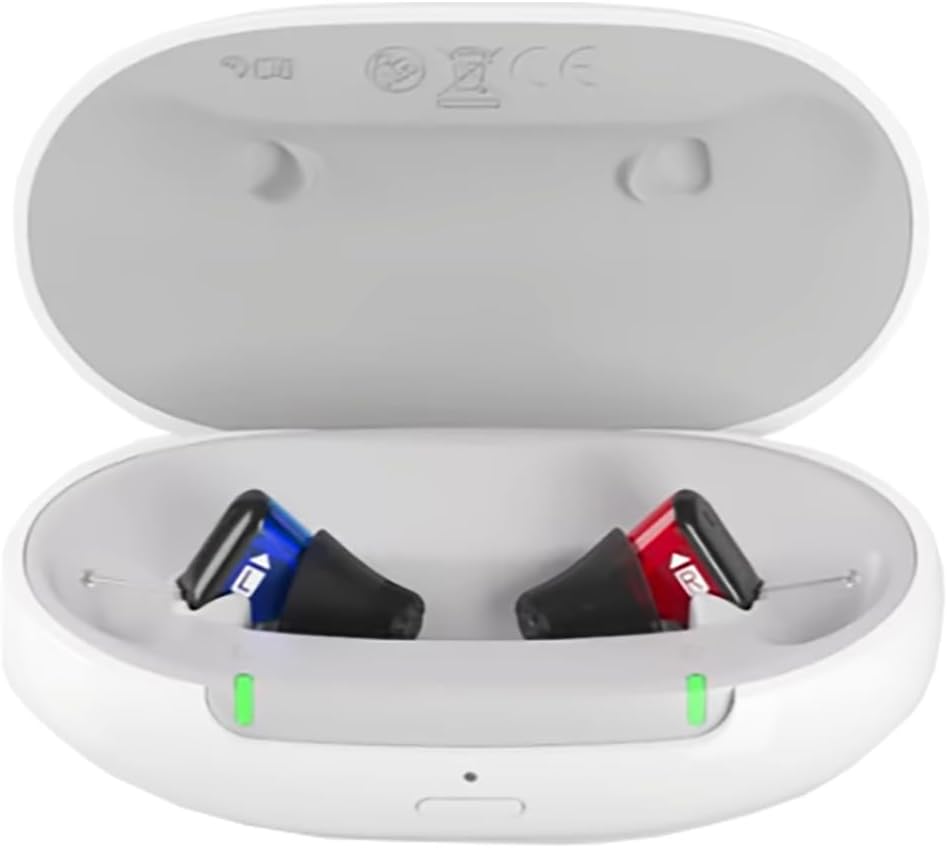
Signia Silk Charge & Go IX portable charger with two hearing aids inserted, showing green indicator lights.

Image 3: The Signia Silk Charge & Go IX portable charger with two Signia Silk IX hearing aids correctly placed in their respective charging slots. Green indicator lights are visible, signifying that the hearing aids are actively charging.

  1. Open the lid of the portable charger.
  2. Identify the left (blue) and right (red) indicators inside the charging slots.
  3. Gently place your Signia Silk IX hearing aids into their corresponding slots. Ensure they are seated correctly and make proper contact with the charging pins.
  4. Close the lid. The hearing aids will automatically begin charging.

5. Operating the Charger

5.1 Charging Hearing Aids

Once hearing aids are correctly placed in the charger and the lid is closed, charging will commence. The LED indicators on the charger will provide feedback:

  • Blinking Green: Hearing aids are charging.
  • Solid Green: Hearing aids are fully charged.
  • Blinking Orange/Red: Low battery on the portable charger itself.

A full charge for the hearing aids typically takes approximately 4 hours. The portable charger can provide up to 4 days of additional charges for your hearing aids on a single full charge of the charger itself.

5.2 Portable Charging

The Signia Silk Charge & Go IX is designed for portability. Once the charger itself is fully charged, you can disconnect it from the power source and use it to charge your hearing aids on the go. Simply place your hearing aids in the charger, close the lid, and they will charge wirelessly using the internal battery of the portable charger.

6. Maintenance

6.1 Cleaning the Charger

  • Ensure the charger is disconnected from any power source before cleaning.
  • Wipe the exterior of the charger with a soft, dry, lint-free cloth.
  • Do not use abrasive cleaners, solvents, or harsh chemicals.
  • Gently clean the charging contacts inside the slots with a dry cotton swab if necessary, ensuring no debris is present.

6.2 Storage

When not in use, store the charger in a cool, dry place, away from direct sunlight and extreme temperatures. If storing for an extended period, ensure the charger has at least a partial charge to maintain battery health.

7. Troubleshooting

If you encounter issues with your Signia Silk Charge & Go IX portable charger, refer to the following common problems and solutions:

  • Charger not powering on or charging:
    • Ensure the USB-C cable is securely connected to both the charger and the power source.
    • Try a different USB port or power adapter.
    • Check if the power outlet is functional.
  • Hearing aids not charging when placed in the charger:
    • Ensure the hearing aids are correctly seated in their respective left/right slots and making proper contact with the charging pins.
    • Verify that the portable charger itself has sufficient battery charge (check its LED indicator).
    • Clean the charging contacts on both the hearing aids and the charger.
    • Ensure the lid is fully closed.
  • LED indicators not working:
    • If the charger is connected to power, ensure the power source is active.
    • If the charger is running on its internal battery, ensure it has charge.
    • If the issue persists, contact customer support.

If these steps do not resolve the issue, please contact Signia customer support or your hearing care professional.

8. Specifications

FeatureSpecification
Product Dimensions1 x 3.5 x 1 inches
Item Model NumberSignia Charge and Go
Connectivity TechnologyUSB
Connector TypeUSB Type C
Compatible DevicesSignia Silk IX 5 & 7 Hearing Aids
Special FeaturePortable Charger
ColorWhite
Total USB Ports1
Wattage10 watts
Number of Items1
MaterialPlastic
ManufacturerWSAUD A/S
ASINB0CRLCHFFR

9. Warranty and Support

9.1 Warranty Information

The Signia Silk Charge & Go IX portable charger comes with a 1-year warranty provided through the manufacturer. Please retain your proof of purchase for warranty claims.

9.2 Customer Support

For technical assistance, troubleshooting beyond this manual, or warranty inquiries, please contact Signia customer support or your authorized Signia hearing care professional. Contact information can typically be found on the manufacturer's official website or through your point of purchase.

Related Documents - Signia Charge and Go

Preview Signia Hearing Aids Comprehensive Catalog 2025 November Edition
Explore the Signia hearing aid comprehensive catalog for 2025, featuring the latest innovations, product lines like Signia IX and AX, historical milestones, advanced features, and care solutions for superior hearing.
Preview Signia Pocket Guide: Hearing Aid Solutions for Government Services & Veterans
Comprehensive guide to Signia hearing aids for Government Services, featuring the Signia Xperience platform, rechargeable models, and product details for veterans. Includes fitting and support information.
Preview Signia Silk C&G IX 送信器 取扱説明書
Signia Silk C&G IX 送信器の安全な使用方法、機能、メンテナンス、トラブルシューティング、保証に関する詳細な情報を提供する取扱説明書です。
Preview Signia Pocket Guide for Government Services
Signia's Pocket Guide details advanced hearing aid solutions, including the Augmented Xperience and Xperience platforms, for veterans and military personnel. It covers product features, fitting information, and support resources.
Preview Signia Silk C&G IX Hearing Aids and Charger User Guide
Comprehensive user guide for Signia Silk C&G IX hearing aids and the Silk Charger. Learn about daily use, charging, maintenance, and troubleshooting for your Signia hearing devices.
Preview Signia Motion C&G SP IX Hearing Aid Quick Start Guide: Setup, Charging, and Care
A comprehensive quick start guide for Signia Motion C&G SP IX hearing aids, covering component identification, turning on/off, insertion, removal, charging, maintenance, user controls, and support resources.