
Introduction
Thank you for choosing the Vieta Pro Karaoke Party Microphone. This device combines a high-quality microphone with an integrated speaker, designed for an engaging karaoke experience. It features True Wireless technology, allowing two microphones to connect to a single device, and offers various sound modes and connectivity options.
Package Contents
- Vieta Pro Karaoke Party Microphone with Integrated Speaker
- Charging Cable (USB-C)
- User Manual

Image: The retail box of the Vieta Pro Karaoke Party Microphone, showing the product and its features.
Product Overview
Familiarize yourself with the main components and controls of your Vieta Pro Karaoke Party Microphone.

Image: Front view of the Vieta Pro Karaoke Party Microphone, highlighting the control buttons for power, volume, mode, and Bluetooth.
Controls and Ports:
- Power Button: Press and hold to turn on/off. Short press to switch modes.
- Volume Buttons (+/-): Adjust speaker volume.
- Mode Button (M): Cycle through sound effects or modes.
- Bluetooth Button: Initiate Bluetooth pairing.
- USB-C Port: For charging the device.
- 3.5mm Audio Jack (Input): Connect external audio sources.
- 3.5mm Audio Jack (Output): Connect headphones or external speakers.
- Light Mode Button: Change or turn off LED lighting effects.
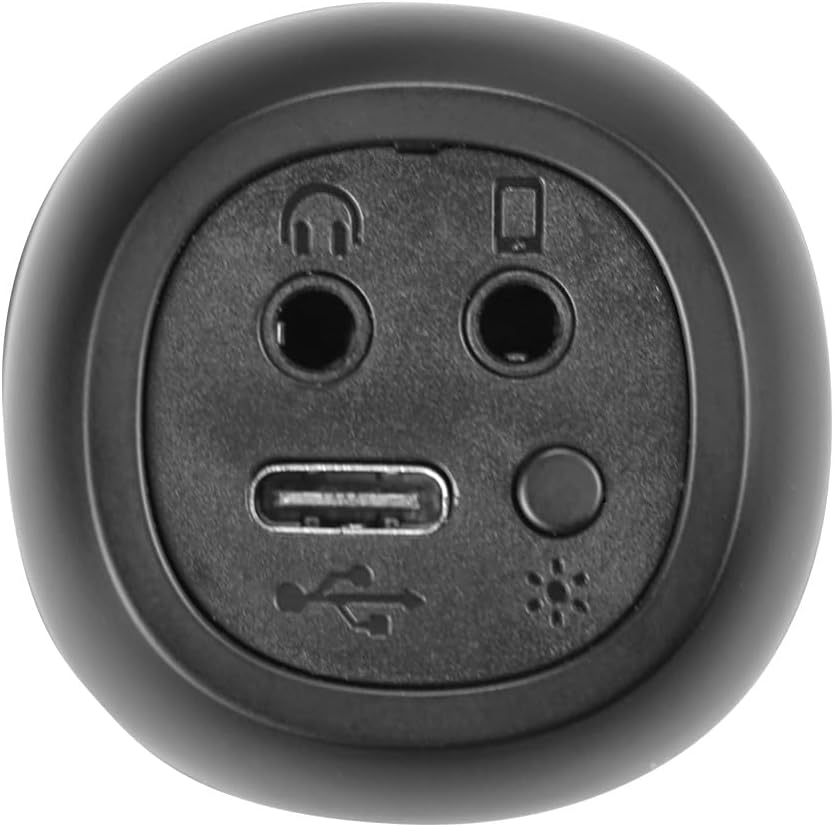
Image: Close-up view of the bottom of the microphone, showing the USB-C charging port, 3.5mm audio input/output jacks, and the light mode button.
Setup and Connection
1. Charging the Microphone
Before first use, fully charge the microphone. Connect the provided USB-C cable to the microphone's USB-C port and the other end to a USB power adapter (not included) or a computer's USB port. The battery indicator light will show charging status.
2. Powering On/Off
Press and hold the Power Button for approximately 3 seconds to turn the microphone on or off. A sound prompt will indicate the power status.
3. Bluetooth Pairing
- Turn on the microphone. It will automatically enter Bluetooth pairing mode, indicated by a flashing Bluetooth light.
- On your smartphone, tablet, or computer, enable Bluetooth and search for available devices.
- Select "Vieta Pro Karaoke Party" from the list of devices.
- Once connected, a sound prompt will confirm successful pairing, and the Bluetooth light will stop flashing.
4. True Wireless Connection (Connecting Two Microphones)
To use two Vieta Pro Karaoke Party microphones simultaneously with one device:
- Ensure both microphones are powered on and not connected to any other Bluetooth device.
- On one microphone (this will be the primary), double-press the Bluetooth Button. It will enter True Wireless pairing mode.
- The primary microphone will search for the second microphone. Once connected, a sound prompt will confirm the True Wireless connection.
- Now, connect the primary microphone to your device via Bluetooth as described in step 3. Both microphones will now output audio from your device.

Image: Two individuals holding and using Vieta Pro Karaoke Party Microphones, demonstrating the True Wireless feature.
5. Wired Connection (AUX)
Connect an external audio source (e.g., MP3 player) to the microphone using a 3.5mm audio cable (not included) plugged into the 3.5mm audio input jack.
Operating Instructions
1. Adjusting Volume
Use the Volume + and Volume - buttons on the microphone to adjust the speaker output volume. You can also control the volume from your connected device.
2. Changing Sound Modes/Effects
Press the Mode Button (M) repeatedly to cycle through the four available sound configuration modes or voice effects. Experiment to find your preferred sound.
3. Voice Reduction Feature
This feature allows you to reduce the vocal track of a song, making it easier to sing along. To activate or deactivate this feature, refer to the specific instructions in the full manual or experiment with the Mode Button (M) or a dedicated button if present (not explicitly detailed in provided data, but mentioned as a feature).
4. Recording
The microphone supports one-touch recording. Connect the microphone to a compatible recording device (e.g., smartphone with a recording app) via Bluetooth or the 3.5mm output jack. Press the dedicated Recording Button (if available, or refer to the full manual for specific button assignment) to start and stop recording.
5. LED Lighting Effects
Press the Light Mode Button (located near the ports at the bottom) to change the LED lighting patterns or turn them off.

Image: Close-up of the Vieta Pro Karaoke Party Microphone's speaker grille, showing the integrated LED lighting effects.
Maintenance
- Cleaning: Use a soft, dry cloth to clean the microphone's surface. Do not use abrasive cleaners or solvents.
- Storage: Store the microphone in a cool, dry place away from direct sunlight and extreme temperatures.
- Battery Care: To prolong battery life, avoid fully discharging the battery frequently. Charge the device regularly, even if not in use for extended periods.
- Water Exposure: This device is not waterproof. Avoid exposure to water or high humidity.
Troubleshooting
| Problem | Possible Cause | Solution |
|---|---|---|
| No power | Battery is depleted. | Charge the microphone using the USB-C cable. |
| Cannot connect via Bluetooth | Bluetooth is off on the device; microphone is already connected to another device; microphone is out of range. | Ensure Bluetooth is enabled on your device. Disconnect from other devices. Move microphone closer to your device (within 10 meters). Restart both devices. |
| No sound output | Volume is too low; microphone is muted; incorrect input source. | Increase volume on both the microphone and your connected device. Check if the microphone is in the correct operating mode. |
| True Wireless connection fails | One or both microphones are already paired; microphones are too far apart. | Ensure both microphones are unpaired from other devices. Place them close to each other during True Wireless pairing. Follow True Wireless pairing steps carefully. |
Specifications
| Feature | Detail |
|---|---|
| Model Name | Karaoke Party |
| Brand | Vieta Pro |
| Connectivity Technology | True Wireless, Bluetooth |
| Connector Type | USB-C, 3.5mm Jack |
| Power Output | 18 W |
| Battery Life | Up to 10 hours |
| Battery Type | 1 Lithium-ion (included) |
| Frequency Range | 50 to 15,000 Hz |
| Impedance | 600 Ohms |
| Polar Pattern | Unidirectional |
| Compatible Devices | Personal Computer, Smartphone |
| Special Features | Volume Control, 1-Touch Recording, Lighting Modes, Battery Indicator, Radio |
| Weight | 337 Grams |
| Material | Plastic |
Warranty and Support
For warranty information and technical support, please contact the manufacturer, FRAMASON AUDIO SA, or your local retailer. Keep your proof of purchase for any warranty claims.
Manufacturer: FRAMASON AUDIO SA


