
1. Introduction
This manual provides comprehensive instructions for the installation, operation, and maintenance of your NALsa Android 12 Autoradio, model M300S 8core 4+32G. Please read this manual carefully before using the product to ensure proper functionality and safety. Keep this manual for future reference.
2. Compatibility
This autoradio is specifically designed for Ford Fiesta MK6 and MK7 models manufactured between 2008 and 2017. Before installation, please ensure your vehicle's central console matches the compatible design. If you are uncertain about compatibility, please contact technical support with a photo of your original central console.

This image illustrates the dashboard of a Ford Fiesta before and after the installation of the NALsa Android 12 Car Stereo. The 'Prima dell'installazione' (Before installation) panel shows the original car stereo slot, while the 'Dopo l'installazione' (After installation) panels display the new Android stereo seamlessly integrated, showing its user interface.
3. Package Contents
Verify that all items listed below are included in your package:
- Android Host Unit (Display)
- Power Cable with Canbus Box
- RCA Cable
- Reverse Camera (HD 720P, complimentary)
- USB Cables (various types)
- Microphone
- GPS Antenna
- 4G Antenna

This image displays the typical contents of the NALsa Android Car Stereo package. It includes the main device, power cable with Canbus box, RCA cable, reverse camera, USB cables (2-pin and 3-pin), microphone, GPS antenna, and 4G antenna. Note that some accessories like the cooling fan connector cable might vary by model (e.g., M90S/95S without it).
4. Product Features and Specifications
4.1 System Overview (M300S Model)
- Operating System: Android 12.0 (API 29)
- CPU: 8-core processor
- Memory: 4GB RAM + 32GB ROM
- Display: 9 or 10-inch 2.5D IPS multi-touch capacitive screen
- Resolution: 1280*720 pixels
- Internet Connectivity: 4G LTE, 5G WiFi, USB, Hotspot
- Bluetooth: Version 5.0 (for music and hands-free calls)
- Amplifier IC: 7851/7850/7838
- Receiver IC: 7708
- Cooling: Powerful cooling fan on the rear
4.2 General Features
- CarPlay & Android Auto: Integrated, supports wired and wireless connections.
- GPS Navigation: Built-in GPS module, supports online and offline maps (GPS, BDS, GLONASS).
- Digital Media Formats: MP3, MP4, MP5, WMA, JPEG.
- Radio Tuner: FM/AM, RDS compatible.
- DSP: Integrated Digital Signal Processor for surround sound adjustment, bass adjustment, and treble filtering.
- Special Features: Built-in speaker, microphone, WiFi function, steering wheel control support, 3G/4G network support.
- Display Features: High-resolution IPS screen for wide viewing angles and rich colors, Picture-in-Picture, Split Screen function.
- Inputs: Rearview camera input, front camera input.
- Language Support: Supports most world languages.
4.3 Optional Features (Requires additional accessories)
- DAB+ (Digital Audio Broadcasting)
- DVR (Digital Video Recorder)
- TPMS (Tire Pressure Monitoring System)
- OBD2 (On-Board Diagnostics)
- Dash Cam

This table provides a detailed comparison of various NALsa car multimedia player models, from M100S to M800S. It outlines differences in Internet connectivity (WiFi, 4G), Operating System (Android 12), API version, CPU core count, RAM/ROM configurations, Bluetooth version, display resolution, screen type (IPS), cooling fan presence, AV output, DSP, and RDS support. The M300S model features 8-core CPU, 4GB RAM + 32GB ROM, 4G LTE/5G WiFi, Bluetooth 5.0, 1280*720 IPS screen, cooling fan, DSP, and RDS.
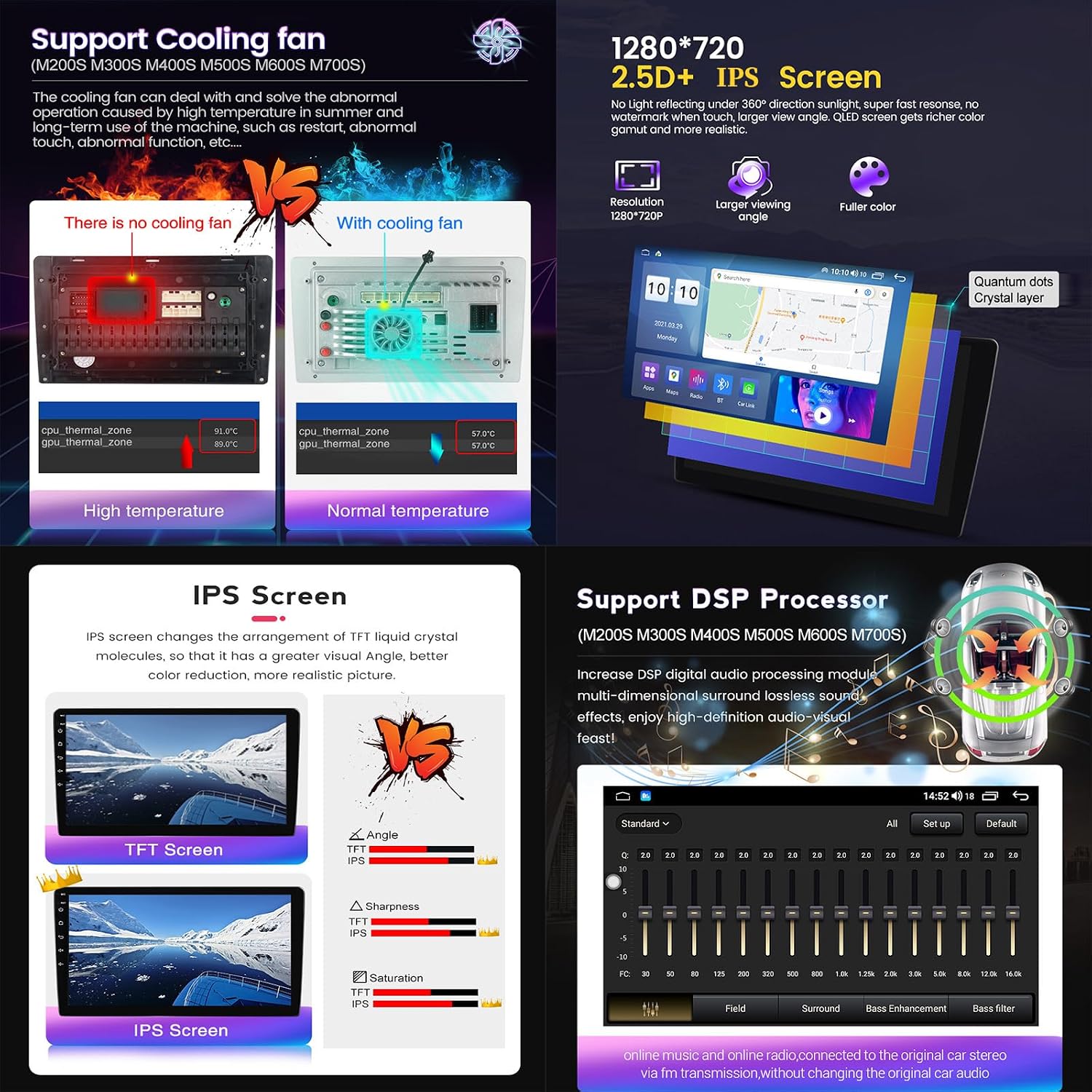
This image showcases advanced features. It compares models with and without a 'Support Cooling fan' (Support Cooling fan), showing temperature differences for CPU and GPU. It details the '1280*720 2.5D+ IPS Screen' with a wider viewing angle and richer color. A comparison between TFT and IPS screens emphasizes the superior color and viewing angle of IPS. Finally, it highlights the 'Support DSP Processor' (Support DSP Processor) for enhanced audio adjustment, including surround sound, bass, and treble filtering.
5. Installation Guide
5.1 Pre-Installation Checks
- Ensure the vehicle's ignition is off and the battery is disconnected before starting installation.
- Confirm the compatibility of the autoradio with your Ford Fiesta MK6/MK7 model (2008-2017).
- Unpack all components and verify against the package contents list.
5.2 Wiring and Connections
Refer to the wiring diagrams provided to correctly connect the power, audio, GPS, 4G, USB, and camera cables. Ensure all connections are secure to prevent malfunctions.

This image details the OCTA CORE CPU architecture (2*ARM Cortex-A75 + 6*ARM Cortex-A55) and Bluetooth 5.0. It also shows connection methods for Wireless CarPlay (via Bluetooth and 'Car Link' app) and Wired Android Auto (via USB cable and 'Car Link' app). Additionally, it provides two wiring diagrams for the back of the host device: one for M200S-M700S models and another for M100S-M150S models, indicating ports for GPS, WiFi, Radio, 4G antenna, USB, RCA, and power.
5.3 Post-Installation
- Reconnect the vehicle battery.
- Turn on the ignition and power on the autoradio.
- Test all functions: touchscreen, audio, radio, GPS, Bluetooth, CarPlay/Android Auto, and camera inputs.
- Adjust settings as needed.
6. Operating Instructions
6.1 Basic Operation
- Power On/Off: Press and hold the power button.
- Touchscreen: Navigate the interface by tapping, swiping, and pinching.
- Steering Wheel Control: Configure steering wheel buttons for common functions (volume, track skip, mode) in the settings menu.
6.2 CarPlay and Android Auto
The M300S model supports both wired and wireless CarPlay and Android Auto.
- Wireless Connection: Enable Bluetooth on your phone and pair with the autoradio. Open the 'Car Link' application on the autoradio and follow the on-screen instructions.
- Wired Connection: Connect your phone to the autoradio via a USB cable. Open the 'Car Link' application and follow the prompts.
6.3 GPS Navigation
Access the GPS application from the main menu. The system supports various online and offline map applications. Ensure the GPS antenna is properly installed for optimal signal reception.
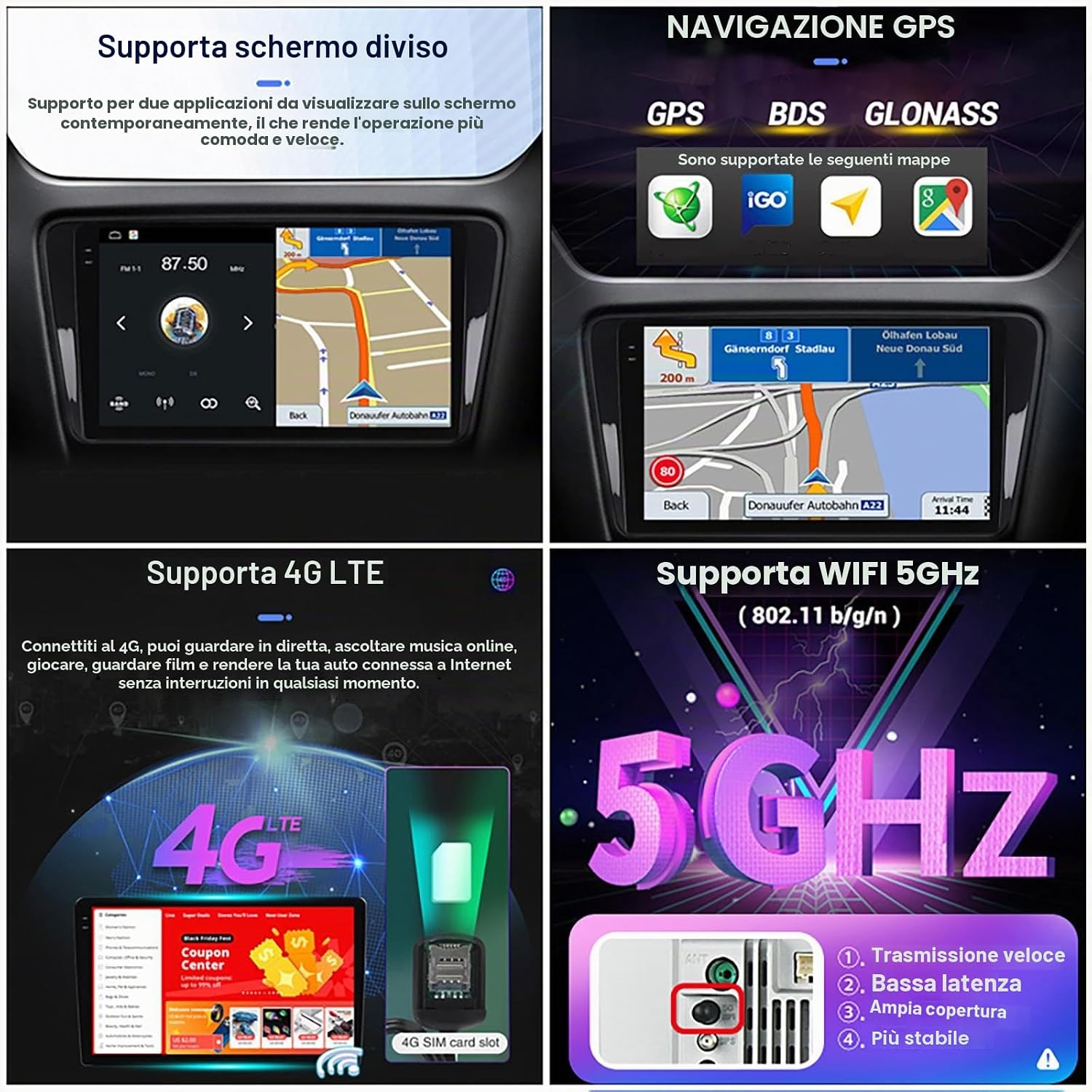
This image highlights key features of the car stereo. It demonstrates the 'Supporta schermo diviso' (Split Screen) function, allowing two applications to run simultaneously. It also shows 'NAVIGAZIONE GPS' (GPS Navigation) with support for GPS, BDS, GLONASS, and various map applications. Furthermore, it illustrates 'Supporta 4G LTE' (4G LTE Support) for internet connectivity and 'Supporta WIFI 5GHZ' (5GHz WiFi Support) for faster and more stable wireless connections.
6.4 Multimedia Playback
Play audio and video files from USB drives. The system supports MP3, MP4, MP5, WMA, and JPEG formats. Use the built-in media player application.
6.5 Radio (FM/AM/RDS)
Select the Radio application to access FM and AM stations. The system is RDS compatible, displaying station information where available.
6.6 Split Screen Function
The split-screen feature allows you to run two applications simultaneously, such as navigation and music playback. Activate this feature through the multitasking menu or by long-pressing an app icon and dragging it to one side of the screen.
7. Maintenance
- Cleaning: Use a soft, dry cloth to clean the screen and unit. Avoid abrasive cleaners or solvents.
- Software Updates: Periodically check for software updates through the system settings to ensure optimal performance and access to new features.
- Temperature: Avoid exposing the unit to extreme temperatures. The built-in cooling fan helps manage internal temperatures during operation.
8. Troubleshooting
- No Power: Check all power connections and vehicle fuses. Ensure the battery is properly connected.
- No Sound: Verify speaker connections. Check volume levels and audio settings (DSP).
- GPS Signal Loss: Ensure the GPS antenna is correctly installed and has a clear view of the sky.
- Touchscreen Unresponsive: Try restarting the unit. If the issue persists, a factory reset might be necessary (note: this will erase all user data).
- CarPlay/Android Auto Not Connecting: Ensure Bluetooth is on and paired for wireless. For wired, try a different USB cable or port. Check the 'Car Link' app settings.
- System Slow/Freezing: Close unnecessary background applications. Clear cache or perform a system restart.
9. Technical Specifications
| Feature | Specification (M300S) |
|---|---|
| Manufacturer | NALsa |
| Product Dimensions | 25 x 35 x 10 cm |
| Operating System | Android 12.0 (API 29) |
| CPU | 8-core |
| RAM | 4GB |
| ROM | 32GB |
| Display Resolution | 1280*720 |
| Display Type | 2.5D IPS Multi-touch Capacitive |
| Internet Connection | 4G LTE, 5G WiFi |
| Bluetooth Version | 5.0 |
| Amplifier IC | 7851/7850/7838 |
| Receiver IC | 7708 |
| Voltage | 12 Volt |
| Wattage | 45 watts |
| Special Features | Built-in GPS, FM/AM Tuner, SWC, Carplay, Android Auto, DSP, Cooling Fan |
10. Support
For technical assistance, installation support, or any questions regarding your NALsa Android Autoradio, please contact our professional pre-sales and after-sales service team. You can reach us via Amazon chat or email. When contacting support, please provide your product model, year of manufacture, and a photo of your central console if the query is about compatibility or installation.