
JOYO JT-09 Clip-on Digital Electronic Tuner Instruction Manual
Model: JT-09
Introduction
The JOYO JT-09 Clip-on Digital Electronic Tuner is a compact and precise tuning device designed for a variety of string instruments. This manual provides essential information for setting up, operating, and maintaining your tuner to ensure accurate and consistent performance.
Features
- Highly Sensitive Tuning: Ensures accurate detection of notes, even in environments with ambient noise.
- Multiple Tuning Modes: Supports Chromatic, Guitar, Bass, Ukulele, and Violin tuning.
- Wide Tuning Range: Covers 0A (27.5Hz) to 8C (4186.01Hz).
- Clear LCD Digital Display: Provides easy-to-read visual feedback for tuning status (flat, in tune, sharp).
- Automatic Shut-off: Conserves battery life by automatically powering down after 5 minutes of inactivity.
- Durable Construction: Made from ABS plastic with a high-quality rubber clamp to protect your instrument.

The JOYO JT-09 tuner is versatile, supporting tuning for a wide range of instruments including guitar, bass, ukulele, and violin, in addition to chromatic tuning.
Setup
- Battery Installation:
Locate the battery compartment on the back of the tuner. Insert one CR2032 coin cell battery, ensuring the correct polarity (+ side up). Close the battery compartment securely.
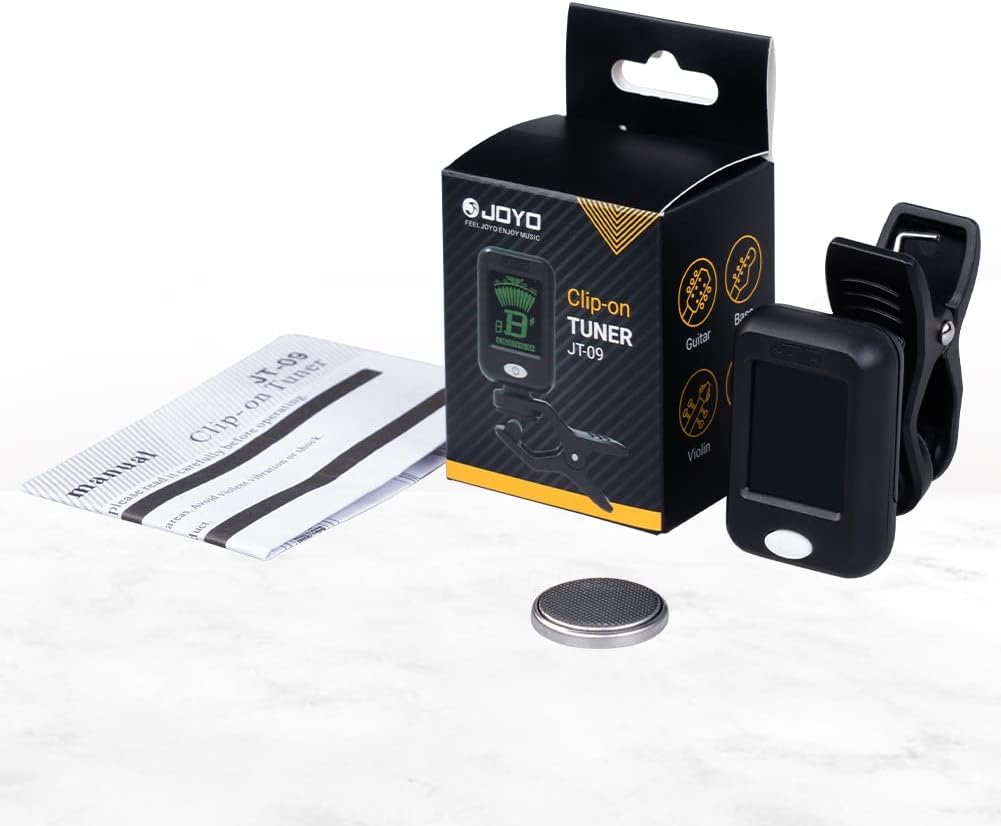
The package includes the JOYO JT-09 clip-on tuner, a CR2032 battery, and a user manual.
- Attaching to Instrument:
Gently open the clip and attach the tuner to the headstock of your instrument. Ensure the rubber pads of the clamp make firm contact with the instrument surface without causing damage. The tuner's display can be rotated 360 degrees and tilted 135 degrees for optimal viewing.

The tuner features a durable rubber-padded clamp to securely attach to your instrument without causing damage.

Designed for optimal viewing, the tuner's display can be tilted up to 135 degrees and rotated 360 degrees, ensuring readability from any angle.
- Power On/Off:
Press and hold the power/mode button (located on the front of the tuner) for approximately 2 seconds to turn the unit on or off. A short press of the button cycles through the tuning modes.
Operating Instructions
- Select Tuning Mode:
With the tuner powered on, short press the power/mode button to cycle through the available tuning modes: Chromatic (C), Guitar (G), Bass (B), Violin (V), Ukulele C (Uc), and Ukulele D (Ud). Select the mode appropriate for your instrument.

The compact design of the JOYO JT-09 tuner makes it convenient for use during practice or performance on instruments like the ukulele.
- Tuning Your Instrument:
Pluck a single string on your instrument. The tuner's display will show the note name and a needle indicator. Adjust the string's tension until the needle is centered and the display turns green. If the needle is to the left and the display is blue, the note is flat; tighten the string. If the needle is to the right and the display is blue, the note is sharp; loosen the string.

The tuner's clear LCD screen provides visual feedback, indicating whether a note is flat (blue), in tune (green), or sharp (blue), guiding the user to perfect pitch.
- Automatic Shut-off:
The tuner will automatically power off after 5 minutes of no signal input, helping to preserve battery life. To reactivate, press and hold the power/mode button.
Maintenance
- Cleaning: Wipe the tuner with a soft, dry cloth. Do not use liquid cleaners or abrasive materials.
- Battery Replacement: When the display dims or the tuner becomes unresponsive, replace the CR2032 battery as described in the Setup section.
- Storage: Store the tuner in a cool, dry place away from direct sunlight and extreme temperatures. Remove the battery if storing for extended periods to prevent leakage.
Troubleshooting
- Tuner does not power on: Check if the battery is correctly installed and has sufficient charge. Replace the battery if necessary.
- Inaccurate tuning: Ensure the tuner is securely clipped to the instrument's headstock. Verify that the correct tuning mode is selected for your instrument. Tune in a quiet environment to avoid interference.
- Display is dim: This indicates a low battery. Replace the CR2032 battery.
Specifications
| Model | JT-09 |
| Tuning Items | Chromatic, Guitar, Bass, Violin, Ukulele C, Ukulele D |
| A4 Frequency | 440Hz |
| Tuning Range | 0A (27.5Hz) - 8C (4186.01Hz) |
| Precision | +/- 1 cent |
| Power Supply | 1 x CR2032 Battery |
| Item Weight | 2.68 ounces (approx. 76g) |
| Product Dimensions | 3.27 x 1.38 x 4.13 inches (approx. 83 x 35 x 105 mm) |
| Material Type | ABS Plastic |

This image provides key technical specifications for the JOYO JT-09 tuner, such as its A4 frequency of 440Hz, tuning modes, tuning range, precision, weight, and dimensions.
Warranty and Support
JOYO Technology is committed to providing reliable products and customer satisfaction.
- Customer Service: Quick replies within 24 hours for any inquiries.
- Return Policy: 30 days no reason to return.
- Warranty: Replacement available within 12 months for product defects.
For further assistance or support, please refer to the contact information provided with your purchase or visit the official JOYO website.