
MSI PRO B760M-P
MSI PRO B760M-P Motherboard User Manual
Model: PRO B760M-P
Introduction
The MSI PRO B760M-P is a Micro-ATX motherboard designed for Intel 14th, 13th, and 12th Gen Core Processors with an LGA 1700 socket. It supports DDR5 memory, features a PCIe 4.0 x16 slot, and includes dual M.2 Gen4 slots for high-speed storage. This manual provides essential information for setting up, operating, maintaining, and troubleshooting your motherboard.

Image: The MSI PRO B760M-P motherboard displayed alongside its retail packaging, showcasing the product's design and branding.
Setup and Installation
Package Contents
Before beginning installation, please verify that all components are present in the package:
- MSI PRO B760M-P Motherboard
- I/O Shield
- SATA Cable
- M.2 Screws
- Quick Installation Guide and Documentation

Image: The MSI PRO B760M-P motherboard laid out with its accompanying accessories, including the I/O shield, SATA cable, and M.2 screws, demonstrating the complete package contents.
Motherboard Overview
Familiarize yourself with the layout and key components of the motherboard:

Image: A top-down view of the MSI PRO B760M-P motherboard, providing a clear perspective of its overall layout, including the CPU socket, DIMM slots, and various connectors.
- CPU Socket (LGA 1700): Supports Intel 14th, 13th, and 12th Gen Core Processors.
- DDR5 DIMM Slots: Four slots for DDR5 memory modules, supporting speeds up to 6800+MHz (OC).
- PCIe 4.0 x16 Slot: Primary slot for graphics cards, reinforced with Steel Armor for durability.
- M.2 Gen4 Slots: Two slots for high-speed NVMe SSDs, with the primary slot featuring Shield Frozr for thermal management.
- SATA 6Gbps Ports: Multiple ports for traditional SATA storage devices.
- Rear I/O Ports: Includes USB 3.2 Gen 2 Type-C, USB 3.2 Gen 1 Type-A, HDMI 1.4, DisplayPort 1.4, VGA, 1Gbps LAN, and 7.1 HD Audio.
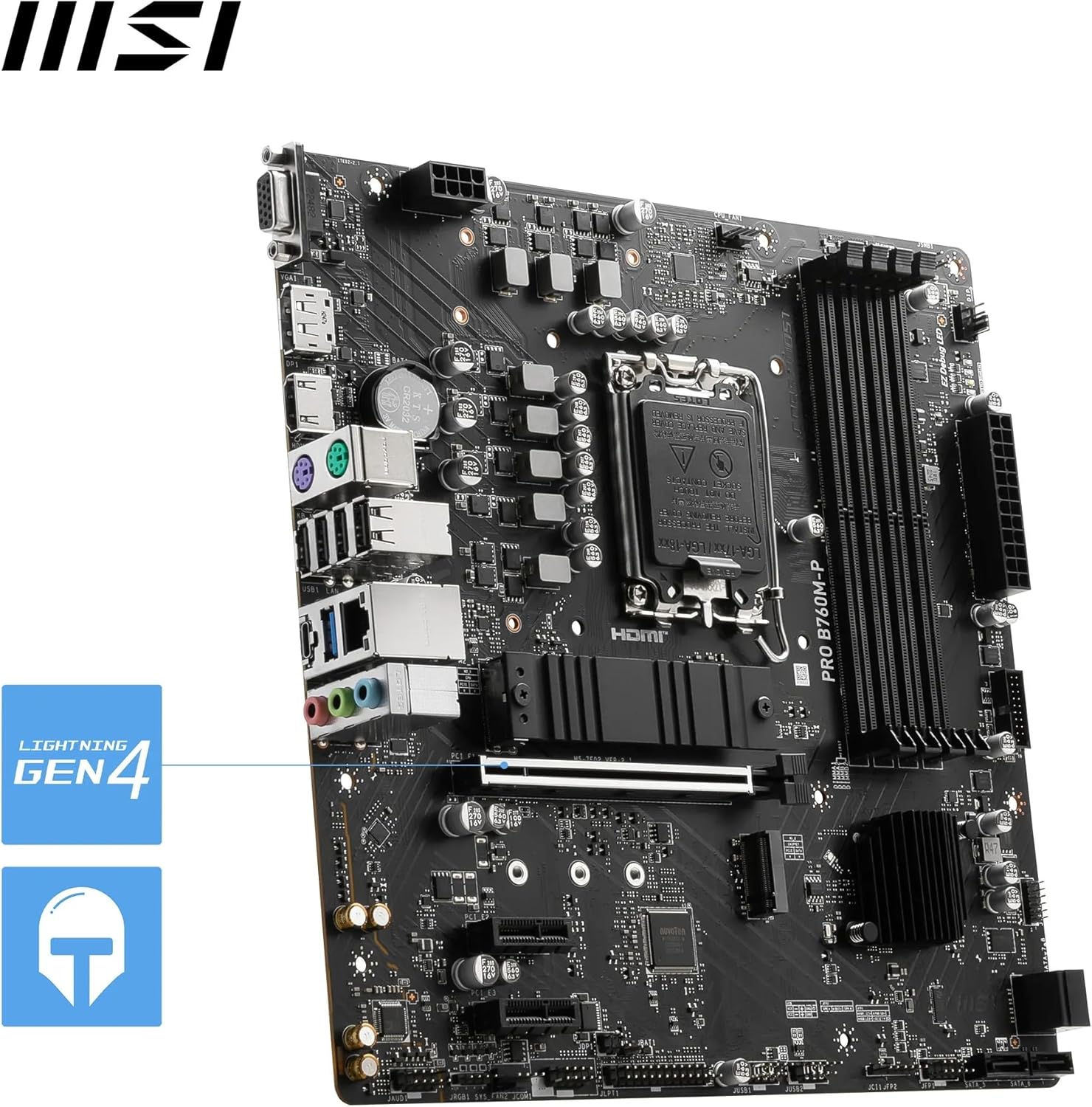
Image: A detailed view of the rear input/output (I/O) panel of the MSI PRO B760M-P motherboard, highlighting the various connectivity options available.
Component Installation
- CPU Installation: Carefully align your Intel LGA 1700 processor with the socket and gently lower it into place. Secure the retention arm.
- CPU Cooler Installation: Install your compatible CPU cooler according to its manufacturer's instructions.
- Memory Installation: Insert DDR5 RAM modules into the DIMM slots, ensuring they are fully seated until the clips lock into place. Refer to the motherboard manual for recommended slot population for dual-channel operation.
- Storage Installation: For M.2 SSDs, insert the drive into the M.2 slot and secure it with the provided M.2 screw. If using the primary M.2 slot, ensure the Shield Frozr heatsink is properly installed over the SSD. For SATA drives, connect the SATA data and power cables.
- Graphics Card Installation: Insert your PCIe graphics card into the primary PCIe 4.0 x16 slot. Ensure it clicks securely into place.
- Power Supply Connections: Connect the 24-pin ATX main power connector and the 8-pin CPU power connector from your power supply to the motherboard.
- Front Panel Connections: Connect the front panel headers (power button, reset button, USB ports, audio jacks) to the corresponding pins on the motherboard. Refer to the motherboard's detailed user guide for pin assignments.
Operating Instructions
Initial Boot-up and BIOS/UEFI Setup
After assembling your system, connect a monitor, keyboard, and mouse. Power on the system. During the initial boot sequence, press the 'Del' key (or as indicated on screen) to enter the BIOS/UEFI setup utility. Here you can configure boot order, enable XMP for memory, and adjust other system settings. Save changes and exit to proceed with operating system installation.
Driver Installation
For optimal performance and stability, install the latest drivers for your motherboard's chipset, LAN, audio, and any other integrated components. These can typically be found on the official MSI website under the support section for your specific model.
Maintenance
Regular maintenance helps ensure the longevity and optimal performance of your MSI PRO B760M-P motherboard:
- Dust Cleaning: Periodically clean dust from the motherboard and components using compressed air. Ensure the system is powered off and unplugged before cleaning.
- BIOS/UEFI Updates: Check the MSI website for the latest BIOS/UEFI updates. Updates can improve compatibility, stability, and performance. Follow the provided instructions carefully when updating the BIOS.
- Driver Updates: Keep your system drivers updated to ensure compatibility with new software and hardware, and to benefit from performance improvements and bug fixes.
Troubleshooting
If you encounter issues with your motherboard, consider the following common troubleshooting steps:
- No Power/No Boot: Double-check all power connections (24-pin ATX, 8-pin CPU). Ensure the power supply is switched on.
- No Display: Verify that the monitor is connected to the graphics card (or motherboard if using integrated graphics) and is powered on. Reseat the graphics card and RAM modules.
- Component Not Detected: Ensure all components (RAM, SSDs, graphics card) are properly seated in their respective slots and securely connected. Check BIOS/UEFI settings to confirm detection.
- System Instability/Crashes: This could be due to outdated drivers, incompatible components, or overheating. Ensure proper cooling and update drivers.
For more detailed troubleshooting or persistent issues, please refer to the comprehensive user manual available on the MSI support website or contact MSI technical support.
Specifications
| Feature | Detail |
|---|---|
| Brand | MSI |
| Series | PRO B760M-P |
| CPU Socket | LGA 1700 |
| Compatible Processors | Intel Core 14th/ 13th/ 12th Gen Processors, Intel Pentium Gold and Celeron Processors |
| Chipset Type | Intel B760 |
| RAM Memory Technology | DDR5 |
| Memory Speed | 3800 MHz (up to 6800+MHz OC) |
| Memory Storage Capacity | 192 GB (Max) |
| Product Dimensions | 9.6 x 9.61 x 9.6 inches |
| Item Weight | 1.96 pounds |
| Platform | Windows 11 |
| LAN | 1Gbps |
| USB Ports | USB 3.2 Gen 2 Type-C (10Gbps), USB 3.2 Gen 1 Type-A (5Gbps), USB 2.0 |
| Video Output | HDMI 1.4, DisplayPort 1.4, VGA |
Warranty and Support
MSI provides a limited warranty for its motherboards. Please refer to the official MSI website or the warranty card included in your product packaging for specific terms and conditions regarding warranty coverage, duration, and service procedures.
For technical support, driver downloads, BIOS updates, and additional resources, please visit the official MSI support website: www.msi.com/support
You may also find helpful information and community support through MSI's forums and social media channels.
Related documentsPRO B760M-P


Ask a question about this manual
Ask about setup, troubleshooting, compatibility, parts, safety, or missing instructions. Manuals+ will review the question and use this page’s manual context to help answer it.