
1. Product Overview
The Yale Linus L2 Smart Lock is an advanced electronic door lock designed to provide secure and convenient access to your home. Featuring integrated Bluetooth and Wi-Fi connectivity, it allows remote control and monitoring of your door from anywhere. The Linus L2 is compatible with major voice assistants and smart home devices, offering seamless integration into your smart living environment.
This second-generation smart lock boasts a refined design, a robust metal casing, and a quiet, high-torque motor for efficient locking and unlocking. Its rechargeable battery ensures long-lasting performance and quick charging.
Key Features:
- Enhanced Design: Smaller, stronger, quieter, and twice as fast as the previous generation.
- Integrated Connectivity: Built-in Wi-Fi and Bluetooth for remote access without additional bridges.
- Automatic Locking/Unlocking: Configurable auto-lock when you leave and auto-unlock upon approach.
- Activity Log & Smart Alerts: Monitor door status and access history in real-time.
- Yale Dot Compatibility: Tap your phone on the included Yale Dot for instant lock/unlock.
- Rechargeable Battery: Quick and easy charging for continuous operation.

Image: Yale Linus L2 Smart Lock with the Yale Home mobile application displaying lock status and guest access management. This illustrates remote control and monitoring capabilities.
2. Setup and Installation
Before installation, ensure your door and existing lock cylinder are compatible with the Yale Linus L2 Smart Lock. The installation process typically involves replacing your existing thumb-turn or cylinder with the Linus L2 unit.
2.1 Package Contents:
- 1 x Yale Linus L2 Smart Lock
- 1 x Yale Dot
- 1 x Rechargeable Battery
- 1 x Door Sensor
- 1 x Mounting Plate
- 1 x Adhesive Pad
- 1 x Mounting Kit (screws, tools)
2.2 Installation Steps:
- Prepare Your Door: Ensure your door is clean and free from obstructions. Remove any existing thumb-turn or internal lock components as per the detailed instructions in the Yale Home app.
- Install Mounting Plate: Attach the Linus L2 mounting plate to your door, aligning it with the existing cylinder. Use the provided screws from the mounting kit.
- Insert Battery: Fully charge the provided rechargeable battery before first use. Insert the charged battery into the Linus L2 Smart Lock unit.
- Attach Smart Lock: Secure the Yale Linus L2 Smart Lock onto the mounting plate. Ensure it is firmly attached and aligned correctly.
- Install Door Sensor: Mount the door sensor on the door frame, ensuring it aligns with the magnet on the smart lock unit when the door is closed. This enables DoorSense™ technology.
- Download Yale Home App: Download the Yale Home app from your smartphone's app store.
- Pair Device: Follow the in-app instructions to pair your Linus L2 Smart Lock with your smartphone via Bluetooth. This will guide you through calibration and initial setup.
- Set up Wi-Fi: The Linus L2 has integrated Wi-Fi. Follow the app's prompts to connect your lock to your home Wi-Fi network for remote access features.
- Install Yale Dot: Place the Yale Dot in a convenient location near your door. This allows for quick tap-to-unlock functionality.

Image: Technical dimensions of the Yale Linus L2 Smart Lock, showing measurements of 51.7mm width, 146.2mm height, and 45.75mm depth (without the thumb-turn).
3. Operating the Yale Linus L2 Smart Lock
3.1 Locking and Unlocking:
- Via Yale Home App: Open the Yale Home app, select your lock, and tap the lock/unlock icon.
- Manual Operation: Use the thumb-turn on the inside of the lock for manual locking and unlocking.
- Auto-Lock: Enable this feature in the app to automatically lock your door after a set period when it closes.
- Auto-Unlock: Enable this feature to automatically unlock your door as you approach your home (requires location services).
- Yale Dot: Tap your smartphone against the Yale Dot (NFC tag) to quickly lock or unlock your door without opening the app.
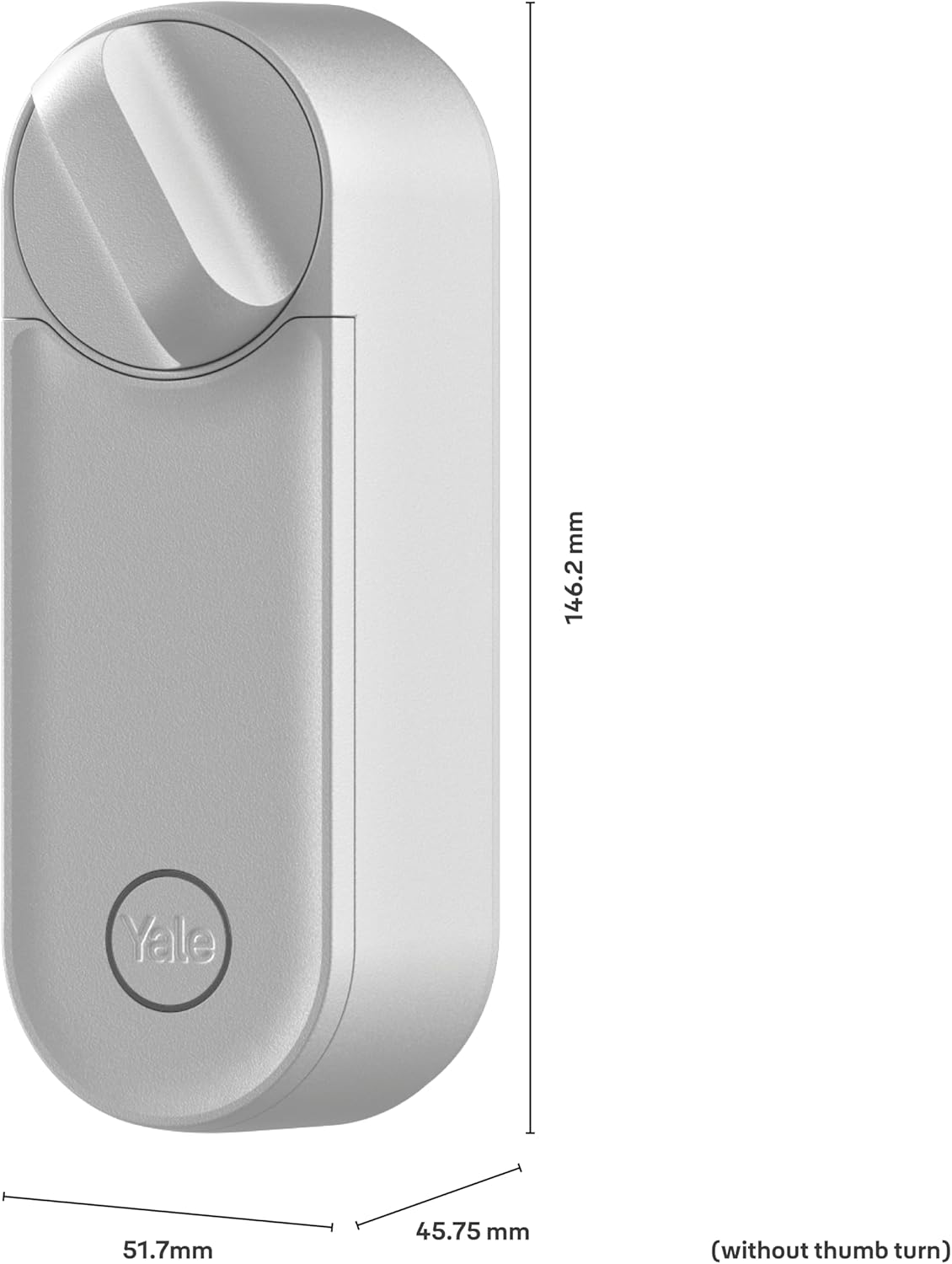
Image: A user tapping their smartphone on a Yale Dot, demonstrating the quick access feature to lock or unlock the door.
3.2 Guest Access:
You can grant access to trusted individuals through the Yale Home app. This allows you to create temporary or scheduled access for family, friends, or service providers.
- Open the Yale Home app and navigate to the "Guest List" section.
- Add a new guest and define their access permissions (e.g., always, recurring, temporary).
- Guests will receive an invitation to download the app and gain access.
3.3 Activity Feed and Notifications:
The Yale Home app provides a detailed activity log, showing who entered or exited and when. You can also set up smart notifications to receive alerts for specific events, such as when the door is unlocked or left ajar.

Image: The Yale Home application displaying an activity feed, detailing various lock events such as manual locks, remote unlocks, and door open/closed statuses.
3.4 Smart Home Integration:
The Linus L2 Smart Lock integrates with popular smart home ecosystems and voice assistants, including Google Home, Amazon Alexa, and Samsung SmartThings. This allows for voice control and automation within your smart home setup.

Image: Two Yale Linus L2 Smart Locks (silver and black) with logos indicating compatibility with Google Home, Amazon Alexa, and Samsung SmartThings, highlighting smart home integration.
4. Maintenance
4.1 Battery Management:
- The Linus L2 uses a rechargeable Lithium-ion battery. Monitor the battery level through the Yale Home app.
- When the battery is low, you will receive notifications. Remove the battery and charge it using the provided USB cable.
- A fully charged battery provides extended usage.
4.2 Cleaning:
- Clean the exterior of the smart lock with a soft, dry cloth.
- Avoid using abrasive cleaners, solvents, or harsh chemicals, as these can damage the finish.
4.3 Firmware Updates:
- Regularly check the Yale Home app for available firmware updates.
- Updates provide performance improvements, new features, and security enhancements. Follow in-app instructions to perform updates.
5. Troubleshooting
5.1 Lock Not Responding:
- Check Battery: Ensure the battery is charged and correctly inserted. Replace or recharge if necessary.
- App Connection: Verify your smartphone's Bluetooth is enabled and you are within range. For remote access, ensure the lock is connected to Wi-Fi.
- Restart Lock: Remove the battery, wait a few seconds, and reinsert it to restart the lock.
5.2 Connectivity Issues (Wi-Fi/Bluetooth):
- Wi-Fi Signal: Ensure your Wi-Fi router is within range and providing a strong signal to the lock. Obstacles can interfere with signal strength.
- Bluetooth Pairing: If experiencing Bluetooth issues, try unpairing and re-pairing the lock in the Yale Home app.
- App Updates: Ensure your Yale Home app is updated to the latest version.
5.3 Auto-Lock/Unlock Not Working:
- DoorSense™: Verify the DoorSense™ sensor is correctly installed and calibrated. The app should accurately report if the door is open or closed.
- Location Services: For Auto-Unlock, ensure location services are enabled for the Yale Home app on your smartphone and that you have set your home location correctly.
- App Settings: Double-check the Auto-Lock and Auto-Unlock settings within the Yale Home app.
5.4 Physical Obstruction:
- Ensure there are no physical obstructions preventing the deadbolt from extending or retracting fully.
- Check that the door frame and strike plate are properly aligned.
6. Specifications
| Brand | Yale |
| Model Number | 05/103210/SI |
| Dimensions (L x W x H) | 5.17 x 14.62 x 4.57 cm (without thumb-turn) |
| Weight | 648 Grams |
| Power Source | 1 Lithium-ion Battery (included, rechargeable) |
| Material | Metal |
| Color | Silver (Linus L2 noir mat variant is black) |
| Special Features | App Unlock, Integrated Wi-Fi, Bluetooth, Auto-Lock/Unlock, DoorSense™ |
| Compatibility | Google Home, Amazon Alexa, Samsung SmartThings |
| Security Standard | EN 1303:2015 (Cylinder) |
7. Warranty Information
The Yale Linus L2 Smart Lock comes with a manufacturer's warranty. Please refer to the official Yale website or your purchase documentation for specific warranty terms and conditions. Typically, spare parts availability is guaranteed for 2 years from the date of purchase.
8. Support and Contact
For further assistance, technical support, or to access detailed FAQs, please visit the official Yale Home website or contact customer service.
- Yale Home App: The app provides in-depth guides and troubleshooting tips.
- Online Support: Visit www.yalehome.com for product information and support resources.
- Privacy and Legal: For privacy policy and legal information, refer to Yale Privacy & Legal Center.


