
1. Introduction
Thank you for choosing the Brilliant Palmero Ceiling Fan with RGB Function. This product combines efficient LED lighting with a powerful fan to provide both illumination and comfortable air circulation. Designed for indoor use, it features remote control operation for convenience and an RGB function for customizable ambiance. Please read this manual thoroughly before installation and operation to ensure safe and correct use.

Image 1: The Brilliant Palmero Ceiling Fan offers dual functionality, combining cooling and lighting. It is energy-efficient, improves air circulation, provides comfort, saves space, and can be used year-round.
2. Key Features
The Brilliant Palmero Ceiling Fan is equipped with several features designed for comfort and convenience:
- Integrated 40W LED: Energy-efficient and cost-effective ceiling lamp.
- Ventilator Function: Provides pleasant air circulation.
- Remote Control Included: Allows for easy adjustment of light intensity, light color, and fan speed from a distance.
- RGB Function: Offers dynamic color lighting options for various moods.
- Dimmable Lighting: Adjust brightness and color temperature from warm white to cool white.
- Reversible Fan Blades: Supports both summer (cooling) and winter (heat circulation) modes.

Image 2: Overview of key features: integrated LED, fan, and remote control for ease of use.
3. Safety Instructions
Always follow basic safety precautions when installing and operating electrical appliances to reduce the risk of fire, electric shock, and personal injury.
- Professional Installation: Installation should be performed by a qualified electrician in accordance with all local and national electrical codes.
- Power Disconnection: Ensure the power supply is disconnected at the main circuit breaker before installation, maintenance, or cleaning.
- Secure Mounting: The ceiling fan must be securely mounted to a structural ceiling joist or a suitable support system capable of holding the fan's weight.
- Blade Clearance: Ensure there is adequate clearance between the fan blades and any obstacles (walls, furniture) to prevent injury or damage.
- Water Exposure: This product is designed for indoor use only and is not water-resistant. Do not expose to water or high humidity.
- Children and Pets: Keep children and pets away from the fan during operation and installation.
- Remote Control: Keep the remote control away from moisture and extreme temperatures.
4. Package Contents
Verify that all components are present and undamaged before proceeding with installation. If any parts are missing or damaged, contact your retailer.
- Brilliant Palmero Ceiling Fan Unit
- Remote Control
- E27 Tuya Light Bulb
- Mounting Hardware (screws, anchors, etc.)
- User Manual (this document)
5. Setup and Installation
Important: Installation should only be carried out by a qualified electrician. Ensure the main power supply is switched off before beginning installation. The fan unit is largely pre-assembled, but professional installation to the ceiling and electrical wiring is required.
- Prepare the Mounting Location:
Identify a suitable location on the ceiling that can support the fan's weight (approximately 1.87 kg) and allows for proper blade clearance. Ensure there is an existing electrical junction box or prepare one according to local codes.
- Mount the Bracket:
Attach the mounting bracket securely to the ceiling joist or support structure using the provided hardware. Ensure it is firmly fixed and stable.
- Wiring Connections:
Connect the fan's electrical wires to the household wiring according to the wiring diagram provided in the separate installation guide (if applicable) or by a qualified electrician. Pay close attention to live, neutral, and ground connections. Ensure all connections are secure and insulated.
- Attach the Fan Unit:
Carefully lift the fan unit and attach it to the mounting bracket. Secure it with the screws or locking mechanism as per the specific design. Ensure the fan is stable and does not wobble.
- Install the Light Bulb:
Insert the provided E27 Tuya light bulb into the lamp fitting. Ensure it is screwed in firmly but do not overtighten.
- Final Checks:
Double-check all connections and ensure no wires are pinched. Restore power at the main circuit breaker.

Image 3: Product dimensions and weight for installation planning.
6. Operating Instructions
The Brilliant Palmero Ceiling Fan is operated primarily via the included remote control. The E27 Tuya bulb also allows for smart control via a compatible app (refer to Tuya bulb instructions for app setup).
6.1 Remote Control Functions

Image 4: The remote control provides convenient operation of both lighting and fan functions.
- Power On/Off: Press the power button to turn the fan and light on or off.
- Fan Speed Control: Use the fan speed buttons to adjust the airflow (typically multiple speed settings).
- Light On/Off: Separate button for controlling the light independently.
- Light Brightness (Dimming): Adjust the light intensity using the dimming buttons.
- Light Color Temperature: Change the light color from warm white to cool white.
- RGB Function: Activate and cycle through various RGB colors or modes.
- Timer Function: Set a timer for the fan or light to turn off automatically (if available on remote).

Image 5: Detail of the fan blades and dynamic RGB lighting.
6.2 Seasonal Operation (Summer/Winter Mode)
The fan features a reversible motor function to optimize air circulation for different seasons. This function is typically controlled via a switch on the fan body or the remote control (refer to specific remote instructions).
- Summer Mode (Counter-clockwise rotation): Creates a downward airflow, producing a cooling effect.
- Winter Mode (Clockwise rotation): Creates an upward airflow, circulating warm air near the ceiling throughout the room.

Image 6: Enjoy a gentle breeze on warm days or ensure optimal air circulation in the room, all from your favorite spot.
6.3 Dimmable Lighting
The integrated LED lighting is dimmable and allows for adjustment of color temperature to suit your preference and mood.
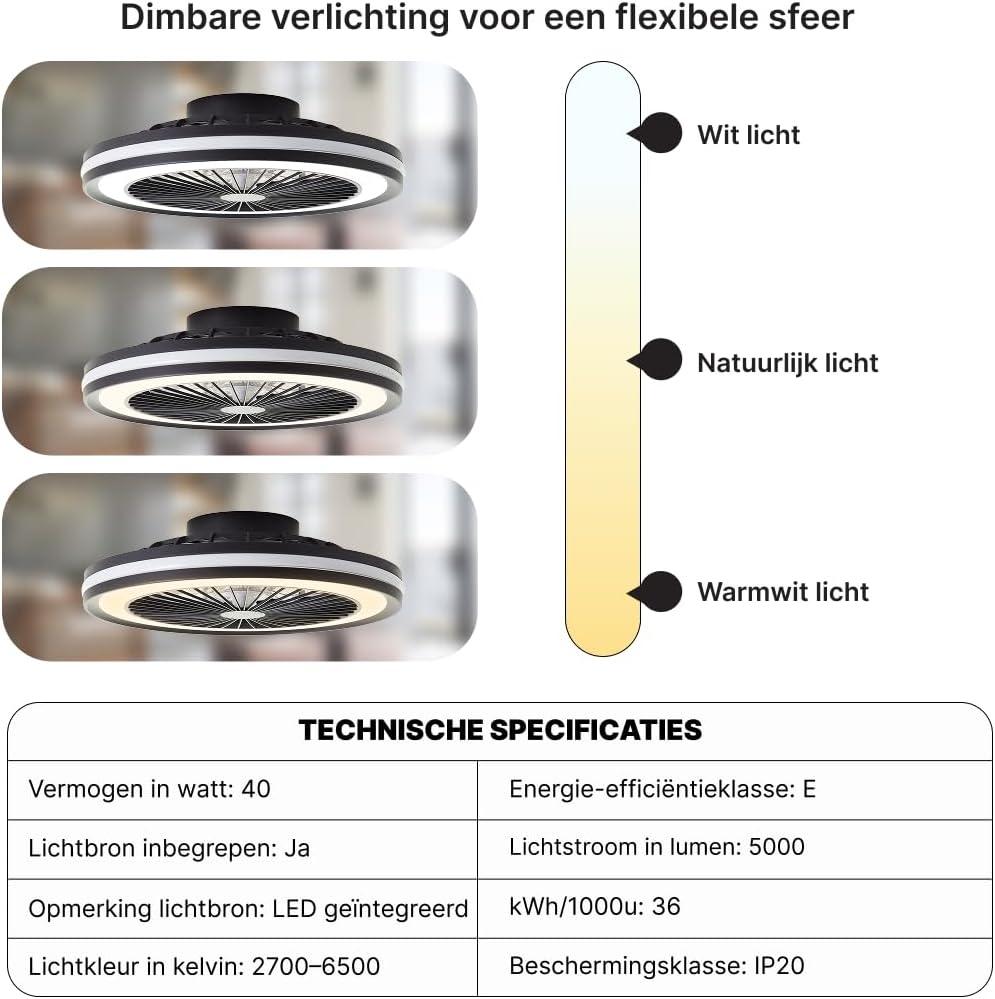
Image 7: Dimmable lighting for a flexible atmosphere, offering white, natural, and warm white light options.
7. Maintenance
Regular maintenance ensures the longevity and optimal performance of your ceiling fan. Always disconnect power before performing any maintenance.
- Cleaning:
Wipe the fan blades and housing with a soft, damp cloth. Do not use abrasive cleaners or solvents, as these can damage the finish. Ensure the fan is completely dry before restoring power.
- Bulb Replacement:
If the E27 Tuya bulb needs replacement, ensure the power is off. Unscrew the old bulb and replace it with a new E27 LED bulb of compatible wattage (max 40W). Refer to the Tuya bulb's specific instructions for smart functionality setup if replacing with a new smart bulb.
- Tighten Fasteners:
Periodically check all screws and fasteners on the mounting bracket and fan housing to ensure they are secure. Tighten if necessary.
8. Troubleshooting
If you encounter issues with your Brilliant Palmero Ceiling Fan, refer to the following common problems and solutions:
| Problem | Possible Cause | Solution |
|---|---|---|
| Fan does not start | No power supply; Loose wiring; Remote control battery dead. | Check circuit breaker; Verify wiring connections (consult electrician); Replace remote control batteries. |
| Light does not turn on | Bulb loose or faulty; No power supply; Remote control issue. | Check bulb connection or replace bulb; Check circuit breaker; Replace remote control batteries. |
| Fan wobbles | Loose mounting screws; Unbalanced blades. | Tighten all mounting screws; Ensure blades are securely attached and balanced (balancing kit may be needed). |
| Remote control not working | Dead batteries; Obstruction; Remote not paired. | Replace batteries; Remove obstructions between remote and fan; Re-pair remote if necessary (refer to remote instructions). |
If the problem persists after attempting these solutions, please contact customer support.
9. Specifications
The following table details the technical specifications of the Brilliant Palmero Ceiling Fan (Model G96460/75).
| Feature | Detail |
|---|---|
| Model Number | G96460/75 |
| Brand | Brilliant |
| Product Dimensions (L x W x H) | 13L x 46B x 13H cm |
| Weight | 1.875 kg |
| Material | Metal |
| Color | Multi-colored (Warm White to Cool White) |
| Style | Modern/Design |
| Room Type | Bathroom (Note: Product is not water-resistant, suitable for dry indoor environments) |
| Indoor/Outdoor Use | Indoor |
| Power Source | Corded Electric |
| Special Features | Remote control, Incl. E27 Tuya lamp, Energy-saving LED, Multifunctional (light + fan), RGB-function |
| Control Method | Remote Control |
| Light Source | Integrated LED |
| Number of Light Sources | 1 |
| Light Color Temperature | 2700-6500 Kelvin (Warm White to Cool White) |
| Wattage | 40 watt |
| Lamp Fitting | E27 (for included Tuya bulb) |
| Switch Type | Touch (via remote) |
| Water Resistance Level | Not water resistant |
| Connectivity Protocol | Wifi (for Tuya bulb) |
| Luminous Flux | 5000 Lumen |
| Energy Efficiency Class | E |
| Energy Consumption | 36 kWh/1000h |
| Protection Class | IP20 |
| Mounting Type | Ceiling mounting, Recessed mounting |
| Assembly Required | No (unit is pre-assembled, but installation is required) |
Note: Some specifications may vary slightly. Refer to the product packaging for the most accurate information.
10. Warranty and Support
Warranty: The manufacturer provides a 1-year availability duration for spare parts within the EU. For specific warranty terms and conditions, please refer to the documentation provided with your purchase or contact your retailer.
Customer Support: If you have any questions, require technical assistance, or need to report a problem that cannot be resolved using the troubleshooting guide, please contact the retailer or the manufacturer's customer service department. Keep your purchase receipt and model number (G96460/75) handy when contacting support.


