
1. Introduction
Welcome to the Motorola Moto 40 Smartwatch user manual. This document provides essential information for the proper setup, operation, and maintenance of your device. Please read this manual thoroughly before using your smartwatch to ensure optimal performance and longevity.
2. What's in the Box
Upon opening your Motorola Moto 40 Smartwatch package, you should find the following items:
- Motorola Moto 40 Smartwatch
- 60 cm black USB-A charging cable with POGO Pins (with Magnets)
- Quick Start Guide (separate document)
3. Setup
3.1 Initial Charging
Before first use, fully charge your Motorola Moto 40 Smartwatch. Connect the magnetic POGO pin charging cable to the charging contacts on the back of the watch and plug the USB-A end into a compatible power adapter (not included) or a computer's USB port.

Image: The Motorola Moto 40 Smartwatch connected to its magnetic charging cable, illustrating the charging process.
3.2 Pairing with Your Smartphone
- Download the Moto Watch app from your smartphone's app store (available for iOS and Android).
- Ensure Bluetooth is enabled on your smartphone.
- Open the Moto Watch app and follow the on-screen instructions to create an account or log in.
- Select 'Add Device' and choose your Motorola Moto 40 from the list of available devices.
- Confirm the pairing code displayed on both your watch and smartphone.
- Complete the setup process within the app, including granting necessary permissions for notifications and health tracking.
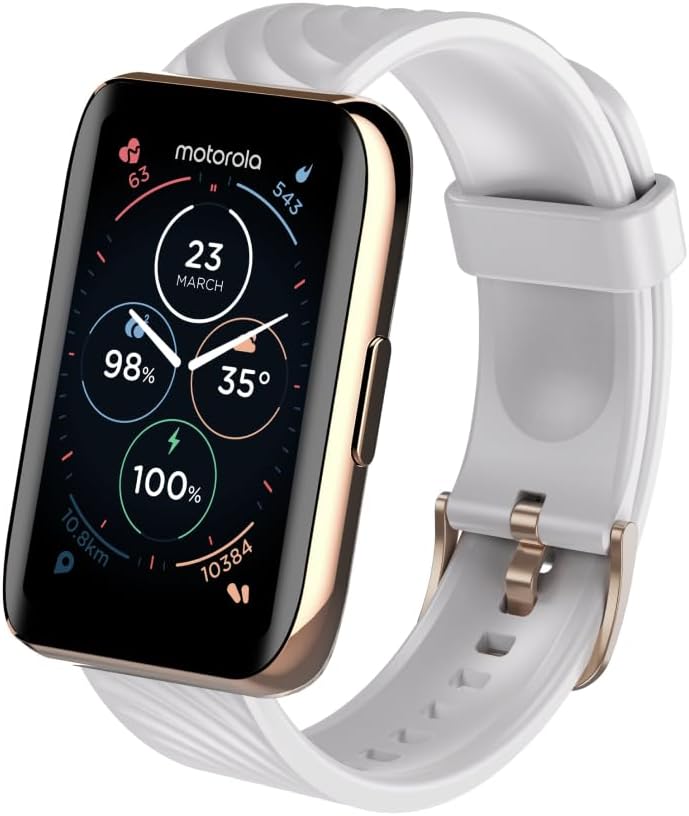
Image: An angled view of the Motorola Moto 40 Smartwatch, highlighting its rectangular display, side button, and silicone strap.
4. Operating Instructions
4.1 Display and Navigation
The Motorola Moto 40 features a 1.5-inch crystal-clear display. Navigate through menus and features by swiping up, down, left, or right on the touchscreen. The side button typically serves as a home button or to access the app list.

Image: The Motorola Moto 40 Smartwatch displaying a vibrant watch face with various data points including time, date, heart rate, steps, and battery percentage.
4.2 Smart Notifications
Once paired with your smartphone, the Moto 40 will display notifications for calls, messages, and app alerts directly on your wrist. Ensure notification permissions are enabled in the Moto Watch app and your phone's settings.

Image: The Motorola Moto 40 Smartwatch showing an incoming text message notification on its display.
4.3 Health and Fitness Tracking
The Moto 40 is equipped with sensors for comprehensive health tracking:
- Heart Rate Tracking: Continuous heart rate monitoring to provide insights into your cardiovascular health.
- Sleep Tracking: Monitors sleep patterns, including duration and quality, to help improve your rest.
- SpO2 Monitoring: Measures blood oxygen saturation levels.
- Activity Tracking: Records steps, distance, calories burned, and various workout types.
Data from these features can be viewed on the watch and in detail within the Moto Watch app, which integrates with Google Fit for broader health management.

Image: The Motorola Moto 40 Smartwatch displaying various health metrics, alongside a smartphone screen showing detailed heart rate data.
4.4 Battery Life
The Moto 40 offers an extended battery life of up to 10 days on a single charge, depending on usage. Regular charging is recommended to maintain optimal performance.

Image: The Motorola Moto 40 Smartwatch showcasing a selection of customizable watch faces, allowing users to personalize their device.
4.5 Other Features
- Weather Forecasts: Access current weather conditions and forecasts directly from your wrist.
- Customizable Watch Faces: Personalize your watch with various pre-installed watch faces or use your own photos.

Image: The Motorola Moto 40 Smartwatch displaying the current weather forecast, including temperature and conditions.
5. Maintenance
5.1 Cleaning Your Smartwatch
To clean your Moto 40, gently wipe the screen and body with a soft, lint-free cloth. For stubborn dirt, slightly dampen the cloth with water. Avoid using harsh chemicals or abrasive materials, as these can damage the device.
5.2 Water Resistance
The Moto 40 has a water resistance rating of IP67, meaning it is protected against dust and can withstand immersion in water up to 1 meter for 30 minutes. It is suitable for daily wear and activities like hand washing or light rain. However, it is not designed for water-related activities such as swimming, showering, or diving.
5.3 Band Care
The silicone band is designed for durability. Clean it regularly with a damp cloth. If you experience skin irritation, ensure the band is clean and not worn too tightly. Interchangeable bands are available to suit different occasions.
6. Troubleshooting
If you encounter issues with your Motorola Moto 40 Smartwatch, consider the following common solutions:
- Watch not turning on: Ensure the watch is fully charged. Connect it to the charger for at least 30 minutes.
- Cannot pair with phone: Check that Bluetooth is enabled on your phone and the watch. Restart both devices and try pairing again. Ensure the Moto Watch app is updated.
- Notifications not appearing: Verify that notification permissions are granted to the Moto Watch app in your phone's settings. Check the app's settings for specific notification preferences.
- Inaccurate health data: Ensure the watch is worn snugly on your wrist, about one finger-width above your wrist bone. Clean the sensor on the back of the watch.
- Short battery life: Reduce screen brightness, disable unnecessary features, or limit background app refresh.
For persistent issues, refer to the support section within the Moto Watch app or visit the official Motorola support website.
7. Specifications
| Feature | Specification |
|---|---|
| Model Number | MOSWZ40-RG |
| Product Dimensions | 2.68 x 6.3 x 1.14 inches |
| Item Weight | 4.6 ounces (0.13 Kilograms) |
| Display Size | 1.57 Inches |
| Operating System | Moto Watch OS |
| Connectivity | Bluetooth |
| Battery Type | Lithium Ion (1 included) |
| Battery Capacity | 240 Amp Hours |
| Water Resistance | IP67 |
| Special Features | Activity Tracker, Heart Rate, Sleep Tracking, SpO2 |
| Manufacturer | CE Brands International Inc |
8. Warranty and Support
8.1 Product Warranty
Your Motorola Moto 40 Smartwatch is covered by a limited manufacturer's warranty. Please refer to the warranty card included in your product packaging or visit the official Motorola website for detailed terms and conditions regarding warranty coverage and duration.
8.2 Customer Support
For technical assistance, troubleshooting, or service inquiries, please contact Motorola customer support. Contact information can typically be found on the official Motorola website or within the Moto Watch application.


