
1. Introduction
Thank you for choosing the NICE-POWER DC Power Supply Variable, Model R-SPS3020C. This high-power bench power supply is designed for a wide range of applications, including battery charging, laboratory research, and electronic repairs. It features adjustable voltage and current, multiple protection functions, memory storage, and a dedicated battery charging mode. This manual provides detailed instructions for safe and efficient operation of your device.
2. Product Overview and Components
Familiarize yourself with the various parts of your DC power supply.
2.1 Front Panel

Image: Front and rear view of the NICE-POWER DC Power Supply, highlighting key components and their labels.
- Display: Shows Voltage (V), Current (A), and Power/Charge Ah (W/Ah).
- Indicators: C.V (Constant Voltage), C.C (Constant Current), Check, Charging, Full.
- Encoder Knobs: Used for precise adjustment of Voltage and Current. Press to select digit, rotate to adjust.
- M1, M2, M3 Buttons: Memory storage buttons for saving and recalling frequently used settings.
- OCP Button: Over Current Protection setting.
- LOCK Button: Locks the panel controls to prevent accidental changes.
- OUTPUT Button: Toggles the power output on or off.
- Battery Button: Activates the dedicated battery charging function.
- Output Terminals (MAX 5A): Front panel terminals for low current applications (up to 5A).
2.2 Rear Panel
- High Power Output Terminals: Used for applications requiring more than 5A, up to the maximum rated current of the unit (20A for this model).
- Cooling Fan: Automatically activates to dissipate heat during operation.
- AC Input: Power cord connection.
- Fuse Box: Contains the protective fuse for the unit.
3. Setup
Follow these steps for initial setup of your power supply:
- Unpack: Carefully remove the power supply and all accessories from the packaging. Verify all components listed in the 'What's in the Box' section are present.
- Placement: Place the power supply on a stable, flat surface with adequate ventilation around the unit, especially at the rear where the cooling fan is located.
- Power Connection: Connect the provided input power cable to the AC input on the rear panel of the power supply and then to a suitable AC power outlet.
- Load Connection: Connect your load using the provided output power cables. For currents up to 5A, use the front panel terminals. For currents exceeding 5A (up to 20A), use the high power output terminals on the rear panel to prevent damage to the front terminals. Ensure correct polarity (positive to positive, negative to negative).

Image: The NICE-POWER DC Power Supply with its included cables, demonstrating connection to a battery.
4. Operating Instructions
4.1 Power On/Off
Press the 'POWER' button on the front panel to turn the unit on or off.
4.2 Voltage and Current Adjustment

Image: Detailed view of the encoder adjustment knobs, illustrating how to press and rotate for precise setting.
- Voltage Adjustment: Rotate the 'VOLTAGE' encoder knob to adjust the output voltage. Press the knob to select the digit you wish to adjust (e.g., tens, units, tenths).
- Current Adjustment: Rotate the 'CURRENT' encoder knob to adjust the output current limit. Press the knob to select the digit you wish to adjust.
4.3 Output Switch
Press the 'OUTPUT' button to enable or disable the power output. When the output is enabled, the display will show the actual output voltage and current. Disabling the output prevents accidental power delivery to your load.
4.4 Battery Charging Function
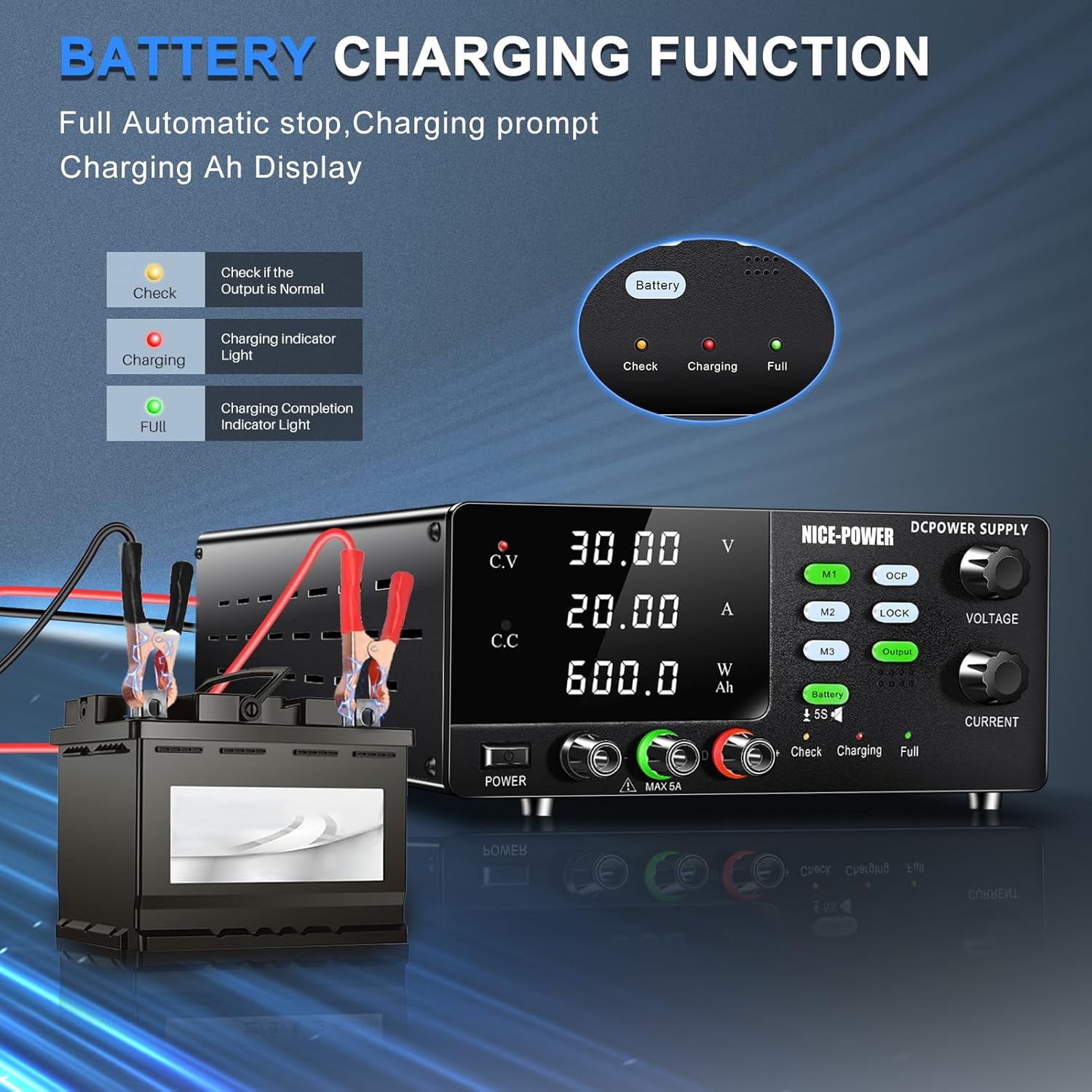
Image: The DC Power Supply displaying its battery charging function, showing the 'Check', 'Charging', and 'Full' indicators.
This power supply is specifically designed for battery charging. To activate this mode:
- Connect the battery to the rear high power output terminals, ensuring correct polarity.
- Press the 'Battery' button on the front panel. The power supply will enter battery charging mode.
- Observe the charging indicators:
- Check (Yellow): Illuminates if the wiring is incorrectly connected or if there is another error in the charging circuit. Verify connections.
- Charging (Red): Indicates that the battery is currently being charged.
- Full (Green): Lights up when the battery is almost fully charged and the power supply automatically stops charging.
- Recommended Charging Parameters: While the power supply can charge various battery types, always refer to your battery's specifications. A general guideline is: Charging voltage = 1.15 * battery rated voltage. Charging current = 0.1C~1C ("C" is the battery capacity).
4.5 Memory Storage (M1, M2, M3)

Image: The DC Power Supply highlighting its memory storage buttons (M1, M2, M3) and various protection icons.
The power supply allows you to store and recall three sets of commonly used voltage and current settings:
- To Save: Set the desired voltage and current. Long-press (hold for 2-3 seconds) one of the M1, M2, or M3 buttons until the display flashes, indicating the settings are saved.
- To Recall: Short-press (quick press) one of the M1, M2, or M3 buttons to instantly recall the saved settings.
4.6 Lock Button
Press the 'LOCK' button to lock the front panel controls. This prevents accidental changes to the voltage and current settings during operation. Press it again to unlock.
5. Safety Information and Protections
Your NICE-POWER DC Power Supply is equipped with multiple safety features to ensure safe operation and protect both the device and your connected load:
- Over-Current Protection (OCP): Prevents damage to the load by limiting the output current to a set maximum.
- Over-Temperature Protection: The unit will automatically shut down if it detects an internal temperature exceeding safe limits.
- Short-Circuit Protection: Automatically cuts off output in case of a short circuit to prevent damage.
- Important Note on High Current: For output currents above 5A, always use the high current output terminals on the rear of the unit. Using the front panel terminals for high currents can damage the power supply.
6. Maintenance
To ensure the longevity and optimal performance of your power supply, follow these maintenance guidelines:
- Cleaning: Regularly wipe the exterior of the unit with a soft, dry cloth. Do not use abrasive cleaners or solvents.
- Ventilation: Ensure the cooling fan and ventilation slots are free from dust and obstructions. Periodically clean them with compressed air if necessary.
- Storage: When not in use for extended periods, store the power supply in a cool, dry place, away from direct sunlight and excessive humidity.
- Fuse Replacement: If the unit does not power on, check the fuse located in the fuse box on the rear panel. Replace it with a fuse of the same type and rating if blown.
7. Troubleshooting
If you encounter issues with your power supply, refer to the table below for common problems and their solutions:
| Problem | Possible Cause | Solution |
|---|---|---|
| Unit does not power on. | Power cable not connected; Power outlet faulty; Blown fuse. | Ensure power cable is securely connected; Test power outlet; Check and replace fuse if necessary. |
| No output voltage/current. | Output switch is off; OCP activated; Load not connected correctly; Short circuit in load. | Press 'OUTPUT' button to enable output; Check OCP settings; Verify load connections; Disconnect load and check for short circuit. |
| "Check" indicator lights up during battery charging. | Incorrect battery polarity; Battery not connected; Faulty battery. | Verify battery connections and polarity; Ensure battery is properly connected; Test battery condition. |
| Unit overheats and shuts down. | Insufficient ventilation; Overload. | Ensure adequate space around the unit for airflow; Reduce load or operating time. |
8. Specifications
Technical specifications for the NICE-POWER DC Power Supply Variable (Model R-SPS3020C):
| Parameter | Value |
|---|---|
| Model Name | R-SPS3020C |
| Output Voltage | 0-30V DC |
| Output Current | 0-20A DC |
| Output Power | 600W |
| Product Dimensions (L x W x H) | 9.4 x 5.1 x 15 inches |
| Item Weight | 7.41 Pounds |
| Cooling Method | Air Cooling (Intelligent Fan) |
| Manufacturer | NICE-POWER |

Image: The DC Power Supply with its physical dimensions and weight displayed.
9. Warranty and Support
Your purchase includes the NICE-POWER DC Power Supply, one set of output power cables, one input power cable, and this user manual. For any questions, technical assistance, or support regarding your product, please contact NICE-POWER customer service. Contact information can typically be found on the product packaging or the official NICE-POWER website.


