
1. Introduction
Welcome to the MaxiViz Wireless Outdoor Security Camera user manual. This guide provides comprehensive instructions for setting up, operating, and maintaining your new security camera. The MaxiViz CG6 is designed to provide reliable and high-quality surveillance for your home or business, featuring 2K HD resolution, advanced AI motion detection, and robust weatherproofing.
2. Package Contents
Please verify that all items listed below are included in your package:
- MaxiViz Wireless Outdoor Security Camera (CG6)
- Mounting Bracket
- USB Charging Cable
- Mounting Screws and Wall Anchors
- User Manual (this document)

Image: The MaxiViz Wireless Outdoor Security Camera and its included accessories, including the camera unit, mounting bracket, USB cable, and screws.
3. Setup and Installation
3.1 Charging the Camera
Before initial use, fully charge the camera using the provided USB cable. Connect the USB cable to the camera's charging port and a standard 5V/1A USB power adapter (not included). The indicator light will show charging status.
3.2 App Installation
Download the VicoHome app from your smartphone's app store. The app is essential for camera setup, live viewing, and accessing features.
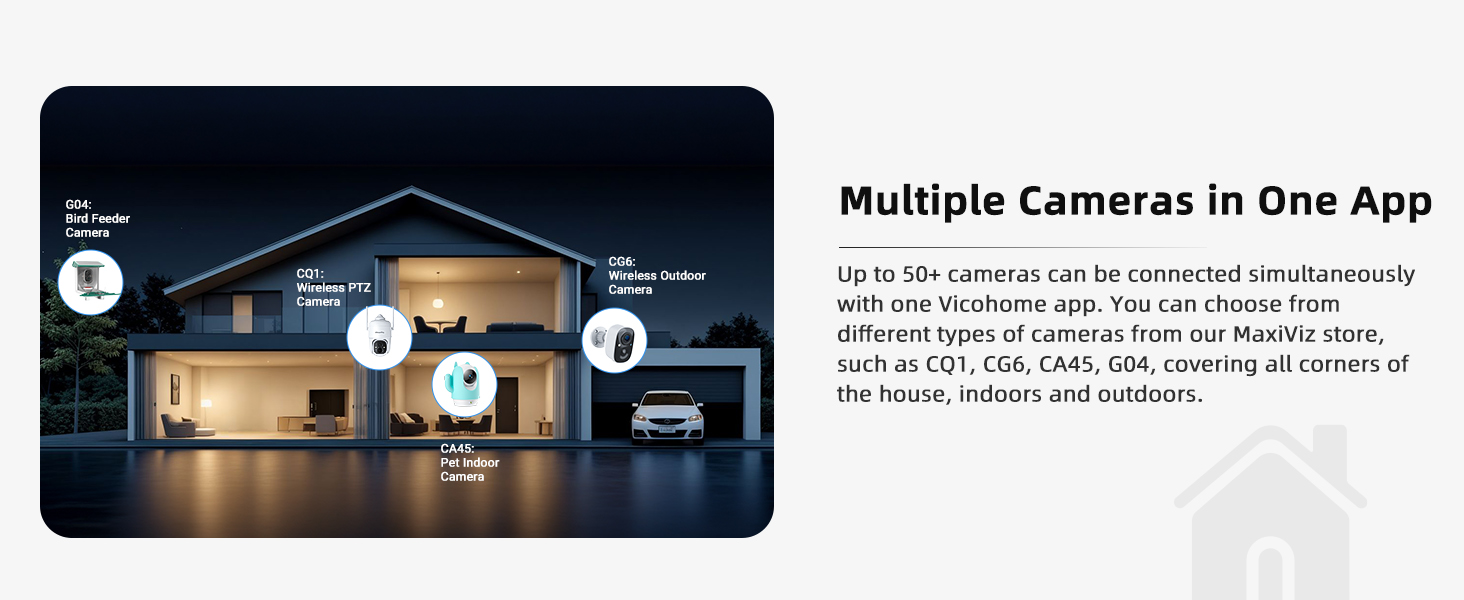
Image: Screenshot showing the VicoHome app interface and download options for App Store and Google Play.
3.3 Pairing the Camera
- Open the VicoHome app and create an account or log in.
- Tap the '+' icon to add a new device.
- Follow the on-screen instructions to connect your camera to your 2.4GHz Wi-Fi network. (Note: 5GHz Wi-Fi is not supported).
- Scan the QR code displayed on your phone with the camera lens.
3.4 Mounting the Camera
Choose a suitable location for your camera, ensuring it has a clear view of the area you wish to monitor and good Wi-Fi signal strength. The camera is IP66 weatherproof, suitable for outdoor use in various conditions.
- Secure the mounting bracket to a wall or surface using the provided screws and anchors.
- Attach the camera to the mounting bracket and adjust the angle for optimal coverage.

Image: A MaxiViz camera securely mounted on the exterior wall of a house, demonstrating its outdoor placement.
Video: This video demonstrates the quick and easy installation process of the MaxiViz Wireless Outdoor Security Camera, including mounting the bracket and attaching the camera.
4. Operating Instructions
4.1 Live View and Two-Way Talk
Access the live video feed from your camera anytime, anywhere via the VicoHome app. The integrated microphone and speaker allow for clear two-way communication, enabling you to speak with visitors or deter unwanted guests.

Image: Illustration of the two-way audio feature, showing a child speaking through the camera and multiple users accessing the camera feed remotely.
Video: An overview of the MaxiViz CG6 Wireless Outdoor Camera's features, including its 2K resolution, AI object detection, and two-way audio capabilities.
4.2 Motion Detection and Alerts
The camera utilizes PIR motion sensing combined with advanced AI analytics to accurately distinguish between people, pets, vehicles, and parcels. This significantly reduces false alerts, ensuring you are only notified about relevant events. You can customize motion zones and sensitivity settings within the app.

Image: Depiction of the camera's AI analysis identifying different objects like people, pets, vehicles, and packages to reduce false alarms.

Image: The camera detecting motion near a garage, triggering real-time alerts, app notifications, and an AI motion detection warning.
4.3 Night Vision Modes
The MaxiViz CG6 offers superior night vision capabilities. You can choose between:
- Infrared Night Vision: Provides clear black and white footage up to 33 feet in complete darkness.
- Full-Color Night Vision: Utilizes built-in LED floodlights to illuminate the area, providing vivid color footage even at night.

Image: A comparison showing the clarity of 2K HD color night vision versus standard infrared night vision, highlighting the camera's ability to see clearly in the dark.
4.4 Storage Options
Your footage is secured with bank-level encryption. You have two primary storage options:
- Local Storage: Insert a Micro SD card (up to 128GB, not included) into the camera for local recording.
- Cloud Storage: Enjoy free 3-day loop cloud recording. Optional premium cloud plans are available for extended storage and advanced features.

Image: Visual representation of the camera's flexible storage options, including support for up to 128GB SD card and free 3-day loop cloud storage.
5. Maintenance
- Cleaning: Regularly wipe the camera lens and body with a soft, damp cloth to remove dust and debris. Do not use harsh chemicals.
- Battery Life: The rechargeable battery provides 2-5 months of usage per charge, depending on activity and settings. Monitor battery status in the VicoHome app and recharge as needed.
- Firmware Updates: Keep your camera's firmware updated through the VicoHome app to ensure optimal performance and access to new features.
6. Troubleshooting
| Problem | Possible Cause | Solution |
|---|---|---|
| Camera offline | Weak Wi-Fi signal, low battery, or power issue. | Check Wi-Fi signal strength, recharge battery, or restart the camera. Ensure it's within 2.4GHz Wi-Fi range. |
| Frequent false alerts | High motion sensitivity, environmental factors (e.g., moving branches, shadows). | Adjust motion detection sensitivity in the app. Define specific activity zones to exclude irrelevant areas. |
| Poor night vision quality | Lens obstruction, insufficient ambient light for color mode. | Clean the camera lens. Ensure sufficient light for color night vision or switch to infrared mode. |
| Two-way audio unclear | Microphone/speaker obstruction, network latency. | Ensure no obstructions around microphone/speaker. Check network connection stability. |
| Cannot connect to Wi-Fi | Incorrect Wi-Fi password, 5GHz network, or too far from router. | Verify Wi-Fi password. Ensure you are connecting to a 2.4GHz network. Move camera closer to the router. |
7. Product Specifications
| Feature | Detail |
|---|---|
| Model Number | CG6 |
| Resolution | 2K HD (2304*1296) |
| Night Vision | Infrared (33ft) & Full-Color Night Vision |
| Connectivity | 2.4GHz Wi-Fi (IEEE 802.11b/g/n) |
| Weatherproof Rating | IP66 |
| Storage Options | Micro SD Card (up to 128GB), Cloud Storage |
| Battery Type | Lithium Polymer (included) |
| Power Consumption | 3.5 watts |
| Dimensions (L x W x H) | 17.78 x 12.7 x 7.62 cm |
| Weight | 660 g |
| Operating Temperature | -20°C to 50°C (-4°F to 122°F) |
8. Warranty and Customer Support
MaxiViz provides a 12-month warranty for this product from the date of purchase. This warranty covers manufacturing defects and ensures the product functions as described under normal use.
For technical assistance, troubleshooting, or warranty claims, please contact MaxiViz customer support. We are committed to providing lifetime technical help and aim to reply within 24 hours.
For more information, please visit the official MaxiViz website or refer to the contact details provided on your product packaging.

