
1. Product Overview
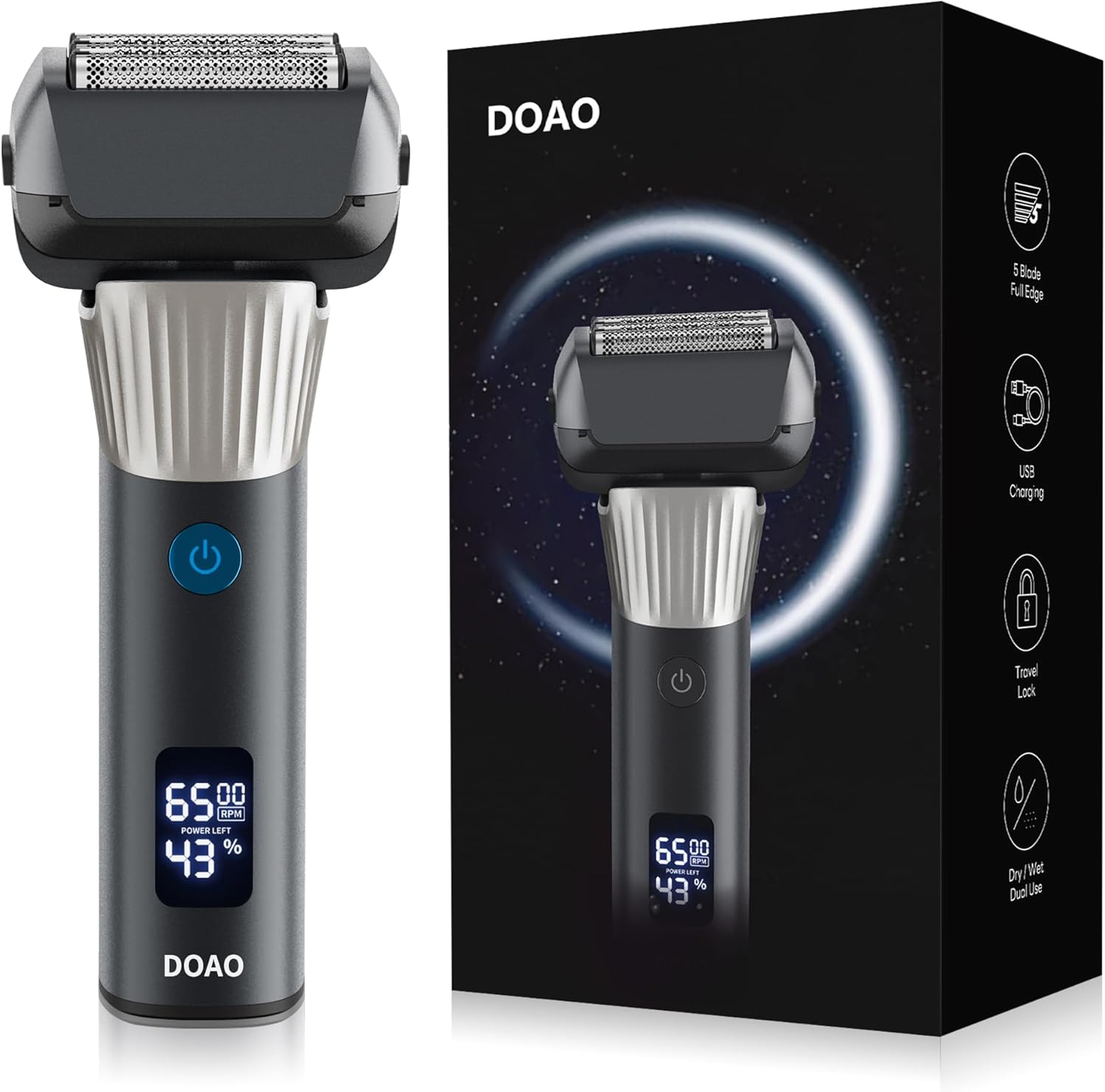
The DOAO Electric Shaver Model A5 is an advanced, cordless, and waterproof electric razor designed specifically for men. It offers a close and smooth shave with superior cutting technology, adapting to facial contours for enhanced comfort. This 2-in-1 grooming tool also features a convenient pop-up trimmer for precise styling.
Key Features:
- Exceptional Shaving Performance: Advanced electric shaver designed for a close and smooth shave.
- Pop-up Trimmer: Integrated trimmer for precise styling and shaping.
- Convenient and Cordless: Rechargeable with up to 100 minutes of shaving time per charge. Features USB-C charging.
- Durable Design: Constructed with high-quality materials for daily use and longevity.
- Waterproof and Easy to Clean: Fully washable for easy cleaning and maintenance.
2. Components Included
Your DOAO Electric Shaver package includes the following items:
- 1 x DOAO Electric Shaver
- 1 x USB-C Charging Cable
- 1 x Cleaning Brush
- 1 x Protective Shaver Head Cover
- 1 x Storage Pouch
- 1 x Instruction Manual

3. Safety Information
[IMPORTANT] Always ensure the shaver is unplugged and completely dry before cleaning. Do not use near water sources like bathtubs or showers while plugged in. Avoid shaving over open wounds or irritated skin. Regularly clean the shaver head to prevent bacterial growth and maintain hygiene. Ensure the device is properly charged before use to avoid performance issues.
- Keep out of reach of children.
- Do not disassemble or attempt to repair the shaver yourself.
- Use only the provided USB-C cable for charging.
- Store in a cool, dry place when not in use.
4. Setup
Before first use, fully charge your DOAO Electric Shaver. The shaver features a digital display that indicates the battery percentage.
- Connect the provided USB-C charging cable to the shaver's charging port.
- Plug the other end of the USB-C cable into a compatible USB power adapter (not included) or a USB port.
- Allow the shaver to charge until the battery indicator shows 100%. A full charge provides up to 100 minutes of run time.

5. Operating Instructions
Follow these steps for an optimal shaving experience:
- Prepare Your Face: Clean and thoroughly dry your face before shaving. For a wet shave, apply shaving foam or gel.
- Power On: Press the power button to turn on the electric shaver. Allow it a moment to adapt to your skin.
- Position the Shaver: Hold the shaver at approximately a 30-degree angle to your skin.
- Shave: Move the shaver in a gentle, circular motion over your face. The flexible head and pressure-sensitive blades are designed to adapt to your facial contours for a comfortable shave.
- Wet or Dry Shaving: The DOAO Electric Shaver is designed for both wet and dry use. You can shave with foam, gel, or even in the shower.


Using the Pop-up Trimmer:
To use the precision pop-up trimmer for sideburns, mustache, or beard lines, simply slide the trimmer switch upwards. After use, push the switch back down to retract the trimmer.

6. Maintenance and Cleaning
Regular cleaning ensures optimal performance and hygiene of your shaver.
- Power Off: Turn off the shaver and unplug it from any charging source.
- Remove Shaver Head: Gently detach the shaver head from the body.
- Rinse: Rinse the shaver head thoroughly under running water. The shaver is waterproof, allowing for easy cleaning.
- Brush Cleaning: Use the provided cleaning brush to remove any stubborn hair clippings from the blades and foil.
- Dry: Allow the shaver head and body to air dry completely before reattaching the head and storing.

Important: Do not use abrasive cleaners or harsh chemicals to clean the shaver, as this may damage the device.
7. Troubleshooting
If you encounter any issues with your DOAO Electric Shaver, please refer to the following common solutions:
- Shaver Not Turning On: Ensure the shaver is fully charged. If the battery is low, connect it to the USB-C charger.
- Poor Shaving Performance: Clean the shaver head thoroughly to remove any trapped hair or debris. Ensure the blades are not dull; replacement heads may be needed after extended use.
- Battery Not Holding Charge: Ensure the charging cable is securely connected and the power source is functional. If the issue persists, the battery may require servicing.
- Excessive Noise/Vibration: Check if the shaver head is properly attached. Clean the shaver to ensure no foreign objects are interfering with the blades.
For issues not covered here, please contact customer support.
8. Specifications
| Feature | Detail |
|---|---|
| Brand | DOAO |
| Model Name | A5 |
| Item Model Number | A5 |
| Power Source | Battery Powered |
| Battery Type | 1 Lithium-polymer (included) |
| Battery Life | Up to 100 minutes |
| Special Features | Wet and Dry, Pivoting Head, Waterproof, Washable, Cordless, Portable, Battery Indicator, Rechargeable, Floating Head, LED Display, Pop-up Trimmer |
| Blade Material | Stainless Steel |
| Color | Titanium Grey |
| Item Weight | 210 Grams |
| Product Dimensions (L x W x H) | 4.76 x 6.7 x 16.29 cm |
| Recommended Uses | Beard, Face |
9. Warranty and Support
DOAO stands behind the quality of its products. This electric shaver comes with a lifetime warranty, ensuring peace of mind for your purchase.
For any product inquiries, technical support, or warranty claims, please contact our customer service. We aim to provide a response within 12 hours to ensure customer satisfaction.
Customer Support:
- Website: www.doao.com (Example link, replace with actual if available)
- Email: support@doao.com (Example email, replace with actual if available)

