
1. Product Overview
The Coibeu DN01 Articulated Monitor Desk Mount is designed to provide ergonomic positioning for your monitor, enhancing comfort and productivity. It features a robust mechanical spring system and durable aluminum construction.
Key Features:
- Stable Mechanical Spring Support: Tested for over 30,000 cycles, ensuring consistent stability and smooth adjustments.
- Elegant and Functional Design: Modern, lightweight structure that optimizes workspace aesthetics and offers superior practicality.
- Wide Compatibility: Supports 17 to 34-inch screens with VESA patterns of 75x75mm and 100x100mm.
- Superior Load Capacity: Safely holds monitors up to 10kg (22 lbs), preventing sagging or accidental falls.
- Flexible Adjustment: Offers height adjustments from 135mm to 445mm and full 360-degree rotation for optimal viewing angles.
- Aeronautical Aluminum Construction: Made from high-strength aluminum for enhanced durability and lighter weight, resisting wear and rust.
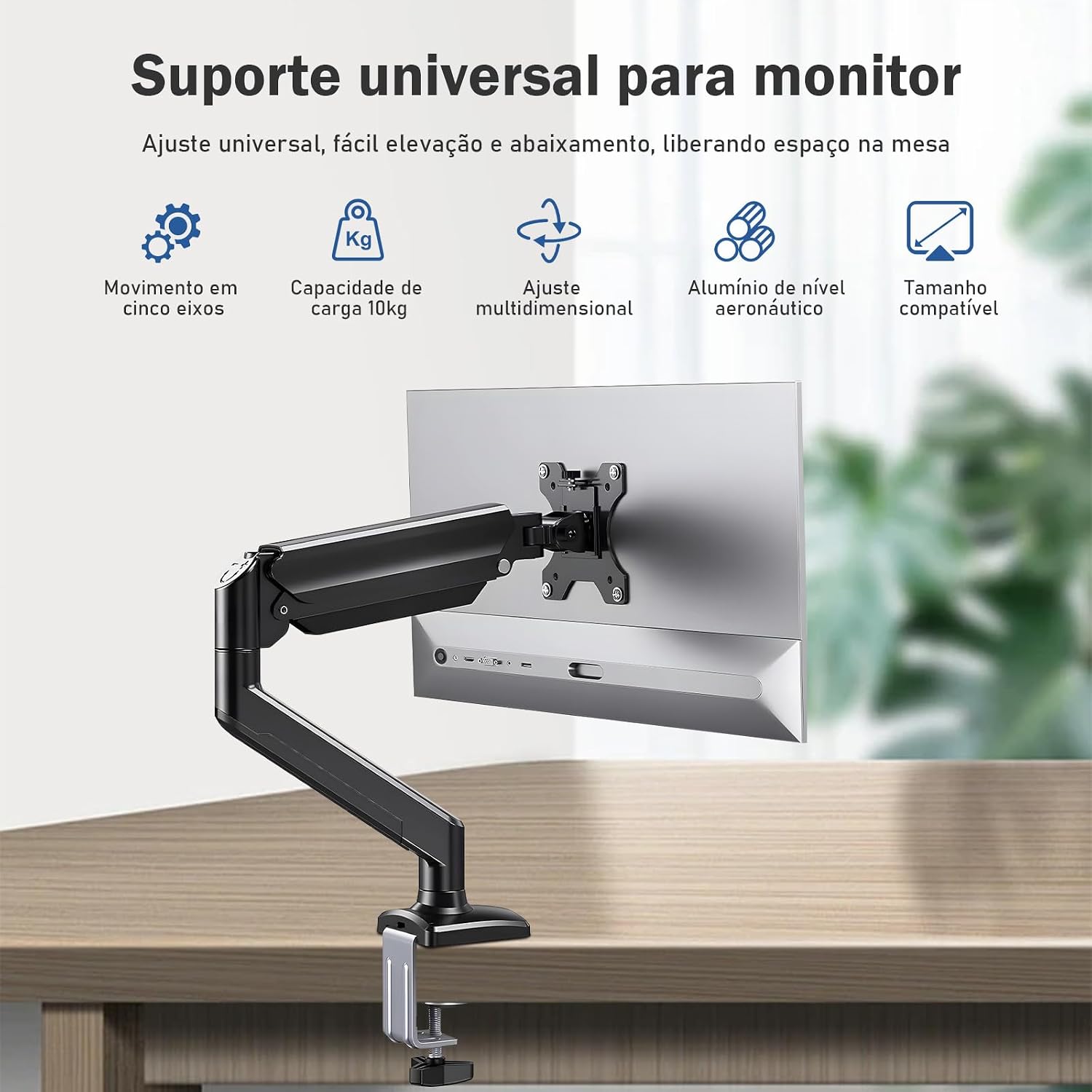
Figure 1: Overview of the Coibeu DN01 monitor mount highlighting its universal support, 5-axis movement, 10kg capacity, multi-dimensional adjustment, aviation-grade aluminum, and compatible size.
2. Specifications
| Feature | Detail |
|---|---|
| Mounting Type | Desk Mount (Clamp or Grommet) |
| Movement Type | Articulated |
| Brand | Coibeu |
| Material | Aluminum |
| Color | Black |
| Compatible Devices | Monitor, Television |
| Screen Size Compatibility | 17 to 34 inches |
| VESA Compatibility | 75x75mm, 100x100mm |
| Maximum Load Capacity | 10kg (22 lbs) |
| Height Adjustment Range | 135mm to 445mm |
| Maximum Tilt Angle | 100 Degrees |
| Rotation | 360 Degrees |
| Model Number | WKZJ-DN |
| Item Weight | 2360 Grams (approx. 5.2 lbs) |

Figure 2: Illustration of the monitor mount's compatibility with screens ranging from 17 to 34 inches, emphasizing ease of installation.

Figure 3: Visual representation of the monitor mount's 10kg load stability, ensuring secure support for various monitor sizes.
3. Installation Instructions
This monitor mount offers two installation methods: C-clamp for desk edges and grommet mount for desks with a pre-drilled hole. Choose the method that best suits your desk setup.
3.1 C-Clamp Installation (Unpunched Method)
- Attach the C-clamp base to the main pole of the monitor arm.
- Position the C-clamp on the edge of your desk.
- Tighten the clamp screw until the mount is securely fastened to the desk. Ensure it is stable before proceeding.
Video 1: Practical illustration of the product, demonstrating both C-clamp and grommet installation methods, as well as various adjustments.
For a visual guide on C-clamp installation, refer to the provided video (Method 1: Unpunched) which shows the steps for securing the mount to the desk edge.
3.2 Grommet Mount Installation (Punching Method)
- Disassemble the C-clamp components and reconfigure them for grommet mounting.
- Insert the grommet bolt through the pre-drilled hole in your desk.
- Secure the mount from underneath the desk using the provided plate and nut. Tighten firmly.
The provided video (Method 2: Punching) also illustrates the grommet mount installation process, showing how to secure the mount through a desk hole.
3.3 Attaching the Monitor
- Ensure your monitor has a VESA compatible mounting pattern (75x75mm or 100x100mm).
- Attach the VESA plate from the monitor arm to the back of your monitor using the appropriate screws.
- Carefully slide the monitor (with the attached VESA plate) onto the arm's mounting head until it clicks into place.
- Tighten any security screws to prevent accidental detachment.
The practical illustration video also demonstrates the process of attaching the monitor to the arm.
4. Operating and Adjustments
The Coibeu DN01 monitor mount offers extensive flexibility for optimal viewing comfort. Adjustments should be made carefully to avoid damage to the monitor or mount.
4.1 Height Adjustment
The mechanical spring system allows for smooth vertical movement. Gently push or pull the monitor to your desired height within the 135mm to 445mm range. The arm will hold its position once released.

Figure 4: Depiction of the smooth air pressure suspension system, illustrating the height adjustment range from 135mm to 445mm.
4.2 Tilt and Swivel Adjustment
The monitor can be tilted up to 100 degrees (85° upwards, -30° downwards) and swiveled horizontally at various joints. Gently adjust the monitor to achieve your preferred viewing angle. The practical illustration video demonstrates these movements.
4.3 Rotation (Portrait/Landscape)
The VESA plate allows for 360-degree rotation, enabling you to switch your monitor between landscape and portrait orientations. Simply rotate the monitor to the desired orientation.

Figure 5: Illustration of the five interlinked axes, demonstrating the extensive range of motion for height, angle, and rotation adjustments without limitation.
The practical illustration video also showcases the free adjustment capabilities, including rotation between portrait and landscape modes.
5. Maintenance
To ensure the longevity and optimal performance of your Coibeu DN01 monitor mount, follow these simple maintenance guidelines:
- Cleaning: Wipe the mount with a soft, damp cloth. Avoid abrasive cleaners or solvents that could damage the finish.
- Tightness Check: Periodically check all screws and bolts to ensure they are securely tightened. Re-tighten if necessary, but do not overtighten.
- Spring Tension: The mechanical spring is designed for long-term stability. If you notice the monitor sagging or rising too easily, consult the manufacturer's support for adjustment instructions. Do not attempt to disassemble the spring mechanism yourself.

Figure 6: Close-up view of the mechanical spring suspension system, highlighting its robust design for free and stable adjustments.

Figure 7: Detail of the mount's construction from aeronautical grade aluminum, emphasizing its durability and quality.
6. Warranty and Support
The Coibeu DN01 Articulated Monitor Desk Mount comes with a 90-day warranty from the date of purchase, covering manufacturing defects. Please retain your proof of purchase for warranty claims.
For technical support, troubleshooting, or warranty inquiries, please contact Coibeu customer service through the retailer where the product was purchased or visit the official Coibeu website for contact information.
For more information about Coibeu products, visit Coibeu on Amazon.