
Introduction
Welcome to the instruction manual for your Gibbon Mounts 111D Rolling Laptop Desk. This versatile mobile standing desk is designed for comfort and flexibility in various settings, including home offices, bedrooms, and living rooms. This manual provides essential information for proper assembly, operation, maintenance, and safety to ensure optimal use of your new desk.
Key features of your desk include a 180° tiltable desktop, a height adjustment range from 27.2 inches to 41.3 inches, and dual-wheel options for easy mobility or stability.
Setup and Assembly
The Gibbon Mounts 111D Rolling Laptop Desk requires assembly. All necessary tools and components are included in the package. Please follow the instructions carefully to ensure correct and safe assembly.
Assembly Steps:
- Assemble the column to the base.
- Assemble the connector to the desktop.
- Assemble the desktop to the column.
- Assemble the handle.
For a visual guide, refer to the image below and the official assembly video.
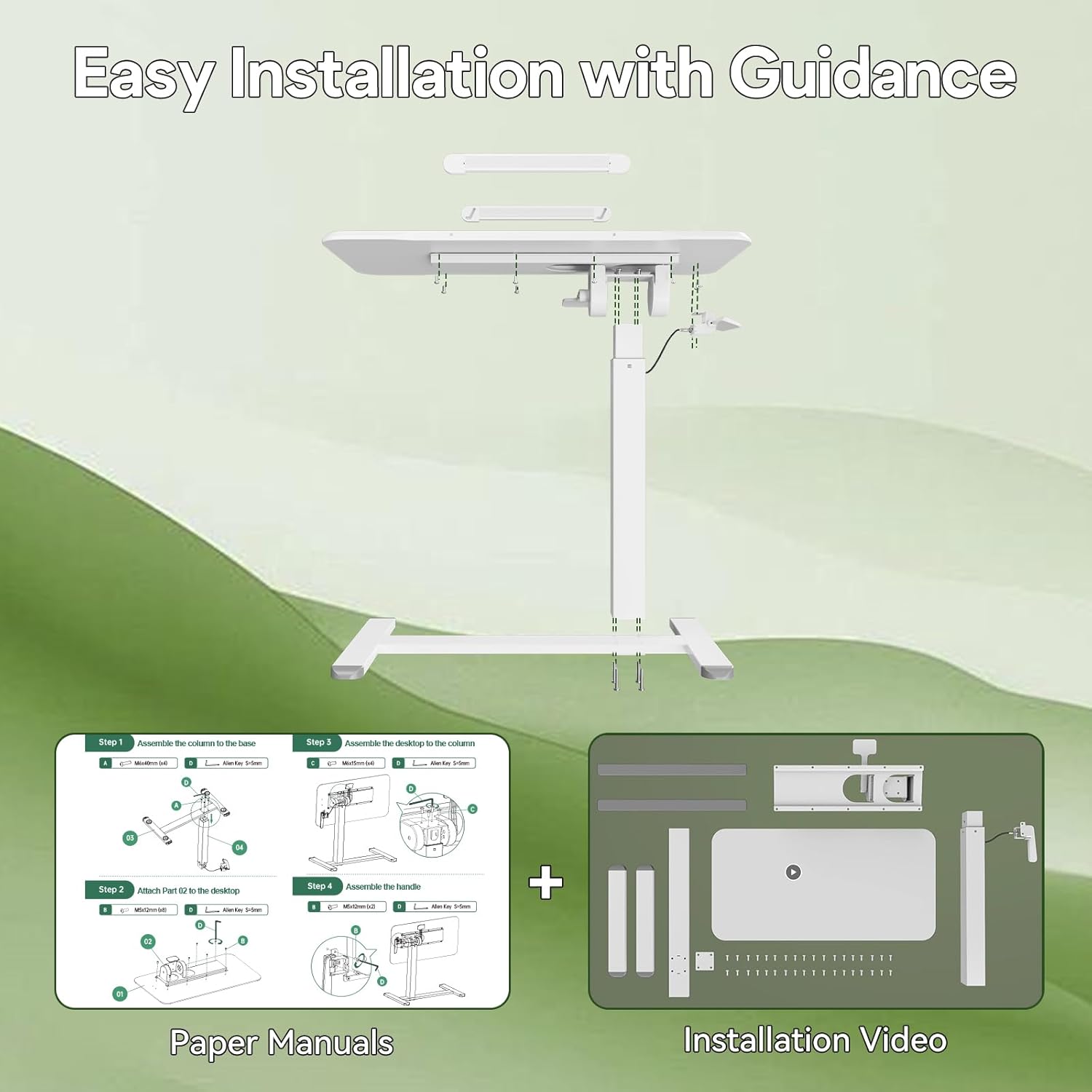
Figure 1: Easy Installation with Guidance. This image illustrates the four main steps for assembling the desk, showing components and tools.
Video 1: Gibbon Mounts Bedside Tiltable Mobile Standing Desk. This video provides a detailed visual guide for assembling the desk and demonstrates its key features.
Operating Instructions
Height Adjustment:
The desk features a powerful gas spring lifting mechanism for smooth and effortless height adjustments. The height can be adjusted from 27.2 inches to 41.3 inches.
- To Raise: Squeeze the handle located under the desktop and gently lift the desktop to your desired height.
- To Lower: Squeeze the handle and apply gentle downward pressure on the desktop. It is recommended to use both hands for controlled lowering.

Figure 2: How to Adjust the Height. This diagram illustrates the process of raising and lowering the desk's height using the integrated handle.
Tilt Adjustment:
The desktop is designed to be 180° tiltable, allowing you to adjust the angle for various tasks such as reading, drawing, or typing. It can be used on both the left and right sides.
- Locate the tilt adjustment lever under the desktop.
- Release the lever, adjust the desktop to your preferred angle, and then secure the lever.

Figure 3: How to Adjust the Angle. This image demonstrates the mechanism for tilting the desktop to various angles.
Anti-slip Strips:
The desktop includes two 13.4-inch anti-slip strips to prevent your laptop, mouse, or other items from sliding off when the surface is tilted. These strips can be slid up to secure items or slid down to be flush with the desktop when not needed.

Figure 4: Adjustable Anti-slip Strips. This image shows how the anti-slip strips can be adjusted to secure items on the tilted desktop.
Wheel Options:
Your desk comes with two types of base options to suit different floor types and mobility needs:
- Hidden Wheels: The low-profile base with 4 hidden wheels (1.2 inches high) allows the desk to easily slide under furniture, saving space. These are ideal for smooth surfaces.
- Lockable Casters: Four 360° lockable casters (3.7 inches high) are provided as an alternative. These can be swapped with the hidden wheels for improved mobility on carpets or when you need to lock the desk in a stationary position.

Figure 5: Handy Side Table with 2 Base Options. This image illustrates the two types of wheels available for the desk and their respective uses.
Maintenance
To maintain the appearance and functionality of your Gibbon Mounts 111D Rolling Laptop Desk, follow these simple care instructions:
- Wipe the desk surface with a damp cloth.
- Avoid using abrasive cleaners or harsh chemicals, as these may damage the finish.
- Regularly check all screws and connections to ensure they remain tight.
Safety Information
Please observe the following safety guidelines to prevent injury or damage to the product:
- Do not exceed the maximum weight recommendation of 17.6 pounds (8 kg) on the desktop.
- Ensure all assembly components are securely fastened before using the desk.
- Keep hands and fingers clear of moving parts during height and tilt adjustments to avoid pinching.
- Use caution when moving the desk, especially on uneven surfaces or with items on the desktop.
Specifications
| Feature | Detail |
|---|---|
| Brand | Gibbon Mounts |
| Model Number | 111D |
| Product Dimensions (D x W x H) | 15.7"D x 31.5"W x 27.2"H (Minimum) |
| Maximum Height | 41.3" |
| Desktop Material | Engineered Wood |
| Base Material | Alloy Steel |
| Color | White |
| Special Features | 180° Tiltable Top, Adjustable Height, Collapsible, Dual-Wheel Options (Hidden/Lockable) |
| Maximum Weight Capacity | 17.6 lbs |
| Assembly Required | Yes (Recommended 1 person) |

Figure 6: Product Dimensions and Features. This image highlights the key dimensions and adjustable features of the desk.
Warranty and Support
Your Gibbon Mounts 111D Rolling Laptop Desk comes with a Limited Warranty.
For detailed warranty information, product support, or any inquiries, please visit the official Gibbon Mounts store: Gibbon Mounts Store.