
MONKEY LOOP ML-DD1
MONKEY LOOP ML-DD1 Delay Pedal Instruction Manual
Model: ML-DD1
Introduction
Thank you for purchasing the MONKEY LOOP ML-DD1 Delay Pedal. This device is designed to provide versatile delay effects for electric guitars, allowing for creative sound shaping. This manual provides essential information for the safe and effective use of your pedal. Please read it thoroughly before operation and retain it for future reference.
Safety Information
- Power Supply: Use only a DC 9V power adapter with a negative center polarity. Using an incorrect power supply may damage the unit and void the warranty.
- Environment: Do not expose the pedal to water, moisture, excessive heat, or direct sunlight. Operate in a dry, well-ventilated area.
- Handling: Avoid dropping or subjecting the pedal to strong impacts.
- Cleaning: Clean with a soft, dry cloth. Do not use liquid cleaners or solvents.
- Servicing: Do not attempt to service the unit yourself. Refer all servicing to qualified personnel.
Package Contents
The MONKEY LOOP ML-DD1 Delay Pedal package includes:
- MONKEY LOOP ML-DD1 Delay Pedal
- User Manual (this document)
- Velcro strip for pedalboard mounting
Product Overview
The ML-DD1 is a compact delay effect pedal featuring controls for delay time, effect intensity, and feedback. It incorporates true bypass for signal integrity when the effect is disengaged.
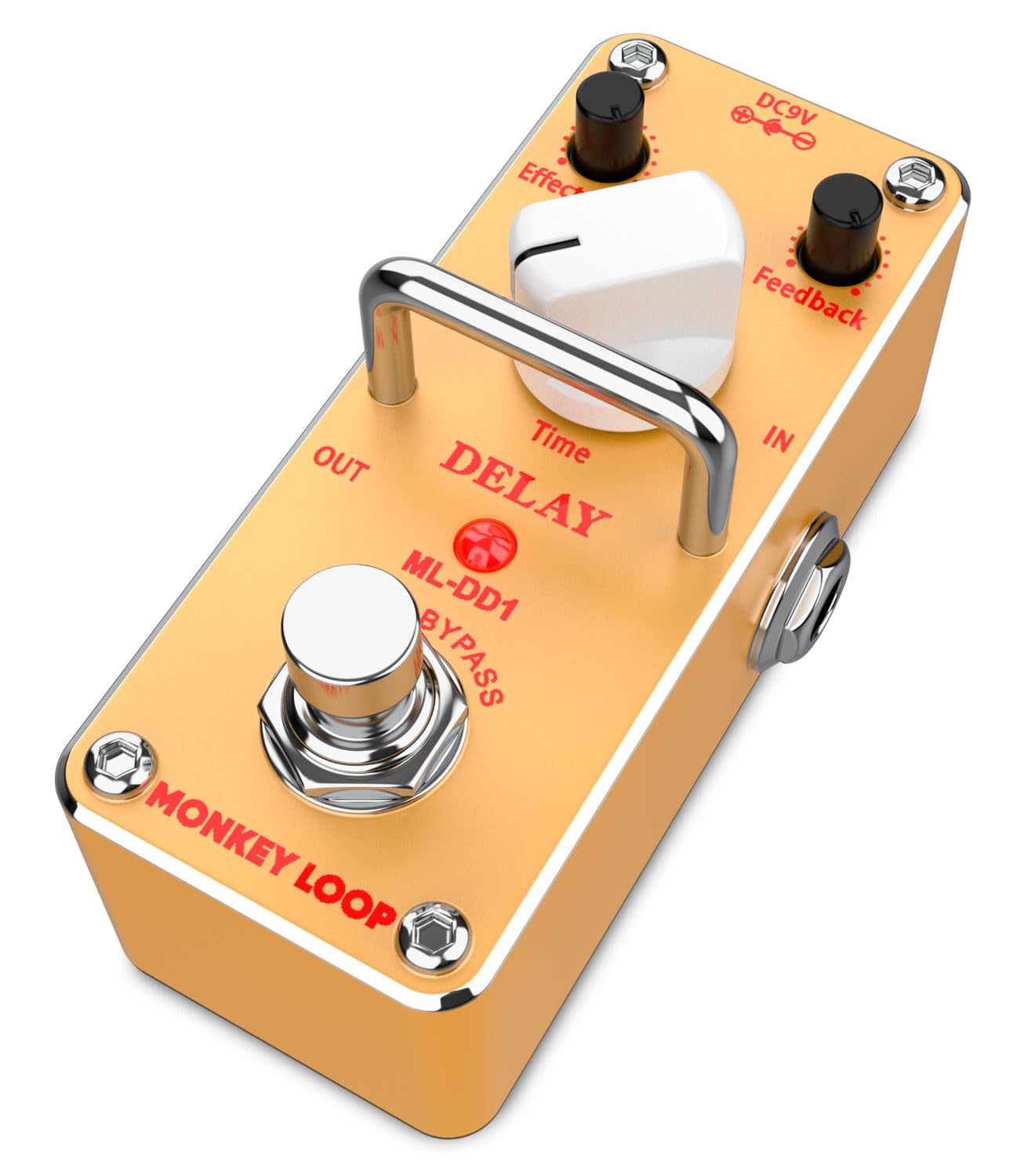
Image: Angled view of the MONKEY LOOP ML-DD1 Delay Pedal, highlighting its compact design and control knobs.
Controls and Connections
- Time Knob: Adjusts the delay time.
- Effect Level Knob: Controls the intensity or volume of the delay effect.
- Feedback Knob: Determines the number of delay repeats.
- IN Jack: 1/4-inch input for your guitar or previous effect pedal.
- OUT Jack: 1/4-inch output to your amplifier or next effect pedal.
- DC 9V Input: Power input for a 9V DC adapter (negative center).
- Footswitch: Engages or disengages the delay effect (True Bypass).

Image: Top view of the ML-DD1 Delay Pedal, illustrating the control layout and input/output jacks.
Setup
- Power Connection: Connect a DC 9V power adapter (negative center) to the DC 9V input jack on the pedal. Ensure the power adapter is compatible to prevent damage.
- Input Connection: Connect your electric guitar or the output of a preceding effect pedal to the IN jack of the ML-DD1 using a standard 1/4-inch instrument cable.
- Output Connection: Connect the OUT jack of the ML-DD1 to your guitar amplifier's input or to the input of the next effect pedal in your signal chain using a standard 1/4-inch instrument cable.
- Placement: Place the pedal on a stable surface or secure it to your pedalboard using the provided Velcro strip.

Image: The ML-DD1 Delay Pedal connected in a guitar signal chain, ready for use.
Operating Instructions
- Engaging the Effect: Press the footswitch to turn the delay effect ON. The LED indicator will illuminate. Press it again to turn the effect OFF. When OFF, the pedal operates in true bypass mode, preserving your original signal.
- Adjusting Delay Time: Rotate the Time knob clockwise to increase the delay time (longer echoes) and counter-clockwise to decrease it (shorter echoes).
- Setting Effect Level: Use the Effect Level knob to control the volume of the delayed signal relative to your dry signal. Turn clockwise for a louder delay and counter-clockwise for a subtler delay.
- Controlling Feedback: The Feedback knob adjusts the number of repeats. Turn it clockwise for more repeats, creating longer, decaying echoes. Turn it counter-clockwise for fewer repeats, resulting in shorter, quicker decays.
Experiment with different combinations of these controls to achieve a wide range of delay effects, from subtle ambience to expansive, repeating echoes.
Maintenance
- Cleaning: Keep the pedal clean by wiping it with a soft, dry cloth. Avoid abrasive materials or chemical cleaners.
- Storage: When not in use for extended periods, disconnect the power supply and store the pedal in a dry, cool place away from direct sunlight.
- Cable Care: Regularly check all cables for damage. Replace any frayed or damaged cables to ensure optimal performance and safety.
Troubleshooting
| Problem | Possible Cause | Solution |
|---|---|---|
| No sound when pedal is ON. |
|
|
| No sound when pedal is OFF (True Bypass). |
|
|
| Unwanted noise or hum. |
|
|
Specifications
- Model: ML-DD1
- Effect Type: Delay
- Input Impedance: 100 Kohm
- Output Impedance: 150 ohm
- Equivalent Input Noise: -90 dBu or less
- Current Consumption: 23 mA (DC 9V)
- Power Requirement: DC 9V Adapter (Negative Center)
- Dimensions (L x W x H): 9.4 cm x 4.2 cm x 4.8 cm (3.7 in x 1.65 in x 1.89 in)
- Weight: 133 g (0.29 lbs)
- Signal Format: Analog
- Hardware Interface: 1/4 inch Audio
- Manufacturer: Monkey Loop
- Country of Origin: China

Image: Bottom view of the ML-DD1 Delay Pedal, displaying power requirements and regulatory markings.
Warranty and Support
For warranty information and technical support, please refer to the documentation provided at the time of purchase or contact your retailer. Keep your proof of purchase for any warranty claims.
For further assistance, visit the official MONKEY LOOP website or contact their customer service department.
Related documentsML-DD1

Ask a question about this manual
Ask about setup, troubleshooting, compatibility, parts, safety, or missing instructions. Manuals+ will review the question and use this page’s manual context to help answer it.