
Virubi B0CRB41TL5
Virubi Modern TV Stand Instruction Manual
Model: B0CRB41TL5
Introduction
This manual provides comprehensive instructions for the assembly, operation, and maintenance of your Virubi Modern TV Stand. Designed for TVs up to 80 inches, this entertainment center features a color-contrasting fashion design, ample storage, and a sturdy construction. Please read all instructions carefully before beginning assembly to ensure safe and proper use.

Figure 1: Fully assembled Virubi Modern TV Stand in a living room setting.
Safety Information
Your safety is paramount. Please adhere to the following safety guidelines:
- Always follow assembly instructions carefully.
- Use appropriate tools and safety gear when assembling the TV stand.
- Do not overload the TV stand. Ensure the weight of your television and other items does not exceed the stand's capacity.
- Place the TV stand on a flat, stable, and level surface to prevent tipping.
- Keep small parts and packaging materials away from children and pets during assembly.
- Regularly check all connections and fasteners to ensure they remain tight and secure.
Product Features
- Color Contrasting Fashion Design: Features different colors for wooden panels in open storage spaces, offering a unique and modern aesthetic.
- Accommodates TVs up to 80": Generous top surface (70.9"L x 15"W x 19.7"H) suitable for 55", 65", 70", and 80" TVs.
- Ample Storage Space: Includes 3 hidden storage spaces and 1 functional open shelf for media players, remotes, and other items.
- Sturdy and Durable Construction: Made from high-grade MDF and quality hardware, ensuring longevity and stability.
- Easy Cable Management: Designed with cutouts for tidy cable routing.
- Adjustable Shelves: Provides flexibility for organizing various items.
- Strengthened Metal Base: Enhances stability and durability.

Figure 2: Key features including cable management, premium hinges, durable material, and metal base.

Figure 3: Illustration of the adjustable shelf feature for flexible storage.
Specifications
| Attribute | Detail |
|---|---|
| Brand | Virubi |
| Model | B0CRB41TL5 |
| Color | Wood Color |
| Product Dimensions (L x W x H) | 70.9"L x 15"W x 19.7"H |
| Mounting Type | Floor Mount |
| Room Type | Living Room, Bedroom |
| Material | High-grade MDF, Metal (legs) |
| Number of Shelves | 4 (including open shelf) |
| Assembly Required | Yes |
| UPC | 196986433748 |
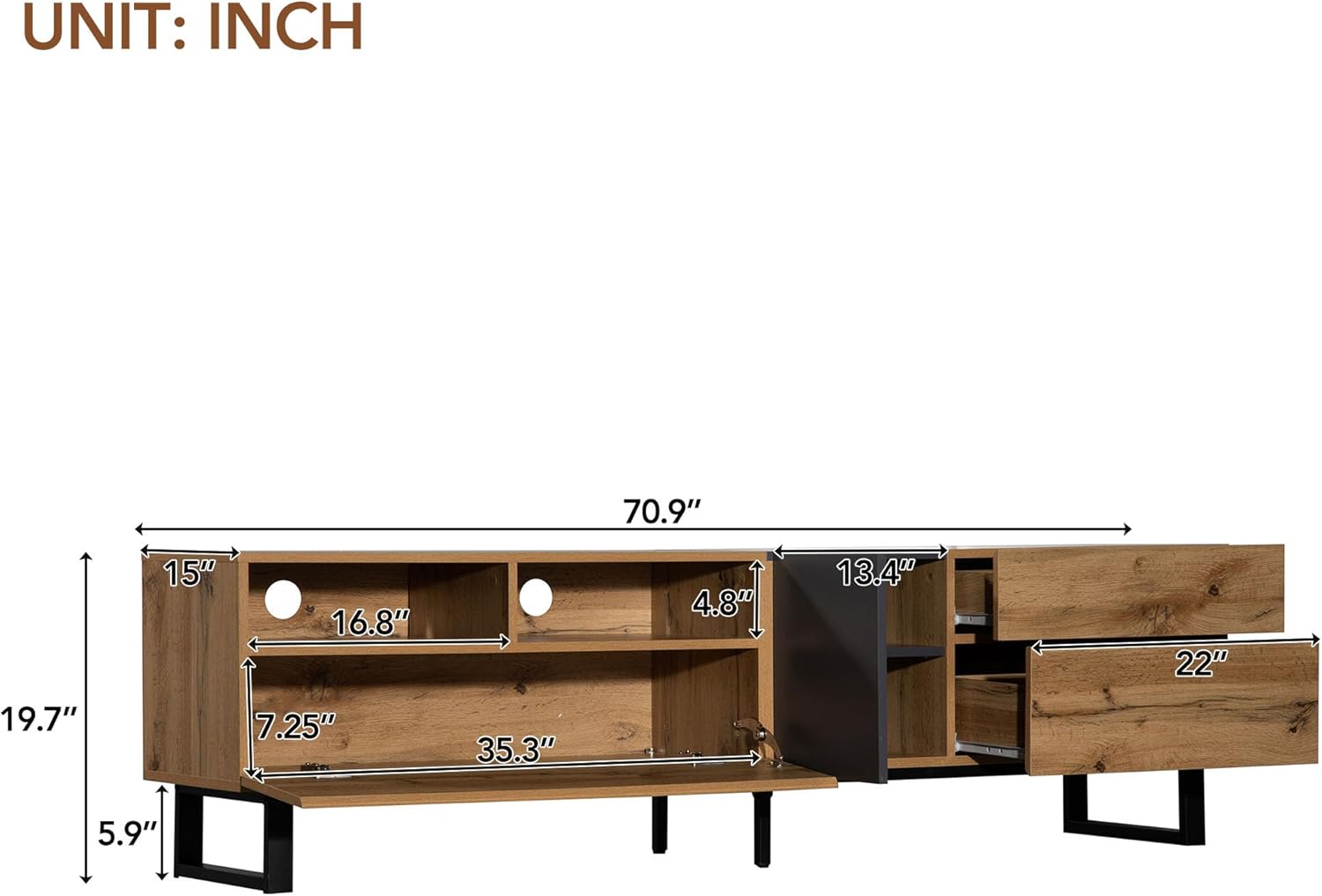
Figure 4: Detailed dimensions of the TV stand.

Figure 5: The TV stand is suitable for televisions up to 80 inches.
Setup and Assembly
Assembly of the Virubi Modern TV Stand is designed to be straightforward with clear instructions. It is recommended to have a power drill for easier screw installation, though manual tools can also be used.
1. Unpacking and Component Identification
Carefully unpack all components from the box. Each wooden piece is labeled with a number, and screws are also numbered to correspond with the detailed instructions. Sort the pieces by their numbers, from smallest to largest, to facilitate the assembly process.

Figure 6: Internal view of the TV stand, showcasing storage compartments and pre-drilled holes for assembly.
2. Assembly Steps
- Begin by identifying the main base and side panels.
- Attach the metal legs to the designated areas on the bottom of the stand.
- Follow the numbered instructions to connect the various panels using the provided screws and hardware. Ensure all connections are secure.
- Install the internal shelves and drawer slides.
- Assemble the drawers and cabinet doors, then attach them to the main unit. Pay attention to hinge alignment for smooth operation.
- Once fully assembled, gently move the TV stand to its desired location.
Operation
The Virubi Modern TV Stand is designed for intuitive use and organization.
- Placing Your TV: Position your television centrally on the top surface of the stand. Ensure the TV's base is fully supported and does not overhang.
- Utilizing Storage: Use the open shelf for frequently accessed media devices like soundbars, gaming consoles, or decorative items. The hidden cabinets and drawers are ideal for storing DVDs, remote controls, cables, and other accessories, keeping your living space tidy.
- Cable Management: Route power cords and media cables through the pre-drilled holes in the back panel to maintain a clean and organized appearance.
Care and Maintenance
To ensure the longevity and appearance of your TV stand, follow these maintenance tips:
- Cleaning: The surface of the TV cabinet is smooth and waterproof. For daily cleaning, simply wipe with a soft, damp cloth. Avoid using harsh chemicals or abrasive cleaners, as they may damage the finish.
- Dusting: Regularly dust the surfaces with a dry, soft cloth to prevent buildup.
- Spills: Wipe up spills immediately with a dry cloth to prevent water damage or staining.
- Sunlight Exposure: Avoid prolonged direct sunlight exposure, which can cause fading or discoloration over time.
- Heat Protection: Use coasters or protective pads under hot items to prevent heat marks.
Troubleshooting
| Problem | Possible Cause | Solution |
|---|---|---|
| Doors/Drawers do not close flush or are misaligned. | Improper hinge or slide adjustment; uneven assembly. | Adjust the hinges on the cabinet doors or the drawer slides until they are properly aligned. Refer to the assembly instructions for specific adjustment details. Ensure all screws are tightened evenly. |
| Stand feels wobbly or unstable. | Uneven floor surface; loose connections; incorrect leg installation. | Ensure the stand is on a flat, level surface. Check all screws and fasteners to confirm they are securely tightened. Verify that the metal legs are correctly installed and fastened. |
| Surface chipping during assembly. | Excessive force when inserting screws; using incorrect tools. | Apply gentle, consistent pressure when inserting screws. If using a power drill, set it to a lower torque setting. Ensure you are using the correct size screwdriver or drill bit for the screws. |
Warranty and Support
Virubi stands behind the quality of its products. For specific warranty information, including coverage details and duration, please refer to the warranty card included with your purchase or contact Virubi customer support directly. If you encounter any issues or have questions regarding your TV stand, please reach out to our customer service team for assistance.
Contact Information: Please visit the official Virubi website or refer to your purchase documentation for the most up-to-date contact details.
Related documentsB0CRB41TL5


Ask a question about this manual
Ask about setup, troubleshooting, compatibility, parts, safety, or missing instructions. Manuals+ will review the question and use this page’s manual context to help answer it.