
Product Overview
This manual provides detailed instructions for the Syncwire Bluetooth 5.4 FM Transmitter Car Adapter, Model SW-XC965. This device allows you to stream audio wirelessly from your Bluetooth-enabled devices to your car's FM radio, make hands-free calls, and fast charge multiple devices simultaneously.
Key Features
- 66W Fast Charge Adapter with USB-C Coiled Cable
- Latest Bluetooth 5.4 Chip for stable connection
- Stronger Dual Mics with CVC Noise Reduction for clear calls
- Bass Boosted & Hi-Fi Stereo Music
- LED Ambient Light Control
- Wide Compatibility with smartphones and vehicles (12-24V)


What's in the Box
- Syncwire Bluetooth 5.4 FM Transmitter Car Adapter
- 3 Year Warranty
Setup Instructions
Step 1: Power On
Insert the Syncwire FM Transmitter into your car's cigarette lighter socket. The device will power on automatically and its LED display will light up.
Step 2: Tune FM Radio
Select an unused FM frequency on your car's radio. Choose a frequency that has no existing radio station broadcasting on it, typically indicated by static or a clear, empty channel.

Adjust your car's FM radio to an empty frequency, such as 103.00 MHz. Step 3: Match FM Frequency
On the Syncwire FM Transmitter, adjust its FM frequency to match the one you selected on your car radio. Use the 'CH' button or the multi-function knob to change the frequency.
Step 4: Pair Bluetooth
On your smartphone or Bluetooth-enabled device, enable Bluetooth and search for available devices. Select "SW-XC965" from the list to pair. Once paired, audio from your device will be transmitted to your car's speakers.
Pair your mobile device with the transmitter by selecting "SW-XC965" in your Bluetooth settings.
Operating Instructions
Controls Overview
- FM Display: Shows the current FM frequency.
- Multifunction Button (FM+/- / Volume+/- / Answer/Hang up/Reject):
- Rotate to adjust volume.
- Press to answer/end calls.
- Long press to reject calls.
- Short press to play/pause music.
- Rotate to change FM frequency (after pressing CH button).
- CH Button: Press to enter FM frequency adjustment mode.
- Deep Bass/Light Switch ('b' button):
- Short press to activate/deactivate Deep Bass mode.
- Long press to turn the LED ambient light on/off.
- Large Mic: For hands-free calling.
- USB-C Cable: Integrated coiled cable for charging.
- QC 3.0 Port: Quick Charge 3.0 USB-A port for fast charging.
- PD 30W Port: Power Delivery 30W USB-C port for fast charging.
Music Playback
Once paired via Bluetooth, music from your device will automatically play through your car's FM radio.
Deep Bass & Hi-Fi Stereo
To enhance your audio experience, press the 'b' button to toggle between standard mode and deep bass mode. This feature provides authentic Hi-Fi sound with boosted bass.

Hands-Free Calling
The transmitter features a dual-mic system with CVC noise suppression and echo-canceling technology for clear call quality.

- Answer Call: Short press the Multifunction Button.
- End Call: Short press the Multifunction Button during a call.
- Reject Call: Long press the Multifunction Button.
Charging Devices
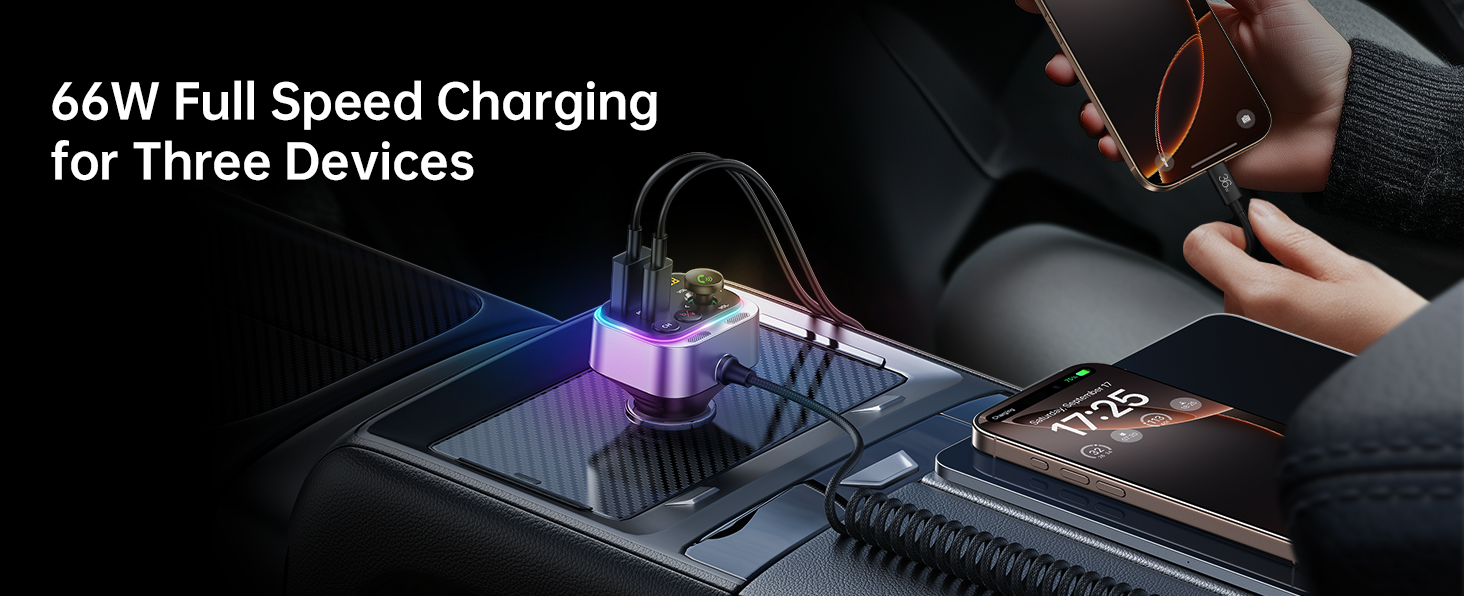
The Syncwire FM Transmitter is equipped with a 66W combined power output, including a PD 3.0 port, a QC 3.0 port, and a 6ft built-in coiled USB-C cable. This allows you to charge up to three devices simultaneously.


LED Ambient Light Control
The transmitter features a vibrant LED display. You can turn the light on or off by long pressing the 'b' button according to your preference.

Maintenance
To ensure optimal performance and longevity of your Syncwire FM Transmitter:
- Keep the device clean by wiping it with a soft, dry cloth.
- Avoid exposing the device to extreme temperatures, direct sunlight, or moisture.
- Do not attempt to disassemble or repair the device yourself. Refer to authorized service personnel for any repairs.
- Ensure the cigarette lighter socket is clean and free of debris for a stable connection.
Troubleshooting
| Problem | Solution |
|---|---|
| No power/device not turning on |
|
| Static or poor audio quality |
|
| Bluetooth not connecting |
|
| Charging is slow or not working |
|
Specifications
| Feature | Detail |
|---|---|
| Model Number | SW-XC965 |
| Bluetooth Version | 5.4 |
| Input Voltage | 12-24V |
| Charging Ports | 1x PD 3.0 (USB-C), 1x QC 3.0 (USB-A), 1x Integrated USB-C Coiled Cable |
| Total Power Output | Up to 66W |
| Microphone | Dual Mics with CVC Noise Reduction |
| Cable Length | 6ft (1.8m) coiled USB-C cable |
| Item Weight | 3.84 ounces (0.11 Kilograms) |
| Dimensions | 3.62 x 3.46 x 1.93 inches |
Warranty and Support
This Syncwire product comes with a 3-year warranty. For technical support, warranty claims, or further assistance, please visit the official SYNCWIRE website or contact their customer service.
Official SYNCWIRE Store: SYNCWIRE Amazon Store
Safety Information
Refer to general wireless audio adapter safety guidelines.
Product Video
This video provides a visual overview of the Syncwire Bluetooth 5.4 FM Transmitter, showcasing its features and design.