
Introduction
Thank you for choosing the BEMOONY Automatic Cat Feeder. This device is designed to provide convenient and reliable feeding for your pets, ensuring they receive their meals on time with precise portion control. This manual will guide you through the setup, operation, and maintenance of your new feeder.
Key Features
- App Control (5G/2.4G WiFi): Easily set daily feeding schedules and manage feeding remotely via a mobile application.
- 5L Capacity: Provides sufficient food for extended periods, ideal for travel or busy schedules.
- Customizable Feeding Schedule: Set 1-10 meals per day, with 1-12 servings per meal.
- 10-Second Voice Recording: Record a personalized message to call your pet at meal times.
- Double-Lock Design: Ensures food freshness and prevents pets from tampering with the food reservoir.
- Dual Power Supply: Operates via power adapter with battery backup (3 x D batteries, not included) for uninterrupted feeding during power outages.
- Easy Disassembly for Cleaning: Designed for simple cleaning and maintenance.
What's in the Box
Upon unboxing your BEMOONY Automatic Cat Feeder, please ensure all components are present:
- Feeder Unit
- Food Bowl
- Power Adapter
- USB Power Cable
- Desiccant Pack
- User Manual

Image: All components included with the BEMOONY Automatic Cat Feeder, laid out on a surface next to a sleeping cat, showing the feeder unit, food bowl, desiccant, power cable, plug, and manual.
Setup Guide
- Assemble the Feeder: Place the transparent food reservoir onto the main feeder unit. Ensure it is securely seated.

Image: A person assembling the feeder by placing the transparent food container onto the base unit.
- Insert Desiccant: Open the lid and insert the desiccant pack into the designated slot on the underside of the lid to maintain food freshness. Close the lid securely using the double-lock mechanism.

Image: A hand placing a desiccant packet into a compartment on the underside of the feeder's lid.
- Attach Food Bowl: Align the food bowl with the dispenser opening at the base of the feeder and push it into place.
- Power the Feeder: Connect the USB power cable to the feeder and plug the adapter into a wall outlet. For backup power, install 3 D-size batteries (not included) in the battery compartment at the bottom of the unit.

Image: The assembled BEMOONY Automatic Cat Feeder with its food bowl, connected to a power outlet, alongside a smartphone showing the feeder's control application.
- Download and Connect App: Download the recommended app (refer to the user manual for specific app name, often "Smart Life" or "POOEKEN"). Follow the in-app instructions to connect your feeder to your 2.4G or 5G WiFi network.
Video: Demonstrates the process of connecting the automatic cat feeder to a smartphone application, showing the app interface for remote control and scheduling.
Operating Instructions
- Fill the Food Reservoir: Open the lid and pour dry pet food into the reservoir. Ensure the food size is appropriate (2-12mm recommended).

Image: A hand pouring dry pet food into the transparent reservoir of the automatic feeder.
- Set Feeding Schedule (App Control): Use the mobile app to set specific meal times and portion sizes (1-12 servings per meal, approximately 10g per serving). You can program up to 10 meals per day.
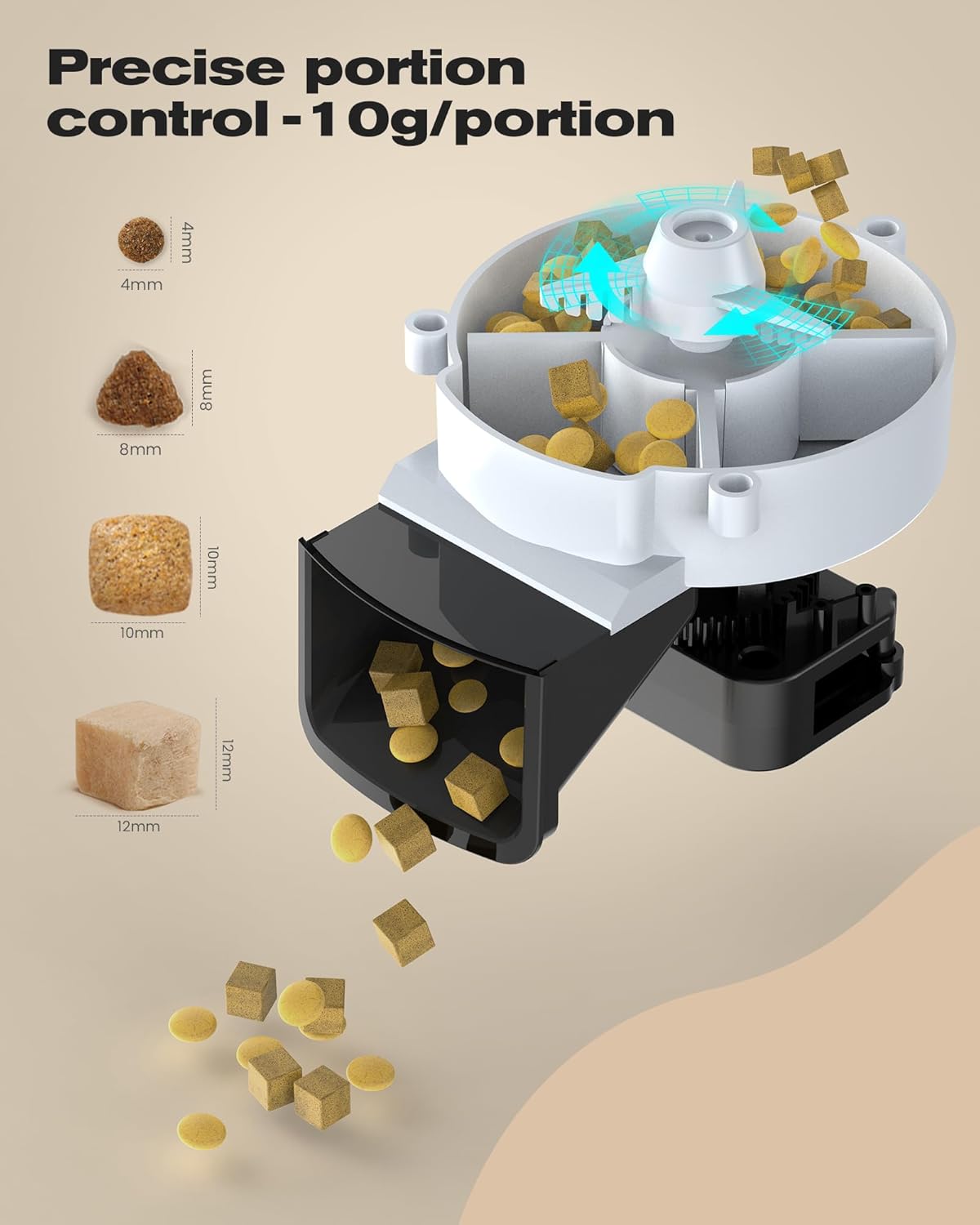
Image: An internal diagram of the feeder's mechanism, illustrating how precise 10g portions of food are dispensed.
- Manual Feeding: The feeder typically has a manual feed button on the unit or within the app for immediate dispensing of food.
- Voice Recording: Press and hold the record button on the feeder to record a 10-second voice message. This message will play at each scheduled mealtime to call your pet.

Image: A cat looking at the feeder, with a graphic indicating the 10-second voice recording feature that plays a familiar call before feeding.
Video: Illustrates the concept of scientific feeding for healthier pets using the automatic feeder, showing a pet eating from the bowl.
Maintenance and Cleaning
Regular cleaning ensures hygiene and extends the lifespan of your feeder. The feeder is designed for easy disassembly.
- Disassembly: Unplug the feeder and remove the food bowl. Detach the food reservoir from the base unit.
- Cleaning: The food bowl and reservoir can be hand-washed with mild soap and water. Do not immerse the main feeder unit (base with electronics) in water. Wipe it clean with a damp cloth.

Image: The food bowl and internal components of the feeder being cleaned under running water in a sink, emphasizing easy maintenance.
- Drying: Ensure all parts are completely dry before reassembling to prevent moisture damage to food or electronics.
- Desiccant Replacement: Replace the desiccant pack every 1-2 months, or as needed, to maintain optimal food freshness.
Troubleshooting
Common Issues and Solutions:
- Feeder not connecting to WiFi: Ensure your WiFi network is 2.4G or 5G compatible. Check if the feeder is within range of your router. Restart the feeder and your router.
- Food not dispensing: Check if the food reservoir is empty or if food is jammed in the dispenser. Ensure the feeder is powered on and the schedule is correctly set in the app.
- "Motor Jam" Error: Unplug the feeder, remove the food reservoir, and carefully check for any obstructions in the dispensing mechanism. Clear any lodged kibble.
- Voice recording not playing: Ensure the recording was saved correctly. Check the volume settings if applicable.
Product Specifications
| Feature | Detail |
|---|---|
| Brand | BEMOONY |
| Model Name | A4-WiFi-5L |
| Capacity | 5 Liters |
| Connectivity | 2.4G/5G WiFi (App Control) |
| Meals per Day | 1-10 |
| Servings per Meal | 1-12 (approx. 10g per serving) |
| Voice Recording | 10 seconds customizable |
| Power Supply | AC Power Adapter, 3 x D Batteries (backup, not included) |
| Material | Acrylonitrile Butadiene Styrene |
| Dimensions (LxWxH) | 8.11 x 7.46 x 7 inches |
| Item Weight | 2.72 pounds |
Warranty and Support
The BEMOONY Automatic Cat Feeder comes with a 2-year warranty from the date of purchase.
For technical support, troubleshooting assistance, or warranty claims, please contact the BEMOONY customer service team. Refer to the product packaging or the official BEMOONY website for the most current contact information.
Directions for Use: Please place the feeder in a dry place.
Care Instructions: Hand Wash Only for removable parts.