
1. Introduction
Welcome to your Pyle Multifunction Sports Training Handheld Watch. This manual provides detailed instructions for the setup, operation, and maintenance of your PSHTM24.5 device. Please read this manual thoroughly before use to ensure proper functionality and to maximize your experience with the product.
2. Safety Information
- Do not attempt to open, disassemble, or modify the device. This may void the warranty and cause damage.
- Keep the device away from extreme temperatures, direct sunlight, and strong magnetic fields.
- While water-resistant, avoid prolonged submersion or exposure to high-pressure water jets.
- Dispose of used batteries responsibly according to local regulations.
- Keep the device out of reach of small children.
3. Package Contents
Verify that all items are present in the package:
- Pyle PSHTM24.5 Handheld Track Watch
- User Manual (this document)

Image: The Pyle PSHTM24.5 watch packaging, with an inset showing the back of the watch and two button cell batteries for installation.
4. Product Overview
The Pyle PSHTM24.5 is a versatile handheld device designed for sports training and outdoor activities. It integrates multiple functions to assist users in tracking performance and navigating environments.
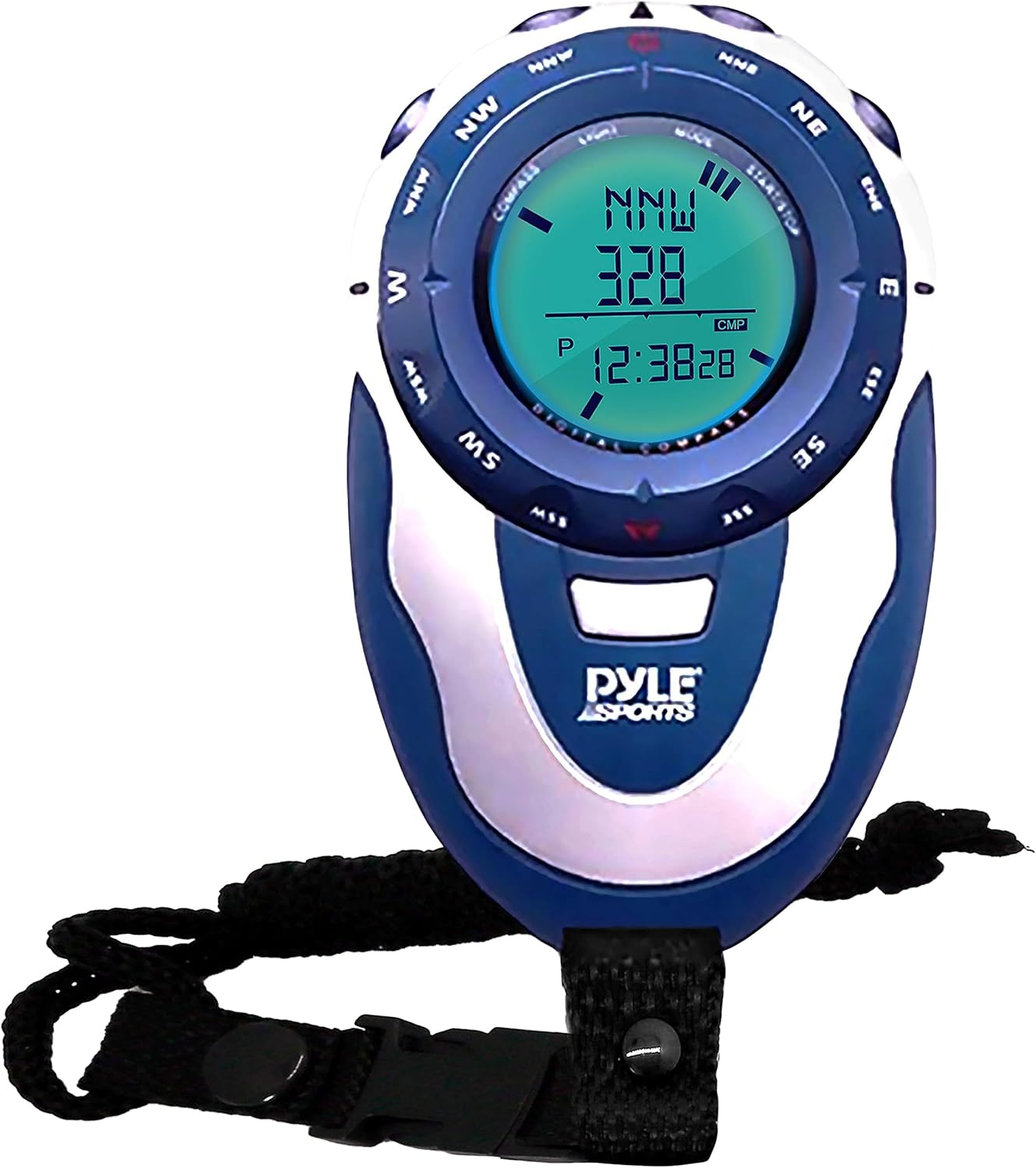
Image: Front view of the Pyle PSHTM24.5 handheld watch, displaying its digital screen with compass reading (NNW 328) and current time (12:38:28).
Key Features:
- Chronograph Mode: Features 42-lap memory and 1/100 second resolution for precise timing of activities.
- Pacer Mode: Assists in maintaining a consistent pace during training sessions.
- Digital Compass: Provides direction with 16 compass points and 1-degree resolution.
- Water Resistance: Designed to withstand splashes and brief water exposure, suitable for outdoor use.
- Target Time Mode: Allows setting a target time and calculates the difference from actual clocked time.
- Electroluminescent Backlight: Ensures visibility of the display in low-light conditions or at night.
- Additional Functions: Includes Countdown Timer, Dual Time display, and Alarm functions.

Image: A diagram illustrating various features of the Pyle PSHTM24.5 watch, including its digital display, graphical resolution, chronograph range (9 hours 59 minutes 59.99 seconds), compass, water resistance, electroluminescent backlight, and dual time capability.
5. Setup
5.1. Battery Installation/Replacement
The PSHTM24.5 operates on button cell batteries. If the display is blank or dim, the batteries may need replacement.
- Locate the battery compartment cover on the back of the device.
- Using a small Phillips head screwdriver, carefully remove the screws and open the compartment cover.
- Remove the old batteries and insert new ones, ensuring the correct polarity (+/-) as indicated inside the compartment.
- Replace the compartment cover and secure it with the screws.
5.2. Initial Time Setting
After battery installation or replacement, you will need to set the current time and date. Refer to the "Time Mode" section for detailed instructions on adjusting these settings.
6. Operating Modes
The PSHTM24.5 features multiple operating modes, which can typically be cycled through using the MODE button.
6.1. Time Mode
This is the default mode, displaying the current time, date, and day of the week.
To Set Time/Date:
- In Time Mode, press and hold the SET button until a value on the display begins to flash.
- Press the MODE button to cycle through the adjustable settings (e.g., seconds, minutes, hours, 12/24-hour format, year, month, day).
- Use the ADJUST button to change the flashing value.
- Once all settings are correct, press the SET button again to confirm and exit the setting mode.
6.2. Chronograph Mode
The chronograph functions as a stopwatch, ideal for timing sports activities. It features 42-lap memory and 1/100 second resolution.
- Enter Chronograph Mode using the MODE button.
- Press START to begin timing.
- Press LAP to record individual lap times while the chronograph continues to run.
- Press STOP to pause or end the timing.
- Press RESET to clear the chronograph and lap memory.
6.3. Pacer Mode
This mode helps you maintain a consistent pace during your training by providing rhythmic beeps.
- Enter Pacer Mode.
- Set your desired pace (e.g., beats per minute) using the SET and ADJUST buttons.
- The watch will emit audible signals to guide your rhythm.
6.4. Compass Mode
The integrated digital compass provides directional readings with 16 compass points and 1-degree resolution.
- Enter Compass Mode.
- Hold the device level and away from any strong magnetic interference (e.g., other electronic devices, large metal objects).
- The display will show your current cardinal direction (e.g., N, NE, SW) and a numerical degree heading.

Image: A hand holding the Pyle PSHTM24.5 watch in an outdoor setting, accompanied by a diagram illustrating the 16 cardinal and intercardinal points of a compass.
6.5. Target Time Mode
This mode allows you to set a target time for an activity. The watch will alert you when this target is reached and can calculate the difference between your actual time and the target time, aiding in performance tracking.
6.6. Countdown Timer
Set a specific duration for a countdown. An alarm will sound once the timer reaches zero.
6.7. Dual Time
The Dual Time function allows you to track a second time zone simultaneously, useful for travel or coordinating with individuals in different regions.
6.8. Alarm Mode
Set daily alarms to remind you of important events or training schedules.
7. Maintenance
7.1. Cleaning
Wipe the device with a soft, slightly damp cloth. Do not use harsh chemicals, abrasive cleaners, or solvents, as these can damage the finish and internal components.
7.2. Storage
When not in use for extended periods, store the device in a cool, dry place, away from direct sunlight and extreme temperatures.
7.3. Water Resistance
The PSHTM24.5 is designed to be water-resistant, meaning it can withstand splashes, rain, and brief exposure to water. It is not intended for swimming, diving, or prolonged submersion. Avoid operating buttons while the device is wet to prevent water ingress.

Image: The Pyle PSHTM24.5 watch being splashed with water, demonstrating its water-resistant capability.
8. Troubleshooting
If you encounter issues with your PSHTM24.5, refer to the table below for common problems and solutions.
| Problem | Possible Cause | Solution |
|---|---|---|
| Display is blank or dim | Low or dead battery | Replace batteries. Refer to Section 5.1. |
| Incorrect time/date displayed | Time/date not set correctly after battery change or initial setup | Refer to Section 6.1 (Time Mode) to set the correct time and date. |
| Compass readings are inaccurate | Magnetic interference from nearby electronics or metal objects; compass may need calibration (if feature available). | Move away from potential sources of interference. If the device has a calibration function, follow its specific instructions. |
| Buttons are unresponsive | Device may be in a locked mode; low battery; temporary software glitch. | Check if a button lock feature is active. Replace batteries if low. Try removing and reinserting batteries to reset the device. |
9. Specifications
- Model: PSHTM24.5
- Display: Electroluminescent Digital Display
- Chronograph: 42-lap memory, 1/100 second resolution
- Compass: 16 compass points, 1-degree resolution
- Water Resistance: Yes (Water-resistant, not for prolonged submersion)
- Power Source: Button Cell Batteries (type not specified, typically CR2032 or similar)
- Item Weight: 6 ounces (0.17 Kilograms)
- Package Dimensions: 9.49 x 5.83 x 2.01 inches
- Special Features: Alarm Clock, Multisport Tracker, Time Display
- Human Interface Input: Buttons
10. Warranty and Support
For warranty information, technical support, or service inquiries, please visit the official Pyle website or contact their customer service department. It is recommended to retain your purchase receipt as proof of purchase for any warranty claims.
Official Pyle Website: www.pyleaudio.com


