
RT ROCKTEK RC-G2
RockTek G20 Bluetooth Voice Remote Control User Manual
Model: RC-G2
1. Introduction
Thank you for choosing the RockTek G20 Bluetooth Voice Remote Control. This remote is engineered to provide a seamless and intuitive control experience, especially when paired with the RockTek G2 TV box. It features Google Voice Assistant integration, Bluetooth connectivity for stable performance, and convenient hotkeys for popular streaming applications.
Important Note: This remote control is specifically designed for the RockTek G2 TV box. When paired with other Android TV or Google TV devices, some functions may not be fully compatible or operational.
2. Product Overview
2.1. Remote Control Layout
Familiarize yourself with the buttons and their functions on your RockTek G20 remote control.
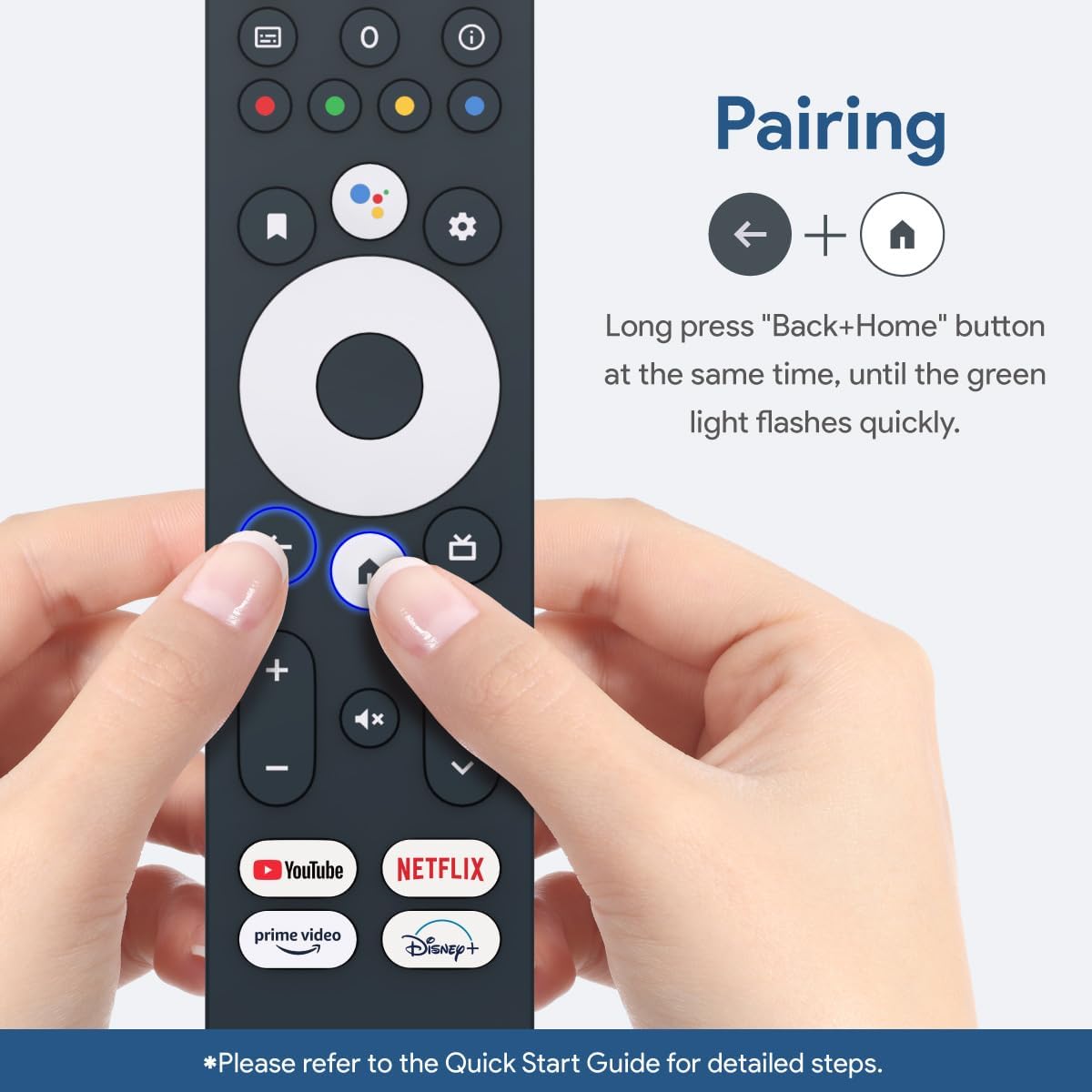
Image: Front view of the RockTek G20 remote control with labels indicating the function of each button, including Power, Numeric Keys, Google Assistant, Direction Buttons, Volume, Mute, and Hotkeys for streaming services.
- Power Button: Turns the device on or off.
- LED Indicator: Shows pairing status and button presses.
- Input Mic: For voice commands.
- Numeric Keys (0-9): For direct channel input or password entry.
- Subtitle Button: Toggles subtitles.
- Info Button: Displays information about current content.
- Function Keys (Colored): Context-dependent functions.
- Google Assistant Button: Activates voice assistant.
- Bookmark Button: Marks content.
- Setting Button: Accesses device settings.
- OK/Enter Button: Confirms selections.
- Direction Buttons (Up, Down, Left, Right): Navigates menus.
- Back/ESC Button: Returns to the previous screen.
- Home Button: Returns to the home screen.
- Channel Up/Down (Page Up/Down): Changes channels or scrolls pages.
- Volume +/- Buttons: Adjusts audio volume.
- Mute Button: Toggles audio mute.
- Hot Keys (YouTube, Netflix, Prime Video, Disney+): Direct access to streaming applications.
2.2. Dimensions
The RockTek G20 remote control has the following approximate dimensions:

Image: Diagram showing the dimensions of the RockTek G20 remote control: 7.2 inches (183mm) in length, 1.5 inches (38mm) in width, and 0.7 inches (17mm) in thickness. It also indicates that 2 AAA batteries are required and not included.
3. Setup
3.1. Battery Installation
The RockTek G20 remote control requires two (2) AAA batteries. Batteries are not included with the remote.
- Locate the battery compartment on the back of the remote control.
- Slide open the battery cover.
- Insert two AAA batteries, ensuring the positive (+) and negative (-) terminals align correctly with the markings inside the compartment.
- Close the battery cover securely.
3.2. Pairing the Remote Control
To ensure full functionality, the remote control must be paired with your RockTek G2 TV box or compatible Android TV/Google TV device via Bluetooth.

Image: A close-up of the RockTek G20 remote control showing hands pressing the Back and Home buttons simultaneously, illustrating the pairing process. Text indicates to long press these buttons until the green light flashes quickly.
- Ensure your TV box or device is powered on and within range.
- On the RockTek G20 remote, press and hold the Back button (←) and the Home button (⌂) simultaneously.
- Continue holding until the green LED indicator on the remote flashes quickly.
- Release the buttons.
- Follow any on-screen prompts on your TV to complete the pairing process. A successful connection message should appear on your screen.
4. Operating Instructions
4.1. Basic Navigation
- Use the Direction Buttons (Up, Down, Left, Right) to navigate through menus and select items on your screen.
- Press the OK/Enter Button in the center of the direction pad to confirm a selection or open an application.
- Press the Back/ESC Button to return to the previous screen or exit a menu.
- Press the Home Button to quickly return to the main home screen of your device.
4.2. Google Voice Assistant
The RockTek G20 remote is Google-certified and supports Google Voice Assistant functionality.
- Press the Google Assistant Button (microphone icon).
- Speak clearly into the remote's microphone (located near the top).
- Examples of commands: "Hey Google, play the latest movie," "Open Netflix," "What's the weather?"
4.3. Hotkey Functionality
The remote includes dedicated hotkeys for quick access to popular streaming platforms:
- Press the YouTube button to launch the YouTube application.
- Press the Netflix button to launch the Netflix application.
- Press the Prime Video button to launch the Amazon Prime Video application.
- Press the Disney+ button to launch the Disney+ application.
Note: Hotkey functions on Android TV boxes other than the RockTek G2 may have support limitations or may not function as expected.
4.4. Numeric Keypad
The G20 remote retains a classic numeric keypad for various uses:
- Use the numeric keys (0-9) to directly input channel numbers.
- Facilitates password entry for applications or Wi-Fi networks.
4.5. Volume and Channel Control
- Press Volume + to increase the audio volume.
- Press Volume - to decrease the audio volume.
- Press the Mute Button to silence the audio. Press again to unmute.
- Use the Channel Up/Down buttons to navigate through TV channels or scroll through content lists.
5. Maintenance
To ensure the longevity and optimal performance of your RockTek G20 remote control, follow these simple maintenance guidelines:
- Cleaning: Wipe the remote with a soft, dry cloth. Do not use liquid cleaners or abrasive materials, as they may damage the surface or internal components.
- Battery Replacement: Replace batteries when the remote's response becomes sluggish or the LED indicator does not light up consistently. Always replace both batteries at the same time with new AAA batteries.
- Storage: Store the remote in a cool, dry place away from direct sunlight and extreme temperatures. If storing for an extended period, remove the batteries to prevent leakage.
- Avoid Drops: Protect the remote from physical shocks and drops, which can damage internal circuitry.
6. Troubleshooting
If you encounter issues with your RockTek G20 remote control, please refer to the following common problems and solutions:
| Problem | Possible Cause | Solution |
|---|---|---|
| Remote not responding. | Dead batteries, remote not paired, or out of range. | Replace batteries. Re-pair the remote (see Section 3.2). Ensure the remote is within Bluetooth range of your device. |
| Voice Assistant not working. | Not paired correctly, microphone blocked, or device settings. | Ensure the remote is properly paired. Check if anything is obstructing the microphone. Verify Google Assistant is enabled on your TV box/device. |
| Hotkeys (e.g., Netflix) not launching apps. | App not installed, or limited compatibility with non-G2 devices. | Ensure the specific app is installed on your device. Remember that hotkey functionality may be limited on devices other than the RockTek G2 TV box. |
| Volume control not working. | Remote not fully synced for volume, or TV/soundbar settings. | Ensure the remote is fully paired. Check your TV or soundbar settings to ensure they are configured to receive volume commands from the connected device. Some devices may require additional setup for universal volume control. |
| Limited functionality with other Android TV/Google TV devices. | Remote is optimized for RockTek G2. | This is expected behavior. The remote is primarily designed for the RockTek G2. Some advanced features or hotkeys may not be fully supported on other devices. |
7. Specifications
| Feature | Detail |
|---|---|
| Model Number | RC-G2 |
| Brand | RT ROCKTEK |
| Connectivity | Bluetooth |
| Special Feature | Voice Search (Google Assistant) |
| Color | Black |
| Power Source | 2 x AAA Batteries (Not Included) |
| Product Dimensions | 1.5 x 0.7 x 7.2 inches (38 x 17 x 183 mm) |
| Item Weight | 2.39 ounces (67.7 grams) |
| Compatible Devices | RockTek G2 TV Box, Google TV, Android TV (limited functionality with non-G2 devices) |
8. Warranty and Support
For warranty information and technical support, please refer to the official RT ROCKTEK website or contact their customer service directly. Keep your purchase receipt as proof of purchase for any warranty claims.
RT ROCKTEK Customer Support: Please visit the RT ROCKTEK Store on Amazon or their official website for contact details and further assistance.
Ask a question about this manual
Ask about setup, troubleshooting, compatibility, parts, safety, or missing instructions. Manuals+ will review the question and use this page’s manual context to help answer it.