
1. Introduction
Thank you for choosing the WLIVE TV Stand. This modern entertainment center is designed to accommodate TVs up to 65 inches and features integrated LED lighting, ample storage, and a sturdy construction. This manual provides essential information for safe assembly, operation, and maintenance of your new TV stand. Please read it thoroughly before beginning assembly or use.

Image 1.1: The WLIVE TV Stand in a modern living room setup, featuring a television, soundbar, and illuminated LED lights.
2. Safety Information
Please observe the following safety guidelines to prevent injury or damage to the product:
- Weight Limit: Do not exceed the maximum weight capacity of 110 pounds for the top surface. Exceeding this limit may cause structural failure and potential injury.
- Level Surface: Always place the TV stand on a flat, stable, and level surface to prevent tipping.
- Assembly: Follow all assembly instructions carefully. Improper assembly can lead to instability and hazards.
- Children: Keep small parts and packaging materials away from children during assembly.
- Tipping Hazard: Secure the TV stand to a wall using anti-tip hardware (if included) to prevent accidental tipping, especially in households with children or pets.
3. Product Specifications
| Feature | Specification |
|---|---|
| Model Name | ADSG044WH |
| Color | White |
| Product Dimensions (D x W x H) | 14" x 57.8" x 17.7" |
| Maximum TV Size Supported | Up to 65 inches |
| Weight Limit (Top Surface) | 110 lbs |
| Material | CARB-certified P2 Particle Board, Engineered Wood |
| Storage | 3 Hidden Cabinets, 1 Open Shelf |
| Special Features | Integrated LED Lights, Cable Management Holes, Soft-Close Cabinet Doors |

Image 3.1: Detailed product dimensions and maximum weight capacity.
4. Package Contents
Before assembly, please verify that all components listed below are present and undamaged. If any parts are missing or damaged, please contact customer support.
- All wooden panels (labeled A, B, C, etc.)
- Hardware pack (screws, dowels, cam locks, hinges, etc.)
- LED light strip(s) and remote control
- Assembly guide
- Installation tools (e.g., Allen wrench)
5. Assembly Instructions
Assembly typically requires two individuals and takes approximately 1-3 hours. Follow the step-by-step instructions provided in the included assembly guide. Ensure you have sufficient space and a clean, soft surface to prevent scratching the panels during assembly.
- Unpack and Identify: Carefully unpack all components and lay them out. Match each part to the corresponding label in the assembly guide.
- Hardware Sorting: Separate and identify all hardware pieces.
- Follow Steps: Adhere strictly to the sequence of steps outlined in the assembly guide. Do not overtighten screws.
- Install LED Lights: Once the main structure is assembled, install the LED light strips as directed in the guide.
- Final Checks: After assembly, ensure all connections are secure and the stand is stable.

Image 5.1: The TV stand with open cabinets, demonstrating the internal storage capacity.
6. Operating Instructions (LED Lights)
The integrated LED lights can be customized using the included remote control. Ensure the LED strip is properly connected to its power source.
- Power On/Off: Use the power button on the remote to turn the lights on or off.
- Brightness Adjustment: Select from 5 brightness levels to suit your preference.
- Color Selection: Choose from 20 vibrant colors to match your mood or decor.
- Dynamic Modes: Explore various dynamic modes, including options that sync with music.

Image 6.1: Overview of LED light features and customization options.
7. Maintenance and Care
To ensure the longevity and appearance of your TV stand, follow these care instructions:
- Cleaning: Wipe surfaces with a soft, damp cloth. Avoid harsh chemicals or abrasive cleaners, which can damage the finish.
- Spills: The wood countertop is water-resistant and stain-resistant. Wipe spills immediately with a dry cloth to prevent damage.
- Dusting: Regularly dust with a dry, soft cloth.
- Avoid Direct Sunlight: Prolonged exposure to direct sunlight may cause fading or discoloration.
- Hardware Check: Periodically check and tighten all hardware connections to maintain stability.
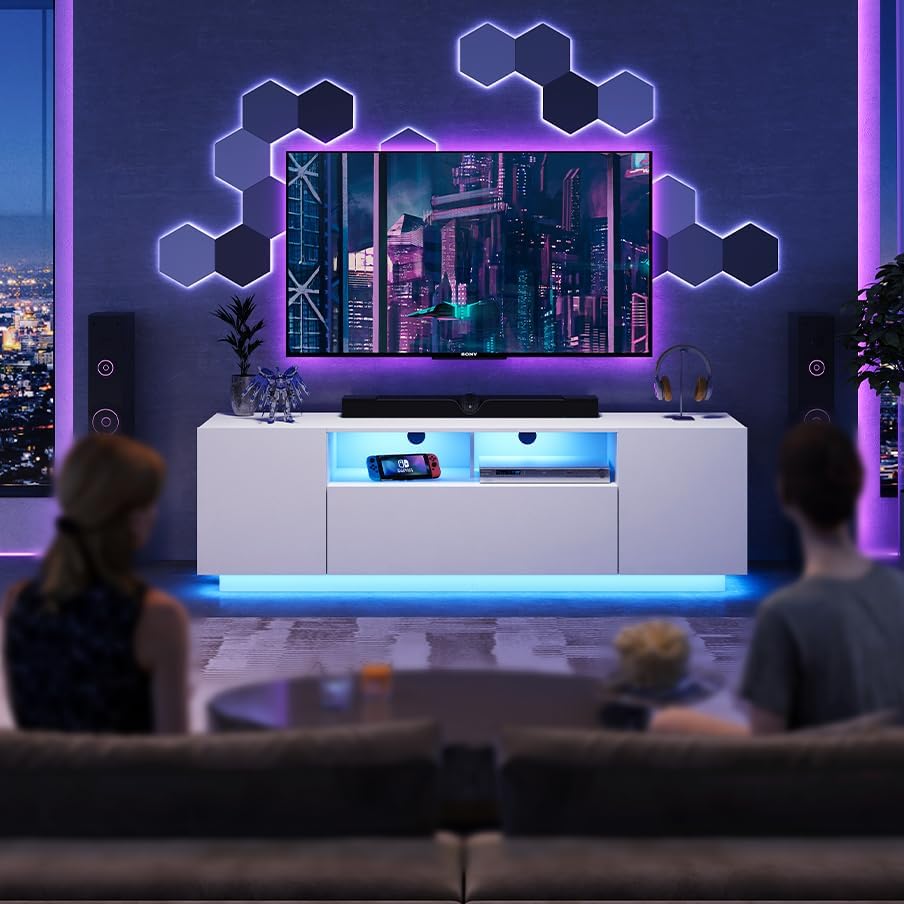
Image 7.1: Features including LED color combinations, storage, soft-close doors, and cable management.
8. Troubleshooting
If you encounter any issues with your WLIVE TV Stand, refer to the following common problems and solutions:
| Problem | Possible Cause | Solution |
|---|---|---|
| LED lights not working | Loose connection, power issue, remote battery dead | Check all cable connections. Ensure power adapter is plugged in. Replace remote control battery. |
| Stand is wobbly/unstable | Loose hardware, uneven surface | Tighten all screws and bolts. Move the stand to a level surface or use shims if necessary. |
| Cabinet doors do not align | Hinges not adjusted correctly | Adjust the screws on the hinges to align the doors. Refer to the assembly guide for hinge adjustment details. |
| Missing parts during assembly | Packaging error | Contact WLIVE customer support with your purchase details and the specific missing parts. |
9. Customer Support
For any questions, concerns, or assistance with your WLIVE TV Stand, please do not hesitate to contact our customer support team. We are committed to providing you with peace of mind and support every step of the way.
Please have your model number (ADSG044WH) and purchase information ready when contacting support to expedite assistance.