
1. Introduction
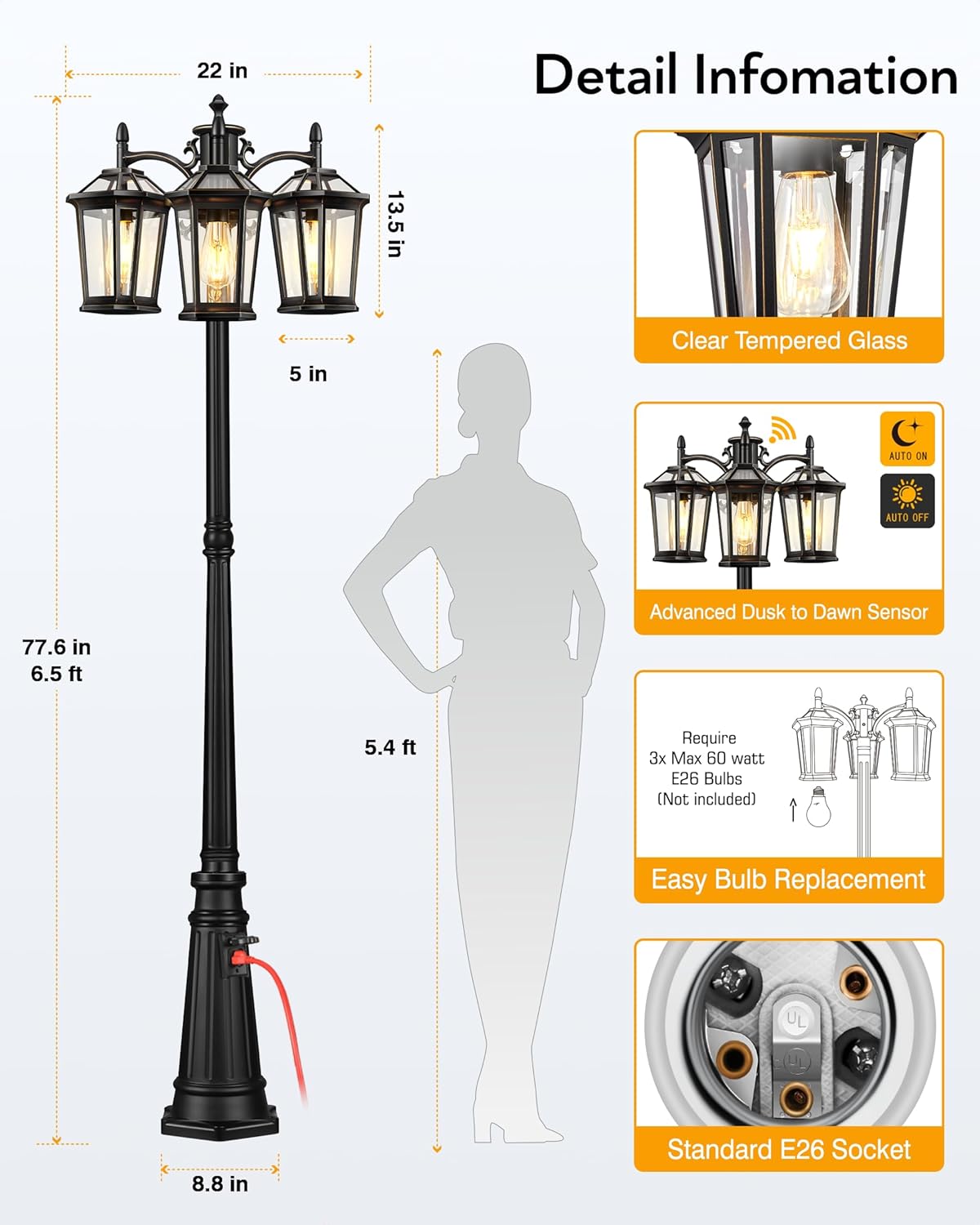
This manual provides detailed instructions for the safe installation, operation, and maintenance of your VIANIS Outdoor Lamp Post Light with Outlet. Please read this manual thoroughly before installation and retain it for future reference. This lamp post features a built-in photocell sensor for automatic dusk-to-dawn operation and an integrated electrical outlet for convenient outdoor power access.
2. Safety Information
WARNING: Risk of Electric Shock. Always disconnect power at the circuit breaker before installation or servicing.
- Ensure all wiring connections are secure and comply with local electrical codes.
- This product must be installed by a qualified electrician if you are not familiar with electrical wiring.
- Do not exceed the maximum wattage for bulbs (3 x 100W E26 max).
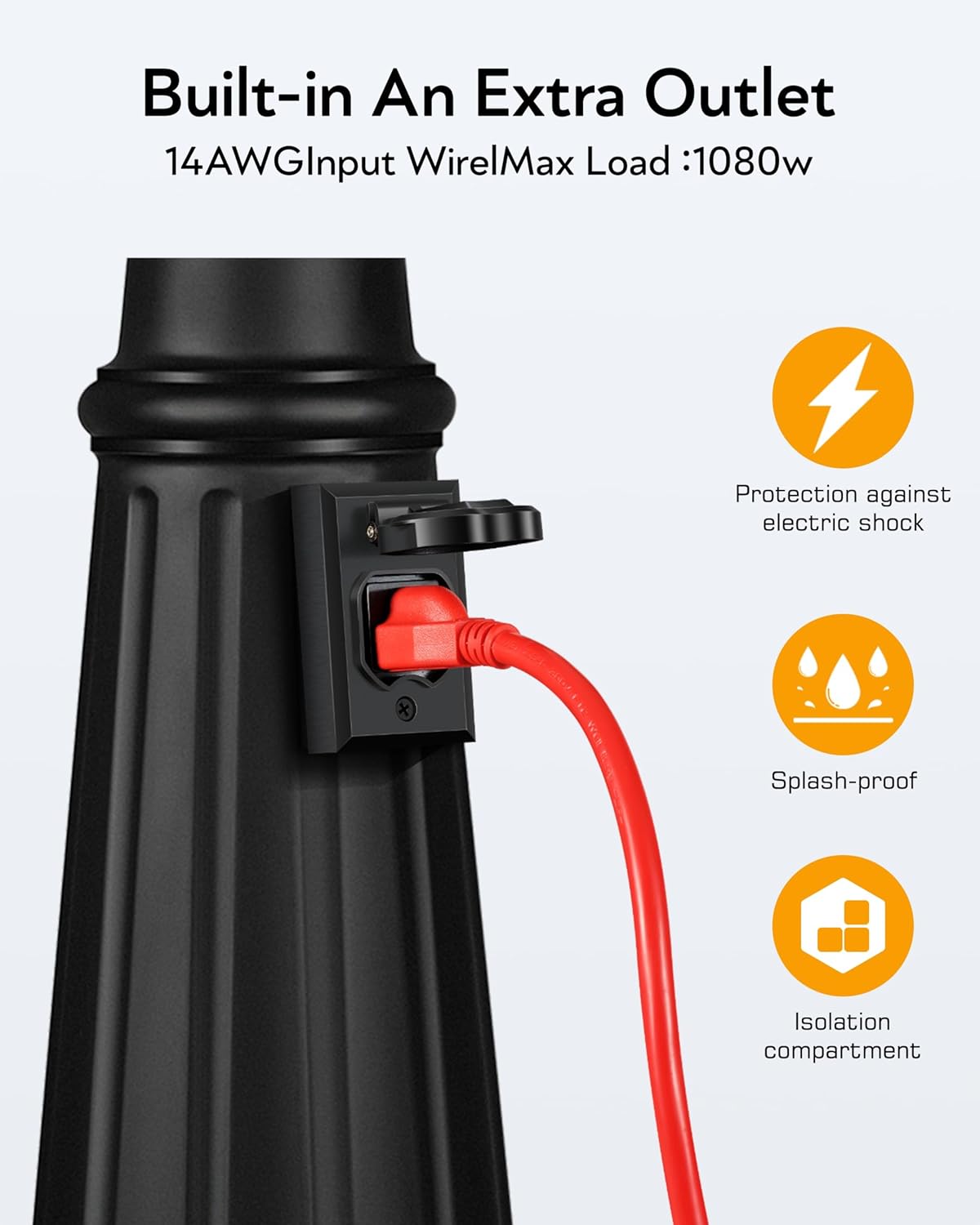
- The built-in outlet has a maximum load of 1080W. Do not overload.
- Keep children away from the installation area.
- Wear appropriate safety gear, including gloves and eye protection, during installation.
3. Package Contents
Verify that all components are present before beginning installation.
- Lamp Post Assembly (Base, Pole Sections, Lamp Heads)
- Mounting Hardware (screws, anchors, wire nuts)
- Installation Template Card
- User Manual


4. Setup & Installation
The VIANIS Outdoor Lamp Post Light is designed for hardwired installation. It can be installed in fresh concrete or by drilling holes in existing concrete using the provided template card.
4.1 Pre-Installation Steps
- Turn off Power: Locate the circuit breaker controlling the installation area and turn off the power.
- Unpack Components: Carefully remove all parts from the packaging and lay them out.
- Review Diagram: Familiarize yourself with the assembly diagram.
4.2 Assembly Instructions
- Assemble Pole Sections: Connect the pole sections securely. Ensure internal wiring is not pinched.
- Attach Lamp Heads: Secure the three lamp heads to the top of the pole assembly.
- Install Bulbs: Insert three E26 base bulbs (not included, max 100W each) into the sockets. The bottom opening design allows for easy bulb replacement without tools.
4.3 Mounting the Lamp Post
Choose one of the following methods:
Method A: Fresh Concrete Installation
- Dig a foundation hole according to local building codes.
- Run electrical conduit and wiring to the center of the foundation.
- Position the lamp post base over the conduit and pour concrete, ensuring the base is level and plumb.
- Allow concrete to cure completely before proceeding.
Method B: Existing Concrete Installation
- Use the provided template card to mark drilling locations on the existing concrete surface.
- Drill holes to the specified depth and diameter.
- Insert appropriate anchors (if not already in concrete).
- Position the lamp post base over the holes and secure it with the provided mounting screws.
4.4 Electrical Connection
- Connect the lamp post's black wire to the household live wire (usually black).
- Connect the lamp post's white wire to the household neutral wire (usually white).
- Connect the lamp post's ground wire to the household ground wire (usually green or bare copper).
- Secure all connections with wire nuts and ensure they are properly insulated.
- Carefully tuck all wires into the junction box or base.
5. Operating Instructions
5.1 Dusk-to-Dawn Sensor
The lamp post is equipped with a sensitive photocell sensor. Once installed and powered, the light will automatically turn on at dusk and turn off at dawn. No manual intervention is required for daily operation.


5.2 Using the Built-in Outlet
The integrated 14AWG input wire outlet provides convenient power for outdoor equipment, tools, or decorations. Ensure the total load connected to the outlet does not exceed 1080W.

6. Maintenance
Regular maintenance ensures the longevity and optimal performance of your lamp post light.
- Cleaning: Periodically clean the glass panels and aluminum finish with a soft, damp cloth. Avoid abrasive cleaners that may damage the finish.
- Bulb Replacement: To replace bulbs, simply unscrew the old bulb and screw in a new E26 base bulb (max 100W). No tools are required due to the bottom opening design.
- Inspection: Annually inspect all electrical connections and the structural integrity of the lamp post. Tighten any loose screws.

7. Troubleshooting
If you encounter issues with your lamp post light, refer to the following common problems and solutions:
| Problem | Possible Cause | Solution |
|---|---|---|
| Light does not turn on at dusk. | 1. Power is off. 2. Photocell sensor is obstructed. 3. Bulb is faulty. 4. Wiring issue. | 1. Check circuit breaker. 2. Ensure sensor is clear of debris or obstructions. 3. Replace bulb. 4. Consult a qualified electrician. |
| Light stays on during the day. | 1. Photocell sensor is not receiving enough light. 2. Sensor is faulty. | 1. Ensure sensor is not in a shaded area or covered. 2. Contact customer support for sensor replacement. |
| Outlet is not providing power. | 1. Power is off. 2. Outlet is overloaded. 3. Internal wiring issue. | 1. Check circuit breaker. 2. Unplug devices and check if it resets. Reduce load. 3. Consult a qualified electrician. |
If troubleshooting steps do not resolve the issue, please contact customer support.
8. Specifications
| Feature | Detail |
|---|---|
| Model Number | V86093E.KG |
| Product Dimensions | 58L x 58W x 200H Centimetres (approx. 22.8L x 22.8W x 78.7H inches) |
| Weight | 9.06 kg (approx. 20 lbs) |
| Material | Aluminum (Die-cast), Tempered Glass |
| Color | Black (with gold trim) |
| Light Source | LED (Bulbs not included) |
| Number of Light Sources | 3 |
| Bulb Base | E26 |
| Max Wattage per Bulb | 100 Watts |
| Total Max Wattage | 300 Watts |
| Power Source | Corded Electric (Hardwired) |
| Control Method | Photocell Sensor (Dusk to Dawn) |
| Built-in Outlet Max Load | 1080 Watts |
| Weather Resistance | Waterproof, Rustproof, Sunproof, Snowproof, Stormproof |
| Installation Type | Floor-mounted |
| Certifications | cULus Listed |

9. Warranty & Support
9.1 Warranty Information
This VIANIS Outdoor Lamp Post Light is covered by a 1-year limited warranty from the date of purchase. This warranty covers defects in materials and workmanship under normal use. Please retain your proof of purchase for warranty claims.

9.2 Customer Support
For technical assistance, warranty claims, or any questions regarding your product, please contact VIANIS customer service:
- Email: service@vianis.com

