
Product Overview
The ZOUPW 100W Portable Solar Panel is designed for efficient and reliable power generation in various outdoor and emergency scenarios. Featuring high-efficiency monocrystalline cells and a durable ETFE coating, this foldable solar panel offers versatile connectivity and a lightweight design for ease of use and transport.

Image: The ZOUPW 100W Portable Solar Panel unfolded, showcasing its compact and lightweight design, ideal for outdoor use with an RV.
Setup Instructions
- Unfold the Solar Panel: Gently unfold the solar panel completely on a flat surface in direct sunlight.

Image: The solar panel unfolded and ready for use in an outdoor setting.
- Adjust Kickstands: Utilize the two adjustable kickstands on the back of the panel to angle it towards the sun. For optimal power output, aim for a 45° angle to capture maximum sunlight. Avoid laying the panel flat on the ground unless the sun is directly overhead (at noon).

Image: Visual guide for adjusting the solar panel kickstands to achieve optimal sun exposure.
- Connect to Device: Open the zippered pocket on the panel to access the built-in controller and 5-in-1 solar connector cable. Connect the appropriate adapter from the 5-in-1 cable to your power station or device.
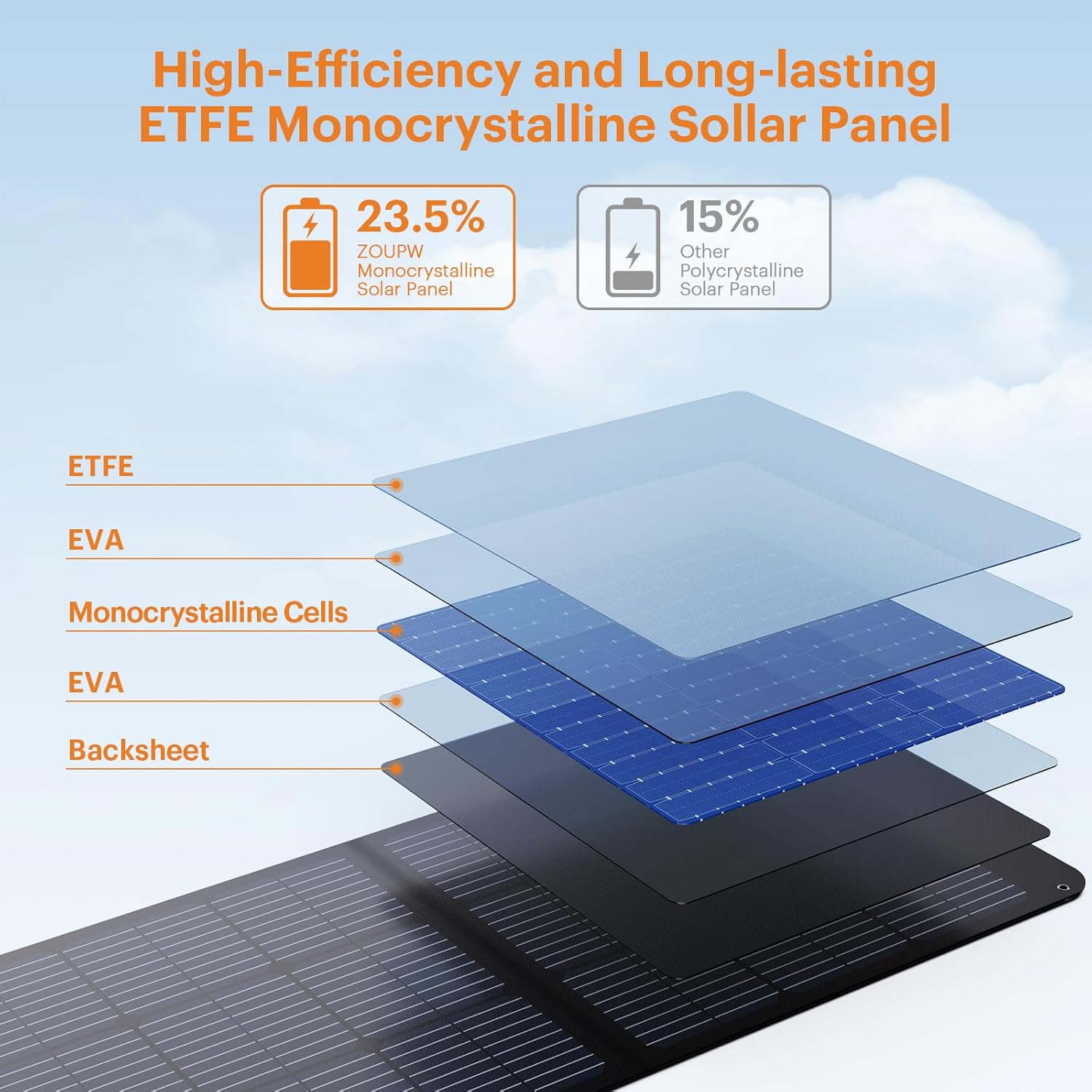
Image: Connectivity options for various power stations and devices.
Video: Easy Setup Demonstration
Video: A user demonstrates the simple setup of the ZOUPW 100W solar panel, highlighting its two-panel design and ease of deployment.
Operating Instructions
- High Efficiency Charging: The panel features 23.5% high-efficiency A+ monocrystalline cells, ensuring faster charging even in low-light conditions.
Image: The solar panel's wide compatibility with various power stations and USB devices.
- Universal Connectivity: The upgraded 5-in-1 solar cable includes connectors for DC8020, XT60, Anderson, DC7909/8mm, and DC5521, compatible with 99% of power stations like Jackery, EcoFlow, Anker, and Bluetti.
- Direct Device Charging: The built-in intelligent controller offers 1x USB-C (PD 15V/3A) and 2x USB-A (including QC3.0 12V/1.5A) ports for direct charging of smartphones, tablets, GPS, and cameras without a solar generator.

Image: Detail of the direct device charging hub with multiple USB ports and safety features.
Video: Charging Capabilities Overview
Video: An overview of what the 100W solar panel can charge, demonstrating its versatility for various devices and power stations.
- Auto-Recovery Charging: The panel features an auto-recovery charging function that automatically resumes charging when sunlight returns after an interruption, eliminating the need for manual reconnection.
Maintenance
- IP67 Waterproof ETFE Coating: The advanced ETFE lamination provides superior durability, heat resistance, and light transmittance. The panel is fully IP67 waterproof against rain and splashes. The zippered pocket protects the built-in controller and cables from moisture.

Image: The solar panel demonstrating its IP67 waterproof capabilities.
- Cleaning: The ETFE surface is easy to wipe clean if it gets dirty or has light rain on it.
Troubleshooting
- Low Power Output:
- Ensure the solar panel surface is oriented towards the sunlight and perpendicular to it. Improper angling will reduce power output.
- Avoid laying the solar panel flat on the ground unless the sun is directly overhead (at noon) to achieve optimal charging efficiency.
- Check for any shading on the panel. Even partial shading can significantly reduce efficiency.
- Charging Speed: The charging speed depends on your power station's maximum input limit. For example, a 60W limit station will only draw 60W from this 100W panel. Always check your power station's specifications.
- No Charging After Interruption: The auto-recovery function should automatically resume charging. If not, ensure all connections are secure and reposition the panel for optimal sunlight.
Specifications
| Brand | ZOUPW |
| Model Number | ZOUPW-F100W |
| Maximum Power | 100 Watts |
| Efficiency | 23.5% High Efficiency |
| Material | ETFE coating material, Monocrystalline solar cells |
| Product Dimensions (Unfolded) | 48.43"L x 21.06"W x 0.98"H |
| Product Dimensions (Folded) | 24.13"L x 21.06"W x 1.77"H |
| Item Weight | 9.48 Pounds |
| Output Voltage | 20.16 Volts |
| Maximum Voltage | 24.3 Volts |
| AC Adapter Current | 4.96 Amps |
| Upper Temperature Rating | 158 Degrees Fahrenheit |
| Special Features | 23.5% high efficiency, IP67 Waterproof and field-ready, Portable and foldable, Shade resistant, True 5-in-1 universal connectivity |
| Included Components | 100W portable solar charger, 10ft solar extension cable (solar TO ANDERSON/XT60/DC7909/DC5521/DC8020), DC5521 (Female) to DC6544/6330/5525/5521/5517/4817/4017/35135/7450/7955 (Male) adapters |
Warranty & Support
The ZOUPW 100W Portable Solar Panel comes with a 12-month manufacturer warranty from the date of purchase. We also provide lifetime technical support to ensure your satisfaction and assist with any product-related inquiries.
For warranty claims or technical assistance, please refer to the contact information provided in your product packaging or visit the official ZOUPW website.


