1. Introduction
This instruction manual provides comprehensive guidance for the safe and effective use of your TKLBLS TDS-6DSP 6-Channel Audio Mixer. Please read this manual thoroughly before operating the device to ensure optimal performance and to prevent damage. Keep this manual for future reference.
2. Product Overview
The TKLBLS TDS-6DSP is a versatile 6-channel audio mixer designed for various audio applications, including recording, live performances, and DJ setups. It features a built-in 99-bit DSP effects processor, 7-band output EQ, 48V phantom power, and multiple connectivity options including USB and Bluetooth.
2.1 Key Features
- 6-Channel Input: 4 XLR/TRS combo inputs for microphones or instruments, 2 stereo line inputs.
- 48V Phantom Power: Independent switch for each microphone channel to power condenser microphones.
- 3-Band EQ per Channel: High, Mid, and Low frequency adjustments for precise sound shaping on each input channel.
- 99 DSP Effects: Integrated digital effects processor with 99 adjustable presets including reverb, delay, chorus, and more.
- 7-Band Output EQ: Graphic equalizer for fine-tuning the main output sound.
- USB Connectivity: USB-B port for computer/tablet recording and playback, USB-A port for recording to USB devices.
- Bluetooth Wireless: Stream audio wirelessly from compatible devices within a 15ft range.
- AUX Output: Auxiliary output for connecting to external devices like active speakers or headphones.
- LED Indicators: Visual feedback for signal levels and phantom power status.
2.2 Mixer Panel Layout
Familiarize yourself with the various controls and connections on the mixer panel. Refer to the diagram below for a detailed overview.

Figure 2.2.1: Front and side view of the TKLBLS TDS-6DSP mixer with labels for all inputs, outputs, and controls, including microphone inputs, 48V switches, gain knobs, EQ knobs, AUX knobs, effect knobs, pan, volume faders, main output, USB interface, display screen, headphone jack, equalizer, pilot lamp, effect volume, master volume, power interface, and heat dissipation vents.

Figure 2.2.2: A detailed top-down view of the TKLBLS TDS-6DSP mixer, showcasing all input channels, main output section, DSP effects module, and the digital MP3 player section with USB port and Bluetooth indicator.
3. Setup
Follow these steps to set up your TKLBLS TDS-6DSP mixer for initial use.
3.1 Power Connection
- Ensure the mixer's power switch is in the OFF position.
- Connect the provided power adapter to the mixer's power input jack.
- Plug the power adapter into a suitable electrical outlet (127V).
- Turn on the mixer using the power switch located on the rear panel.
3.2 Connecting Audio Devices
The mixer supports various audio input and output devices. Refer to the connection diagram below for visual guidance.

Figure 3.2.1: A comprehensive diagram illustrating how to connect various audio devices to the TKLBLS TDS-6DSP mixer, including wireless microphones, corded microphones, guitars, active speakers, power amplifiers, speaker boxes, condenser microphones, computers, cell phones, flash drives, and headphones, along with the power source connection.
- Microphones/Instruments: Connect XLR or 1/4" TRS cables from your microphones or instruments to the MIC/LINE inputs (Channels 1-4).
- Condenser Microphones: For condenser microphones requiring power, activate the individual +48V PHANTOM switch for the respective channel. Ensure all connections are made before activating phantom power.
- Stereo Line Inputs: Use the 5/6 L/R inputs for stereo sources like media players or keyboards.
- Main Output: Connect your main speakers or power amplifier to the MAIN OUT (XLR or 1/4" TRS) jacks.
- Headphones: Plug your headphones into the PHONES jack for monitoring.
- AUX Output: Use the AUX output to send a signal to external monitors or recording devices.

Figure 3.2.2: A visual representation of the 48V phantom power feature, highlighting the individual phantom power switches for each microphone input channel, supporting various capacitive microphones.
4. Operating Instructions
4.1 Basic Audio Mixing
- Gain Adjustment: For each active input channel, adjust the GAIN knob to set the input sensitivity. Aim for the signal to be strong without clipping (the PEAK LED should only flash occasionally).
- Equalization (EQ): Use the HIGH, MID, and LOW knobs on each channel to adjust the tone of the input signal.
- AUX Send: The AUX knob controls the level of the channel's signal sent to the AUX output.
- Effects Send (FX): The FX knob controls the level of the channel's signal sent to the internal DSP effects processor.
- Pan Control: The PAN knob adjusts the stereo position (left/right) of the channel's signal in the main mix.
- Channel Volume: Use the individual VOL (volume) faders for each channel to balance the levels of all inputs.
- Main Output Volume: Adjust the MAIN faders (L/R) to control the overall output level of the mixer. Monitor the MAIN LED indicators to prevent clipping.
4.2 DSP Effects
The TDS-6DSP features 99 built-in digital effects to enhance your audio.

Figure 4.2.1: A visual guide to selecting DSP effects on the TKLBLS TDS-6DSP mixer. The display shows the effect number (01-99), and a rotary knob is used to select the effect type, which is then confirmed by pressing the knob. A list of effect categories (Hall, Room, Delay, Ping Pong, Echo, Echo Reverb, Karaoke, Pitch, Chorus, Tremolo, Flange, Auto Tune) is also shown.
- Select Effect: Rotate the PROGRAM knob in the DSP section to browse through the 99 available effects. The current effect number will be displayed on the screen.
- Confirm Effect: Press the PROGRAM knob to select and activate the displayed effect.
- Adjust Effect Level: Use the FX TO AUX and FX SEND knobs to control how much of the effect is applied to the AUX output and the main mix, respectively.

Figure 4.2.2: A close-up image showing a hand rotating the PROGRAM knob to select one of the 99 DSP effects, with the digital display showing the selected effect number.
4.3 7-Band Output Equalizer
The main output features a 7-band graphic equalizer for overall sound shaping.
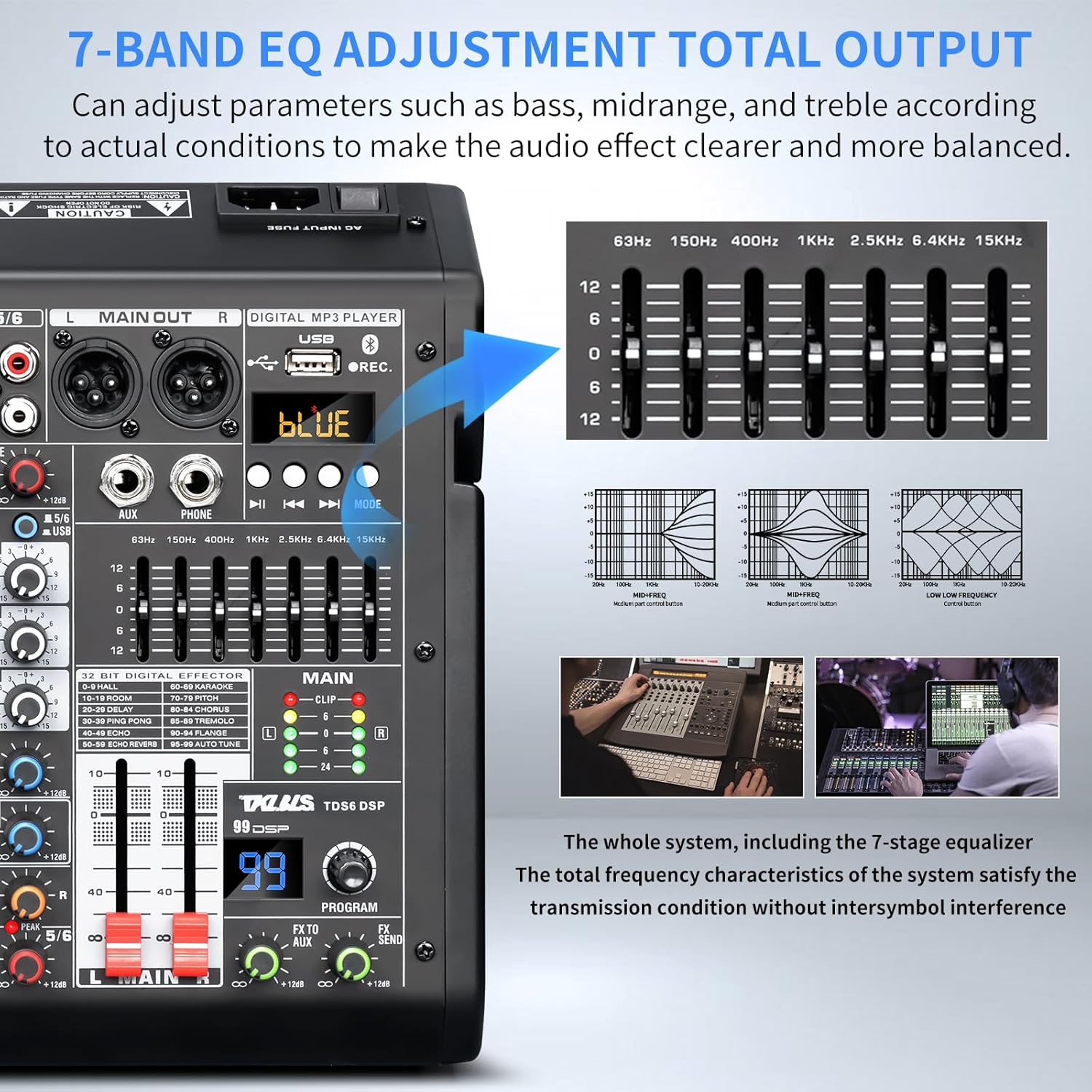
Figure 4.3.1: This image displays the 7-band graphic equalizer on the TKLBLS TDS-6DSP mixer, with frequency bands labeled (63Hz, 150Hz, 400Hz, 1KHz, 2.5KHz, 6.4KHz, 15KHz). It also shows example frequency response curves for low, mid, and high frequencies, indicating how adjustments can make audio clearer and more balanced.
Use the seven faders in the MAIN EQ section to boost or cut specific frequency ranges (63Hz, 150Hz, 400Hz, 1KHz, 2.5KHz, 6.4KHz, 15KHz) of the overall mix. This allows for precise tuning of the final sound output to match your environment or preference.

Figure 4.3.2: A close-up view of a hand adjusting the faders of the 7-band graphic equalizer, demonstrating the tactile control over the main output's frequency response.
5. Connectivity
5.1 Bluetooth Wireless Connection
The mixer allows wireless audio streaming from Bluetooth-enabled devices.

Figure 5.1.1: This image illustrates the wireless Bluetooth and USB lossless sound connection capabilities of the TKLBLS TDS-6DSP mixer, showing a smartphone connected via Bluetooth and a USB flash drive connected to the USB-A port for playing music.
- Press the MODE button on the digital MP3 player section until "BLUE" appears on the display, indicating Bluetooth mode.
- On your Bluetooth device (smartphone, tablet, etc.), search for available Bluetooth devices.
- Select the mixer's Bluetooth name (e.g., "TKLBLS Mixer") from the list and pair.
- Once connected, you can stream audio from your device to the mixer. Use the built-in controls (Play/Pause, song switching) on the mixer for playback control.

Figure 5.1.2: A close-up showing the mixer's display indicating "BLUE" for Bluetooth mode, with a smartphone nearby displaying the Bluetooth logo, symbolizing a successful wireless connection.
5.2 USB Connectivity (Recording & Playback)
The mixer offers versatile USB options for connecting to computers, phones, or USB storage devices.

Figure 5.2.1: This image illustrates the mixer's capability as a live recording sound card, supporting PC and mobile lossless transmission. It shows connections via USB-B to a computer and via USB-B with an OTG cable to a cell phone for recording and live broadcasting.
- Computer Connection (USB-B): Connect the mixer's USB-B port to your computer using a USB 2.0 cable. The mixer will function as an audio interface, allowing you to record the main mix to your computer or play audio from your computer through the mixer.
- Mobile Device Connection (USB-B + OTG): For connecting to smartphones or tablets, use a USB 2.0 cable with an OTG (On-The-Go) adapter. This enables recording and playback with mobile devices.
- USB Storage Device (USB-A): Insert a USB flash drive into the USB-A port to record the main mix directly to the drive or play MP3 files from the drive.

Figure 5.2.2: A visual representation of the mixer connected to a laptop via a USB cable, demonstrating its function as an audio interface for recording and editing audio on a computer.
6. Maintenance
- Cleaning: Use a soft, dry cloth to clean the mixer's surface. Avoid using abrasive cleaners, solvents, or waxes.
- Storage: When not in use, store the mixer in a cool, dry place away from direct sunlight and extreme temperatures.
- Ventilation: Ensure the mixer's ventilation openings are not blocked to prevent overheating.
- Cable Management: Avoid bending or crimping cables excessively. Disconnect cables properly by pulling the plug, not the cable itself.
7. Troubleshooting
This section addresses common issues you might encounter with your TDS-6DSP mixer.
| Problem | Possible Cause | Solution |
|---|---|---|
| No sound output |
|
|
| Distortion or clipping |
|
|
| Condenser microphone not working |
|
|
| Bluetooth connection issues |
|
|
| USB recording/playback not working |
|
|
8. Specifications
| Feature | Detail |
|---|---|
| Model Number | TDS-6DSP |
| Number of Channels | 6 (4 Mono XLR/TRS, 2 Stereo Line) |
| DSP Effects | 99 Presets (Reverb, Delay, Chorus, etc.) |
| Phantom Power | +48V (Independent per channel) |
| Channel EQ | 3-Band (High, Mid, Low) |
| Main Output EQ | 7-Band Graphic Equalizer |
| Connectivity | Bluetooth, USB-B (Computer/Mobile), USB-A (USB Drive) |
| Bluetooth Range | Up to 15 feet (approx. 4.5 meters) |
| Power Source | Corded Electric |
| Voltage | 127 Volts |
| Item Weight | 4.86 pounds (2.21 kg) |
| Package Dimensions | 12.64 x 12.48 x 5.28 inches |
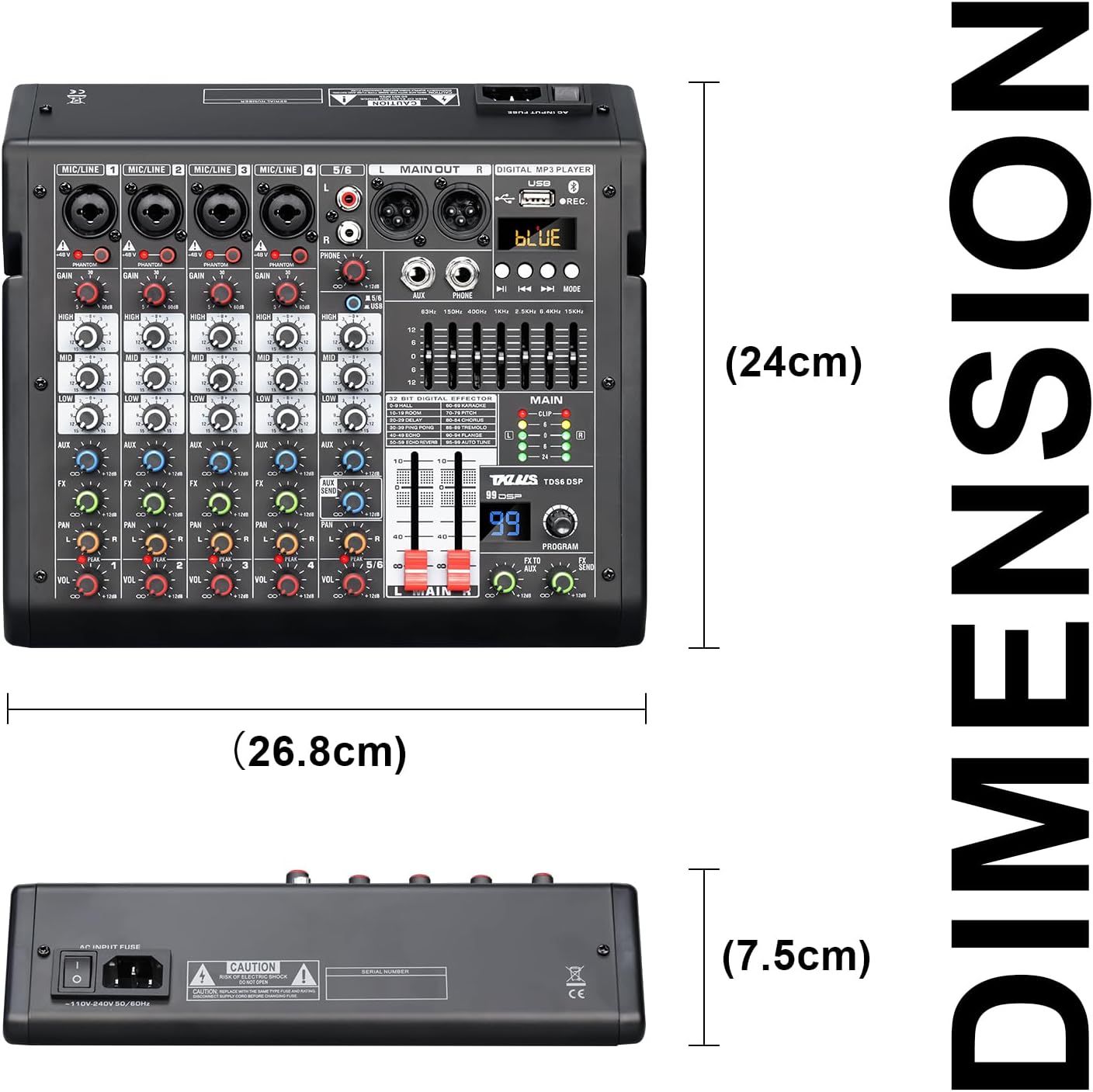
Figure 8.1: Physical dimensions of the TKLBLS TDS-6DSP mixer, showing approximate measurements of 26.8cm (width), 24cm (depth), and 7.5cm (height).
9. Safety Information
- Do not expose this device to rain or moisture.
- Do not remove the cover. There are no user-serviceable parts inside. Refer all servicing to qualified personnel.
- Ensure proper ventilation. Do not block any ventilation openings.
- Avoid placing the device near heat sources such as radiators, heat registers, stoves, or other apparatus (including amplifiers) that produce heat.
- Protect the power cord from being walked on or pinched, particularly at plugs, convenience receptacles, and the point where they exit from the apparatus.
- Only use attachments/accessories specified by the manufacturer.
- Unplug this apparatus during lightning storms or when unused for long periods of time.
10. Warranty and Support
For warranty information or technical support, please contact the manufacturer or your authorized dealer. Keep your purchase receipt as proof of purchase.
For further assistance, you may visit the TKLBLS Store on Amazon.


