
1. Introduction and Overview
The RUBIK MIG 250 welding machine offers unrivaled versatility with multiple welding modes: MMA STICK, GAS MIG, FLUX CORED 0.8-1.0mm, LIFT TIG, and SYN. This 5-in-1 powerful welding machine is designed to handle a wide range of welding tasks, suitable for home DIY projects, workshop production, and professional applications.
Equipped with a state-of-the-art LCD display and an intuitive control panel, the RUBIK MIG 250 simplifies the welding experience. Welding parameters are easy to understand at a glance, allowing for quick adjustments and desired welding results for both novices and experienced users.
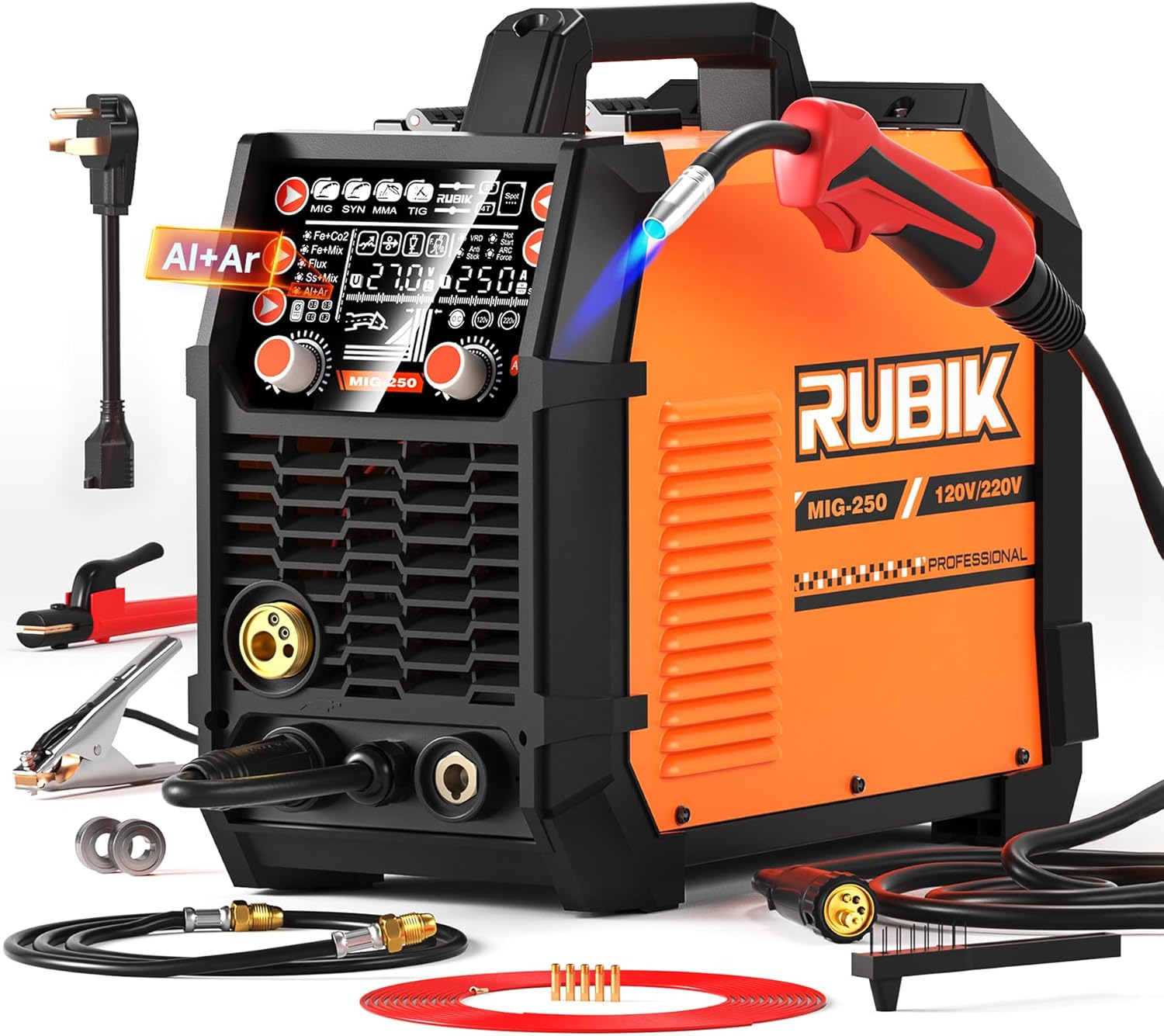
Figure 1: RUBIK MIG Welder 250Amp and included accessories.
2. Setup Guide
Proper setup is crucial for safe and effective welding. Follow these steps for connecting your RUBIK MIG 250 welder for different modes.
Video 1: Demonstration of the RUBIK MIG Welder 250Amp's various welding modes, including MMA (Stick), MIG (Gas), Flux Cored, and Lift TIG, showing connection steps and operation.
2.1. Connecting for MMA (Stick) Welding
For MMA (Manual Metal Arc) welding, connect the welding clamp (electrode holder) to the positive (+) terminal and the ground clamp to the negative (-) terminal of the welder. Ensure all connections are secure before operation.
2.2. Connecting for MIG (Gas) Welding (Fe+Co2)
For MIG welding with gas (e.g., Fe+Co2), connect the MIG welding gun to the designated port, the adapter cable to the positive (+) terminal, and the ground clamp to the negative (-) terminal. Install the appropriate wire spool inside the welder and feed the wire through the gun. Connect your gas hose to the gas inlet on the back of the machine and ensure your gas cylinder is open.
2.3. Connecting for Flux Cored Welding
For Flux Cored welding, connect the MIG welding gun to the designated port, the adapter cable to the negative (-) terminal, and the ground clamp to the positive (+) terminal. Install the flux cored wire spool inside the welder and feed the wire through the gun. No external gas is required for this mode.
2.4. Connecting for Lift TIG Welding
For Lift TIG welding, connect the Argon ARC welding gun to the negative (-) terminal and the ground clamp to the positive (+) terminal. Ensure your argon gas cylinder is connected and open. This mode requires a separate TIG torch, which may not be included with the standard accessory package.
3. Operating Modes
The RUBIK MIG 250 offers five distinct welding processes, each optimized for specific applications and materials. The intuitive LCD display allows for easy selection and adjustment of parameters for each mode.
- MMA (STICK) Welding: Ideal for general fabrication, repairs, and outdoor work. Uses covered electrodes and is versatile across various metals.
- GAS MIG Welding: Utilizes a shielding gas (e.g., CO2, Argon-CO2 mix) and a continuous wire electrode. Excellent for clean, high-quality welds on steel, stainless steel, and aluminum (with appropriate setup).
- FLUX CORED Welding (0.8-1.0mm): Uses a tubular wire filled with flux, eliminating the need for external shielding gas. Suitable for outdoor welding and thicker materials, often producing a slag layer.
- LIFT TIG Welding: Provides precise, high-quality welds, especially on thinner materials and for critical applications. Requires a TIG torch and shielding gas (typically Argon). The 'Lift' start feature minimizes tungsten contamination.
- SYN (Synergic) Welding: Simplifies setup by automatically adjusting welding parameters (voltage, wire feed speed) based on material type and thickness selected by the user. This mode is designed for ease of use and consistent results.

Figure 2: Visual representation of the different welding modes supported by the RUBIK MIG 250.

Figure 3: The accurate screen display provides clear visibility of all functions and welding parameters.
4. Safety Features
The RUBIK Aluminum Welding Machine is designed with multiple built-in safety features to ensure user protection and equipment longevity. These features provide peace of mind during welding operations.
- Inductance Adjustment: Allows fine-tuning of arc characteristics for smoother welds and reduced spatter.
- Slow Wire Feeding: Ensures a smooth arc start by feeding wire at a reduced speed initially.
- One Button Control: Simplifies operation and mode switching.
- Burn Back Adjustment: Prevents the wire from sticking in the weld puddle or burning back into the contact tip.
- VRD (Voltage Reduction Device): Reduces the open-circuit voltage for increased safety, especially in damp or hazardous environments.
- Over Voltage Protection: Protects the machine from damage due to excessive input voltage.
- Over Current Protection: Safeguards the internal components from damage caused by excessive current draw.
- Overload Protection: Prevents the machine from overheating due to prolonged use at high output.
- Overheat Protection: Automatically shuts down the machine if internal temperatures exceed safe limits, preventing damage.
- Anti-Stick: Prevents the electrode from sticking to the workpiece during MMA welding, making it easier to restart the arc.

Figure 4: Overview of the comprehensive safety protection features integrated into the welder.
5. Maintenance
Regular maintenance ensures the longevity and optimal performance of your welding machine. Always disconnect the power before performing any maintenance.
- Cleaning: Periodically clean the exterior of the machine with a dry cloth. Ensure ventilation openings are free from dust and debris.
- Cable Inspection: Regularly inspect all welding cables, connections, and the power cord for any signs of damage, fraying, or loose connections. Replace damaged components immediately.
- Wire Feed System: Check the wire feed rollers for wear and cleanliness. Ensure the wire liner is free of kinks and blockages.
- Storage: Store the welder in a clean, dry environment, away from excessive dust, moisture, and extreme temperatures.
6. Troubleshooting
If you encounter issues with your RUBIK MIG 250 welder, refer to the following common troubleshooting tips. For persistent problems, contact customer support.
- No Power: Check the power cord connection, wall outlet, and circuit breaker. Ensure the welder's power switch is in the 'ON' position.
- No Arc: Verify that the welding gun/electrode holder and ground clamp are properly connected and making good contact with the workpiece. Check welding parameters on the display.
- Poor Weld Quality: Adjust voltage and wire feed speed (or amperage for MMA/TIG). Ensure proper shielding gas flow (for MIG/TIG) and correct wire/electrode type for the material. Clean the workpiece thoroughly.
- Overheat Protection Activated: Allow the machine to cool down. Ensure adequate ventilation around the welder. Reduce duty cycle or welding current if continuously overheating.
- Wire Feeding Issues: Check for tangled wire spool, correct wire size for the rollers, and proper tension on the wire feed mechanism. Inspect the gun liner for blockages.
7. Technical Specifications
Below are the detailed technical specifications for the RUBIK MIG 250 welding machine.

Figure 5: Detailed technical parameters for the RUBIK MIG-250 welder.
| Feature | Detail |
|---|---|
| Manufacturer | RUBIK |
| Item Weight | 34.8 pounds |
| Package Dimensions | 20 x 18.7 x 13 inches |
| Item Model Number | RUBIK Aluminum Welder 250 Amp |
| Color | Orange+black |
| Style | MIG250 |
| Material | ABS, Aluminum |
| Power Source | AC |
| Voltage | 220 Volts (Dual Voltage 110V/220V supported) |
| Wattage | 55 KW |
| Item Package Quantity | 1 |
| Batteries Included? | No |
| Batteries Required? | No |
| First Available Date | December 27, 2023 |
8. Included Accessories
Each RUBIK MIG 250 welding machine comes with a comprehensive accessory package to get you started.
- 1 x MIG250 Welder
- 1 x 3-meter Torch Cable
- 1 set of 200A Grounding Clamps and Welding Cables
- 1 pair of Welding Gloves
- 1 x Power Adapter Cable
- Earth wire clamp
- Steel brush
- Welding tongs
- Welding wire

Figure 6: All accessories included with the RUBIK MIG 250 welder.
9. Warranty and Support
For warranty information, technical support, or any inquiries regarding your RUBIK MIG 250 welder, please refer to the contact details provided in the product packaging or visit the official RUBIK website. Keep your purchase receipt for warranty claims.
