
Introduction
This manual provides detailed instructions for the assembly, operation, and maintenance of your ODK 120cm Gaming Desk. Please read this manual thoroughly before assembly and use to ensure safe and optimal performance of the product. This desk is designed for gaming, remote work, and general office use, offering integrated features for enhanced functionality and comfort.
Important Safety Information: Please assemble and use this product correctly. Careless use or improper assembly may lead to injury or product damage. This product is designed to hold heavy items, so please ensure it is placed in an appropriate, stable location.

Image: A complete gaming setup featuring the ODK 120cm Gaming Desk with its integrated LED lighting.
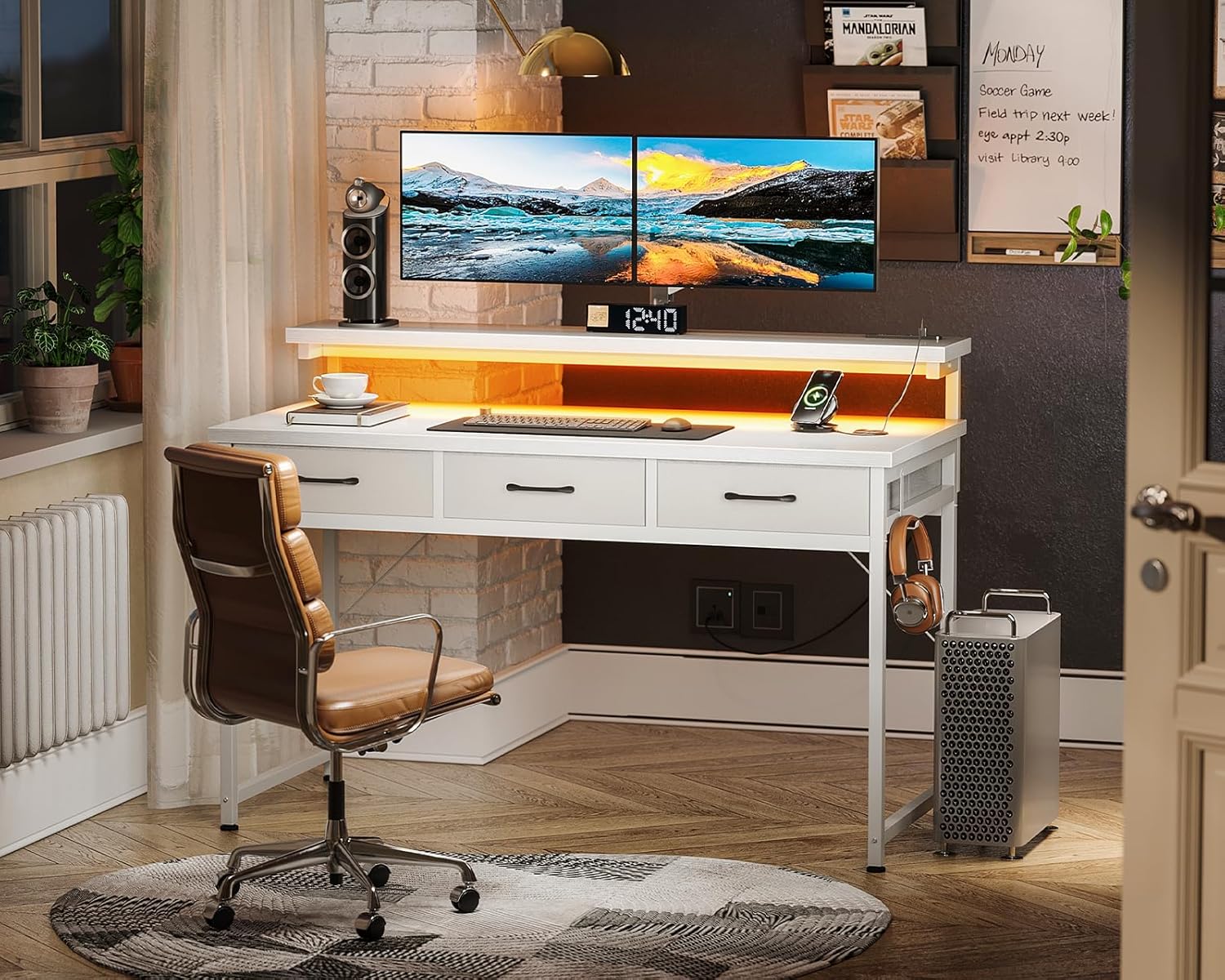
Image: The ODK desk configured for a home office environment.
Video: A short demonstration of the desk in various usage scenarios.
Product Features
- Spacious Design: The desk offers a generous 120cm width and 52cm depth (50cm for the tabletop) providing ample space for your setup.
- Integrated Power Outlets: Equipped with 2 AC outlets (125V/15A) and 2 USB ports (5V/2.1A) for convenient charging and powering devices directly from your desk. Total capacity up to 1450W.
- LED Lighting: Features RGB bar lighting with 10 color adjustment levels and 9 brightness levels to customize your environment.
- Adjustable Monitor Stand: An integrated monitor stand with three height settings (10cm, 13cm, 16cm) to promote ergonomic posture and reduce strain on your neck and shoulders.
- Three Fabric Drawers: Includes three A4-compatible drawers made from non-woven fabric and MDF board, designed to resist deformation even with heavy items. These drawers protect privacy and prevent dust accumulation, keeping your workspace tidy.
- Sturdy Construction: Built with a high-strength and durable steel frame for stability and a solid user experience.

Image: Detailed dimensions of the desk and its components.
Parts List
Before assembly, please verify that all components are present and undamaged. If any parts are missing or damaged, please contact customer support.
| Part | Description | Quantity |
|---|---|---|
| Tabletop | Main desk surface (120cm W x 50cm D) | 1 |
| Monitor Stand | Upper shelf for monitor, adjustable height | 1 |
| Desk Frame | Steel support structure | 1 set |
| Drawers | Non-woven fabric + MDF board drawers | 3 |
| Power Strip | Integrated with 2 AC outlets and 2 USB ports | 1 |
| LED Bar Light | RGB lighting strip with controller | 1 |
| Assembly Tools | Wrench and other necessary tools | 1 set |
| Instruction Manual | Japanese assembly instructions included | 1 |
Setup Instructions
This product requires customer assembly. A wrench is included, so no additional tools are needed. Please follow the Japanese assembly instructions provided in the package for detailed steps.
- Unpack Components: Carefully remove all parts from the packaging and lay them out on a clean, soft surface to prevent scratches.
- Assemble the Frame: Follow the diagrams in the included manual to connect the steel frame components using the provided screws and wrench. Ensure all connections are secure.
- Attach the Tabletop: Secure the main tabletop to the assembled frame.
- Install Monitor Stand: Attach the monitor stand to the tabletop. Refer to the manual for specific attachment points and ensure it is level.
- Insert Drawers: Assemble the fabric drawers as shown in the manual and slide them into their designated slots under the tabletop.

Image: Step-by-step assembly of the fabric drawers.
- Connect Power Strip and LED: Mount the power strip and LED bar light according to the instructions. Plug the power strip into a wall outlet.
- Adjust Monitor Stand Height: The monitor stand can be adjusted to 10cm, 13cm, or 16cm height. Select the desired height by adjusting the screws on the support legs.

Image: Illustration of the monitor stand's three height adjustment options (10cm, 13cm, 16cm).
Video: Demonstrates the 3-level height adjustment feature of the monitor stand.
Operating Instructions
Using the Integrated Power Outlets
The desk includes a power strip with 2 AC outlets and 2 USB ports. To use, ensure the desk is properly plugged into a wall outlet. You can then connect your devices for charging or power. The total power capacity is 1450W.
Image: Detail of the power strip with 2 AC outlets and 2 USB ports.
Controlling the LED Lighting
The RGB LED bar light can be controlled using the attached remote. It offers 10 color adjustment levels and 9 brightness levels.
Image: The RGB LED bar light and its remote control, showing various color options.
Adjusting the Monitor Stand
The monitor stand can be set to three different heights (10cm, 13cm, 16cm) to suit your preference and ergonomic needs. Adjust the screws on the stand's support legs to change the height.
Image: Ergonomic benefits of the adjustable monitor stand.
Maintenance
- Cleaning: Wipe the desk surfaces with a soft, damp cloth. Avoid harsh chemicals or abrasive cleaners that may damage the finish.
- Drawer Care: The fabric drawers can be spot cleaned with a mild detergent if necessary. Ensure they are completely dry before reinserting.
- Tighten Fasteners: Periodically check and tighten all screws and fasteners to maintain stability.
- Cable Management: Regularly organize cables to prevent tangles and damage, especially around the power strip.
Troubleshooting
- Desk Wobbles: Ensure all screws are securely tightened. Check that the desk is on a level surface. Adjust the feet if necessary.
- LED Light Not Working: Check if the LED bar light is properly connected to the power source and the controller. Ensure the power strip is plugged in and receiving power.
- Power Outlets Not Working: Verify the desk's power cord is securely plugged into a functional wall outlet. Check if the total wattage of connected devices exceeds 1450W.
- Drawers are difficult to open/close: Ensure the drawers are assembled correctly and are not overloaded. Check for any obstructions in the drawer slots.
Specifications
| Feature | Detail |
|---|---|
| Brand | ODK |
| Model Number | B01XS021701001JP |
| Product Dimensions (D x W x H) | 52 cm x 120 cm x 75.7 cm |
| Tabletop Depth | 50 cm |
| Minimum Height | 75.7 cm |
| Color | White |
| Style | Minimalist |
| Base Material | Metal (Steel Frame) |
| Special Features | Built-in Monitor Stand, Height Adjustment Function, Integrated Power Outlets (2 AC, 2 USB), LED Light |
| Number of Drawers | 3 |
| Drawer Material | Non-woven fabric + MDF board (A4 compatible) |
| Power Strip Output | 2 AC outlets (125V/15A), 2 USB ports (5V/2.1A), Max 1450W |
| Power Cord Length | 1.8m |
| LED Light | RGB, 10 color modes, 9 brightness levels |
| Assembly Required | Yes, tools included. Japanese manual provided. |
| Product Weight | 16.45 kg |
Warranty and Support
For any initial defects or issues encountered with the product, please contact ODK customer support. While specific warranty details are not provided in this manual, ODK is committed to addressing product concerns. Please retain your proof of purchase for any warranty claims.
For further assistance, please visit the ODK Store on Amazon.


