
Introduction
This manual provides detailed instructions for the setup, operation, maintenance, and troubleshooting of your RIOWOIS DS6341 14-inch Soundbar with Wired Subwoofer. This 2.1 channel home theater system is designed to enhance your audio experience for smart TVs, computers, gaming consoles, and smartphones, offering deep bass and versatile connectivity options.
What's in the Box
Please ensure all items are present upon unboxing:
- Soundbar (14.2 Inches) with Wired Subwoofer (4 Inch)
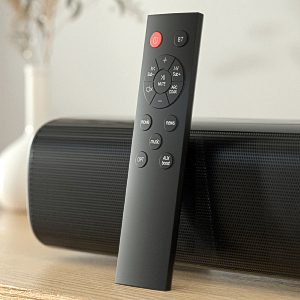
- Remote Control
- Wall Mount Kits
- 3.5mm AUX Cable
- Optical Cable
- Power Adapter
- User Manual

Product Overview
The RIOWOIS DS6341 system features a compact soundbar and a powerful 4-inch wired subwoofer, designed for optimal audio performance in various settings.
Soundbar Features:
- Compact Design: 14.2 inches in length, slim and sleek for small spaces.
- Dual Full-Range Speakers: Delivers clear and high-quality sound.
- Versatile Connectivity: Supports Bluetooth, Optical, and AUX connections.
- Integrated Controls: Buttons on the soundbar for basic operations.
Wired Subwoofer Features:
- 4-inch Driver: Provides deep, rich bass for immersive audio.
- Adjustable Bass: Allows customization of bass levels via remote control.
- Wired Connection: Ensures stable and consistent bass performance.


Setup
The soundbar system is designed for easy setup. Follow these steps for initial installation:
- Connect Subwoofer: Connect the wired subwoofer to the 'SUB OUT' port on the soundbar using the provided cable.
- Power Connection: Connect the power adapter to the 'DC IN' port on the soundbar, then plug the adapter into a standard wall outlet.
- Audio Connection (Choose One):
- Optical: Connect the optical cable from your TV's 'Optical Out' port to the 'OPT IN' port on the soundbar.
- AUX: Connect the 3.5mm AUX cable from your device's 'Audio Out' port to the 'AUX IN' port on the soundbar.
- Bluetooth: Power on the soundbar. Press the 'BT' button on the remote control to enter Bluetooth pairing mode. On your device (TV, smartphone, etc.), search for 'SineAudio DS6341 V1.1' in the Bluetooth settings and pair.
- Remote Batteries: Insert two AAA batteries (not included) into the remote control.
- Wall Mounting (Optional): Use the provided wall mount kits to securely attach the soundbar to a wall. Ensure proper stud placement for stability.
Operating Instructions
Control your soundbar using the included remote or the integrated buttons on the unit.
- Power On/Off: Press the power button on the remote or the soundbar.
- Volume Adjustment: Use the '+' and '-' buttons on the remote or soundbar to adjust volume.
- Input Source Selection: Press the 'BT', 'OPT', or 'AUX' buttons on the remote to switch between Bluetooth, Optical, or AUX input modes.
- Sound Modes: Use the 'Movie', 'Music', or 'News' buttons on the remote to select optimized audio profiles for different content types.
- Bass Adjustment: Use 'Sub+' and 'Sub-' buttons on the remote to increase or decrease subwoofer bass levels.
- Mute: Press the 'Mute' button on the remote to temporarily silence the audio.
Maintenance
To ensure the longevity and optimal performance of your soundbar system, follow these maintenance guidelines:
- Cleaning: Use a soft, dry cloth to clean the surfaces of the soundbar and subwoofer. Avoid using liquid cleaners or abrasive materials.
- Placement: Place the soundbar and subwoofer on a stable, flat surface or mount securely to a wall. Avoid placing near heat sources, direct sunlight, or in areas with high humidity.
- Ventilation: Ensure adequate ventilation around the units to prevent overheating.
Troubleshooting
If you encounter any issues with your RIOWOIS DS6341 Soundbar, please refer to the following common solutions:
- Delayed Audio: If the soundbar has delayed audio, this can often be resolved via the audio settings on your TV.
- No Sound/Distorted Sound:
- Ensure all cables (power, audio, subwoofer) are securely connected.
- Verify the correct input source is selected on the soundbar (BT, OPT, AUX).
- Check the volume levels on both the soundbar and your connected device.
- Important: The soundbar does not support Dolby and DTS audio formats. Please disable Dolby and DTS settings on your TV, Netflix, Amazon Prime Video, HBO, Hulu, YouTube, and other streaming video applications.
- AUX Connection Issues: For AUX cable connection, ensure the audio cable is plugged into a 'Line OUT' or 'Audio OUT' connector on your TV, not 'Line IN' or 'Audio IN'. The audio cable should connect to the TV audio output and the soundbar audio input. Double-click the AUX boost button on the remote control to restore volume if needed.
- Remote Control Not Working:
- Ensure batteries are correctly inserted and not depleted.
- The remote control is not compatible with universal or TV remotes.
- Bluetooth Pairing Issues: Ensure the soundbar is in Bluetooth pairing mode (indicated by a flashing blue light). Check your device's Bluetooth list for 'SineAudio DS6341 V1.1'.
Specifications
| Feature | Detail |
|---|---|
| Model Name | DS6341 |
| Speaker Type | Soundbar |
| Special Feature | Bass Boost, Wired Subwoofer |
| Recommended Uses | For Computers, Home Entertainment, Gaming, Media Consumption |
| Compatible Devices | Desktop, Gaming Console, Smartphone, Television |
| Subwoofer Diameter | 4 Inches |
| Surround Sound Channel Configuration | 2.1 |
| Speaker Size | 14.2 Inches |
| Speaker Maximum Output Power | 80 Watts |
| Connectivity Technology | Bluetooth |
| Wireless Communication Technology | Bluetooth |
| Bluetooth Range | 10 Meters |
| Audio Output Mode | Stereo |
| Mounting Type | Wall Mount |
| Product Dimensions | 4.8"D x 15"W x 11"H |
| Item Weight | 6.63 pounds |
Warranty and Support
Your RIOWOIS DS6341 Soundbar comes with a 3-year manufacturer warranty. For any issues or support needs, please contact our after-sales service team. We offer 24/7 assistance and can provide replacement remote controls, auxiliary cables, or optical cables free of charge upon request.
Contact Support: Please send an email to our customer service team for prompt assistance. We aim to resolve all issues within 24 hours.
Return Policy: A 30-day free return policy is available for eligible purchases.
Extended Protection Plans: Additional protection plans are available for purchase:
- 2-Year Protection Plan
- 3-Year Protection Plan
- NEW Complete Protect (monthly billing)


