
Spigen ArcPack 30000mAh Power Bank PA2303 User Manual
Model: PA2303
Introduction
Thank you for choosing the Spigen ArcPack 30000mAh Power Bank. This device is designed to provide reliable and fast charging for your electronic devices on the go. Please read this manual carefully before using the product to ensure safe and optimal performance.
Safety Information
- Do not expose the power bank to extreme temperatures, direct sunlight, or fire.
- Avoid dropping, hitting, or disassembling the device.
- Keep away from water and other liquids.
- Do not use if the power bank is damaged or swollen.
- Keep out of reach of children.
- Dispose of the power bank according to local regulations.
Package Contents
The Spigen ArcPack 30000mAh Power Bank package includes:
- 1 x Spigen ArcPack 30000mAh Power Bank
- 1 x Type-C to C Cable (1m)
- 1 x Pouch
- 1 x User Manual
Product Overview and Setup
Familiarize yourself with the ports and indicators on your power bank.

Front view of the Spigen ArcPack Power Bank showing the two USB-C ports (Input/Output) and one USB-A port (Output), with their respective maximum wattages.
Ports:
- USB-C Ports (x2): These ports support both input (charging the power bank) and output (charging devices) with up to 20W PD3.0.
- USB-A Port (x1): This port supports output (charging devices) with up to 22.5W QC3.0.
LED Indicators:
The power bank features LED indicator lights to show the remaining battery level and charging status.
Operating Instructions
Charging the Power Bank
- Connect the included Type-C to C cable to one of the USB-C ports on the power bank.
- Connect the other end of the cable to a compatible USB wall charger (not included).
- The LED indicators will illuminate to show the charging progress. When all LEDs are solid, the power bank is fully charged.
Charging Your Devices
The Spigen ArcPack Power Bank can charge up to three devices simultaneously.

The Spigen ArcPack Power Bank connected via a USB-C cable to charge a smartphone, demonstrating its charging function.
- Connect your device's charging cable to the appropriate output port on the power bank (USB-A or USB-C).
- Connect the other end of the cable to your device.
- The power bank will automatically begin charging your device. The LED indicators will show the remaining battery level.
- For optimal fast charging, use a compatible cable and ensure your device supports PD3.0 or QC3.0.
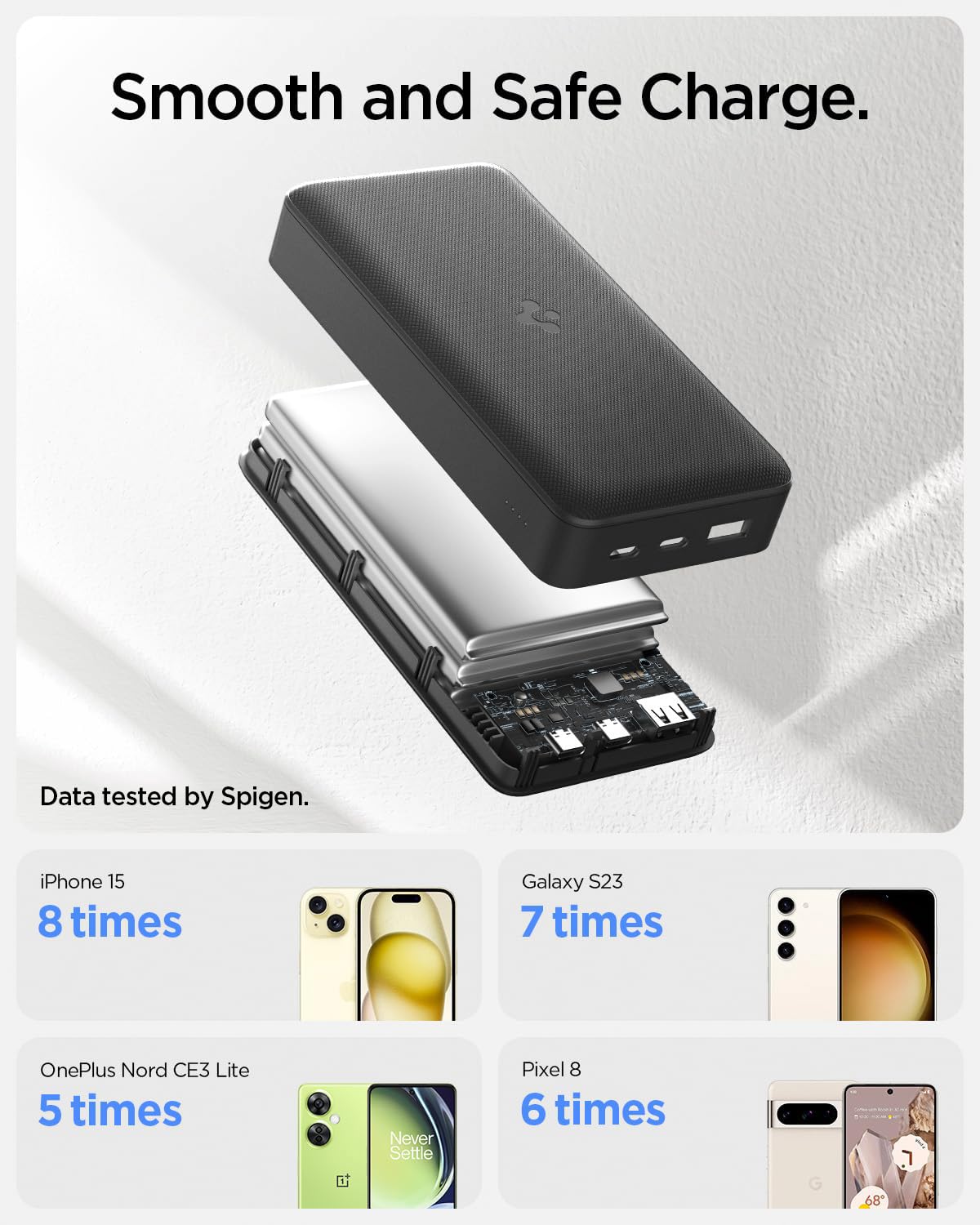
An illustration demonstrating the charging capacity of the 30000mAh power bank for various devices, including iPhone 15, Galaxy S23, OnePlus Nord CE3 Lite, and Pixel 8.
Universal Compatibility
The power bank is compatible with a wide range of mobile phones, tablets, and wearable devices.

An image illustrating the universal compatibility of the power bank with various mobile, tablet, and wearable devices from brands like Apple, Samsung, OnePlus, and Google.
Maintenance
- Clean the power bank with a soft, dry cloth. Do not use harsh chemicals or abrasive materials.
- Store the power bank in a cool, dry place when not in use.
- To prolong battery life, fully charge the power bank at least once every three months if it is not used regularly.
- Use the included shock-proof pouch for protection during transport.

The included shock-proof pouch for the power bank, shown both empty and with the power bank inside a pocket.
Troubleshooting
| Problem | Possible Cause | Solution |
|---|---|---|
| Power bank not charging | Charging cable is faulty or not properly connected. Wall charger is not working or incompatible. | Check cable connections. Try a different USB-C cable. Use a different wall charger. |
| Device not charging from power bank | Power bank battery is depleted. Charging cable is faulty or not properly connected. Device is incompatible. | Recharge the power bank. Check cable connections. Try a different charging cable. Ensure your device is compatible. |
| Slow charging | Cable is not fast-charging compatible. Device does not support fast charging. Multiple devices charging simultaneously (multi-output max 15W). | Use a high-quality, fast-charging compatible cable. Ensure your device supports PD3.0/QC3.0. Charge devices individually for maximum speed. |
| Power bank gets warm during use | Normal operation during high-speed charging. | This is normal. If it becomes excessively hot, discontinue use and contact support. |
Specifications
| Feature | Detail |
|---|---|
| Model Number | PA2303 |
| Battery Capacity | 30000 mAh |
| Max Output | 22.5W (USB-A), 20W (USB-C) |
| Multi-Output Max | 15W |
| Input Ports | 2 x USB Type-C (PD3.0) |
| Output Ports | 2 x USB Type-C (PD3.0), 1 x USB Type-A (QC3.0) |
| Special Features | Fast Charging, LED Indicator Lights, Over Charging Protection |
| Dimensions | 18.1 x 11.6 x 3.6 cm |
| Weight | 553 g |
| Safety Compliance | Passed 11 reliability tests including Over-Heat, Drop, and Over-Current. Complies with 16 Safety Criteria. |

An infographic detailing the 11 reliability tests passed by the power bank, including ESD Shock, High & Low Temperature, Drop Test, and Over-Current Test, ensuring guaranteed safety.
Warranty and Support
The Spigen ArcPack 30000mAh Power Bank comes with a 12 Months Warranty from the date of purchase.
For warranty claims, technical support, or any inquiries regarding your product, please contact Spigen customer service through their official website or the retailer where the product was purchased. Please have your proof of purchase and product model number (PA2303) ready.

