
1. Introduction
Thank you for choosing the Sweetcrispy Computer Desk. This manual provides essential information for the safe assembly, operation, and maintenance of your new desk. Please read these instructions carefully before beginning assembly and retain them for future reference.
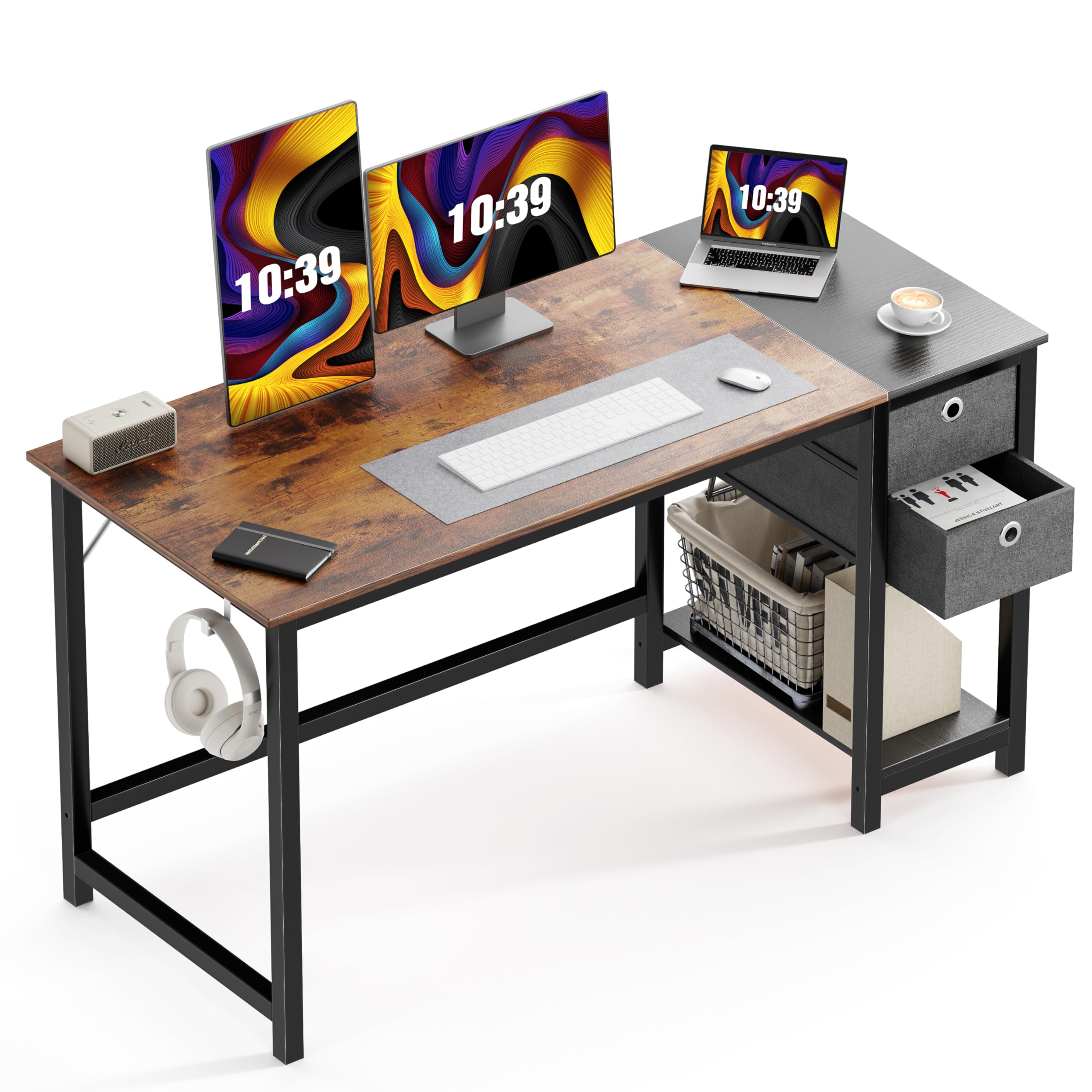
Image: The Sweetcrispy Computer Desk, 55 inches, featuring a rustic wood top and black metal frame, with two fabric drawers and a lower shelf on the right side. A laptop, lamp, and chair are also visible.
2. Safety Information
- Always assemble the desk on a soft, clean surface to prevent scratches.
- Ensure all screws and fasteners are securely tightened before use. Periodically check and re-tighten as necessary.
- Do not overload the desk or drawers. The maximum weight capacity for the desktop is 176 lbs (80 kg).
- Keep small parts and packaging materials away from children to prevent choking hazards.
- Avoid placing hot items directly on the desktop surface without protection.
- Do not stand or climb on the desk.
- Place the desk on a level surface to prevent wobbling.
3. Package Contents
Before assembly, verify that all components are present and undamaged. If any parts are missing or damaged, please contact customer support.
- Desktop Panel (High-quality particleboard)
- Metal Frame Components
- 2 x Fabric Drawers (Removable)
- Side Hook (for headphones or bags)
- Lower Storage Shelf
- Assembly Hardware (Screws, Allen wrench, etc.)
- Instruction Manual (This document)
4. Setup and Assembly
Assembly typically takes 20-30 minutes with two people. Follow the steps below and refer to the assembly video for visual guidance.
4.1 Assembly Video Guide
Video: A detailed guide demonstrating the step-by-step assembly process for the Sweetcrispy Computer Desk. This video shows how to connect the metal frame, attach the desktop, and install the drawers and side hook.
4.2 Step-by-Step Assembly
- Unpack and Identify Parts: Lay out all components and hardware. Refer to the parts list in your included paper manual to ensure everything is present.
- Assemble the Metal Frame: Connect the main metal frame pieces using the provided screws. Ensure all connections are snug but do not fully tighten until all frame pieces are in place.
- Attach the Desktop: Carefully place the desktop panel onto the assembled metal frame. Align the pre-drilled holes and secure the desktop with the appropriate screws. Fully tighten all frame screws once the desktop is attached.
- Install the Storage Unit: Attach the side storage unit frame to the main desk frame.
- Insert Drawers and Shelf: Place the lower storage shelf into its designated position. Insert the two fabric drawers into their compartments.
- Attach Side Hook: Secure the headphone/bag hook to the side of the desk frame as desired.

Image: A close-up view of the desk's sturdy black metal frame, highlighting the cross-bracing for stability.

Image: An illustration demonstrating the removable nature of the fabric drawers, showing how they can be pulled out and reinserted into the desk's storage compartments.
5. Operating Instructions
5.1 Using the Drawers
The desk features two removable fabric drawers for organized storage. These drawers are ideal for magazines, files, books, and small personal items. To use, simply slide them into the designated compartments. They can be easily removed if you prefer open shelving or need to access items stored behind them.

Image: A close-up view of the two-tier fabric drawers, showing headphones and a game controller stored inside, demonstrating their storage capacity.
5.2 Utilizing the Side Hook
A convenient iron hook is included on the side of the desk frame. This hook is designed to hold headphones, bags, or other accessories, keeping your desktop clear and organized.
5.3 General Use
The spacious desktop can accommodate a PC, laptop, monitor, keyboard, and other office essentials. The lower shelf provides additional space for a printer, books, or decorative items.
Video: A brief overview showcasing the features and functionality of the Sweetcrispy Computer Desk, including its storage drawers and overall design.
6. Maintenance
6.1 Cleaning the Desktop
The desktop is made of high-quality particleboard with a waterproof surface, making it easy to clean. Use a soft, damp cloth to wipe away dust and spills. Avoid abrasive cleaners or harsh chemicals that could damage the finish.

Image: A detailed view of the desk's surface, emphasizing its premium particleboard construction and waterproof properties.
6.2 Cleaning the Metal Frame
Wipe the metal frame with a soft, dry cloth. For stubborn marks, a slightly damp cloth can be used, followed by immediate drying to prevent rust.
6.3 Drawer Care
The fabric drawers can be spot cleaned with a mild detergent and damp cloth. Allow them to air dry completely before reinserting into the desk.
7. Troubleshooting
- Wobbling Desk: Ensure all screws are fully tightened. Check that the desk is placed on a level surface. Adjust any leveling feet if present.
- Missing Parts: If you find any parts missing upon unpacking, please refer to the 'Support' section to contact Sweetcrispy customer service for assistance.
- Difficulty Assembling: Review the assembly video and instructions carefully. Ensure you are using the correct hardware for each step. If issues persist, contact customer support.
8. Specifications
| Brand | Sweetcrispy |
| Model Number | A-J2BC-55BKRT |
| Overall Dimensions (L x W x H) | 55.12"D x 23.62"W x 29.72"H (140cm x 60cm x 75.5cm) |
| Weight Capacity (Desktop) | 176 lbs (80 kg) |
| Material | High-quality Particleboard (Desktop), Metal (Frame) |
| Number of Drawers | 2 (Fabric, Removable) |
| Assembly Time (Approx.) | 20-30 minutes (2 people recommended) |
| Included Components | Headphone Hook, Instruction Manual, Metal Frame, Storage Drawers |

Image: A technical drawing illustrating the precise dimensions of the desk, including length, width, height, and drawer measurements.
9. Warranty Information
Sweetcrispy products are manufactured to high-quality standards. This product comes with a manufacturer's warranty against defects in materials and workmanship. Please refer to the warranty card included in your package or contact Sweetcrispy customer support for specific warranty terms and conditions.
10. Support
For any questions, concerns, or assistance with your Sweetcrispy Computer Desk, please contact our customer support team:
- Online: Visit the Sweetcrispy Store on Amazon
- Email: Refer to your purchase documentation for direct email support.
Please have your model number (A-J2BC-55BKRT) and purchase date ready when contacting support.


