
Playseat Trophy
Playseat Trophy Sim Racing Cockpit Instruction Manual
Model: Trophy (RAP.00314)
Introduction
This instruction manual provides essential information for the safe and efficient assembly, operation, and maintenance of your Playseat Trophy Sim Racing Cockpit. Please read this manual thoroughly before beginning assembly or use. Retain this manual for future reference.

Figure 1: Assembled Playseat Trophy Sim Racing Cockpit.
Safety Information
- Ensure all components are securely fastened before use. Loose parts can cause instability and potential injury.
- Do not exceed the maximum recommended driver weight of 122 kg (269 lb).
- Keep hands and fingers clear of moving parts during adjustment.
- Place the cockpit on a stable, level surface to prevent tipping.
- This product is designed for indoor use only.
- Adult assembly is required. Keep small parts away from children.
Package Contents
Verify that all components are present before beginning assembly. If any parts are missing or damaged, contact Playseat support.
- Playseat Trophy frame components
- ActiFit seat fabric
- Hardware kit (screws, bolts, washers, Allen keys)
- Instruction manual (this document)
Assembly Instructions
Follow these steps carefully to assemble your Playseat Trophy Sim Racing Cockpit. It is recommended to have a clear, open space for assembly.
- Unpack Components: Carefully remove all parts from the packaging and lay them out on a clean, soft surface to prevent scratches.
- Assemble Base Frame: Connect the main frame sections using the provided bolts and Allen keys. Ensure all connections are snug but do not overtighten initially.
- Attach Seat Frame: Secure the seat frame to the base frame. The seat frame is designed for adjustability, so ensure the adjustment mechanisms are accessible.
- Install ActiFit Seat: Drape and secure the ActiFit fabric seat onto the seat frame according to the diagrams. Ensure it is taut and properly aligned.
- Mount Wheel Deck: Attach the wheel deck to the front frame section. This component is also adjustable.
- Mount Pedal Plate: Secure the pedal plate to the lower front section of the frame.
- Final Tightening: Once all components are in place, systematically tighten all bolts. Re-check all connections for stability.

Figure 2: Frame structure of the Playseat Trophy before peripheral installation.
Adjustments and Ergonomics
The Playseat Trophy is designed for extensive adjustability to accommodate various body types and preferences. Optimal ergonomics are crucial for comfort and performance during long racing sessions.
- Seat Position: The bucket seat can be adjusted forward, backward, and for recline. Loosen the adjustment levers/knobs, slide the seat to your desired position, and re-secure.
- Wheel Deck Angle and Height: Adjust the angle and height of the wheel deck to ensure your steering wheel is at a comfortable and natural position relative to your body.
- Pedal Plate Angle and Distance: The pedal plate can be angled and moved closer or further away to suit your leg length and preferred pedal feel.
- Lumbar Support: The ActiFit seat includes adjustable lumbar support. Customize this to provide adequate lower back support. Avoid overtightening.
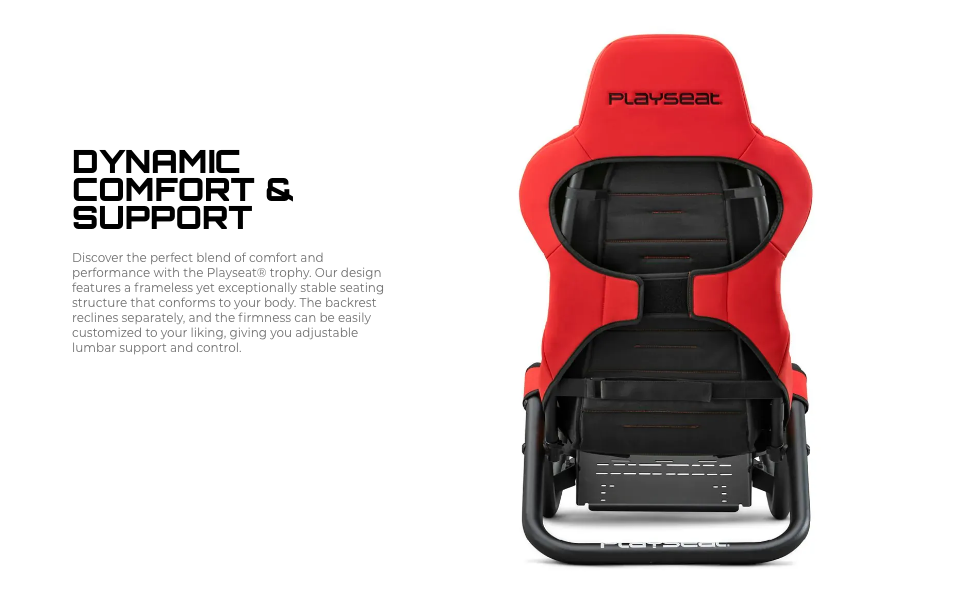
Figure 3: Adjustable components for personalized setup.
Compatibility
The Playseat Trophy Sim Racing Cockpit is designed for broad compatibility with various sim racing peripherals.
- Steering Wheels: Compatible with all major steering wheel brands and models, including Direct Drive systems.
- Pedals: Supports all major pedal sets on the market.
- Platforms: Fully compatible with PC and console gaming setups.
- Gearshift and Handbrake: Optional holders are available for mounting gear shifters and handbrakes (sold separately).

Figure 4: Example setup with a Direct Drive steering wheel.
Maintenance
Regular maintenance ensures the longevity and optimal performance of your Playseat Trophy cockpit.
- Cleaning:
- For the ActiFit fabric, use a damp cloth with mild soap and water. Avoid harsh chemicals.
- For the frame, wipe with a soft, dry cloth.
- Fastener Check: Periodically check all bolts and fasteners to ensure they remain tight. Re-tighten if necessary.
- Storage: The lightweight design allows for easy movement. When not in use, store in a dry, cool place away from direct sunlight.
Troubleshooting
| Issue | Possible Cause | Solution |
|---|---|---|
| Cockpit feels unstable or wobbly. | Loose fasteners; uneven surface. | Ensure all bolts are securely tightened. Move the cockpit to a level surface. |
| Difficulty adjusting seat/wheel/pedal positions. | Adjustment mechanisms are too tight or obstructed. | Loosen adjustment levers/knobs sufficiently. Check for any obstructions. |
| Discomfort during use. | Incorrect ergonomic setup. | Review the "Adjustments and Ergonomics" section and fine-tune all positions. Adjust lumbar support. |
Specifications
| Model Name | Playseat Trophy |
| Model Number | RAP.00314 |
| Color | Red |
| Material Type | Polyester (ActiFit fabric), Alloy Steel, Aluminum (Frame) |
| Dimensions (L x W x H) | 138 x 58 x 101 cm (55.12 x 22.83 x 39.37 inches) |
| Item Weight | 16 kg (33.07 lbs) |
| Optimal Driver Height | 120 - 220 cm |
| Optimal Driver Weight | 20 - 122 kg (44 - 269 lb) |
| Direct Drive Support | Yes |
| Required Assembly | Yes |
Warranty and Support
Warranty: The Playseat Trophy Sim Racing Cockpit comes with a 1-year manufacturer's warranty. This warranty covers defects in materials and workmanship under normal use. It does not cover damage resulting from misuse, accidents, modifications, or unauthorized repairs.
Support: For technical assistance, missing parts, or warranty claims, please contact Playseat customer support through their official website or the retailer where the product was purchased. Please have your model number (RAP.00314) and proof of purchase available.
Ask a question about this manual
Ask about setup, troubleshooting, compatibility, parts, safety, or missing instructions. Manuals+ will review the question and use this page’s manual context to help answer it.