
1. Introduction
The Aokeo Microphone Isolation Shield is designed to enhance audio recording quality by minimizing unwanted ambient noise and room reflections. This professional recording studio equipment provides 360-degree sound insulation, creating a more controlled acoustic environment for your microphone. It is suitable for various recording applications, including vocals, instrument sounds, podcasts, voiceovers, and live broadcasts.

Image 1.1: The Aokeo Microphone Isolation Shield, designed to reduce ambient noise during recording.
2. Product Features
- 360° Sound Insulation: This shield surrounds your microphone completely, offering superior sound insulation compared to traditional covers. It helps eliminate up to 98% of noise, effectively creating a mobile recording studio. For optimal results, use in conjunction with a pop filter. (Note: Microphone is not included.)
- Double-Layer Design: The exterior features a high-density PET felt soundproofing board to block external noise. The interior utilizes low-density sound-absorbing panels with ribs for sound diffusion, effectively absorbing excess sound and providing a pure recording environment.
- Wide Compatibility: Measuring 14.4 x 12.8 x 8.7 inches, this shield includes a standard 3/8" microphone thread mount and a 5/8" thread adapter. It is compatible with most microphones and microphone mounts on the market, including popular models like HyperX QuadCast, SoloCast, Elgato Wave, Blue Yeti, and Blue Snowball iCE.
- Lightweight and Portable: Weighing only 400 grams, the shield is easy to carry and transport, enabling recording anywhere. It can be installed on a 3/8" threaded microphone arm bracket, floor-standing microphone bracket, microphone shock absorber bracket, or placed directly on a desktop.
- Versatile Applications: Ideal for recording vocals, musical instruments, podcasts, voiceovers, live streams, and use in professional recording studios and broadcasting studios.

Image 2.1: Illustration of the multi-layer design for effective noise reduction.

Image 2.2: Visual representation of the sound absorption and reflection reduction process.
3. Package Contents
Please verify that all items listed below are included in your package:
- Isolation Shield (x1)
- Nut (x2)
- Washer (x1)
- Screw (x1)
- Adapter (x1)
- Connecting Rod (x1)
- Base (x1)
- Manual (x1)
- Packing box (x1)

Image 3.1: All components included in the product package.
4. Setup Instructions
Follow these steps to assemble your Aokeo Microphone Isolation Shield:
4.1. Installation for Microphones ≤ 0.5KG
- Take out the Isolation Shield, Base, Washer, and Nut. Install them as shown in the picture.
- Take out the Connecting Rod, Nut, and Adapter. Install them as shown in the picture.
- Install your microphone onto the adapter.
4.2. Installation for Microphones > 0.5KG
- Take out the Isolation Shield, Base, Washer, Connecting Rod, and Nut. Install them as shown in the picture.
- Install your microphone directly onto the connecting rod. (Note: For heavier microphones, the connecting rod cannot move back and forth once installed.)

Image 4.1: Detailed visual instructions for assembling the isolation shield with different microphone weights.
4.3. Versatile Placement Options
The Aokeo Microphone Isolation Shield can be used in various configurations:
- Desktop Use: Place the assembled shield directly on a flat surface.
- With a Stand: Attach the shield to a 3/8" threaded microphone arm bracket or a floor-standing microphone bracket.

Image 4.2: Examples of desktop and stand-mounted usage.
4.4. Adjusting the Connecting Rod
The connecting rod's position can be adjusted to suit different microphone placements and recording scenarios. This allows for precise positioning of your microphone within the shield for optimal sound capture.
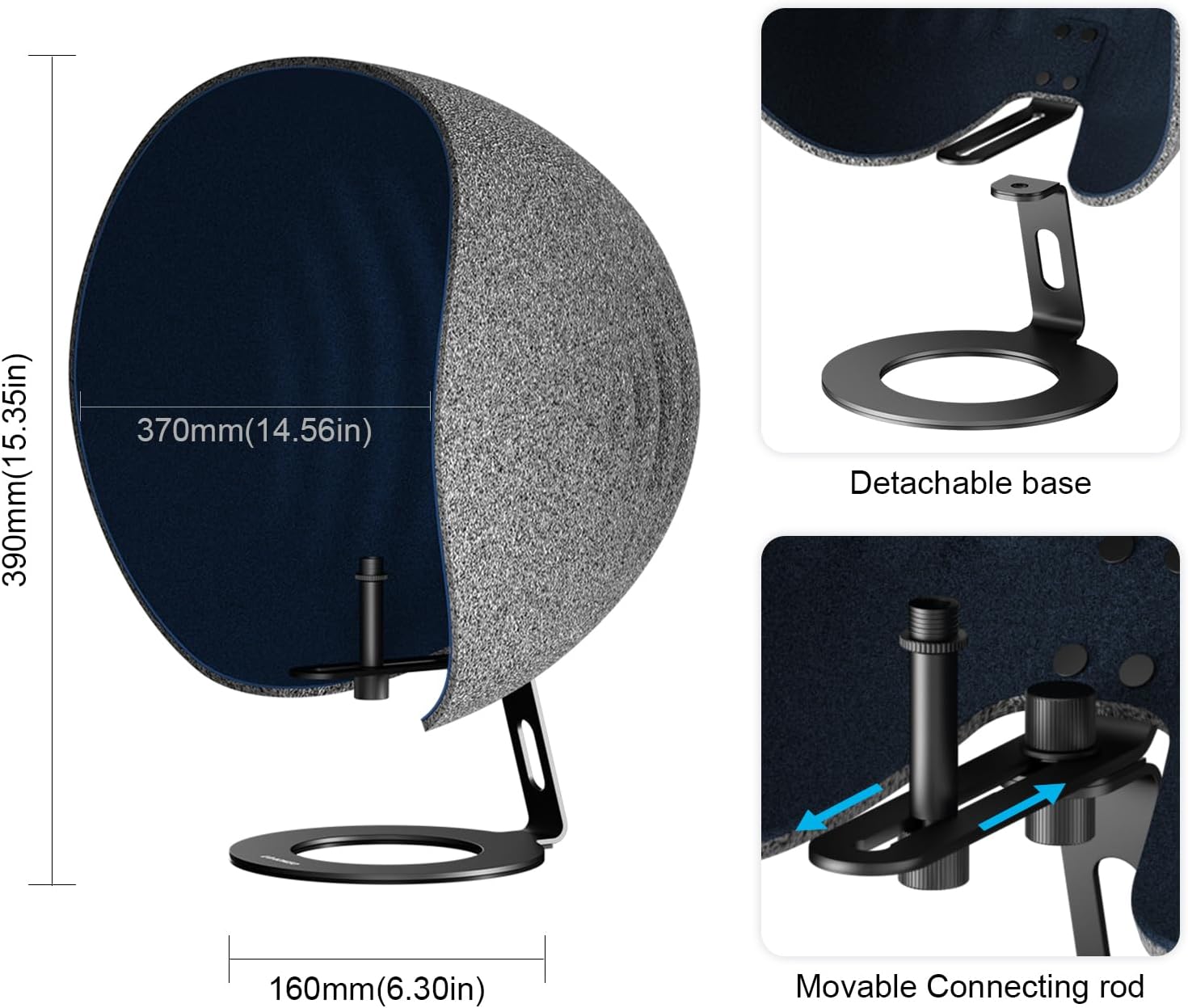
Image 4.3: Dimensions of the shield and details of the movable connecting rod for adjustment.
4.5. Video Guide: Studio Setup Overview
Video 4.1: This video provides an overview of setting up a professional studio environment, including the microphone isolation shield, demonstrating its integration and functionality.
5. Operating Instructions
To achieve the best sound quality, position your microphone within the isolation shield so that the sound source (e.g., your mouth, instrument) is directed towards the center of the shield's interior. The shield's design will then effectively absorb unwanted reflections and reduce ambient noise, allowing for a clearer and more focused recording.

Image 5.1: Diagram showing the principle of noise reduction and sound collection within the shield.

Image 5.2: Illustration of the wider sound insulation range provided by the shield.
6. Maintenance
To ensure the longevity and optimal performance of your Aokeo Microphone Isolation Shield, follow these simple maintenance guidelines:
- Cleaning: Gently wipe the exterior surfaces with a soft, dry cloth. For the interior sound-absorbing foam, use a soft brush or a vacuum cleaner with a brush attachment to remove dust and debris. Avoid using liquid cleaners directly on the foam.
- Storage: When not in use, store the shield in a clean, dry environment away from direct sunlight and extreme temperatures. The foldable design allows for compact storage.
- Handling: Handle the shield with care to prevent damage to the foam or structural components.
7. Troubleshooting
If you encounter issues with your Microphone Isolation Shield, refer to the following common problems and solutions:
| Problem | Possible Cause | Solution |
|---|---|---|
| Insufficient Noise Reduction | Microphone not positioned correctly within the shield; excessive ambient room noise; shield not fully enclosing the microphone. | Ensure the microphone is centered and close enough to the shield's interior. Minimize external noise sources. Consider using a pop filter for plosives. |
| Shield Instability | Loose connections; uneven surface; heavy microphone on a lightweight stand. | Tighten all nuts and screws. Ensure the stand is on a flat, stable surface. If using a heavy microphone, ensure the stand is robust enough or use the desktop configuration. |
| Difficulty Attaching Microphone | Incorrect thread size; adapter not used or used incorrectly. | Verify your microphone's thread size. Use the provided 5/8" adapter if your microphone requires it. Ensure the adapter is securely fastened. |
8. Specifications
- Model Number: BK-sheid
- Item Weight: 3.89 pounds (approximately 1.76 kg)
- Package Dimensions: 15.35 x 13.74 x 10.39 inches (approximately 39 x 34.9 x 26.4 cm)
- Material: PET Felt, Low-Density Sound-Absorbing Panels
- Compatible Devices: Personal Computer (via microphone connection)
- Connector Type: Lightning (refers to microphone connection, typically 3/8" or 5/8" thread)
- Manufacturer: Aokeo
- UPC: 854289008819
- Date First Available: December 25, 2023
9. Warranty and Support
Aokeo is committed to providing high-quality products and customer satisfaction. For any questions, technical assistance, or support regarding your Microphone Isolation Shield, please contact Aokeo customer service. Refer to the product packaging or the official Aokeo website for the most current contact information.
While specific warranty details are not provided in this manual, standard consumer rights and return policies apply. Please retain your proof of purchase for any warranty claims or support requests.