
1. Introduction
Thank you for purchasing the SHARP 55GP6260E Quantum Dot Google TV. This manual provides essential information for the safe and efficient use of your television. Please read it thoroughly before operating the device and retain it for future reference.
Safety Information
Always follow basic safety precautions when using this television to reduce the risk of fire, electric shock, and injury. Do not expose the TV to rain or moisture. Do not open the cabinet. Refer all servicing to qualified personnel.
2. Package Contents
Ensure all items listed below are included in your package:
- SHARP 55GP6260E Main Unit
- Remote Control
- 2 x AAA Batteries
- Installation Kit for TV Stand
- Quick Guide
3. Setup
3.1 Installing the TV Stand
Carefully place the TV screen-down on a soft, flat surface. Attach the included stand feet to the designated slots at the bottom of the TV using the provided screws from the installation kit. Ensure the stand is securely fastened before placing the TV upright.

Image: Close-up of the TV stand feet, showing their design and how they attach to the television base.
3.2 Wall Mounting (Optional)
The SHARP 55GP6260E supports a VESA standard of 400 x 300 mm. Use a compatible wall mount (not included) and follow the instructions provided with the wall mount. Ensure the wall can support the weight of the TV and mount.
3.3 Initial Power-On and Google TV Setup
After securely placing the TV or mounting it, connect the power cord to the TV and a power outlet. Press the power button on the remote control or the TV. Follow the on-screen instructions to complete the initial Google TV setup, including network connection, Google account login, and channel scanning.

Image: A technical diagram illustrating the overall dimensions of the 55-inch SHARP television, including width, height, and depth, both with and without the stand.
4. Connections
The television offers a variety of ports for connecting external devices:
- HDMI 2.1 (x4): For high-definition audio and video input, with eARC support on one port for enhanced audio return channel.
- USB (x2): For connecting USB storage devices to play media or for software updates.
- Antenna Input: For connecting a terrestrial antenna.
- Satellite Input: For connecting a satellite dish.
- Headphone Jack: For private audio listening.
- Digital Optical Audio Output: For connecting to external audio systems.
- Mini Composite / CVBS + Audio Input: For connecting older analog devices.
- Bluetooth: For wireless connection to compatible audio devices or accessories.
- Wi-Fi: For wireless internet connectivity.
- LAN (RJ45): For wired internet connectivity.

Image: The back panel of the SHARP television, clearly displaying the arrangement of various input and output ports for external device connections.
5. Operating Instructions
5.1 Google TV Interface
Your SHARP 55GP6260E features Google TV, providing a personalized experience with access to a vast library of content. Navigate using the remote control to browse pre-installed applications like Netflix, YouTube, Google Play Movies & TV, Google Play Store, and Prime Video. Utilize the integrated Google Assistant for voice commands and Chromecast for casting content from your mobile devices.
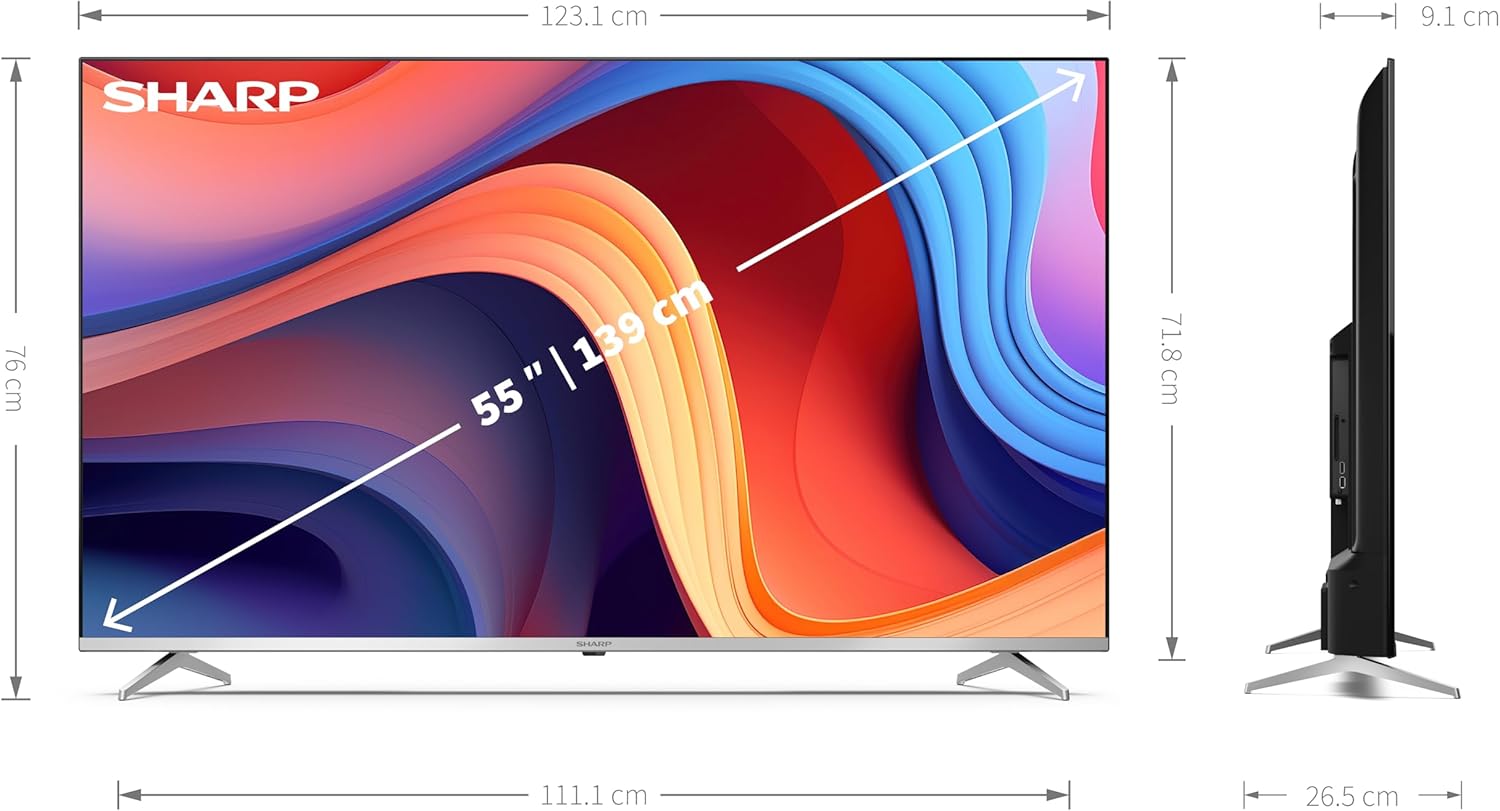
Image: The SHARP television screen showcasing the Google TV interface, featuring a personalized content feed and icons for popular streaming applications such as YouTube, Prime Video, and Disney+.
5.2 Picture and Sound Enhancements
Experience superior visual and audio quality with the following technologies:
- Quantum Dot Technology (Q-COLOUR): Delivers an ultimate color space for vibrant and accurate colors.
- 4K Ultra HD Resolution: Provides stunning clarity and detail with 3840 x 2160 pixels.
- HDR10, HLG, and Dolby Vision: Support for high dynamic range content, offering enhanced contrast and brightness.
- Active Motion 1000: Improves motion clarity for fast-paced scenes.
- Dolby Atmos: Creates an immersive 3D audio experience.
- Integrated Speaker System: Features a front silk tweeter (10 W) and a downward-firing woofer (10 W) for balanced sound.
6. Maintenance
6.1 Cleaning the Television
Before cleaning, unplug the power cord. Use a soft, dry cloth to wipe the screen and cabinet. For stubborn marks, lightly dampen the cloth with water or a mild, non-abrasive screen cleaner. Never spray liquid directly onto the screen or cabinet.
6.2 Software Updates
Your Google TV may receive automatic software updates. Ensure your TV is connected to the internet to receive the latest features and security patches. You can also manually check for updates through the TV's settings menu.
7. Troubleshooting
If you encounter issues with your television, refer to the following common troubleshooting steps:
- No Power: Check if the power cord is securely connected to both the TV and the power outlet. Try a different outlet.
- No Picture/Sound: Ensure the correct input source is selected. Check all cable connections (HDMI, antenna, etc.).
- Poor Picture Quality: Adjust picture settings (brightness, contrast, sharpness). Check the signal strength for antenna/satellite.
- No Internet Connection: Verify Wi-Fi password or LAN cable connection. Restart your router and modem.
- Remote Control Not Working: Replace the AAA batteries. Ensure there are no obstructions between the remote and the TV's IR sensor.
For more complex issues, please contact customer support.
8. Specifications
| Feature | Specification |
|---|---|
| Brand | Sharp |
| Model Number | 55GP6260E |
| Screen Size | 55 Inches (139 cm) |
| Display Technology | QLED, Quantum Dot |
| Resolution | 4K Ultra HD (3840 x 2160 px) |
| Operating System | Google TV |
| Refresh Rate | 60 Hz |
| Special Features | Quantum Dot Technology, Dolby Vision, Dolby Atmos, HDR10, HLG, Active Motion 1000, Frameless Design |
| Connectivity Technology | Bluetooth, HDMI, Wi-Fi, LAN |
| HDMI Ports | 4 (HDMI 2.1 with eARC) |
| USB Ports | 2 |
| VESA Standard | 400 x 300 mm |
| Product Dimensions (with stand) | 123.1 x 76 x 26.5 cm |
| Product Dimensions (without stand) | 123.1 x 71.8 x 9.1 cm |
| Color | Silver |
| Batteries | 2 AAA (included) |
| Spare Parts Availability | Information unavailable |
| Software Updates Guaranteed Until | Information unavailable |
Energy Information
For detailed energy consumption data, please refer to the energy label and product information sheet.

Image: The official EU Energy Label for the SHARP 55GP6260E television, indicating its energy efficiency class and power consumption in kWh/1000h for both SDR and HDR content.

Image: A detailed product information sheet for the SHARP 55GP6260E television, providing comprehensive technical data and compliance information.
You can find more information in the EPREL database: https://eprel.ec.europa.eu/qr/1763513
9. Warranty and Support
Your SHARP 55GP6260E television comes with a manufacturer's warranty. Please refer to the warranty card included in your package for specific terms and conditions. For technical support, service, or warranty claims, please contact Sharp customer service.
- Manufacturer: SHARP
- Customer Service Email: kamil.gorczyca@sharpconsumer.eu
- Official Website: www.sharpconsumer.com


