
LENCENT BT23R
LENCENT Bluetooth 5.3 FM Transmitter User Manual
Model: BT23R
1. Introduction
This manual provides comprehensive instructions for the safe and effective use of your LENCENT Bluetooth 5.3 FM Transmitter. This device is designed to enhance your in-car audio experience by providing wireless audio streaming, hands-free calling, and fast charging capabilities through your vehicle's cigarette lighter socket.
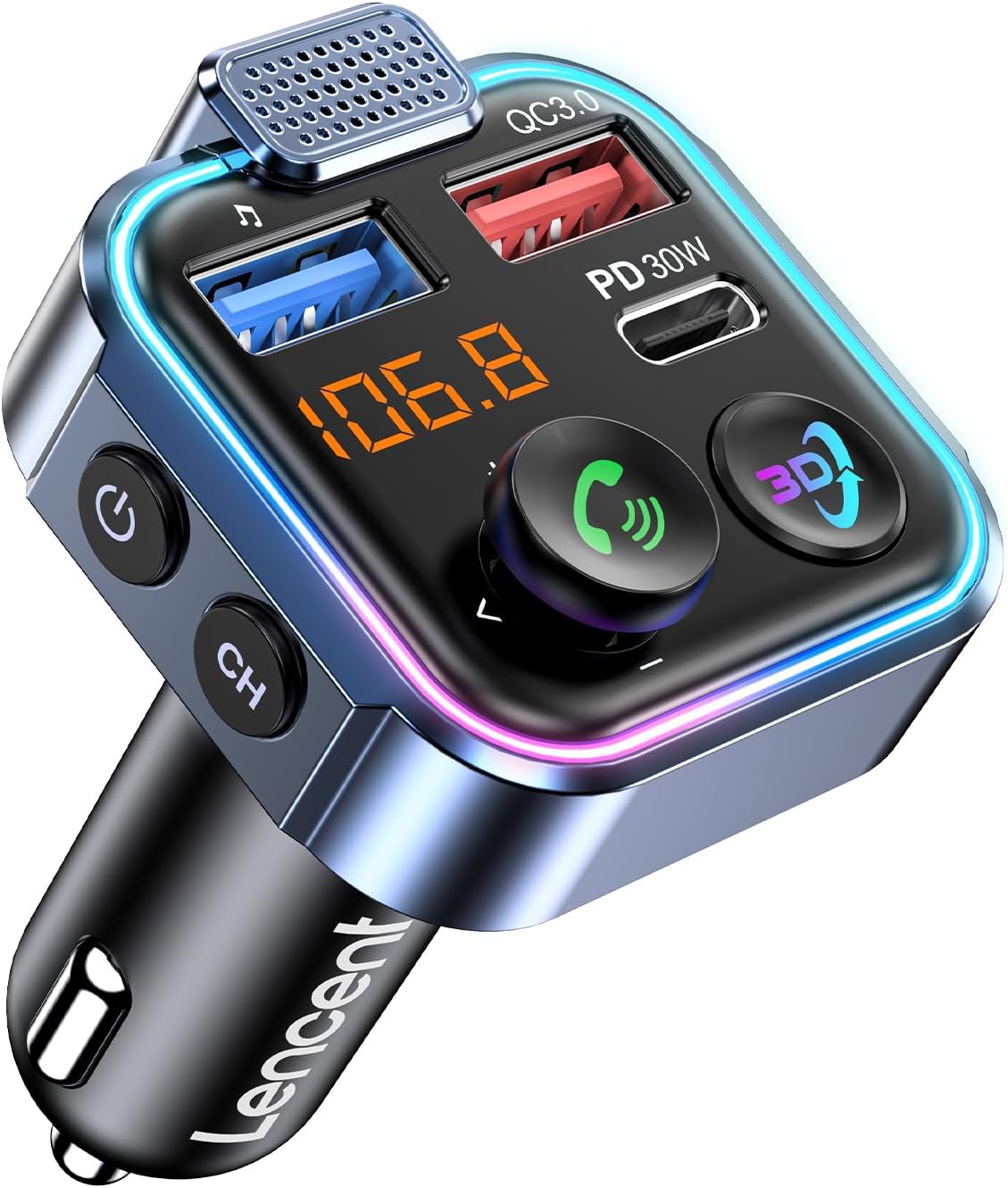
Image: The LENCENT Bluetooth 5.3 FM Transmitter, showing its compact design, LED display, USB-A and USB-C charging ports, and control buttons.
2. Product Features
- Immersive 3D Stereo Audio Effect: Experience enhanced sound quality with a dedicated 3D audio button for a concert-like atmosphere. Supports music playback from your phone or a U-Disk (up to 64GB, WMA/MP3/WAV/APE/FLAC formats).
- PD 30W and QC 18W Fast Charging: Equipped with PD3.0 30W (Type-C) and QC3.0 18W (USB-A) ports, allowing simultaneous high-speed charging for two devices, with a maximum total output of 48W.
- 7-Color LED Design and Light Off: Features customizable LED lights in 7 colors (red, purple, cyan, green, blue, gradient) that can sync with music or be turned off according to preference.
- Bluetooth V5.3 and Hands-Free Calling: Provides a fast and stable Bluetooth connection for audio streaming. Includes a built-in microphone and CVC noise reduction technology for clear hands-free calls. Voice assistant activation is supported.
- Advanced Security and Universal Compatibility: Built-in safety features protect against overcurrent, overvoltage, overheating, and short-circuits. Compatible with most Bluetooth-enabled devices (smartphones, tablets, etc.) and vehicles (12V-24V).

Image: Visual representation of the 3D audio effect feature, showing sound waves emanating from the device.

Image: The transmitter displaying its various 7-color LED lighting modes, enhancing the car's ambiance.
3. Package Contents
Please check the package for the following items:
- LENCENT Bluetooth 5.3 FM Transmitter Unit
- User Manual
4. Product Diagram and Components
Image: Front view of the LENCENT FM Transmitter, highlighting its various ports and controls.
- Microphone: For hands-free calling.
- USB-A Port (QC3.0): Quick Charge 3.0 compatible port for fast charging.
- USB-C Port (PD 30W): Power Delivery 30W compatible port for ultra-fast charging.
- LED Display: Shows FM frequency and other status indicators.
- Multi-function Joystick (Call Button): Press to answer/end calls, push left/right for track control, push up/down for volume control.
- 3D Audio Button: Activates/deactivates the 3D stereo audio effect.
- Power Button: Turns the device on/off.
- CH (Channel) Button: Used to enter FM frequency adjustment mode.
- Cigarette Lighter Plug: Connects the device to your car's power socket.
5. Setup Instructions
Follow these steps to set up your LENCENT FM Transmitter:
- Insert the Transmitter: Plug the LENCENT FM Transmitter into your vehicle's 12V-24V cigarette lighter socket. The device will power on automatically and display the current FM frequency.
- Find an Empty FM Frequency: Tune your car's FM radio to an empty frequency. An empty frequency is one with static or no active broadcast. Ideally, choose a frequency between 87.5 MHz and 108.0 MHz that is not used by local radio stations.
- Match Transmitter Frequency:
- Press the "CH" button on the transmitter. The frequency display will start flashing.
- Use the multi-function joystick (push left/right) to adjust the transmitter's frequency to match the empty frequency you found on your car radio.
- Once matched, wait a few seconds for the frequency to stop flashing, indicating it's set.
- Pair with Your Phone via Bluetooth:
- On your smartphone, enable Bluetooth and search for available devices.
- Select "BT23R" (or similar model name) from the list of devices.
- Once paired, the transmitter's display may show a Bluetooth icon, and you will hear a confirmation tone.

Image: A visual guide demonstrating the three setup steps: tuning the car radio, adjusting the transmitter's frequency, and Bluetooth pairing.
6. Operating Instructions
6.1 Audio Playback
After successful Bluetooth pairing, you can stream audio from your smartphone to your car's stereo system.
- Bluetooth Streaming: Play music or audio from your phone's apps (e.g., Spotify, YouTube, Apple Music) directly through your car speakers.
- U-Disk Playback: Insert a U-Disk (USB flash drive) into the USB-A port. The transmitter will automatically detect and play audio files (WMA/MP3/WAV/APE/FLAC formats, up to 64GB).
- Volume Control: Push the multi-function joystick up or down to adjust the volume. It is recommended to set your phone's volume to maximum and control the overall volume using your car's stereo.
- Track Control: Push the multi-function joystick left for the previous track and right for the next track.
- 3D Audio Effect: Press the "3D" button to activate or deactivate the immersive 3D stereo audio effect.

Image: Diagram illustrating the simple operation of the multi-function joystick for volume and track control during music playback.
6.2 Hands-Free Calling
The built-in microphone and CVC noise reduction technology ensure clear communication during calls.
- Answer Call: Press the multi-function joystick (call button) once.
- Hang Up Call: Press the multi-function joystick (call button) once during a call.
- Reject Call: Press and hold the multi-function joystick (call button) for 2 seconds.
- Redial Last Number: Double-press the multi-function joystick (call button).
- Activate Voice Assistant: Press and hold the multi-function joystick (call button) for 3 seconds.

Image: A visual guide showing how to use the multi-function joystick for various hands-free calling operations.
6.3 Device Charging
Utilize the fast-charging ports to power your mobile devices.
- PD 30W (Type-C) Port: Ideal for fast charging compatible devices like iPhones and iPads.
- QC 18W (USB-A) Port: Suitable for quick charging Android phones and other QC3.0 compatible devices.

Image: The LENCENT FM Transmitter plugged into a car's power outlet, simultaneously charging an Apple phone via PD 30W and an Android phone via QC 18W.
7. Maintenance
To ensure the longevity and optimal performance of your LENCENT FM Transmitter, follow these maintenance guidelines:
- Cleaning: Use a soft, dry cloth to clean the device. Do not use liquid cleaners or aerosols, as they may damage the electronics.
- Storage: When not in use for extended periods, store the device in a cool, dry place away from direct sunlight and extreme temperatures.
- Handling: Avoid dropping the device or subjecting it to strong impacts, which can damage internal components.
- Power Source: Always ensure the device is plugged into a 12V-24V DC power supply as specified.
8. Troubleshooting
If you encounter issues with your LENCENT FM Transmitter, refer to the following common problems and solutions:
| Problem | Possible Cause | Solution |
|---|---|---|
| Static or Poor Audio Quality | Interference from other radio stations; weak FM signal. |
|
| Cannot Pair via Bluetooth | Bluetooth not enabled; device not in pairing mode; incorrect device selected. |
|
| No Sound Output | Incorrect FM frequency; low volume; device not powered. |
|
| Charging Not Working | Loose connection; incompatible cable; device not supported. |
|
9. Specifications
| Feature | Detail |
|---|---|
| Model Number | BT23R |
| Bluetooth Version | 5.3 |
| Input Voltage | DC 12V-24V |
| USB-C Output | PD 30W |
| USB-A Output | QC 18W |
| Total Output Power | Max 48W |
| FM Frequency Range | 87.5 MHz - 108.0 MHz |
| U-Disk Support | ≤64GB (WMA/MP3/WAV/APE/FLAC formats) |
| Product Dimensions | 3.35 x 1.85 x 1.85 inches |
| Item Weight | 1.45 ounces |
| Material | Plastic, Iron |
| Special Features | 3D Audio Effect, 7-Color LED, Hands-Free Calls, Noise Cancellation |
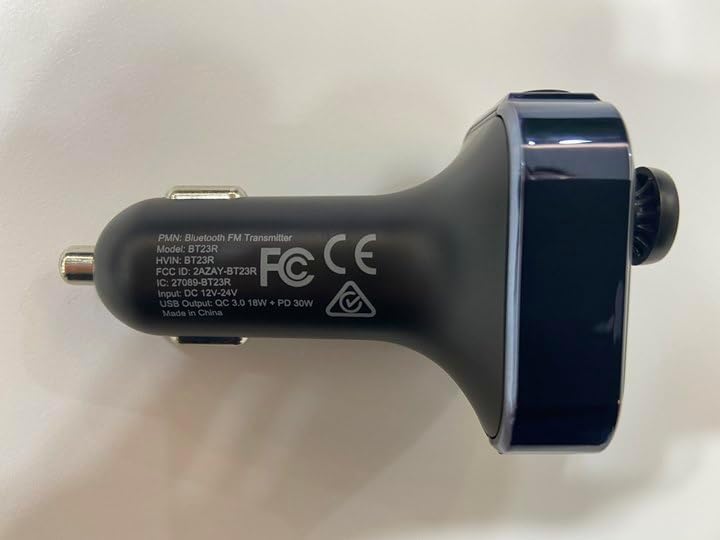
Image: The underside of the LENCENT FM Transmitter, displaying regulatory markings and model information.
10. Warranty and Support
For warranty information and customer support, please refer to the documentation provided with your purchase or contact the seller directly. LENCENT is committed to providing quality products and attentive customer service.
Seller: LencentUS
Video: An official product video from LENCENT, demonstrating the key features and functionality of the Bluetooth FM Transmitter, including 3D audio, Bluetooth 5.3 connectivity, and fast charging capabilities.
Related documentsBT23R


Ask a question about this manual
Ask about setup, troubleshooting, compatibility, parts, safety, or missing instructions. Manuals+ will review the question and use this page’s manual context to help answer it.