
1. Introduction
Thank you for choosing the AMAZTIM T3 Ultra Smart Watch. This device is designed to provide advanced health monitoring, fitness tracking, and smart communication features with exceptional durability. This manual will guide you through the setup, operation, and maintenance of your new smartwatch.
2. What's in the Box
Please verify that all items are present in your package:
- 1 x AMAZTIM T3 Ultra Smart Watch
- 1 x Charging Cable
- 1 x User Manual (this document)
- 1 x Watch Band (pre-installed or separate)

Image: Contents of the AMAZTIM T3 Ultra Smart Watch package, showing the watch, charging cable, and user manual.
3. Setup
3.1 Initial Charging
Before first use, fully charge your AMAZTIM T3 Ultra Smart Watch. Connect the magnetic charging cable to the charging points on the back of the watch and plug the USB end into a power adapter (not included) or a computer USB port. The watch display will indicate charging status.

Image: The AMAZTIM T3 Ultra Smart Watch connected to its magnetic charging cable, showing the charging interface.
3.2 App Installation and Pairing
To unlock the full functionality of your smartwatch, you need to install the companion application on your smartphone.
- Download the App: Search for the 'KOSPET FIT' app on the Google Play Store (for Android) or Apple App Store (for iOS) and install it.
- Enable Bluetooth: Turn on Bluetooth on your smartphone.
- Add Device: Open the 'KOSPET FIT' app, navigate to the 'Device' section, and select 'Add a new device'.
- Pair: Select 'AMAZTIM T3 Ultra' from the list of available devices. Confirm the pairing request on both your phone and the watch.
- Grant Permissions: Allow necessary permissions, especially for notifications, to ensure proper functionality.

Image: Visual guide for connecting the smartwatch to an iOS device via the KOSPET FIT app.
3.3 Notification Setup
To receive messages and app notifications on your watch, follow these steps:
For iOS Devices:
- Ensure the 'KOSPET FIT' app is running in the background.
- In the app, go to 'Device' and enable 'SMS' reminders.
- In the app, go to 'Device' and then 'App' to enable notifications for desired applications (e.g., Instagram, YouTube, Facebook).
- On your iPhone, go to 'Settings' > 'Bluetooth' > tap the 'i' icon next to your watch > enable 'Share System Notifications'. Also, ensure 'Show Previews' is set to 'Always' or 'When Unlocked' for messages.
For Android Devices:
- Ensure the 'KOSPET FIT' app is running in the background and added to the whitelist in your phone's settings to prevent it from being closed by the system.
- Disable 'Do Not Disturb' and 'Low Power Mode' on your phone.
- In the app, go to 'Device' and enable 'SMS Reminder'.
- In the app, go to 'Device' and then 'App Reminder' to enable notifications for desired applications. Grant the 'KOSPET FIT' app access to notifications if prompted.

Image: Visual guide for setting up notifications on an iOS device.

Image: Visual guide for setting up notifications on an Android device.
4. Operating the Smart Watch
4.1 Display and Navigation
The AMAZTIM T3 Ultra features a 1.43-inch Ultra HD AMOLED display with a resolution of 466x466 pixels and up to 1000 nits brightness, ensuring clear visibility even in direct sunlight. The 'Always On Display' mode allows the time to be visible continuously.
Navigation is primarily touch-based:
- Swipe Up/Down: Access quick settings or notifications.
- Swipe Left/Right: Cycle through widgets and main functions (e.g., heart rate, activity, weather).
- Tap: Select an item or open an application.
- Press Side Buttons: The watch typically has physical buttons for power, back, or quick access to sports modes. Refer to the on-screen prompts for specific button functions.
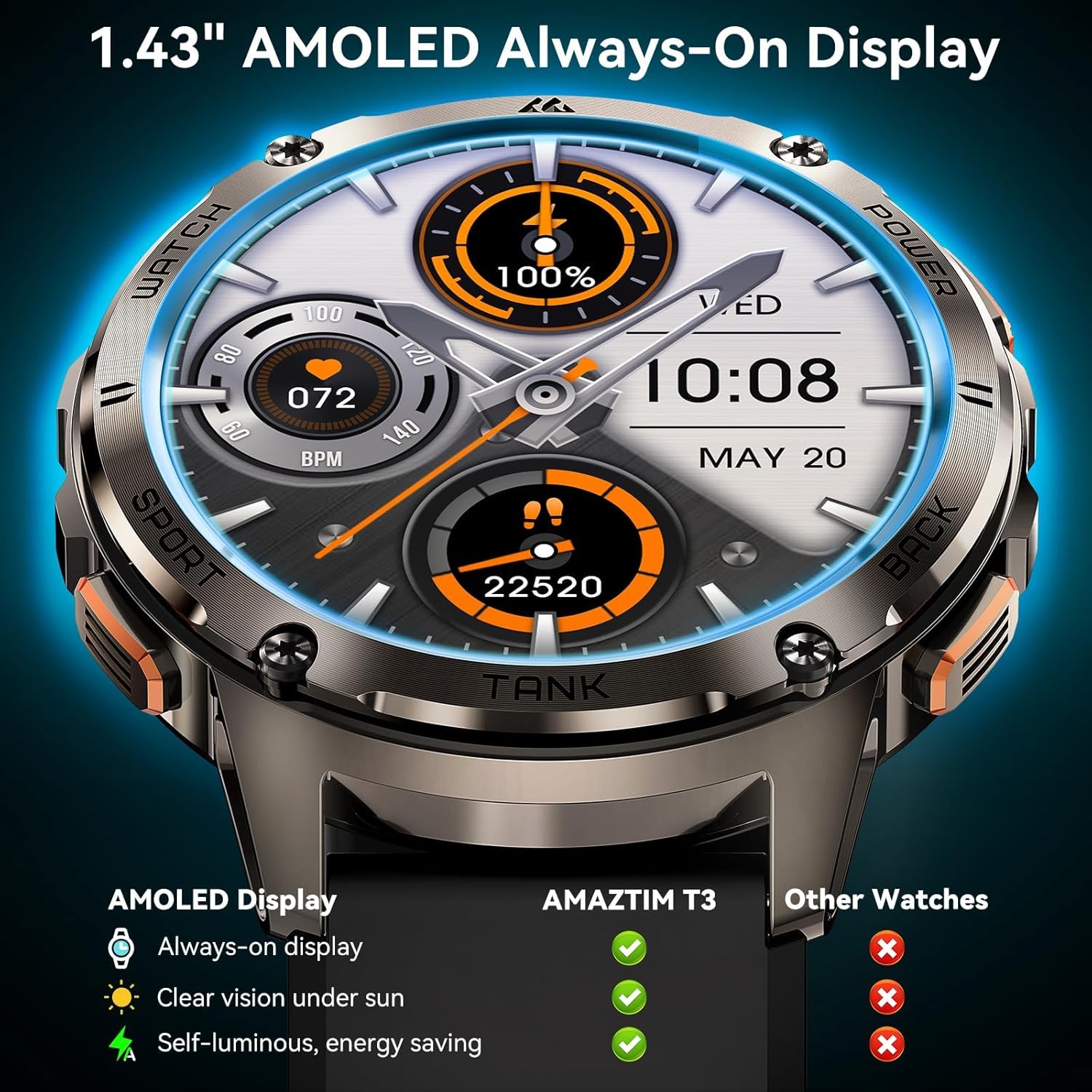
Image: The 1.43-inch AMOLED display of the AMAZTIM T3 Ultra Smart Watch, showcasing its clarity and 'Always On Display' feature.
4.2 Bluetooth Calling and AI Voice Assistant
The watch supports Bluetooth calls, allowing you to answer or dial calls directly from your wrist when connected to your smartphone. It also integrates an AI Voice Assistant for hands-free control.
- Making/Answering Calls: When a call comes in, you can answer or reject it from the watch screen. To make a call, use the dialer on the watch or the voice assistant.
- Using AI Voice Assistant: Activate the voice assistant (usually by a long press of a button or a specific swipe gesture) and speak commands such as "Call Jack," "Play music," or "How is the weather today?"

Image: The AMAZTIM T3 Ultra Smart Watch displaying an incoming call and illustrating the use of its AI Voice Assistant for various commands.
4.3 Health Monitoring
The AMAZTIM T3 Ultra provides comprehensive health data monitoring:
- Heart Rate Monitor: Real-time and 24-hour heart rate tracking.
- Blood Oxygen Monitor (SpO2): Measures blood oxygen levels.
- Sleep Tracking: Monitors all-day sleep, including light, deep, and REM sleep stages, and provides analysis in the app.
- Breath Training: Guided breathing exercises.
- Pedometer: Tracks steps and calories burned.
Access detailed health reports and historical data through the 'KOSPET FIT' app.

Image: The AMAZTIM T3 Ultra Smart Watch showing real-time heart rate, alongside a smartphone displaying detailed health monitoring data from the companion app.
4.4 Sports Modes
The watch supports over 170 sports modes and features 6 intelligent sports recognition functions. It accurately tracks workout data, including duration, calories, heart rate, and more.
- Accessing Sports Modes: Navigate to the sports section on your watch to select your desired activity.
- Intelligent Recognition: The watch can automatically detect activities like walking, running, elliptical training, cycling, rowing machine, and still activities.

Image: A visual representation of the 170+ sports modes supported by the AMAZTIM T3 Ultra Smart Watch.

Image: The AMAZTIM T3 Ultra Smart Watch tracking sleep, with the companion app showing detailed sleep stage analysis.
5. Durability and Water Resistance
The AMAZTIM T3 Ultra is built with military-grade durability (MIL-STD-810H certified) and features a full-metal unibody with Corning Gorilla Glass, making it resistant to various harsh conditions.
- Military Standard Quality: Passed 15 military tests including salt spray, rain, and impact.
- Water Resistance: Rated 5ATM and IP69K, allowing immersion in water up to 50 meters. Suitable for swimming and diving.

Image: The AMAZTIM T3 Ultra Smart Watch undergoing rigorous military-grade durability tests, including temperature extremes, water immersion, and shock resistance.

Image: The AMAZTIM T3 Ultra Smart Watch being used during swimming, demonstrating its 5ATM and IP69K water resistance.
6. Battery Life
The T3 Ultra is equipped with a 480mAh pure cobalt-based battery, offering extended usage times:
- Normal Use: Up to 15 days.
- Power Saving Mode: Up to 60+ days.
- Heavy Usage: Approximately 8 days.
- AOD (Always On Display) Mode: Approximately 13 days.
Charging time is approximately 1 hour for a full charge.

Image: A chart illustrating the battery performance of the AMAZTIM T3 Ultra Smart Watch under various usage conditions.
7. Compatibility
The AMAZTIM T3 Ultra Smart Watch is compatible with both iOS and Android smartphone devices.
- iOS Devices: Compatible with iPhone 5 series and newer (e.g., iPhone 15, 14, 13, 12, 11, X/8 series).
- Android Devices: Compatible with Galaxy series, Pixel series, Xiaomi series, Huawei series, and other Android smartphones.

Image: A visual guide detailing the wide compatibility of the AMAZTIM T3 Ultra Smart Watch with different iOS and Android smartphone models.
8. Maintenance
- Cleaning: Regularly wipe the watch screen and body with a soft, dry cloth. For stubborn dirt, use a slightly damp cloth and then dry thoroughly.
- Charging Contacts: Ensure the charging contacts on the back of the watch and the charging cable are clean and free of debris to maintain efficient charging.
- Storage: Store the watch in a cool, dry place when not in use. Avoid extreme temperatures.
- Water Exposure: While the watch is waterproof, it is recommended to rinse it with fresh water after exposure to saltwater or chlorinated water and dry it completely.
- Software Updates: Keep the 'KOSPET FIT' app updated to ensure your watch has the latest features and performance improvements.
9. Troubleshooting
- Watch Not Turning On: Ensure the watch is fully charged. Connect it to the charger for at least 30 minutes.
- Cannot Pair with Phone:
- Ensure Bluetooth is enabled on your phone and the watch.
- Make sure the watch is not already paired with another device.
- Restart both your phone and the watch.
- If switching phones, a factory reset of the watch may be required before pairing with a new device.
- Notifications Not Received:
- Verify that notification permissions are granted to the 'KOSPET FIT' app on your phone (refer to Section 3.3).
- Ensure the 'KOSPET FIT' app is running in the background and not being closed by your phone's system.
- Check if 'Do Not Disturb' or 'Low Power Mode' is active on your phone.
- Inaccurate Health Data:
- Ensure the watch is worn snugly on your wrist, not too tight or too loose.
- Clean the sensor on the back of the watch.
- For best results, remain still during measurements.
- Screen Lock Issue (e.g., during shower): The watch may not have a dedicated screen lock feature to prevent accidental touches during water exposure. It is advisable to avoid direct water jet impact on the screen or remove the watch during showers if this is a concern.
10. Specifications
| Feature | Specification |
|---|---|
| Model Number | T3 Ultra |
| Display | 1.43-inch AMOLED, 466x466 pixels, 1000 nits peak brightness |
| Battery Capacity | 480mAh Lithium Polymer |
| Battery Life (Typical Use) | Up to 15 days |
| Battery Life (Power Saving Mode) | Up to 60+ days |
| Water Resistance | 5ATM & IP69K (50 meters) |
| Durability Standard | MIL-STD-810H |
| Connectivity | Bluetooth |
| Operating System Compatibility | Android and iOS |
| Item Weight | 5.9 ounces |
| Package Dimensions | 7.13 x 3.86 x 0.87 inches |
11. Warranty and Support
AMAZTIM is committed to providing quality products and customer satisfaction. While specific warranty details are not provided in this manual, general support is available.
- For technical assistance, product inquiries, or warranty claims, please contact AMAZTIM customer support through the official website or the contact information provided with your purchase.
- Customer support typically responds within 24 business hours.


